Decorating An Ent For Christmas

These images may look the same, but if you peer closely at the one on the left you’ll notice the eyes staring back at you. It seems animatronic decor is in this year, and we think [Fjord Carver’s] talking Christmas tree is one of the better offerings.

He picked up the diminutive tree at the dollar store, then started added the pieces that put on the show seen after the break. A small strand of battery operated lights, and a bit of garland are traditional. But the Arduino and pair of servo motors are a new holiday tradition. They move parts of the tree to reveal a set of eyes and animate a mouth. He drives the display by sending serial commands from a computer to the Arduino. This way you can script your performances, with flapping jaw, moving eyelids, and blinking lights while the computer supplies the sound.

Is it just us, or does anyone else really want to see this guy singing the Chipmunk’s Christmas Song? Or if that’s a bit too wholesome you could go the more vulgar route.

Continue reading “Decorating An Ent For Christmas”

Smother Yourself In Addressable LEDs

Guess where this guy’s headed in his suit of many colors? If you said Burning Man give your self a pat on the back. After making a half-hearted EL suit for the festival in 2010 [Sander] decided he needed to step it up this year. He bought and affixed 200 LED modules to this suit so that he could light up the night.

They’re mounted in a grid, and in order to keep the changing patterns orderly he mapped the physical location of each in his code using a two-dimensional array. The controller uses an Arduino nano to push the patterns out to the array via SPI.

[Sander] included several different visual effects for the controller. One strobes the suit starting from the right cuff when he shakes someone’s hand. There’s also an audio spectrum analyzer chip and microphone that let him pulse the lights to music. You can see how bright this thing is in the image above, but to get the full effect shouldn’t skip the video after the break.

He’s entered the project into the Full Spectrum Laser Cutter giveaway. If he wins, we expect laser cut goodness for next year’s festival!

Continue reading “Smother Yourself In Addressable LEDs”

Geared System Adds RFID To Regular Door Locks

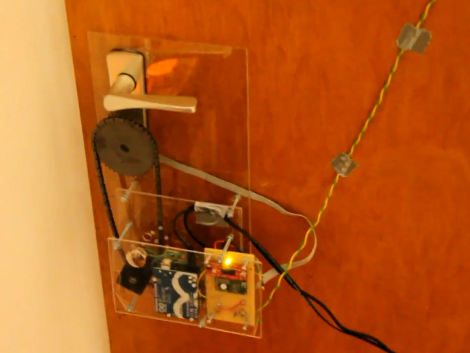
[Flowolf] added an auto-locking RFID entry system to his front door. He used our favorite fabrication system, acrylic and threaded rod (we also like to throw in aluminum angle bracket from time to time). The support structure mounts underneath the escutcheon plate for the lockset, keeping the main acrylic sheet flat against the door.

An RFID reader and Arduino run the system, with a button inside to unlock the door. But if power were to fail, you will still be able to get in or out manually. When you are using the electronic system, a stepper motor connected to the geared lock knob by a chain is what grants access, then revokes it again five seconds later. The wire going up out of the this image is for a switch that lets the unit sense when the door is closed.

As shown in the video after the break, you can turn the auto-lock feature off. But we’d like to see an emergency entry feature, like a knock-based lock, because eventually you will leave without your keys!

Continue reading “Geared System Adds RFID To Regular Door Locks”

Chrono-tomic Shield Helps Your Arduino Keep Perfect Time

chronotomic-arduino-shield

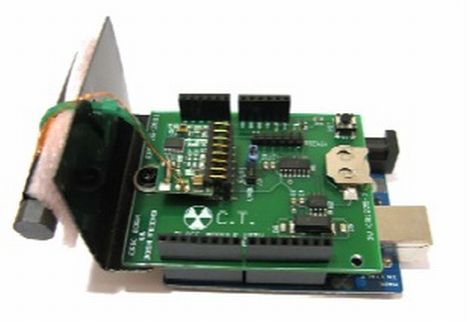
[Josh] and his lab partner [Eric] needed a final project for their Embedded Systems Design class, and thought that designing an Arduino shield would be a cool idea. They noticed that there are plenty of ways to get an Arduino to keep time, though none that they knew of utilized WWVB (Atomic Time) signals directly.

The Chrono-tomic Arduino shield uses a C-MAX radio to demodulate the WWVB signal, demodulating it and passing it along to a PIC16F1824 microcontroller. The PIC decodes the data frame and verifies it is valid, sending the time to an MCP79410N real-time clock module.

We can hear the “Yo dawg I herd you like microcontrollers so I put a microcontroller on your microcontroller shield” jokes already, but the pair says that they offloaded the time processing to the PIC in order to let the Arduino focus on whatever tasks it has been delegated. The Arduino code merely needs to request the time from the RTC whenever it is required, rather than deal with the decoding itself.

Is it overkill? Perhaps – though we think it heavily depends on your application and configuration. We can certainly conjure up situations where it would be useful.

arduino-seismic-sensor

Detecting Seismic Waves With A Piezo Element

While we normally see piezo elements being used to output audio, [Veedo] thought that they could be used in a more useful manner. He bought way too many piezo film tabs and decided to use them to build a makeshift seismic sensor.

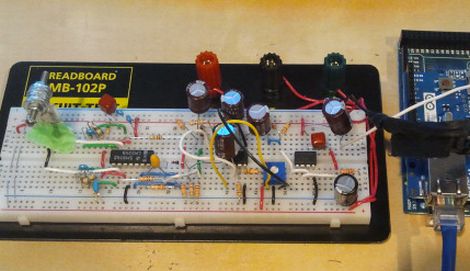
The piezo tabs came with weights attached at one end, though while testing them, he found that they more or less only detected vibrations with frequencies in the KHz range. Since earthquakes tend to produce vibrations in the 30-80 Hz range, he had to tweak his setup to detect the proper frequencies. To do this, he attached a weight made of a screw and washers, checking the output signals on his oscilloscope until the dominant sensed frequencies were in the range of 40 Hz.

The sensor was attached to a breadboard, then wired through a charge amp to create a small AC signal, which floats on 2.5Vdc. The bottom half of the wave is chopped off with a diode, after which it is fed into an Arduino Mega. The seismic data is then pushed up to his Pachube account for storage, though he can view the feeds locally via the a web server programmed into the Arduino.

We’re not sure how much advanced notice this sort of setup would give you in the event of an earthquake, but it seems like a fun project to build either way.

Christmas Tree Water Sensor Gets An Upgrade And A Fancy New Box

xmas-tree-water-sensor

[Eric Ayars] has a nice cast iron Christmas tree stand at home, but the only drawback is that the stand makes it hard to see just how much water is available to the tree. Last year we covered a small gadget he created to help keep tabs on the water level, but as several of you predicted, the system eventually failed.

His previous solution used copper plated proto board to sense how much water was in the stand, but the leads corroded in about a week’s time. With Christmas just around the corner, he decided to give things another try.

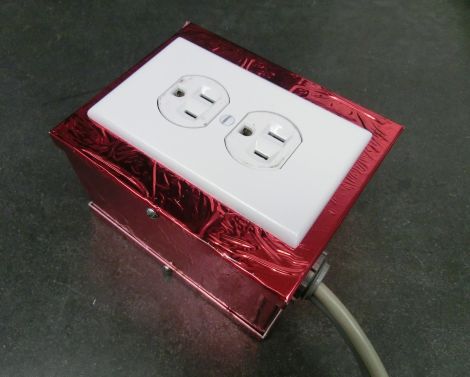
His revamped water level sensor relies on measuring capacitance changes in a copper strip board when under water rather than detecting a complete circuit like the previous model. To protect his sensor this time around he coated the board with polyurethane, which should provide a decent corrosion barrier.

Using the Arduino CapSense library, the sensor can detect the presence of water, signaling an alarm if the base needs refilling. One of our readers suggested that he use the tree itself as a low water indicator, which is just what [Eric] did this year. If the water is somewhat low, the Arduino-controlled relay powering the tree is switched off and then on again, every 5 seconds. If the base is nearly dry, the tree asks for water by blinking the word “Water” repeatedly in Morse code.

We think that this year’s solution is pretty clever, and we’re glad to see that [Eric] didn’t give up after last year’s setback!

Web-enabled Coffee Maker Over-complicates Your Break Time

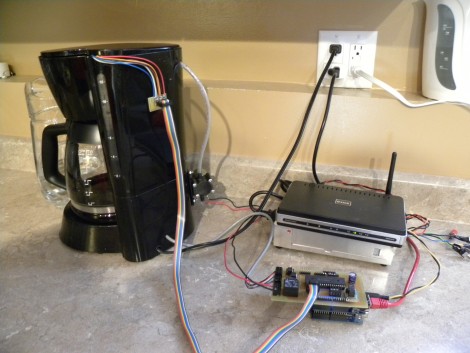
Some think that grinding the beans and filling the coffee maker is part of the coffee-drinking ritual, but [Jamie] isn’t one of them. Instead, he’s been working to make this coffeemaker a web-enabled device. He built it as part of a class project, and has implemented most of what you need to make a cup of Joe automatically.

You can see a small pump attached to the back of the coffee maker. It sucks water from a pitcher (slightly visible to the left of the coffee maker) to fill the reservoir. He experimented with a couple of different water level sensing solutions. His most recent is a PCB with several traces of different length. As those traces are covered by water, a voltage can be read via ADC to establish water level.

He’s using an Arduino and Ethernet shield to add connectivity for the device. The problem is that there aren’t enough ADC pins left on the Arduino to read the water level sensor. Because of this, he added a self-build shield that uses a PIC to do the ADC measurements and push digital data across to the Arduino. A bit complicated, and it doesn’t load the grounds automatically (yet?). But that’s not to say we don’t appreciate complicated coffee hacks.