Laser Light Show Features Full XY Control Via Homemade Galvanometers

[Rich] over at NothingLabs has put together a really cool laser light show that you really must see in an effort to win a laser cutter from Instructables.

His walkthrough discusses the mechanics of laser light shows – specifically how galvanometers are typically used to precisely aim mirrors in order to draw images and write text. Commercial galvanometers tend to be pretty expensive, so he opted to build his own, using relatively cheap and easy to find parts.

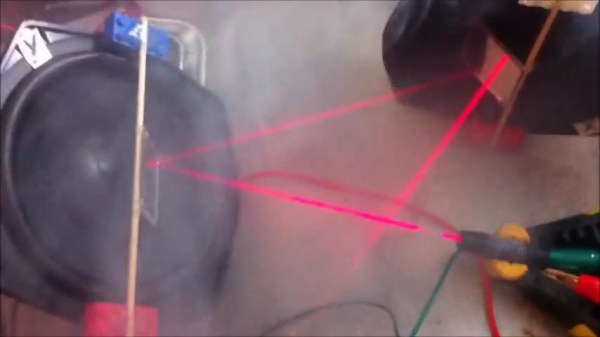
The galvanometers were constructed using a pair of old speaker woofers, a few Lego bricks, and some acrylic mirror squares. The mirrors were mounted on the speakers, which were then wired to an Arduino. He removed the batteries from a cheap red laser pointer and permanently wired it to the Arduino, which it now uses as a pulsed power source. Once he had everything built, he positioned the laser using a fog machine for guidance.

As you can see in the video below, the laser show is quite impressive. His homemade galvos provide a somewhat rough quality to the final projected image, and we like that a lot. It looks almost as if all of the text and images were hand drawn, which is a pretty cool effect.

Just as [Rich] mentions, we hope to see some cool hacks based off his work in the future.

If you are interested in some of our previous laser features, check these out.

Continue reading “Laser Light Show Features Full XY Control Via Homemade Galvanometers”

RoboTouch Adds Physical Game Controls To The IPad

robotouch

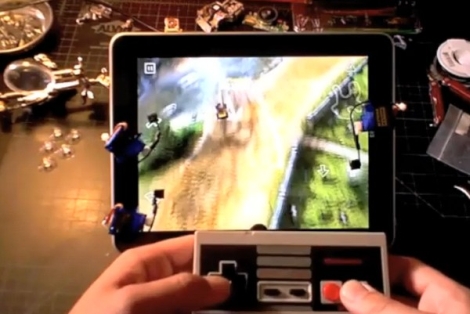
[ProtoDojo] wanted to play a racing game on his iPad, but he was not a big fan of using the touch interface for this particular title. Instead, he put together a pretty neat little hack that allows him to play games on his iPad using an old NES controller.

He built a set of custom conductive arms which he mounted on three micro servos. The servos were attached to the iPad screen using small suction cups in the locations where it expects to receive button presses. They are also wired to an Arduino that interprets button presses from the attached NES controller. When the Arduino senses that the D-pad or buttons have been pressed, it triggers the servos, which in turn press the virtual buttons on the screen.

In the video below, you can see that after adjusting the servo positions, the setup seems to work pretty well. You might expect to see some sort of lag with a setup like this, but we didn’t notice any. The [ProtoDojo] web site is currently down due to heavy traffic, but you should be able to find some more build details there, once it becomes functional again.

Continue reading “RoboTouch Adds Physical Game Controls To The IPad”

Giving “sight” To The Visually Impaired With Kinect

NAVI

We have seen Kinect used in a variety of clever ways over the last few months, but some students at the [University of Konstanz] have taken Kinect hacking to a whole new level of usefulness. Rather than use it to control lightning or to kick around some boxes using Garry’s Mod, they are using it to develop Navigational Aids for the Visually Impaired, or NAVI for short.

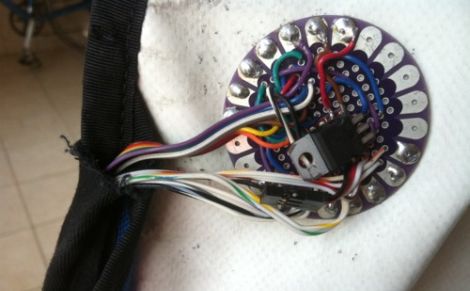
A helmet-mounted Kinect sensor is placed on the subject’s head and connected to a laptop, which is stored in the user’s backpack. The Kinect is interfaced using custom software that utilizes depth information to generate a virtual map of the environment. The computer sends information to an Arduino board, which then relays those signals to one of three waist-belt mounted LilyPad Arduinos. The LilyPads control three motors, which vibrate in order to alert the user to obstacles. The group even added voice notifications via specialized markers, allowing them to prompt the user to the presence of doors and other specific items of note.

It really is a great use of the Kinect sensor, we can’t wait to see more projects like this in the future.

Stick around to see a quick video of NAVI in use.

[via Kinect-Hacks – thanks, Jared]

Continue reading “Giving “sight” To The Visually Impaired With Kinect”

Electronic Diaper Bag Reminds You To Pack Everything But The Baby

lilypad_diaperbag

[jnorby] knows what it’s like to leave the house with her baby in tow, only to realize that she has left something she needs at home. Instead of relying on a paper checklist, she decided to craft her own diaper bag that alerted her if she had forgotten to pack a particular item.

She built her bag from scratch, wiring small circuits into each of the pockets she created on the inside of the bag. Wires were run to each half of a snap fastener, so that they would complete the circuit when the snaps touch. The LEDs and snaps were then connected to a LilyPad Arduino, which checks the status of the snap circuits, lighting the appropriate LED once the proper item has been packed.

While we like the idea of a bag that uses functional indicators that remind you to pack items, we do think that the use of the Arduino, or any microprocessor for that matter, is massive overkill. We would ditch the LilyPad and snap fasteners for reed switches or perhaps normally closed micro leaf switches that turn the LEDs off once the proper item has been packed, rather than the other way around.

Tilt And Pivot Camera Base Uses Just Two Servos

[Caled] shows us how to build a tilt and pivot camera base. One of these can be quite handy for taking precisely aligned images that can later be stitched together into panoramic, or even spherical images. We have grand visions of being able to produce something along the lines of these stunning interactive images with hardware that is cheaper and easier to build than this other motorized rig.

The design utilizes just two servo motors. In the image above you can just make out a pair of discs that serve as the base for the rig. In the center of the upper disc is the first servo, pointing downward, which rotates the camera. Two upright supports on either side of the point-and-shoot provide the framework for the tilt feature. The camera is mounted in a frame whose center is a threaded rod on the near side, and the second servo motor on the far side. An Arduino with a servo shield controls the movements along with a button pad and LCD screen as a user interface. The last step in the project log points to software options for combining the captured photos.

NBA Hangtime Pinball Display

[Ed Zarick] continues work on his NBA Hangtime pinball machine with the completion of the scoreboard and backglass. You should remember this project as we already covered the layer audio he developed for the system. Now he’s proving to be a protoboard master, using point-to-point techniques to build a pair of two and a half digit LED displays for team scores, as well as a shot clock timer and other status indicators.

The lighting board that controls it all is commanded via the i2c protocol, just like the three audio modules. It uses shift registers along with MOSFETs and [Ed] has taken the time to add pin headers and sockets for board interconnects. As is true with the audio system, one Arduino Mega acts as the master on the i2c bus and you’ll notice in the video after the break that the display works in perfect harmony with the sound effects.

We can’t wait to see what he comes up with for the play field!

Continue reading “NBA Hangtime Pinball Display”

Passcode Protected Laser Tripwire Alarm System

laser_tripwire

Sometimes security doesn’t need to be overly complex to be effective. Instructables user [1234itouch] recently built a simple laser tripwire alarm that can be mounted virtually anywhere, complete with a keypad for disarming the device.

He mounted a photo cell in a project box, along with an Arduino and a 12-button key pad. A laser pointer is aimed at the photo cell from across a gap, which results in a steady voltage being read by the Arduino. When the laser beam is broken, a drop in voltage is detected, and the alarm sounds until you enter the proper pre-configured passcode. Entering the passcode triggers a 15 second grace period during which the the alarm cannot be tripped again.

It might not be built with triple-thick steel doors and thermo-sensors, but it’s a simple device for simple needs. In its current form it could be pretty useful, and with a little reworking, there are a wide range of things it could be used for.

Continue reading to see a demo video of the tripwire alarm, and be sure to check out these other tripwire-based security systems.

Continue reading “Passcode Protected Laser Tripwire Alarm System”