Using Arduinos To Drive Undocumented Displays

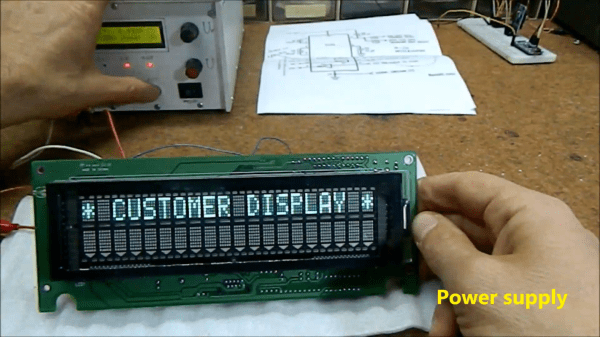
For those of us old enough to remember the VCR (and the difficulty of programming one), the ubiquitous vacuum fluorescent display, or VFD, is burned into our memories, mostly because of their brightness and contrast when compared to the superficially-similar LCD. These displays are incredibly common even apart from VCRs, though, and it’s easy to find them for next to no cost, but figuring out how to drive one if you just pulled it out of a 30-year-old VCR is going to take some effort. In this build, [mircemk] shows us how he drives unknown VFD displays using an Arduino in order to build his own weather forecasting station.

For this demonstration [mircemk] decided to turn a VFD into a weather forecasting station. First of all, though, he had to get the VFD up and running. For this unit, which came from a point-of-sale (POS) terminal, simply connecting power to the device turned on a demo mode for the display which let him know some information about it. From there, and with the knowledge that most POS terminals use RS232 to communicate, he was able to zero in on the Rx and Tx pins on the on-board microcontroller and interface them with an Arduino. From there it’s a short step to being able to output whatever he wanted to this display.

For this project, [mircemk] wanted the display to output information about weather, but rather than simply pull data from some weather API he is actually using a sensor suite connected to the Arduino to measure things like barometric pressure in order to make a 12-hour forecast. The design is inspired by old Zambretti weather forecasters which used analog wheels to input local weather data. It’s an interesting build not only for the VFD implementation but also for attempting to forecast the weather directly with just a tiny sensor set instead of downloading a forecast to display. To do any better with your own forecasts, you’d likely need your own weather station.

Continue reading “Using Arduinos To Drive Undocumented Displays”

Giant working NERF gun runs on Arduino.

Giant Working NERF Gun Runs On Tiny Arduino

Well, here it is: a shoe-in for the new world’s largest NERF gun. (Video, embedded below.) The Guinness people haven’t shown up yet to award [Michael Pick], but at 12.5 feet, this baby is over twice as long as the current record holder, which belongs to former NASA mechanical engineer Mark Rober and his now-puny six-foot six-shooter.

We have to wonder if it is technically bigger than the six-shooter, because they seem to be roughly the same scale, except that [Michael] chose a much bigger model to start from. The main body is made from wood, and there are a ton of 3D-printed details that make it look fantastically accurate. The whole thing weighs over 200 pounds and takes at least two people to move it around. We especially love the DIY darts that [Michael] came up with, which are made from a PVC tube inside a section of pool noodle, topped off with a 3D printed piece for that distinctive orange cap.

Propelling those darts at around 50 MPH is a 3,000 PSI air tank connected to an Arduino Pro Mini that controls the trigger and the air valves. While [Michael] hasn’t run the thing quite that high, it does plenty of damage in the neighborhood of 40-80 PSI. As you’ll see in the video after the break, this is quite the ranged weapon. Watch it blow a hole clean through a sheet of drywall and much more.

Want to build something with a bit more stealth? Make it death from above with a NERF quadcopter.

Continue reading “Giant Working NERF Gun Runs On Tiny Arduino”

A robot playing tic-tac-toe against a human

TICO Robot Plays Tic-Tac-Toe By Drawing On A Tiny Whiteboard

Tic-tac-toe (or “Noughts and Crosses”) is a game simple enough to implement in any computer system: indeed it’s often used in beginner’s programming courses. A more challenging project, and arguably more interesting and useful, is to make some kind of hardware that can play it in real life. [mircemk] built a simple yet elegant machine that can play tic-tac-toe against a human player in a way that looks quite similar to the way humans play against one another: by drawing.

The robot’s design and programming were developed at PlayRobotics, who named the project TICO. The mechanical parts are available as STL files, to be printed by any 3D printer, and a comprehensive manual explains how to assemble and program the whole thing. Since it’s all open source, anyone can build it from scratch and modify it to their liking. The pictures show the original design by PlayRobotics, while the video (embedded after the break) shows [mircemk]’s version, which includes a wooden frame that gives it a bit more presence.

Continue reading “TICO Robot Plays Tic-Tac-Toe By Drawing On A Tiny Whiteboard”

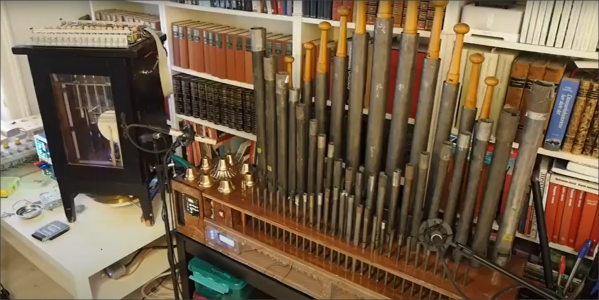
Arduino Orchestra Plays The Planets Suite

We’ve seen a great many Arduino synthesizer projects over the years. We love to see a single Arduino bleeping out some monophonic notes. From there, many hackers catch the bug and the sky is truly the limit. [Kevin] is one such hacker who now has an Arduino orchestra capable of playing all seven movements of Gustav Holst’s Planets Suite.

The performers are not human beings with expensive instruments, but simple microcontrollers running code hewn by [Kevin’s] own fingertips. The full orchestra consists of 11 Arduino Nanos, 6 Arduino Unos, 1 Arduino Pro Mini, 1 Adafruit Feather 32u4, and finally, a Raspberry Pi.

Different synths handle different parts of the performance. There are General MIDI synths on harp and bass, an FM synth handling wind and horn sections, and a bunch of relays and servos serving as the percussive section. The whole orchestra comes together to do a remarkable, yet lo-fi, rendition of the whole orchestral work.

While it’s unlikely to win any classical music awards, it’s a charming recreation of a classical piece and it’s all the more interesting coming from so many disparate parts working together. It’s an entirely different experience than simply listening to a MIDI track playing on a set of headphones.

We’d love to see some kind of hacker convention run a contest for the best hardware orchestra. It could become a kind of demoscene contest all its own. In the meantime, scope one of [Kevin’s] earlier projects on the way to this one – 12 Arduinos singing Star Wars tracks all together. Video after the break.

Continue reading “Arduino Orchestra Plays The Planets Suite”

Elderly Remote Keeps Things Simple

If you are lucky, you’ve never experienced the heartbreak of watching a loved one lose their ability to do simple tasks. However, as hackers, we have the ability to customize solutions to make everyday tasks more accessible. That’s what [omerrv] did by creating a very specific function remote control. The idea is to provide an easy-to-use interface for the most common remote functions.

This is one of those projects where the technology puzzle is now pretty easy to solve: IR remotes are well-understood and there are plenty of libraries for recording and playing back signals. The real work is to understand the user’s challenges and come up with a workable compromise between something useful and something too complex for the user to deal with.

Continue reading “Elderly Remote Keeps Things Simple”

VFD clock with wood case

Captivating Clock Puts Endangered Displays On Display

The DT-1704A VFD is straight from the 1976 Radio Shack Catalog
The DT-1704 VFD as seen the 1976 Radio Shack Catalog. The “A” version has no substrate, making the VFD fully clear for added effect.

When you have a small stock of vacuum fluorescent displays (VFDs) straight out of the 1976 Radio Shack catalog, you might sit around wondering what to do with them. When [stepawayfromthegirls] found out that his stash of seven DT-1704A tubes may be the last in existence, there was no question. They must be displayed! [stepawayfromthegirls]’ mode of display is this captivating clock build. Four VFDs with their aqua colored elements are set against a black background in a bespoke wooden case. Looking under the hood, the beauty only increases.

VFD Clock Wiring is almost as stunning as the clock itself
VFD Clock Wiring is nearly as stunning as the clock itself.

Keeping the build organized was not an easy task because the tubes are designed in such a way that each segment must be individually controlled. The needed I/O duties are provided by an Arduino Mega 2560 Pro (Embed). 28 2n3904’s each with their two resistors serve as drivers for each VFD segment.

The output of a  24 V AC transformer left over from the 1980s is rectified to 34 V of DC power which is then regulated to 27 V to power the tubes. Switching power supplies provide 6 V to the Arduino and 1.3 V to the filaments. If you look closely, you’ll also see a GPS module so that the clock doesn’t need to be set. To future-proof the clock against daylight savings time adjustments, a potentiometer on the back of the case allows the user to set custom hour offsets without editing any code.

We think the end result is a remarkably clean, simple, and elegant clock that he will be proud of for many years to come!

If VFD clock builds are your thing, then you’ll enjoy this Network Attached VFD Clock and a Mini VFD Clock with floating display.  And while not VFD based, we’d be silly to leave out the Boat Anchor Nixie Clock with enough knobs, switches, and buttons to delight even the fussiest of hacker.


A macro keypad making music.

Meet The Marvelous Macro Music Maker

Do you kind of want a macropad, but aren’t sure that you would use it? Hackaday alum [Jeremy Cook] is now making and selling the JC Pro Macro on Tindie, which is exactly what it sounds like — a Pro Micro-based macro keypad with an OLED screen and a rotary encoder. In the video below, [Jeremy] shows how he made it into a music maker by adding a speaker and a small solenoid that does percussion, all while retaining the original macro pad functionality.

[Jeremy]’s original idea for a drum was to have a servo seesawing a chopstick back and forth on the table as one might nervously twiddle a pencil. That didn’t work out so well, so he switched to the solenoid and printed a thing to hold it upright, and we absolutely love it. The drum is controlled with the rotary encoder: push to turn the beat on or off and crank it to change the BPM.

To make it easier to connect up the solenoid and speaker, [Jeremy] had a little I²C helper board fabricated. There’s one SVG connection and another with power and ground swapped in the event it is needed. If you’re interested in the JC Pro Macro, you can pick it up in various forms over on Tindie. Of course, you might want to wait for version 2, which is coming to Kickstarter in October.

There are many ways to make a macro keyboard. Here’s one that also takes gesture input.

Continue reading “Meet The Marvelous Macro Music Maker”