Cheap DIY Mic Sounds (And Looks) Damn Good

As any musician, podcaster, or youtuber will be quick to tell you, there’s no substitute for a good microphone. They’ll also be quick to tell you all about their favorite microphone, why it’s better than all the others, and how much it cost (oh, and how round it sounds, whatever that means). But what if you could build your own that sounds as good, if not better, and do it for only $30?

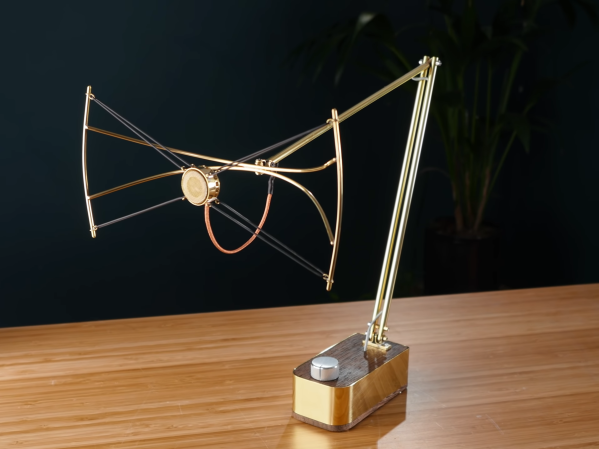
That’s what [Matt] from DIY Perks set out to discover when he built his DIY USB-C Microphone. He was able to source the same microphone capsule that can be found in his high-end, $600 CAD E100S, and built a simple pre-amplifier that bumps its quiet output up to line-level. He even connected it to the mic module with some custom cable made from two tiny enameled wires that won’t transmit bumps and vibrations, wrapped inside desoldering braiding which acts as a shield. He fed the output from the pre-amp into a cheap USB audio interface and voilĂ ! — top-notch sound for next to nothing. Make sure you check out the video below to hear a comparison between the mic and its professional counterparts.

Of course, sounding good isn’t quite enough. [Matt] wasn’t satisfied until the piece looked the part as well, which is why he encased the mic module in custom-bent brass mesh shielding and tubing (which also helps to reduce electrical interference). The brass cage sits suspended via rubber o-rings on a beautiful bent brass mount, which sits atop an articulated brass arm of [Matt]’s own design. Finally, the arm is mounted to a wood and brass enclosure that also serves to house the electronics.

And, in true open-source fashion, the video description is full of links to parts, schematics, and templates in case you want to build one of these beauties for yourself. Between this fantastic build and this other, super-overkill scratch-built USB microphone we featured earlier in the year, there has never been a better time to make yourself a mic you won’t have to trade your car for.

Thanks to [RichV] and [BaldPower] for the tip!

Continue reading “Cheap DIY Mic Sounds (And Looks) Damn Good”

Bring That Old Hi-Fi Into The 2020s

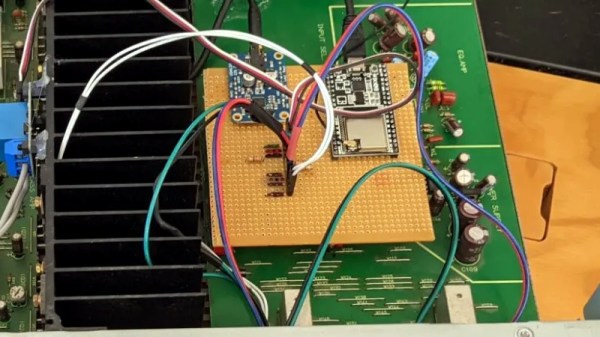
It’s a distressing moment for some of us, when a formerly prized piece of electronic equipment reaches a point of obsolescence that we consider jettisoning it. [Jon Robinson] ran into this dilemma by finding the Kenwood Hi-Fi amplifier his 17-year-old self had spent his savings on. It was a very good amp back in the day, but over two decades later, it’s no longer an object of desire in a world of soundbars and streaming music boxes. After a earlier upgrade involving an Arduino to auto-power it he’s now given it an ESP32 and an i2S codec which performs the task of digital audio streaming as well as a better job than the Arduino of controlling the power.

Inside the case is a piece of stripboard with the ESP and codec modules, but there was still the problem of seamlessly integrating it with the amp’s distinctly analogue-era controls. The output from the codec is wired into an audio input – quaintly labelled for a DAT player – and a simple cam on the input selector switch operates a microswitch to select the ESP32.

If you’re dipping your toe in decent audio then an old amp from decades past can make an excellent purchase, but you might wish to educate yourself through our Know Audio series.

Know Audio: It All Depends On The DAC

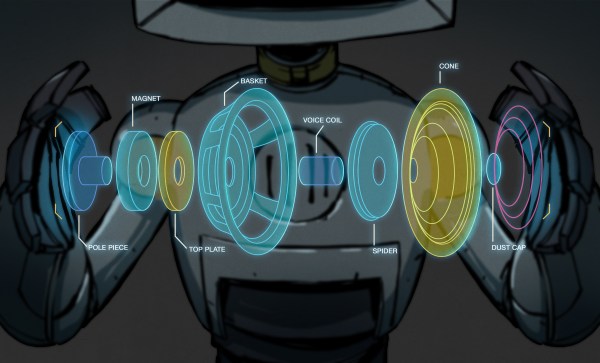
Our trip through the world of audio technology has taken us step-by step from your ears into a typical home Hi-Fi system. We’ve seen the speakers and the amplifier, now it’s time to take a look at what feeds that amplifier.

Here, we encounter the first digital component in our journey outwards from the ear, the Digital to Analogue Converter, or DAC. This circuit, which you’ll find as an integrated circuit, takes the digital information and turns it into the analogue voltage required by the amplifier.

There are many standards for digital audio, but in this context that used by the CD is most common. CDs sample audio at 44.1 kHz 16 bit, which is to say they express the level as a 16-bit number 44100 times per second for each of the stereo channels. There’s an electrical standard called i2s for communicating this data, consisting of a serial data line, a clock line, and an LRclock line that indicates whether the current data is for the left or the right channel. We covered i2s in detail back in 2019, and should you peer into almost any consumer digital audio product you’ll find it somewhere. Continue reading “Know Audio: It All Depends On The DAC”

A Deep Dive Into The Sound Of An Apple II

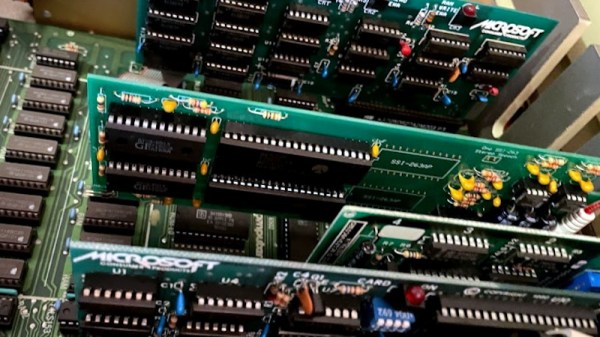
A major part of the retrocomputing scene for many of us lies in the world of chiptunes, music created either using original retrocomputing hardware or in the style of those early synthesiser chips. There’s one machine we don’t hear much about among all this though, and that’s the Apple II. Though probably one of the most expandable of all the 8-bit home computers, it lacked a sound channel beyond a speaker hooked up to a memory location port so any complex sound work had to be done via an add-on card. It’s something [Nicole Branagan] has investigated in depth, as she demonstrates first the buzz from the speaker and then what must have been an object of extreme desire back in the day, a Mockingboard sound card.

Her card is not an original but a modern recreation using the same hardware, which is to say a pair of 6522 VIA port chips, each driving an AY-3-8910 audio chip. This is already a familiar device to those who have heard an Amstrad CPC, a later Sinclair Spectrum or, an MSX, and in the Apple it delivers an impressive stereo sound thanks to both channels being present. Interestingly though, it delivers a far smoother output than an MSX playing the same music, probably because of a superior filtering circuit.

She wraps up with a discussion of coding on the Apple for the AY, and how to best accommodate the card on the later Apple IIgs. If the AY chip catches your interest, it’s also easy to drive from a microcontroller.

This Audio Mixer Is A Eurorack

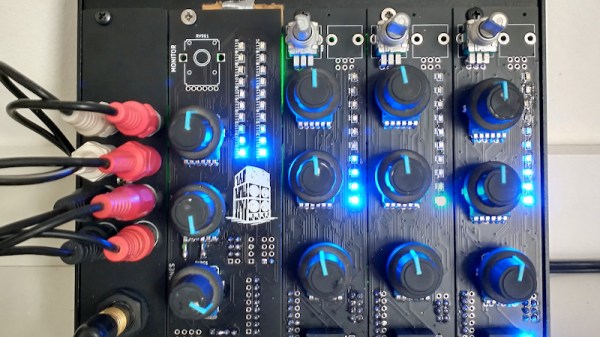
Music making and DJing have both become arts predominantly pursued in a computer, as the mighty USB interface has subsumed audio, MIDI, and even DJ turntable interface controllers. There was a time though when an indispensable part of any aspiring performer’s equipment would have been an analog mixer, a device for buffering and combining multiple analog audio signals into a single whole. A mixer is still a useful device though, and [Sam Kent] has produced a very nice one that takes the form of a set of Eurorack modules made from PCB material. There are two types of modules, the main channel module which you can think of as the master module, and a series of isolator modules that handle the individual inputs.

Mixer preferences are as individual as each user, so for example where we’d expect sliders he’s used rotary potentiometers, and for us placing the master channel on the left-hand side is unfamiliar. But that’s the beauty of a modular design, there’s nothing to stop anyone building one of these to simply configure it as they wish. We notice that for a mixer described as for DJs there’s no RIAA preamp for the turntable fans, but it’s not impossible to fix with an off-board preamp. Otherwise, we like it and have a sudden hankering for it to be 1992 again with a pair of Technics SL1200s and a room full of people.

Designing a mixer, even a simple one, isn’t easy. Our own [Lewin Day] wrote a retrospective of his experiences with one.

Know Audio: Amplifier Nuts And Bolts

As we’ve followed a trail through Hi-Fi and audio systems from the listener’s ear towards the music source, we’ve reached the amplifier. In our previous article we gave a first introduction to distortion and how some amplifier characteristics can influence it, and here we’ll continue along that path and look at the amplifier itself. What types of audio amplifier circuits will you encounter, and what are their relative merits and disadvantages?

A Few Amplifier Basics

Horowitz and Hill's Transistor Man
Horowitz and Hill’s Transistor Man

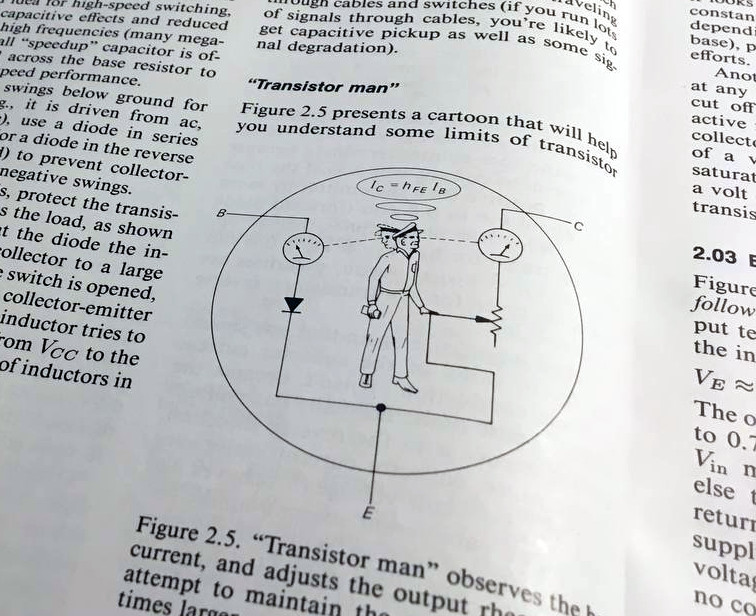
If you know anything about a transistor, it’s probably that it’s a three terminal device whose output pin forms part of a potential divider whose state is dependent on what is presented to its input pin. The Art of Electronics had it as a cartoon of a man standing inside a bipolar transistor and adjusting a variable resistor between collector and emitter while watching an ammeter on the base.

Properly biased in its conducting range, a transistor can behave as a linear device, in which the potential divider voltage moves in response to the input in a linear relationship, and thus the voltage on the output is an amplified version of the voltage on the output. This is the simplest of transistor amplifiers, and because different types of amplifier are referred to by lettered classes, it’s known as a class A amplifier. Continue reading “Know Audio: Amplifier Nuts And Bolts”

Stereo Recording Made Easy With A 3D-Printed Mount

When making a recording it can be surprisingly difficult to capture a good stereo image. A well-known technique is the ORTF microphone arrangement in which two cardoid microphones sit at 110 degrees to each other and 17cm apart, and thus pick up a readily reproducible stereo separation. It’s something that we’ve been known to do in our student days with a pair of Shure SM58s and a stack of Post Office elastic bands, but [marsairforce] has done a much nicer job with a very neat 3D-printed microphone clip.

Designed in OpenSCAD, the first iteration printed on a resin printer proved to be too brittle for the task, so a second version was printed on an FDM machine. This incorporated significant strengthening, as well as a screw mount for a microphone stand. The result is an extremely useful and cheap addition to any recording set-up, and anyone who has wrestled with achieving a good stereo image will appreciate it. You can see some of what went into it in the video below the break.

If this is your field of interest, you might also wish to look at a binaural microphone.

Continue reading “Stereo Recording Made Easy With A 3D-Printed Mount”