DIY Spring And Plate Reverb

If you’re running your own recording studio, you’re going to need a lot of gear that seems excessively esoteric to the non-musically inclined. A rack full of synth gear looks just like any other cabinet of technology you would find in a server room. Electronic music is, for the most part, very utilitarian looking, but there are a few pieces that add a very nice aesthetic touch to any studio. [Peter] made two great looking pieces of hardware – both reverbs – that significantly add to the decor of his studio. As a bonus, they also sound really good.

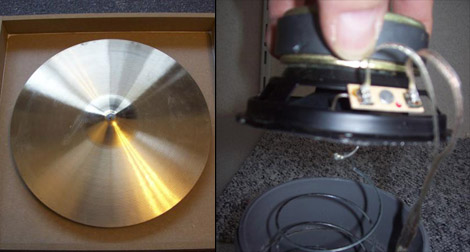
[Peter]’s spring reverb (Dutch, Google translate) works just the same as any other spring reverb; a speaker puts some music into a slightly stretched spring, and this sound is picked up by another transducer at the opposite end. For this build, [Peter] used a Slinky and a piece of PVC pipe left over from a bathroom remodel. Adding a few jacks, pots, and a preamp, [Peter] had a very nice and extremely large spring reverb.

The plate reverb (translation) is also a staple of pro recording studios around the globe. This reverb is somewhat similar to a spring reverb, except the spring is replaced with a tuned metal plate. [Peter] used a cymbal from a drum set for this piece of kit. Two speakers are attached to the back of the cymbal, one feeds a sound into the cymbal, the other speaker picks up those sounds and sends it to the mixing board.

There’s a lot of really cool musical DIY projects over on [Peter]’s site, along with a few audio demos for each of his DIY projects. We’ve included his reverb demos after the break, feel free to give those a listen.

Thanks go to [geekabit] for sending this one in.

Continue reading “DIY Spring And Plate Reverb”

Hackaday Links May 9th 2012

Homecut – CNC Cutting Directory

homecut

So you have a CNC machine that you use as a hobby, but would like to do some actual work on the side? Or maybe you have an idea you’d like made. Homecut is a map directory where you can maybe hook up with the right person.

The Curta Mechanical Calculator

curta calculator

As [leehart] mentioned in our comments section, the Curta mechanical calculator is a truly ingenious piece of engineering. A quick Google search should find all kinds of information on it, but this article could be a good place to start for some mechanical hacking inspiration!

Luxman Amplifier DAC Upgrade

nand-dac

[R. Barrios] wasn’t happy with using the sound card for his HTPC setup, so decided to add a DAC module onto his reciever. The resulting audio quality was very good, and the build came out quite clean.  Check it out if you’re thinking of a hack-upgrade to your stereo equipment.

3D Printable Tilt-Shift Adapter

tilt-shift-lens

A tilt-shift lens a neat piece of equipment that is used to make a large scene look like they were miniatures. It’s a cool effect, but professional lenses to do this can cost thousands of dollars. This Instructable tells you how to go about printing your own. For more info on the technique itself, check out this Wikipedia article.

New 3D Printer on the Block

3d-printer

If you would like to take the plunge into 3D printing, but are looking for somewhere to get a parts kit, the [ORD Bot Hadron 3D Printer] may be worth a look.  The build quality looks great, and the price for the mechanical components is quite reasonable at $399. You’ll need to provide the electronics and extruder. Thanks [comptechgeek]!

Hard Resetting Your Ford Touch System The Easy Way

ford-sync-reset

[Jeff Clymer] owns a Ford Focus, and while he’s generally happy with the car, the “My Ford Touch/Sync” system can be buggy at times. He spends a lot of time in the car each day, so when the entertainment center locks up as it is frequently known to do, he has to turn off the car and pull a fuse to reset the system. Since pulling a fuse while on the road is pretty impractical, he decided to install a reset button, making system reboots a breeze.

He started by disassembling various fuses until he found one with an easy to remove fusible link. Once it was in pieces, he soldered a pair of wires to the fuse terminals and connected everything to a normally closed momentary pushbutton switch. After adding an inline fuse holder and reinserting the original fuse, he installed the button into the back of his glove box

Now instead of physically removing the fuse each time his stereo locks up, he can simply push a button and be on his way. Here’s hoping a software fix is coming for [Jeff’s] car sooner rather than later!

Rotary Phone-light-amp Could Be Filed Under Bizarre

[Samimy’s] latest project is a little strange, but one man’s weird is another man’s wonderful so we’re not about to start criticizing his work. Nope, we’re here to praise the fact that his rotary phone turned reading light and audio amp is very well constructed.

He started by removing the phone housing. Those old enough to have used one of these devices will remember their bulk, and there’s a lot of unused space in both the handset and body housing. [Samimy] started by removing the speaker and microphone from the handset, and drilling a ring of holes to receive white LEDs. The circuit was wired so that lifting the handset turns on the lights.

But he didn’t stop there. A set of speakers and the audio amplifier circuitry from an old tape deck are also hiding inside the base of the phone. If you look closely in the image above you can see that he’s connected his cellphone and is listening to some tunes through the antique hardware. Take a gander at the video after the break to see construction and use of the project.

Continue reading “Rotary Phone-light-amp Could Be Filed Under Bizarre”

Programming An Arduino Using An Audio File

This proof-of-concept is just waiting for you to put it to good use. [Mike Tsao] wrote an Arduino sketch that lets him decode incoming audio data which could be used to program the device. He’s calling the project TribeDuino because it decodes an audio file which is actually the firmware update for a Korg Monotribe.

Earlier in the month [Mike] read our feature on a project that reverse engineered the audio-based firmware update for the Korg hardware. He wanted to see if he could write some code to read that file on his own hardware. All it took was an audio jack and two jumper wires to get the Arduino ready to receive the audio file. His firmware reads the Binary Frequency-Shift Keying encoded data as the audio is played, then echos a checksum to prove that it works.

This would be a fantastic addition to your own projects. Since the audio connection only needs to be mono, it only takes just one Arduino pin to add this jack (the other is a ground connection). Having just played around with alternative ways to push data to a microcontroller ourselves, we might give this a try when we have some free time.

Tiny Audio Switcher Eliminates Repetitive Plug Swapping

usb-audio-switcher

[Phil] uses both his computer’s speakers and a set of headphones while working at his desk, but he was growing tired of constantly having to remove the headset from his sound card in order to insert the speaker plug. He’s been meaning to rig something up to make it easier to switch outputs, but never seemed to get around to it until he recently saw this LAN-enabled audio switcher we featured.

His USB-controlled switch features a single audio input and two audio outputs, which he mounted on a nicely done homemade double-sided PCB. The switch can be toggled using any terminal program, sending commands to the on-board ATtiny13A via an FT232R USB to serial UART chip.

The switch’s operation is really quite simple, merely requiring [Phil] to type in the desired audio channel into the terminal. The ATiny and a small relay do the rest, directing the audio to the proper output.

A DIY Audio Player For When All That Matters Is The Music

orange-mepod

[Grissini] hasn’t had the best of luck when it comes to personal audio players. He estimates that he’s gone through about half a dozen iProducts/iKnockoffs over the years, which ultimately adds up to a lot of money poured right down the drain. Rather than lay down his cold hard cash for yet another music player that would succumb to a dead battery or cracked screen, [Grissini] decided that he would be better off if he built one himself.

His Orange mePod isn’t exactly the most attractive or sleekest music player out there, but [Grissini] says it works like a charm. An Arduino Uno powers the device, and he uses an Adafruit Wave Shield to handle the audio playback. Power is supplied via 4AA batteries which keep the tunes going for a reasonable amount of time, and afford him the ability to swap them out for recharging without much fuss.

The player was encased with some leftover cardboard and wrapped in bright orange duct tape, before being mounted on [Grissini’s] belt. He says he gets plenty of looks when he’s out and about, which you would expect from such a unique design.

Stick around to see a quick video of the audio player in action.

Continue reading “A DIY Audio Player For When All That Matters Is The Music”