Recording Audio With Chrome Using HTML5

recording-audio-with-chrome

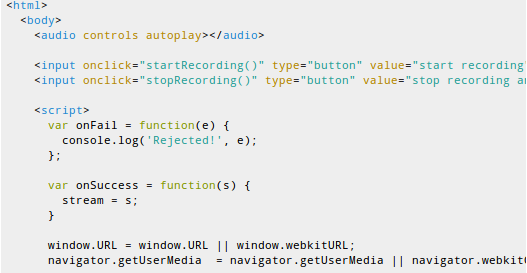
The Dubjoy project was stopped dead in its tracks when the newest version of the Google Chrome browser stopped using Adobe’s flash plugin and transitioned to their own called Pepper Flash. The aim of development was to produce a browser-based editor for translating the audio track of a video clip. After a bit of head scratching and a lot of research they decided to try ditching the use of Flash and implemented a way to record audio using HTML5.

There were quite a few issues along the way. The initial recording technique generated raw audio files, which are not playable by Chrome’s HTML5 audio player. This can be worked around by buffering the raw audio, then converting it to a different format once the recording is finished. The user also needs to monkey with the Chromes flags to enable HTML5 audio. So they did get it working, but it’s not yet a smooth process.

We love seeing the neat stuff you can do with HTML5. One of our favorites is the use of a tablet’s accelerometer as a browser game controller.

[via Reddit]

Wireless Speaker Made Using Arduinos And 2.4 GHz Tranceivers

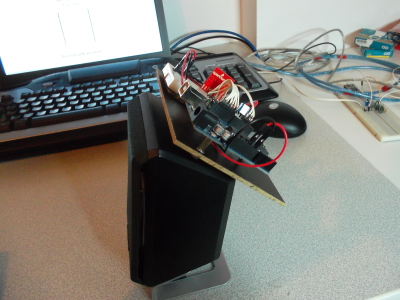
[Texane] picked up a 2.4 GHz transmitter/receiver pair for transmitting sensor data wirelessly. After using them in a project he wanted to try pushing them a bit to see what the limits are when it comes to higher bandwidths. He ended up building a wireless speaker that transmits audio at about 90 KB/s. That link leads to a subfolder of his git repository. The code for this project is in the RX and TX folders, with images and video in the DOC folder.

The radio hardware that he’s using is a Nordic nRF24L01P chip which is available on a breakout board from Sparkfun. [Texane] mentioned to us that the chip includes error checking, packet ACK, and automatic retransmission. But these add overhead that can slow things down. The chip does offer the option to disable these features to get lower level access to the hardware. That’s exactly what he did and he mentions that the example code he wrote for the transmitter and receiver make every cycle count. This makes us wonder if it’s the speed of the ATmega328 chip that is the bottleneck, or the transceivers themselves?

Hacking An Old Radar Gun To Interface With A Laptop

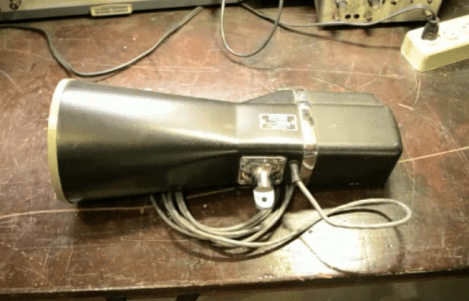
[Gregory Charvat] decided to see what he could do with this old Police radar gun. It is an X-band device that broadcasts continuous waves and measures the Doppler shift as they echo back. He cracked it open to see if he could interface the output with a computer.

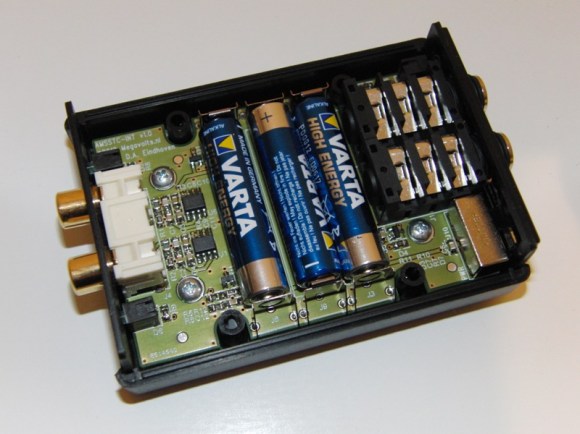
After a little poking around he’s able to get it connected to a 12V feed from his bench supply, and to monitor the output with an oscilloscope. He established that it draws about 0.5A in current he built a companion board which uses AA batteries for power, and provides an audio output which can be plugged into his laptop’s audio-in jack. This technique makes reading the device as easy as recording some audio. From there a bit of simple signal processing lets him graph the incoming measurement.

In the video after the break you’ll see his inspection of the hardware. After making his alterations he takes it into the field, measuring several cars, a few birds, and himself jogging.

Continue reading “Hacking An Old Radar Gun To Interface With A Laptop”

How To Add Audio In To The Sony NEX-5 Line Of DSLR Cameras

[Tynan] loves his Sony NEX-5 camera but he’s fed up with not being able to choose any external microphone when recording video. Recently he set out to remedy that, and managed to add an audio in jack without modify the camera itself.

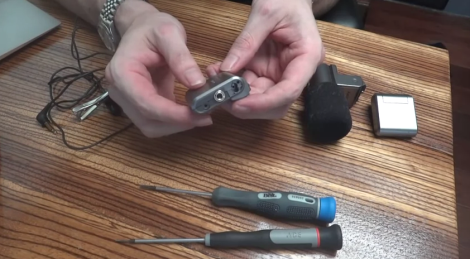
The real trick here is to modify how a microphone accessory connects to the camera. In [Tynan’s] tutorial video (embedded after the break) he uses the enclosure from a flash module as a connector. After removing the electronics he’s left with plenty of room for the guts of a Sony microphone accessory. Those include the PCB and wiring, but not the microphone element itself. A 3.5mm audio jack is added to the flash case, and soldered to the microphone cable. Now he has a modular audio-in jack. The only problem is that his tinkering resulted in mono only. If you don’t mind spending a bit more time reverse engineering the scrapped microphone we bet you can parlay that into a true stereo option.

Continue reading “How To Add Audio In To The Sony NEX-5 Line Of DSLR Cameras”

A Laser Audio Transmitter

Here’s a way of transmitting audio that makes it virtually impossible for someone else to listen in. Instead of sending radio waves bouncing all over creation, this uses the focused light of a laser to transmit audio. In the image above you can see the silver cylinder which houses the laser diode. It is focusing the beam on a light dependent resistor to the right which looks almost like a red LED due to the intensity of the light.

The simplicity of this circuit is fascinating. On the receiving end there is no more than the LDR, a 1.5V power source, and a headphone jack. The transmitter is not much more complicated than that. It includes an audio output transformer which boosts the resistance of the audio signal. This increase in resistance ensures that the laser diode modulates enough to affect the LDR on the receiving end. The transmitter uses a 3.3V supply. Check out the video after the break to hear the high quality of audio coming through the setup.

Once you’re done playing around with the transmitter you might try turning the laser into a remote control for your stereo.

Continue reading “A Laser Audio Transmitter”

Turn Your Old Bluetooth Headphones Into A DIY Car Audio Receiver

wireless-car-audio

[Tim] drives a 1995 Mitsubishi TS Magna, which is equipped with a less than stellar accessory package he lovingly calls a “poverty pack”. He outfitted his ride with an aftermarket head unit that can support the Bluetooth A2DP profile, provided he buys the ridiculously overpriced kit sold by Pioneer. Reluctant to shell out more money on an audio kit than his car is worth, he whipped up his own Bluetooth kit for far less than Pioneer’s asking price.

He had a set of Nokia Bluetooth headphones that he was willing to part with, so he disassembled them to see how he might interface with his car stereo. Connecting the headset to his head unit was a relatively easy task, but he had to work a bit harder to get his Bluetooth receiver powered properly.

After both undervolting and then nearly cooking his wireless audio rig, [Tim] managed to get things operating to his liking. He says that the audio is a touch quieter than he would like at the moment, so he will likely be revising his design in the near future. For now however, he can stream tunes from his phone while he cruises around town.

Toorcamp: Bliplace 2.0

We’ve shown [Tanjent]’s Bliplace 1.0 in the past. He handed out a few hundred of the open source audio toys at Burning Man. At Toorcamp, he’s been showing off an improved 2.0 version of the project. This one has a more powerful microcontroller and many more RGB LEDs.

The device uses the ATMega328 and an electret microphone to sample ambient noise. It the processes the sound into a light pattern which is displayed on the line of RGB LEDs. The demo that I saw showed the LEDs synchronized to bass frequencies, which it could pick up at a range from the large sub-woofers at Toorcamp. It’s powered by a CR2032 coin cell battery, which means it can be worn as a neat audio toy.

This prototype version was etched in his kitchen but [Tanjent] is working on making a production version of the PCB. He plans to release it as a surface mount soldering kit.