Running Minecraft On Two Routers

router

[CNLohr] is no stranger to running Minecraft on some weird hardware. Earlier, he built this Linux powered microscope slide… thing to toggle LEDs with redstone levers in Minecraft. Figuring if Minecraft could run on an AVR, he decided to try the same thing on a router, a TP-LINK TL-WR841N to be specific. Like the microscope slide running Linux, this proved to be an easy task. [CNLohr] had another router he could run Minecraft on, and this one could also punch wood. There really was only one thing for him to do.

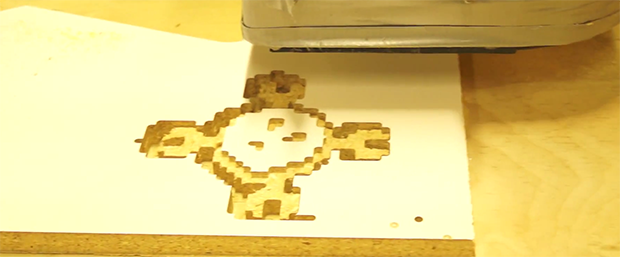
Like the microscope slide and the wireless router, [CNLohr]’s CNC router is now running a Minecraft server. The phrase, “because it’s there” comes to mind. When connected to the CNC server, the player controls a snow golem (a snowman with a jack ‘o lantern head) with a carrot. Wherever the snow golem goes, the tool head follows, allowing him to carve objects in the world, and on a sheet of MDF secured in the CNC machine.

It’s certainly an odd build, but [CNLohr] was able to carve out a pixeley, blocky Hackaday logo with the snow golem controlled CNC machine. Code here, video below.

Continue reading “Running Minecraft On Two Routers”

The Pi CNC Controller

pi

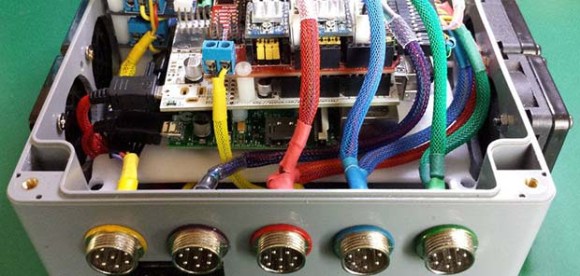
Back in the olden days, the latest and greatest CNC machines had minicomputers bolted onto their frames, replete with paper tape readers and seven segment displays. For the home CNC machinist of today, these hulking electronic brains are replaced with something a little more modern – desktop computers with parallel ports. Having a box filled with computers and motor drivers is just too cool though, and this tiny Raspberry Pi CNC controller fits the bill quite nicely.

The controller uses a Raspberry Pi as the brains of the device, but there aren’t too many options out there for stepper motor control in Pi land. There are, however, dozens of CNC shields or the Arduino. The Pi AlaMode board is able to provide voltage level conversion between the CNC shield and the pi, and also has the nice bonus of a battery-backed real time clock.

With some proper connectors, lighted buttons, and a beautiful cable sleeving job, this Pi CNC controller would be well suited for any of the desktop CNC  or engraving builds we see from time to time.


CNC’d And Anodized Ti Engagement Rings

Ti

[Patrick] met someone, and then some stuff happened. Good for him. Because of this, [Patrick] found himself in need of a pair of engagement rings. With a friend, some titanium bar stock, and an awesome lathe, he turned out a few awesome rings and also managed to selectively anodize them with a subtle rainbow of colors.

RingsMaking a ring on a lathe is a relatively simple ordeal, but the two larger rings [Patrick] made (one was for a friend) featured some interesting patterns that aren’t easy to make without a good CNC setup. Luckily, this friend has an awesome CNC with a rotary fourth axis.
With the machining out of the way, [Patrick] then turned to anodization. This was done by constructing a simple power supply with a variac, four diodes, and a big honkin’ cap. He managed to get a good result with a sodium carbonate solution. He doesn’t have any good pictures of it, but by varying the voltage from 20 to 100 Volts, the color of the anodization will change from green, purple, to yellow, to blue.

Finally, A Desktop CNC Machine With A Real Spindle

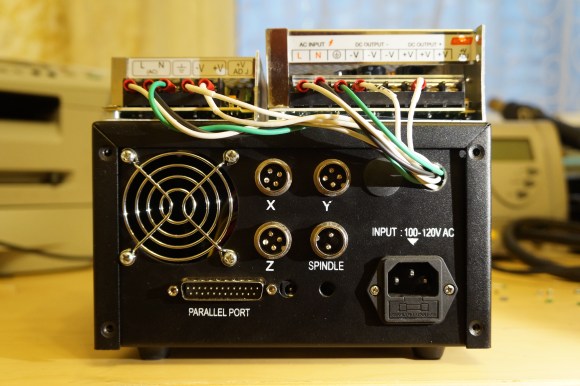
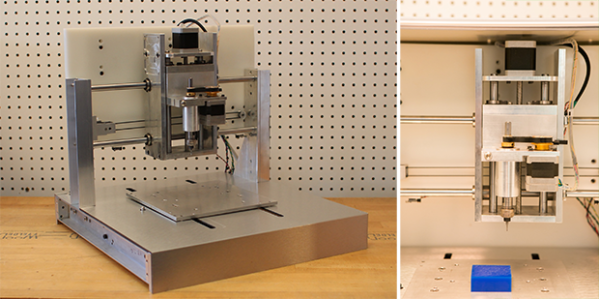
While cheap hobby CNC mills and routers are great machines that allow you to build things a 3D printer just can’t handle, they do have their limitations. They’re usually powered by a Dremel or other rotary tool, so speed control of the spindle via Gcode is nigh impossible. They’re also usually built with a piece of plywood as the bed – cheap, but not high on repeatability. The Nomad CNC mill fixes these problems, and manages to look good and be pretty cheap, to boot.

Instead of using a Dremel or other rotary tool to cut materials, the Nomad team is using a brushless DC motor connected to a real spindle. With a few certain motors, this allows for closed loop control of the spindle;  Sending S4000 Gcode to the mill will spin the spindle at 4000 RPM, and S6000 runs the spindle at 6000 RPM, whether it’s going through foam or aluminum. This is something you just can’t do with the Dremel or DeWalt rotary tools found in most desktop mills and routers.

Along with a proper spindle, the Nomad also features homing switches, a tool length probe, and a few included fixtures that make two-sided machining – the kind you need it you’re going to machine a two-layer PCB – possible, and pretty simple, too. The softwares controlling the mill are Carbide Motion and MeshCAM, a pretty popular and well put together CNC controller. Of course the mill itself speaks Gcode, so it will work with open source CNC software.

It’s all a very slick and well put together package. Below you can find a video of the Nomad milling out a Hackaday logo.

Continue reading “Finally, A Desktop CNC Machine With A Real Spindle”

Hackaday Links: April 20, 2014

hackaday-links-chain

[Josh] hit the same issue we’ve faced before: cable modems don’t match a form factor and usually don’t make themselves easy to mount on something. We could complain about routers as well, but at least most of those have keyhole slots so you can hang them on some screws. Inspiration struck and he fabricated his own rack-mount adapter for it. Velcro holds it in place, with a cutout bezel to see the status lights and an added fan to keep things cool.

Here’s a pair of strange but possibly interesting ones that were sent in separately. The first is an analysis of how much energy short-run CNC prototyping consumes versus traditional manufacturing. The other is an article that [Liz] wrote about getting started with CNC mill bits. She says she compiled all that she learned as she was getting started in the field and wants to save others the effort.

This one goes back several years, but who doesn’t love to hear about a voice-controlled wheelchair?

So you can solder QFN parts but you can’t hammer a nail straight into a piece of wood? The answer, friend, is a laser guided hammer. Someone hire this [Andybot] person, because the solution to the problem shows the ability to out-think an interesting dilemma: how do you put a laser in a hammer head and still use it to hit things?

We’ve seen a lot of these long-range WiFi hacks over the years. This one is worth looking at because of the work done to create an outdoor mount that will stand the test of time.

And finally, we’re still really fond of this 2-bit paper processor that helps you wrap your brain around what’s going on with those silicon wafers that rule our everyday lives. [glomCo] liked it as well, and actually coded an emulator so that you can play with it without printing anything out on paper. We think it takes away some of the fun, but what an excellent programming exercise!

BeagleBone Black + RAMPS

CRAMPS

The BeagleBone Black, with an impressive amount of computing power and a whole bunch of I/O, would make an impressive CNC controller, save for two shortcomings: The BBB isn’t in stock anywhere, and CNC capes are a little on the pricey side. [Marc Peltier] can’t do anything about finding a distributor that doesn’t have the BeagleBone on backorder for you, but he did come up with an adapter for the very popular RAMPS-FD 3D printer controller board (Forum, French, Here’s the Google translation matrix).

The RAMPS-FD is an extension of the RAMPS board and a shield for the Arduino Due. Both the Due and BBB work on 3.3 V, meaning controlling the RAMPS-FD is simply a matter of finding the correct wiring diagram and pin assignments on the BeagleBone. [Marc] solved this problem by using the settings from the BeBoPr cape and using the existing BeBoPr LinuxCNC configuration.

The end result of [Marc]’s tinkering is something a lot like [Charles Steinkueler]’s CNC capes for the BeagleBone Black we saw at the Midwest RepRap Fest. [Charles] isn’t selling his capes, but no one else seems to be selling BeagleBone Blacks, either.

Continue reading “BeagleBone Black + RAMPS”

A Brilliant And Elegant CNC Pendant

pendant

[Mike Douglas] has a small hobby CNC router, which works great — but you’re limited to controlling it from your PC. And unfortunately, there just aren’t pendants made for this consumer level stuff. Annoyed at having to reach over to use his keyboard all the time, he stumbled upon a simple, but brilliant solution: A dedicated USB 10-key pendant keypad.

These USB keypads are designed for laptops that don’t have full size keyboards. They can be had for a few dollars from China, and let you expand your keyboard possibilities… All [Mike] had to do was print off some stickers to put on the keys!

It’s easy to program new hot keys in Mach3  — and there you go! Why haven’t we thought of this before? While you’re at it, why not build a cyclonic dust separator for your CNC too — and if you’re having trouble clamping down work pieces, [Mike] has a pretty cool solution for that as well.