Building A Controller For MMOs

It’s a simple fact of gaming that controllers are more suited for shooters, while the WASD + mouse control of the PC gaming master race is more suited for real-time strategy games and MMOs. [Gabriel] wanted to challenge this idea, so he put together a controller combining the best of a mouse and keyboard for some hand-held RTS and MMO action.

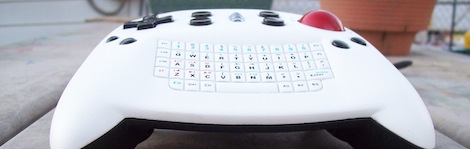
The Keyball Controller as [Gabe] calls it is an amazing amalgamation of a 3rd party XBox and PS3 controllers, an SNES controller, a trackball, two USB keyboards and a ton of Bondo. The front of the Keyball features a WASD D-pad, scroll wheel, trackball, tiny keyboard and a few other commonly used buttons. The rear of the controller is loaded down with tons of trigger buttons and a few meta buttons that alter the function of other buttons.

The fabrication of the controller is absolutely phenomenal and certainly something that deserves to be copied. We’ve seen some controllers duplicated with a silicone mold and resin, so we can only hope that [Gabe] is looking at RTV silicone at the moment.

Building An Autonomous Robot From An Xbox 360 Controller

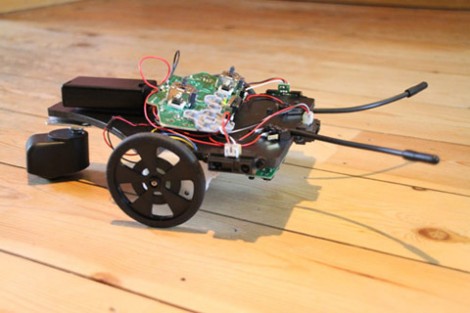
Wow, it’s amazing what [Carl] was able to build using an Xbox 360 control PCB as the base for his robot. His forum posts just touches the surface of the build, but he linked to a PDF file which has the full details.

This build basically attaches sensors and replacement motors to the controller board… and that is it! Some distance sensors are connected to the analog inputs for the left and right trigger. The whiskers use a couple of leaf switches soldered to controller button pads. The motors are geared replacements that use the same connectors as the rumble motors did.

The idea is that the controller is connected to a PC via the wireless radio it has on the PCB. Once the connection is made the PC software can read from all of the sensors and drive the motors accordingly. It would also be really easy to use a single-board solution like the RPi to do away with the need for a remote PC. But this is a fantastic start, and an approach which we had never before considered. See some video of the little guy getting around the room after the break.

Continue reading “Building An Autonomous Robot From An Xbox 360 Controller”

USB Dongle For Unmodified NES Controllers

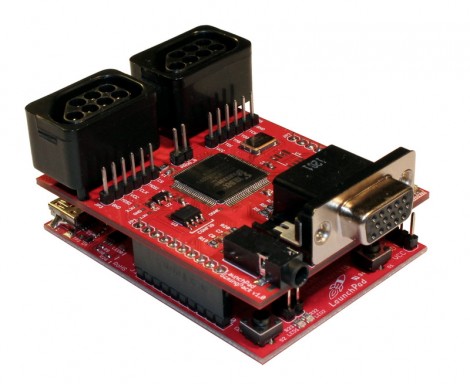
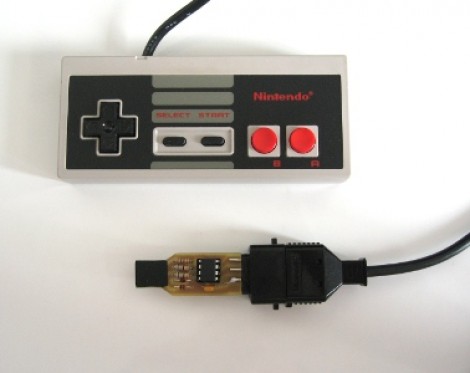
This USB dongle will let you use your unmodified NES controllers on a computer. That’s because it includes the same socket you’d find on the classic console.

The image above shows the prototype. Instead of etching the copper clad board, each trace was milled by hand (presumably with a rotary tool). To the left the black square is made of several layers of electrical tape that builds the substrate up enough to fit snugly in a USB port.

An ATtiny45 running the V-USB stack has no problem reading the controller data and formatting it for use as a USB device. This is actually the second iteration of the project. The first attempt used an ATtiny44 and a free-formed circuit housed inside the controller. It worked quite well, but required alterations to the circuit board, and you needed to replace the stock connector with a USB plug. This dongle allows the controller to go unaltered so it can be used with an NES console again in the future.

Playing Footsie With Your Video Games

[Jon] will be tapping away with his toes during gaming session thanks to this foot controller which is packed with buttons and sensors. It’s the second iteration of the build. The original had some solder joints break and the USB stopped working. He had also been experiencing some erratic behavior and so he decided to upgrade the control hardware and add a few more things in the process.

This version uses an Arduino Uno as the interface board. He did a bunch of prototyping to find the best way to hook up all the analog sensors, and how to properly debounce the buttons. Once he was happy with the inputs he set about finding a better way to use the USB HID standard with the device. We were surprised to hear that the ATmega16u2 (one of the new AVR chips which includes USB hardware) doesn’t play nicely with Linux. But [Jon] managed to hack his way around that issue and now he’s gaming with an even better foot controller than before.

Custom Starcraft Controller

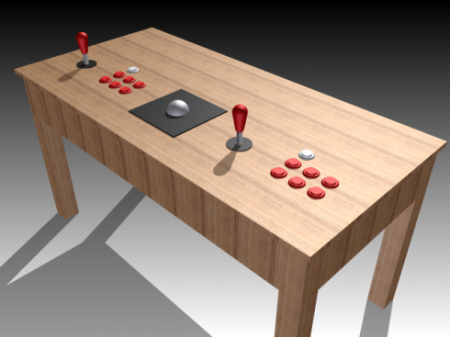
This Starcraft controller was designed as a contest entry. The goal of the contest was to provide a custom controller for the Starcraft Real-Time-Strategy game that shared some of the features seen in First Person Shooter controllers.

The design started as rough sketches. From the there button layout was prototyped before actually building a virtual model of the entire controller. A rendering of the model was submitted as a contest entry, and we’re glad it was also seen through to a physical device. This involved sending the design files off for 3D printing. What came back was painted and assembled to achieve the beautiful look seen above.

On the right is a stick that acts as the mouse controller. The buttons on the left are just the most necessary of Starcraft control keys. They all map to the appropriate keyboard keys and the device enumerates as an HID keyboard so no button mapping is necessary. That being said, a player does have the option of remapping if the layout doesn’t suit.

[Via Reddit with more info at Shoryuken]

Interfacing SNES Controllers With Your Raspberry Pi

This lovely set of wires lets [Florian] connect stock Super Nintendo controllers to his Raspberry Pi. The IDC connector in the upper left plugs into the GPIO header on the RPi rather than going the route of using an intermediary USB converter.

The setup lets you connect two controllers at once, so you’ll have no trouble going head-to-head on Mario Kart as seen in the clip after the break. The ports themselves were pulled from a pair of SNES extension cables. Since button signals are pushed to the console via a shift register there’s just five wires needed for each (voltage, ground, data, clock, and latch). As far was we know the Raspberry Pi pins are not 5V tolerant so you probably want to add some level conversion to this circuit if you build it yourself.

[Florian] wrote a C program which shifts in data from the controllers and converts it to HID keyboard inputs. This should make it extremely flexible when it comes to emulator setup, and using the technique for different styles of controllers should also be pretty easy.

Continue reading “Interfacing SNES Controllers With Your Raspberry Pi”

Multi-system Nintendo Emulator Uses Stock Controllers

The first month of [WoolyDawg5’s] summer break went into building one Nintendo emulator to rule them all. He thinks there’s nothing like playing the games on the original controllers, and we agree with him 100%. Here you can see that the cartridge door on this NES enclosure hides the extra connectors he needs.

With that door closed this looks like a stock console, but only from the front. If you take a look at the back of it you’ll see how he pulled this off. There’s a Zotac motherboard whose I/O panel has been fitted into the back. It’s responsible for emulating games for the NES, SNES, and GameCube consoles — we’re sure it can do more but that covers the controller ports seen here. Each port is wired to a USB controller module. The cables for these modules exit the back of the case and plug into the motherboard’s I/O panel. There is WiFi for the board, and that’s what [WoolyDawg] uses for configuration, tunneling into the OS instead of connecting a keyboard or mouse.

Of course you could just shoehorn all-original console hardware into one package to accomplish something like this.

[Thanks KoldFuzion]