Automated Home Brewing System Has An Insanely Professional Controller

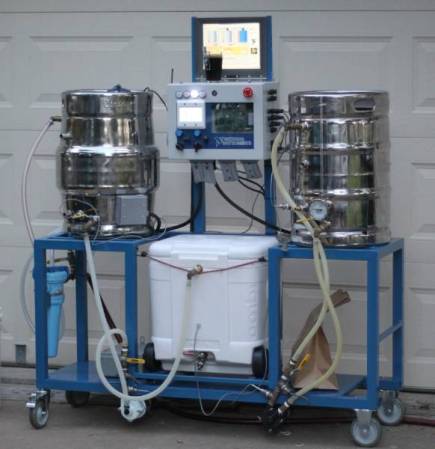
So you know how on Breaking Bad, the chemist [Gale Boetticher] sets up an impressive rig to brew the best cup of coffee? Well what do you think of a group of engineers taking on beer as their side project? This rig, which we do think is pretty insane, is the result of embedded system engineers developing an automated brewing system.

[Ben_B] started from humble beginnings. He built a PID controlled smoker much like the one we saw last Monday. From there he ground out several iterations of brewing hardware, adding a bit of automation at each step along the way. But things really took off when the events department at his company, National Instruments, took notice. They put the team on the task of assembling professional grade control hardware for the unit. And of course while we’re spending the company dime why not chrome those boiling vessels at the same time. The finished project was shown off at a trade show to help promote the company.

The post thread linked at the top has shots of the complicated mounting and wiring that went into the controller. We’re not sure how much intervention is actually necessary during a session. But with all the sensors, pumps, valves, filters, and whatnot we wouldn’t be surprised if all you need to do is pitch some yeast into what comes out of it.

Hackaday Links August 23, 2012

PS3 Controller Cell Phone Mount

PS3-controller-cellphone

Although the details of this build are quite scarce, not much is needed considering all that this cell phone/PS3 controller “mount” is made of is 3 binder clips and a few rubber bands. A very ingenious solution.

Overengineered Throwie

ping-pong-ball-throwie

On the other end of the spectrum, I’ve spent way too much time overengineering the throwie (eventually it ended up using a ping-pong ball). Be sure to watch the first video at 0:32 for an impressive horizontal placement, or check out the baloon throwies at the end of the post for even more fun!

Chinese Noodle Slicing Robot

robot-slicer

This robot may be appropriately engineered in function, but the form of this noodle-slicer has a distinctly Asian style. We think it may have been designed as a prop for a Godzilla movie originally.

2D Glasses

2D-glasses

3D glasses may have been all the rage in 2009, but it’s 2012 so you may want to get your hands on a pair of 2D glasses. These instructions will tell you how to make glasses to convert a 3D film into 2D if the third dimension annoys you or makes you dizzy. Thx [Brian] and [Victor]!

test-box

As seen in this post from the Bacteria forum, the test box originally featured at [HAD] has now been updated to include variable regulators, volt meters and an LED tester.  Check it out on it’s source, [Downing’s Basement]. Thx [Mike]!

Laser Diode Controller For A CNC Mill

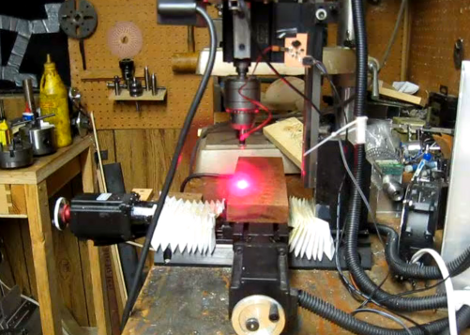
[Smells of Bikes] wanted to add laser etching to the list of tricks his home CNC setup is capable of. He has a diode which will work for the task, but he needed a driver that could be interfaced with the CNC system. He ended up designing a driver board based around the LM3402 chip.

Now driving one of these laser diodes isn’t all that different from driving a Light Emitting Diode. He chose to use the LM3402 chip because he’s the TI engineer who designed the official evaluation board for the part. It’s meant for high-power LED applications, and the 700 mA he needs for the laser is within spec. Since he’s soldering by hand, and this part has a ground pad on the bottom, he shares his soldering technique in detail. Once the driver board is ready, he uses a ‘sed’ command to replace the g-code Z axis commands with digital on/off commands to switch the diode.

Check out the demo video after the break. He uses a diffuse beam since the cutting beam is bright enough to damage his camera.

Continue reading “Laser Diode Controller For A CNC Mill”

N64 Controller Mod Means Playing Games Akimbo

Star Wars Episode 1 Racer for the Nintendo 64 has a rather interesting feature: by entering the code RRDUAL on the cheats menu, it’s possible to plug two controllers into the console and control each engine independently. This gives the game an awesome arcade feel, but dual-wielding N64 controllers is a bit of a burden. [Clarky] thought it would be a good idea to combine two controllers into one, and the Star Wars Racer controller is the result.

Like most console mods, the build began by tearing apart two N64 controllers and gluing them together. With a ton of bondo, sanding, and fiberglass, [Clarky] had a mutated N64 controller perfect for the Episode 1 game.

[Clarky] will be updating the build with a built-in rumble pak, but for now he’s doing his best to learn how to fly a pod racer with both hands. You can check out the demo of his build after the break where he plays the Star Wars game as well as a round of Goldeneye using his akimbo controller.

Continue reading “N64 Controller Mod Means Playing Games Akimbo”

MSP430 Gaming Shield Based On The Gameduino

Get your 8-bit gaming fix with this gaming shield for the TI Launchpad. It’s called the Launchpad GamingPack and was developed as part of TI’s 2012 Intern Design Contest. The team had just six weeks to complete the project.

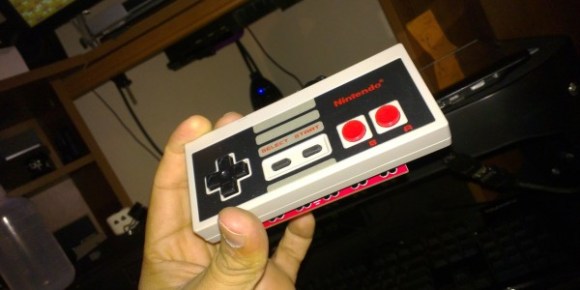
The video after the break starts off with some fast-motion PCB layout. It is followed by footage of the board being populated, then anchored with graphics testing and some game play demonstrations. It looks like a real blast! NES controller ports were included on the board, and the device puts out 400×300 VGA, as well as audio.

As with the Gameduino, the hard work is done by the FPGA at the center of this board. It handles all of the VGA timing work, using what looks like 3-bit color. It is also responsible for generating the audio and monitoring the inputs. Since the team was under a time crunch the shield also includes a 10-pin header on the underside which was added for easy connection with a logic analyzer.

Continue reading “MSP430 Gaming Shield Based On The Gameduino”

A Wireless MAME Coffee Table Controller

MAME coffee table plan

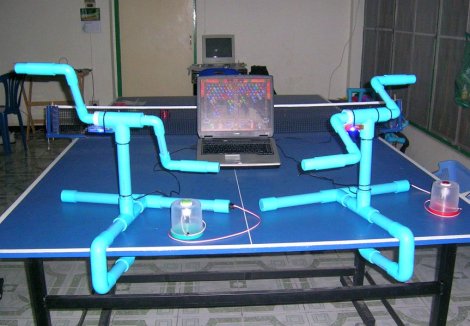
Although we’ve featured quite a few MAME controllers here, we thought we’d feature one more. It’s only a well-drawn mechanical plan at this point, but if the results are anything like the model or detail drawing, we will be quite impressed.

One thing that is of particular interest is the planned parts list. Amongst them are the typical joysticks, buttons, and even a trackball. What may be new to some of our readers is the bluetooth arcade controller by [Wayne and Layne] opensource hardware kits. Although they aren’t cheap at just under $80, and requre an Arduino Mega for use, this is nonetheless an interesting control option. The maximum button presses may be another limiting factor at 6, but it should be a cleaner solution than cannibalizing one or more wireless controllers.

Of course, we’d be negligent if we didn’t at least give you a link to a completed MAME controller. Be sure to feast your eyes on these images if you’d like some finished controller eye candy or check out the pic after the break!

Continue reading “A Wireless MAME Coffee Table Controller”

Building A Custom Interface For Surplus HF Radios

[PRC148] picked up a Motorola Micom radio from eBay. These are US State Department surplus, but apparently the 125 Watt HF units are top-of-the-line at a tenth of the sticker price. The one hangup is that they’re headless; you can’t control them without additional hardware. But the Internets are often kind to the hobbyists, and this is no exception. You can get software to run the radio from a PC thanks to the Micom Yahoo Group. [PRC148] took that software as an example and built his own stand-alone interface. [Cached version of the page]

The head unit is an Arduino driving a four-line LCD display and a rather large array of buttons. The forum thread linked above shows his humble beginnings on a breadboard. During the project [PRC148] learned a lot of skills to end up with what you see above. Hiding behind the reused bezel is a PCB he designed in Eagle CAD and etched himself. It allowed him to cram the tactile switches close enough to work with the button overlay on this keypad.

UPDATE: The traffic from this feature took down the forum hosting the content. They requested that we do not link to them because of this. A cached version without images can be found above thanks to [Termm].