Putting A Little More Juice In Your Emulation Station

After you’ve built a snazzy Raspberry Pi-powered retro gaming console, you might be wondering if you could have just a wee bit more power and run some of those other games you might remember, such as Xbox, Wii, or PS3. Perhaps in the future, a later revision of an RPi could handle it but currently, to emulate the 6th/7th generation of consoles, you need something a little beefier. Luckily, [Zac] got his hands on an old gaming laptop and turned it into his own game console.

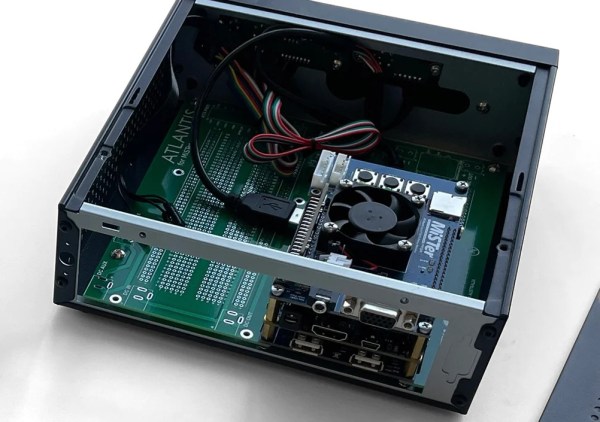
The first step was to take the laptop apart and discard the parts not needed. [Zac] stripped away the battery, Bluray drive, and spinning hard disk. That left him with a much smaller PCB that could fit into a small case. The power button was integrated into the keyboard but came into the motherboard by the flat cable keyboard connection. So by bridging a few pins, he could power up the laptop. Next, he upgraded the RAM, wifi card, an NVMe drive, and redid all the thermal paste and putty to try and keep things cool while overclocking the GPU.

The case for the machine heavily used his CNC as it was walnut with a mid-section made of plywood. The top has a gorgeous cast acrylic window to see inside. The part the [Zac] was dreading with the fine pitch soldering. Ultimately he got both wires connected with good connections and no bridging. Because it’s just a PC at its heart, almost every game is on the table. Emulation, some more moderate PC games, streaming from his office PC, and cloud gaming services allow him to access most games made. We love the concept and the idea.

We love the aesthetic of the build but if you prefer to keep your consoles looking a little more faithful, why not put your mini PC inside of an actual N64 case? Video after the break.

Continue reading “Putting A Little More Juice In Your Emulation Station”

English Words In French Gaming? Non Merci!

Are you a gamer? If you’re French, it seems that you shouldn’t be using so much English in pursuit of your goals.

It’s a feature of an active language, that it will readily assimilate words from others. Pizza, karaoke, vuvuzela, parka, gateau, schadenfreude, they have all played their part in bringing a little je ne sais quoi into our everyday speech. This happens as a natural process as whatever the word is describing becomes popular, and sometimes these new words cause a backlash from those who see themselves as the language’s defenders.

Often this is a fringe activity such as the British politician who made a fool of himself in a radio interview by insisting on the now-archaic Wade-Giles “Peking” rather than the vastly more common Pinyin “Beijing”, but for some tongues it’s no laughing matter. Nowhere is this more the case than in the Francophone world, in which the Academie Francaise and the French and Quebecquois governments see themselves as very much the official guardians of French. And now it seems that the French ministry of culture have turned their eyes upon gamers.

It’s nothing new for words associated with technology to fall under this scrutiny, a quarter century ago in the CD-ROM business it was de rigeur for localized discs to talk about le logicel, l’ordinateur, and telecharger instead of program, computer, and download. The talk of the industry was that Sony refused to do this for PlayStation consoles sold in Quebec during the 1990s, and thus all their sales in the province had to be under-the-counter. But there’s a sense from reading the reports that this intervention is a little clumsy; while it’s easy to say logicel we’re not so sure that jeu video de competition  or video game competition for e-sports and joueur-animateur en direct or live player-animator for streamer aren’t just too much of a mouthful for easy adoption. For the first one, we can’t help remembering that sport is also an everyday French word, so couldn’t they have come up with something less clumsy such as reseau-sports or network-sports?

Here at Hackaday more than one of us are unrepentant Francophiles, so the evolution of French words in our field is of interest to us. Habitez-vous en France ou Quebec? Donnez-nous votres idees dans les commentaires! (mais en Anglais s’il vous plait pour les Americains, excusez-nous)

Header image: Christopher Macsurak, CC BY-SA 4.0.

Gaming Mouse Becomes Digital Camera

Ever since the world decided to transition from mechanical ball mice to optical mice, we have been blessed with computer pointing devices that don’t need regular cleaning and have much better performance than their ancestors. They do this by using what is essentially a tiny digital camera to monitor changes in motion. As we’ve seen before, it is possible to convert this mechanism into an actual camera, but until now we haven’t seen something like this on a high-performance mouse designed for FPS gaming.

For this project [Ankit] is disassembling the Logitech G402, a popular gaming mouse with up to 4000 dpi. Normally this is processed internally in the mouse to translate movement into cursor motion, but this mouse conveniently has a familiar STM32 processor with an SPI interface already broken out on the PCB that could be quickly connected to in order to gather image data. [Ankit] created a custom USB vendor-specific endpoint and wrote a Linux kernel module to parse the data into a custom GUI program that can display the image captured by the mouse sensor on-screen.

It’s probably best to not attempt this project if you plan to re-use the mouse, as the custom firmware appears to render the mouse useless as an actual mouse. But as a proof-of-concept project this high-performance mouse does work fairly well as a camera, albeit with a very low resolution by modern digital camera standards. It is much improved on older mouse-camera builds we’ve seen, though, thanks to the high performance sensors in gaming mice.

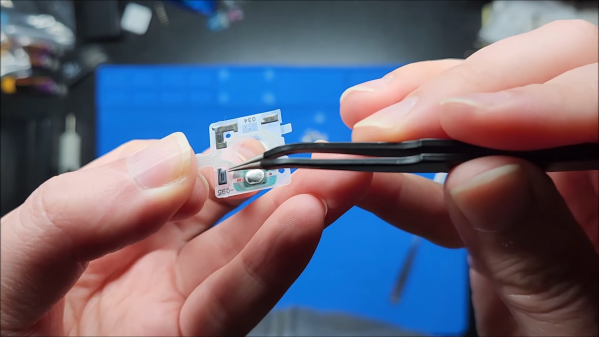
The hairclip-embedded tool being used on a Tiger 99x game console, clipped onto a spot where the plastic ribbon meets the LCD panel itself, heating it up

World’s Smallest Hair Straightener For Fixing Old LCD Ribbons

[Stephen] writes to us about an LCD repair tool he has created. We’ve all seen old devices with monochrome LCDs connected by thin film, where connections between the PCB and the LCD have deteriorated and the LCD would no longer show parts of the picture. This is a connection heating gadget, that [Stephen] affectionately dubs as World’s Smallest Hair Straightener, made specifically to bring cool old tech back to life.

A resin-printed mold houses a coil of Kanthal wire, easy to source and simple to make. He reuses a hair clip as a housing for the heating element, which also provides pressure needed to squish the film-printed conductive traces into the LCD as the adhesive melts. High-temperature epoxy brings the two together, and with a variable power supply, this tool successfully brought an old Tiger 99x handheld back to life.

This hack was made possible, in part, because of [JohnDevin Duncan] in Hackaday comment section sharing his experience on repairing LCD ribbons back in 2015, giving valuable insights on the problem that we initially thought would be solve-able with a soldering iron. The knowledge shared was distilled by [Stephen] into a tool that we all can now use when we encounter a device we really, really want to revive.

Last time we covered this topic, quite a few hackers popped up with their stories and suggestions. Old game console fix stories are a staple here on Hackaday, a few pop to mind – this high-effort trace repair of a water-damaged GameBoy cartridge, a badly designed NES cartridge socket reinvention, and this GameBoy LCD sunburn damage restoration guide.

Custom Macintosh With A Real 486

Older Apple computers can often be something of a collector’s item, with the oldest fetching an enormously high price in auctions. The ones from the late ’80s and early ’90s don’t sell for quite as much yet, but it’s possible that museums and collectors of the future will one day be clamoring for those as well. For that reason, it’s generally frowned upon to hack or modify original hardware. Luckily, this replica of an Apple Macintosh didn’t harm any original hardware yet still manages to run software on bare metal.

The computer is built around a single-board computer, but this SBC isn’t like the modern ARM machines that have become so ubiquitous. It’s a 133MHz AMD 486 which means that it can run FreeDOS and all of the classic DOS PC games of that era without emulation. In order to run Apple’s legacy operating system, however, it does require the use of the vMac emulator, but the 486 is quite capable of handling the extra layer of abstraction. The computer also sports a real SoundBlaster ISA sound card, uses a microSD card for its hard drive, and uses an 800×600 LCD screen.

As a replica, this computer is remarkably faithful to the original and even though it doesn’t ship with a Motorola 68000 it’s still fun to find retro PC gamers that are able to run their games on original hardware rather than emulation. It reminds us of another retro 486 that is capable of running old games on new hardware without an emulator as well.

Retro Gaming With Retro Joysticks

One of the biggest reasons for playing older video games on original hardware is that emulators and modern controllers can’t replicate the exact feel of how those games would have been originally experienced. This is true of old PC games as well, so if you want to use your original Sidewinder steering wheel or antique Logitech joystick, you’ll need something like [Necroware]’s GamePort adapter to get them to communicate with modern hardware.

In a time before USB was the standard, the way to connect controllers to PCs was through the GamePort, typically found on the sound card. This has long since disappeared from modern controllers, so the USB interface [Necroware] built relies on an Arduino to do the translating. Specifically, the adapter is designed as a generic adapter for several different analog joysticks, and a series of DIP switches on the adapter select the appropriate mode. Check it out in the video after the break. The adapter is also capable of automatically calibrating the joysticks, which is necessary as the passive components in the controllers often don’t behave the same way now as they did when they were new.

Plenty of us have joysticks and steering wheels from this era stored away somewhere, so if you want to experience Flight Simulator 5.0 like it would have been experienced in 1993, all it takes is an Arduino. And, if you want to run these programs on bare metal rather than in an emulator, it is actually possible to build a new Intel 486 gaming PC, which operates almost exactly like a PC from the 90s would have.

Continue reading “Retro Gaming With Retro Joysticks”

Exercise Bike Hacked As Input For Xbox 360

If you like playing Grand Theft Auto, you’re pretty familiar with squeezing the triggers for accelerating and braking while driving around. [David Programa] decided this was too easy, and instead developed a system to allow him to pedal his way around the virtual world.

The device relies on a flywheel-based exercise bike, with six magnets placed on the flywheel that triggers a reed switch six times per rotation. The extra magnets give the system better resolution at slow speeds. A Hall Effect sensor would be a more reliable way to build this to survive in the long term, but the reed switch does work. It’s paired with a debounce circuit to keep the output clean. A Raspberry Pi is pressed into service, running a Python program to read a GPIO pin activated by the reed switch, counting pulses to determine the speed of pedalling.

The trigger control used in the Xbox 360 controller is a potentiometer that creates varying voltages depending on its position, allowing it to act as an analog accelerator input. 0 volts corresponds to no input, while the trigger reads 3.3 volts when fully depressed. The Raspberry Pi emulates this with its PWM output, paired with a low-pass filter to create the relevant voltage to inject into the trigger input on a generic Xbox 360 controller.

While it’s a lot less practical than simply using a regular controller, the pedal controls do allow you to get a great workout while playing Grand Theft Auto. Some of the more intense chase missions should be a great way to get your heart rate up, and that’s got to be a good thing.

Ironically, though, the system only works for cars and motorbikes in game. The bicycles in Grand Theft Auto are controlled by mashing the A button instead. Alternatively, you might consider a similar system for playing Mario Kart on the Nintendo Switch. Video after the break.

Continue reading “Exercise Bike Hacked As Input For Xbox 360”