The Basics Of Building A Multitouch Table

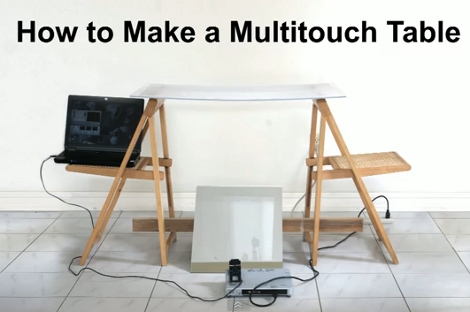
Here is a bare-bones multitouch table setup. We looked in on [Seth Sandler’s] multitouch work a few years ago when he completed the MTmini build. He’s scaling up the size a bit with the MTbiggie, and showing you how easy it is to put together. The demo rig seen above is just a couple of chairs, a sheet of acrylic, a mirror, a projector, a computer, and a diy infrared webcam.

The rig uses ambient infrared light to detect the outlines of your fingers when they touch the acrylic surface. A webcam with an exposed camera film filter feeds an image of the infrared light received below the surface to the computer. The incoming video is processed using Community Core Vision, where each individual point is isolated and mapped. Once the data is available the sky’s the limit on what you can develop. [Seth’s] demo packages include a mouse driver, some physics applications, an Angry Birds implementation, and a few others. See for yourself in the video after the break.

Continue reading “The Basics Of Building A Multitouch Table”

iphone_universal_ir_dongle

IPhone-based Universal IR Remote

If you have a reasonable home theater setup in your living room, odds are you have up to half a dozen remotes sitting around. Short of trying to get your cable receiver’s remote to control everything or laying down some cash for a Harmony remote, what’s a hacker to do?

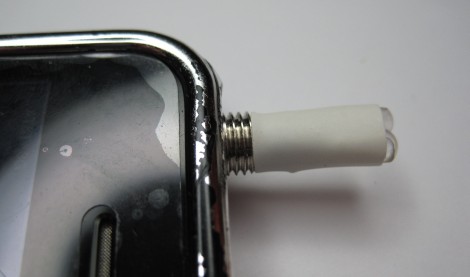
[Andrey] decided he wanted to use his iPhone as a universal IR remote, but he didn’t want to pay very much to do so. Instead of buying a dongle at the store, he soldered some IR LEDs to an old headphone plug, creating a mini IR dongle to control his equipment. After studying IR signaling a bit, he got to work encoding IR remote commands into wav files using Python. The files are then played on his iPhone, allowing him to submit certain commands to his TV set.

Unfortunately, the process of manually converting IR codes to audio files doesn’t quite seem like the most efficient way of doing things. There are other IR dongles currently on the market that utilize the headphone jack, most of which provide pretty robust software for free. These might make a good alternative to manually creating audio files for each IR command. We honestly haven’t seen any teardowns of these retail IR dongles posted online, but it would be interesting to see how they compare to what [Andrey] has put together.

Fingertip Heart Rate Monitor

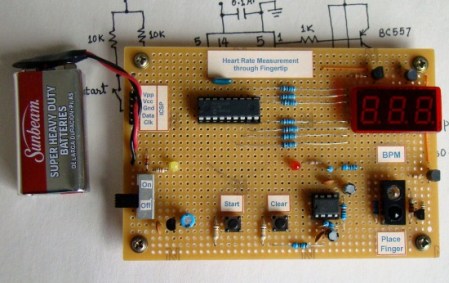
[Embedded lab] has a nice tutorial on building your own heart rate monitor. The monitor works by shining infrared light into the fingertip and looking at the changes in the reflected infrared signal caused by a heartbeat.  The IR detector produces a very small AC signal so a couple of op-amps are used to filter and amplify the signal. The output of the filter circuit is then read in by a PIC16F628A, which counts the beats and displays it on a seven segment display.  This might be a good project to try if you’ve got your microcontrollers down and you are looking to learn some analog electronics. Its noted at the end that the two main problems with building a circuit like this are going to be cross talk and adjusting the filters. The infrared diode and receiver should be close to each other to allow maximum reflection but you also need to make sure that you don’t allow the emitter to shine directly into the detector because the reflected light will be drowned out by the bright emitter.

[via make]

38 KHz IR Communications Tutorial

Learning about how infrared remote controls work is a great way to expand your electronics knowledge. That’s because this technology is invisible to our eye, and happening faster than we can comprehend without help from test equipment. This tutorial over at Pyroelectro talks about the theory behind how the data is transferred and shows you how to build a couple of circuits to experiment with and communicate through infrared light transmissions.

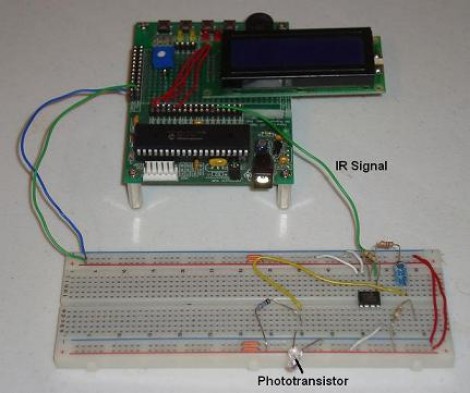
Instead of going with an IR receiver module you’ll build your own using a photo-transistor and an operational amplifier. The Opamp is used to amplify and invert the signal picked up from the IR transmission of a common home entertainment remote control. From there the digital signal is read by a PIC 18F452 microcontroller for processing. But if you want to use a different microcontroller there’s still more than enough usable information to get you across the finish line.

Long-range Laser Night-vision

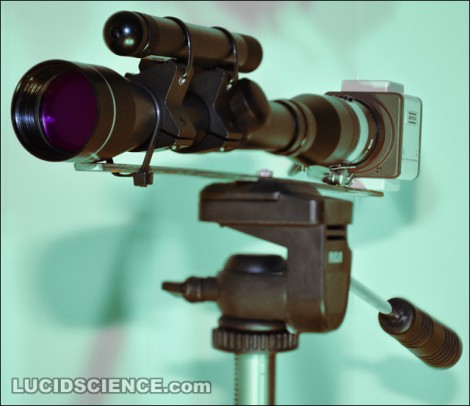
[Oneironaut] is back at it again, churning out yet another great hack in this long-distance night vision build. This isn’t the first time we’ve seen him build a night vision device, you may remember the monocle he put together using the view finder from an old camcorder. This time around he’ll give you look at distant object by using a laser instead of LEDs. He pulled an IR laser diode out of an old CD burner, then used a lens to spread out the dot in order to illuminate a larger area. A standard rifle scope is used as the optics, along with a security camera which can detect the infrared light. As always, he’s done a fantastic job with the images and the write-up. You’ll find his overview video embedded after the break.

Continue reading “Long-range Laser Night-vision”

Video Game Installations For Kids’ Parties

Why won’t someone think of the children?! Actually, some of the best hacks come from entertaining the little ones. Take [Piles of Spam’s] two video game builds. The first is a telescope-based controller that is used to shoot virtual cannon balls at a projection of a pirate ship. The second is a two-player cooperative game where one player drives and the other shoots. Both of them use a projector to display the playing field, an IR laser for targeting, and an NTSC camera to pick up the location of the laser dot. This works really well, thanks to the quality of the physical builds, and great audio and video on the game side of things. See for yourself in the clips after the break.

A couple of posts into the thread [Piles of Spam] talks about laser intensity. He wanted to make sure that there wouldn’t be a room full of half-blind five year olds thanks to the targeting system. Continue reading “Video Game Installations For Kids’ Parties”

BendDesk Multi-touch Furniture

The BendDesk is a horizontal and a vertical multi-touch display connected as one curved surface. Think of it as a smart white-board and a multi-touch desk all in one. It can be used to sort and edit information, or to play games. Check out “Bend Invaders”, a game demonstrated in the video after the break. When you touch two fingers to the display the two points are used to aim a laser at the oncoming monsters.

The system uses a combination of two projectors shining on the surface from underneath and behind. A series of LEDs around the edges of the display bathe it in infrared light. Three cameras with IR filters peer at the underside of the acrylic surface and detect touches by distinguishing variances in the IR pattern through a process called Frustrated Total Internal Reflection. If you’re interested in more of the math and science involved there are a couple of papers available from the project site linked at the top of this post.

We’ve seen so many displays using the Kinect lately, it’s refreshing to see one that doesn’t.

Continue reading “BendDesk Multi-touch Furniture”