Visualizing LEDs For More Efficient Pin Packing

The archetypal “blink an LED” is a great starter project on any platform, but once the bug takes hold that quickly turns into an exploration of exactly how many LEDs a given microcontroller can drive. And that often leads to Charlieplexing. A quick search yields many copies of The Table describing how many LEDs can be driven by a given number of pins but that’s just the most rudimentary way to describe it. Way back in 2013 [M Rule] developed a clever trick to describe the number of LED matrices which can be driven by a Charlieplexed array of a given size that makes this process much more intuitive. The post may be old, but we promise the method is still fresh.

[M Rule] was specifically looking to drive those big, cheap single color LED matrices which are often used to make scrolling signs and the like. These parts are typically a matrix of LEDs with a row of common cathodes and one of common anodes. Internally they are completely dumb and can be driven by row/column scanning, or any other way a typical matrix can be controlled. The question is, given known matrix sizes, how many can be driven with a a number of Charlieplexed LED drive pins?

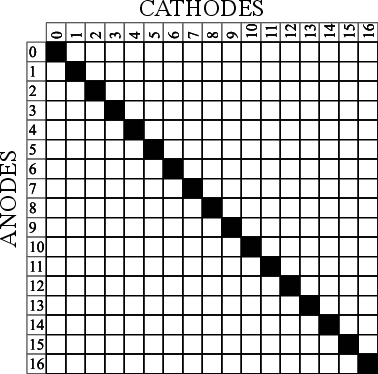
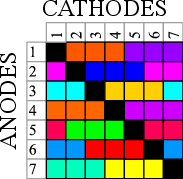
The first step is to visualize the 1D array of available pins as a 2D matrix, as seen to the right. Note each numbered pin is the same on the X and Y, thus the black exclusion zone of illegal drive pin combinations slicing across the graph (you can’t drive an LED connected to one pin twice). The trick, if one were to say it resides in a single place, would be titling the axis anode and cathode, representing two “orientations” the drive pins can be put in. With this diagram [M Rule] observed you can simply drop a matrix into the array. If it fits outside the exclusion zone, it can be driven by those pins!

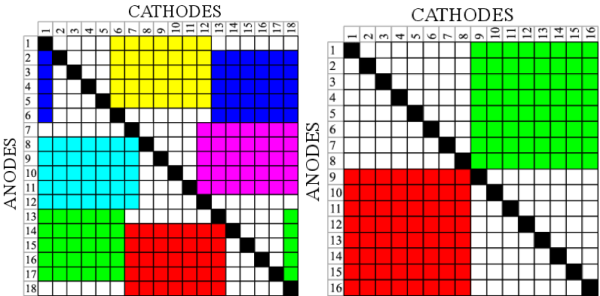
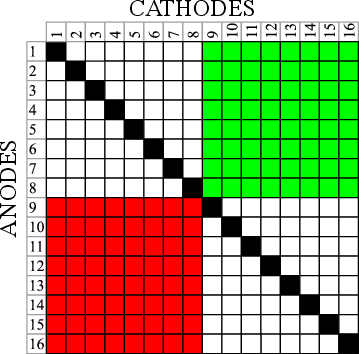
To the left is what this looks like with two 8×8 matrices, one connected between pins 1-8 and 9-16, the other connected between 9-16 and 1-8. This isn’t terribly interesting, but the technique works just as well with single LEDs and any size matrix, including 7-segment displays. Plus as long as an element doesn’t overlap itself it can wrap around the edges leading to some wild visuals, like 14 RGB LEDs on seven pins to the right.

The most extreme examples are pretty exotic. Check out [M Rule]’s post for the crown jewel; 18 pins to drive six 5×7 modules, six 7-segment displays, 12 single LEDs, and 18 buttons!

If this color coded diagram seems familiar, you may be remembering [openmusiclabs]’ excellent diagram describing ways to scan many of buttons. Or our coverage of another trick of matrix topology by [M Rule] from a few weeks ago.

LEDSpicer Is An Open Source Light Controller For Your Arcade Machine

In this day and age of cheap and easy emulation, it’s more tempting than ever to undertake a home arcade cabinet build. If you want to show off, it’s got to have a light show to really pull the crowds in. To make that easier, [Patricio] put together a software package by the name of LEDSpicer.

The project came about when [Patricio] was working on his Linux-based MAME cabinet, and realised there were limited software options to control his Ultimarc LED board. As the existing solutions lacked features, it was time to get coding.

LEDSpicer runs on Linux only, and requires compilation, but that’s not a huge hurdle for the average MAME fanatic. It comes with a wide variety of animations, as well as tools for creating attract modes and managing LEDs during gameplay. There are even audio-reactive modes available for your gaming pleasure. It’s open source too, so it’s easy to tinker with if there’s something you’d like to add yourself.

It’s a great package that should help many arcade builders out there. LEDs can be used to great effect on a cabinet build; this marquee is a particularly good example. Video after the break.

[Thanks to Guillermo for the tip!]

Continue reading “LEDSpicer Is An Open Source Light Controller For Your Arcade Machine”

Simple Trick For LEDs On Solderless Breadboards

Sometimes the most useful hacks are also the simplest ones. A case in point is the LED and resistor assembly that [Skippy] recently posted on his blog. The idea is to solder up some pre-made indicators with integrated resistors to save space on the breadboard when prototyping — instead of four slots, you only use two per LED. This is about as easy a trick as you can imagine, but it has the hallmark of a classic hack: a high utility-to-work ratio.

The deluxe assembly uses a two-pin header as a base to plug into the breadboard. This, of course, could be optional since some breadboards have a memory for the widest pin previously inserted — using header pins may eventually make the slots a little flaky for smaller component leads. But, if you’re mostly using header pins in the breadboard anyway, this is a good way to avoid kinking the leads.

While there are LEDs available with integrated dropping resistors, building your own means you can use whatever LEDs you prefer — or simply have on hand — and adjust the resistor value for different voltages or to adjust the brightness. And for those of you who plug in LEDs without current-limiting resistors, we’re going to assume that you’ve thoroughly researched whatever is driving them and done the math to ensure they’re safe. Or not: they’re your LEDs after all.

We previously featured a no-solder breadboarding trick for SMD LEDs. What’s your favorite solderless breadboard hack? Let us know in the comments below.

Thanks to [Roboteernat] for the tip!

Teardown The Things You Love

This two-decade old blinkenlights project (YouTube link, and also below the break) would look at home among current $1 soldering kits except for a few key differences. Firstly, it has the teardown artist’s name on the back and comes from an era when DIY circuit boards really meant doing things yourself including the artwork, etching, and drilling. The battery holders are our favorite feature. Instead of being a part on a BOM, this board has some wire loops soldered in place and relies on a pair of venerable LR44 alkaline cells instead of the CR2032s we all enjoy today.

Given the age of the project, [Big Clive] is not revisiting his old masterpiece just for nostalgia, he is having to retrace his old circuit and do a teardown on his own work because the schematic was lost to time. We think there is value to revisiting old work like an archaeologist would approach an ancient necklace. Some of us used to comment our code religiously for fear that we would forget what went through our learning minds and need to be reminded of that rigor.

If you want another battery holder that doesn’t need a part number, check out one that leverages the semi-flexible nature of thin PCBs or fake the batteries altogether. Continue reading “Teardown The Things You Love”

Animated Pixel Lamp Is A Must For Any Chiptuner’s Bedroom

Lamps are quite often simple things, designed to light an area and perhaps add a touch of style to a room. Of course, it’s 2019 now, and we don’t need to settle for just that. We can have wildly colored animated lamps if we want to! (French Youtube link, embedded below.)

The lamp in question is the work of [Heliox], who knows her way around an LED or two (hundred). In this build, a string of WS2812 addressable RGB LEDs are hooked up to an Arduino Mega brain. The LEDs are fitted into a round lamp body, with a rectangular diffuser for each one. This creates an attractive pixellated effect and gives the animations a charming 8-bit quality. A thin outer shell is 3D printed in white plastic to further diffuse the light. The top of the lamp rotates an internal potentiometer to control mode selection. There’s also a brightness knob on the bottom if things get a touch too intense.

It’s a tidy build that uses 3D printing and addressable LEDs to quickly and easily create a lamp with a fun retro aesthetic. We could imagine this making a great piece for a hip sitcom apartment. We fully expect to see similar lamps on sale in the next couple of years. Video after the break.

Continue reading “Animated Pixel Lamp Is A Must For Any Chiptuner’s Bedroom”

Simulated Newton’s Cradle Makes A Flashy Desk Toy

Newton’s Cradle was once upon a time, a popular desk toy in offices around the world. For [TecnoProfesor], however, it wasn’t quite flashy enough. Instead, they built a simulated version with flashing LEDs. As you do.

Rather than relying on the basic principles of the cradle to make it work, this relies on two servo motors to move the balls on the ends, with the ones in the middle remaining stationary. Each ball is fitted with an RGB LED, which flashes with the simulated “motion” of the cradle. By using ping pong balls, the light from the LEDs is nicely diffused. The frame is built from wooden dowels, metal rods, and acrylic.

It’s a project that is sure to confuse at first glance, but it’s a great way to learn basic microcontroller skills like interfacing with LEDs and servomotors. We’d love to see a version that works like a real Newton’s Cradle, flashing the LEDs as they are hit by their neighbours. We’ve even seen them automated, for the truly lazy among us.  Alternatively, one could go completely ridiculous and have such a device tweet on every hit, though you might run afoul of the API’s spam restrictions. If you give it a go, drop us a line.

Make Your Own Old School LED Displays

We live in an era in which all manner of displays are cheap and readily available. A few dollars spent online can net you a two-line alphanumeric LCD, a graphical OLED screen, or all manner of other options. Years ago however, people made do with little monolithic LED devices. [sjm4306] wanted to recreate something similar, and got down to work (Youtube link, embedded below).

The resulting device uses 0603 sized SMD LEDs, soldered onto a tiny PCB. 20 LEDs are used per digit, which can display numbers 0-9 and letters A-F. The LEDs are laid out in a pattern similar to Hewlett-Packard designs from years past. This layout gives the numerals a more pleasant appearance compared to a more-classic 7-segment design. Several tricks are used to make the devices as compact as possible, such as putting vias in the LED pads. This is normally a poor design technique, but it helps save valuable space.

[sjm4306] has developed a breadboard model, and a more advanced version that has a pad on the rear to mount a PIC16F88 microcontroller directly. We look forward to seeing these modules developed further, and can imagine they’d prove useful in a variety of projects.

For reference, check out these Soviet-era 7-segment displays. Video after the break.

Continue reading “Make Your Own Old School LED Displays”