A $5 Graphics Card For Homebrew Computers

While not very popular, building a homebrew computer can be a fun and rewarding process. Most of the time, though, the video capabilities of these computers is as bare bones as it can get – running headless, connected to a terminal. While this is an accurate reproduction of the homebrew computers of the 1970s and 80s, there’s a lot to be said about a DIY computer with an HDMI-out port.

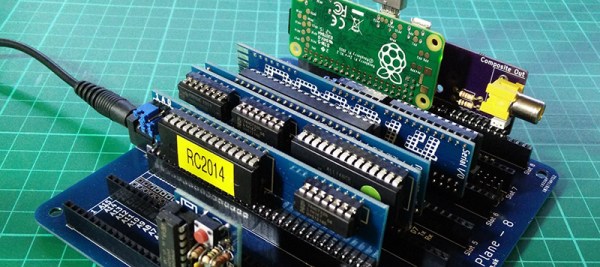
[spencer] built a Z-80-based homebrew computer a few years ago, and while connecting it to a terminal was sufficient, it was a build that could use a little more pizzazz. How did he manage to stuff a terminal in a tiny project box? With everyone’s favorite five dollar computer, the Raspberry Pi Zero.

The computer [spencer] built already had serial inputs, outputs, power, and ground rails – basically, a serial port. The Raspberry Pi also has TX and RX pins available on the 40-pin header, and with a stupidly simple board that [spencer] whipped up in KiCad, he could plug a Pi into the backplane of his homebrew computer. A few setup scripts, and a few seconds after turning this computer on [spencer] could mash a keyboard and wail away on some old school BASIC.

This isn’t a use case that is the sole domain of the Pi Zero. A Parallax Propeller chip makes for a great video terminal with inputs for PS/2 keyboards and mice. A largish AVR, with the requisite NTSC video library, also makes for a great video interface for a homebrew computer. The Pi Zero is only five dollars, though.


Raspberry_Pi_LogoSmall

The Raspberry Pi Zero contest is presented by Hackaday and Adafruit. Prizes include Raspberry Pi Zeros from Adafruit and gift cards to The Hackaday Store!
See All the Entries

A Pi Powered Recording Studio

In the mid-90s, you recorded your band’s demo on a Tascam cassette tape deck. These surprisingly cheap four-track portable studios were just low tech enough to lend an air of authenticity to a band that calls itself, ‘something like Pearl Jam, but with a piano’. These tape decks disappeared a decade later, just like your dreams of being a rock star, replaced with portable digital recording studios.

The Raspberry Pi exists, the Linux audio stack is in much better shape than it was ten years ago, and now it’s possible to build your own standalone recording studio. That’s exactly what [Daniel] is doing for our Raspberry Pi Zero contest, and somewhat predictably he’s calling it the piStudio.

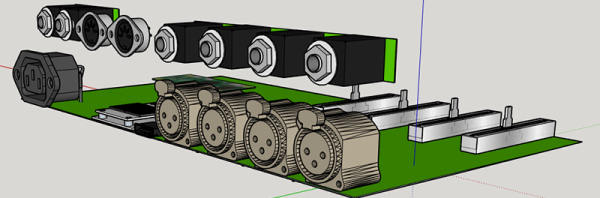
Although the technology has moved from cassette tapes to CompactFlash cards to hard drives, the design of these four-track mini recording studios hasn’t really changed since their introduction in the 1980s. There are four channels, each with a fader, balance, EQ, and a line in and XLR jack. There are master controls, a few VU meters, and if the technology is digital, a pair of MIDI jacks. Since [Daniel] is using a Raspberry Pi for this project, he threw in an LCD for a great user interface.

As with all digital recorders, the money is in the analog to digital converters. [Daniel] is using a 24-bit, 216kHz, four-channel chip, Texas Instruments’ PCM4204. That’s more than enough to confuse the ears of an audiophile, although that much data will require a hard drive. Good thing there will be SATA.

Although you can buy an eight-channel solid state recorder for a few hundred dollars – and [Daniel] will assuredly put more than that into this project, it’s a great application of a ubiquitous Linux computer for a device that’s very, very useful.


Raspberry_Pi_LogoSmall

The Raspberry Pi Zero contest is presented by Hackaday and Adafruit. Prizes include Raspberry Pi Zeros from Adafruit and gift cards to The Hackaday Store!
See All the Entries || Enter Your Project Now!
One Man’s Quest To Spend Less TIme In The Basement

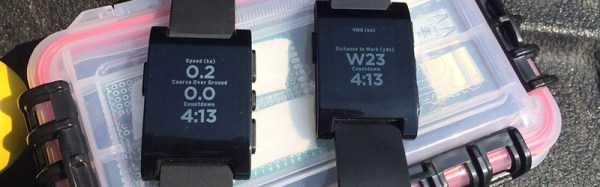
[Lars] has a second floor apartment, and the washing machines and clothes dryers are in the basement. This means [Lars] has spent too much time walking down to the basement to collect his laundry, only to find out there is 15 minutes left in on the cycle. There are a few solutions to this: leave your load in the washer like an inconsiderate animal, buy a new, fancy washer and dryer with proprietary Internet of Things™ software, or hack together a washer and dryer monitoring solution. We all know what option [Lars] chose.

Connecting a Pi to the Internet and serving up a few bits of data is a solved problem. The hard part is deciding which bits to serve. Washers and dryers all have a few things in common: they both use power, they both move and shake, they make noise, and their interfaces change during the wash cycle. [Lars] wanted a device that could be used with washers and dryers, and could be used with other machines in the future. He first experimented with a microphone, capturing the low rumble of a washer sloshing about and a dryer tumbling a load of laundry. It turns out an accelerometer works just as well, and with a sensor securely fastened to a washer or dryer, [Lars] can get a pretty good idea if it’s running or not.

With a reliable way to tell if a washer or dryer is still running, [Lars] only had to put this information on his smartphone. He ended up using PushBullet, and quickly had an app on his phone that told him if his laundry was done.


Raspberry_Pi_LogoSmall

The Raspberry Pi Zero contest is presented by Hackaday and Adafruit. Prizes include Raspberry Pi Zeros from Adafruit and gift cards to The Hackaday Store!
See All the Entries || Enter Your Project Now!

Hack A PS/2 Keyboard Onto Your Pi Zero

Hacking for the Raspberry Pi Zero is a tricky proposition. Whatever you do, you’re working with a nominal five dollar board, so your hacks can’t be too highfalutin. For instance, a decent PS/2 to USB adapter will cost you as much as the Zero did, if not more. But if you just need to drive your Pi Zero from your old Model M (we hear you!) you’ve got to do it on the cheap.

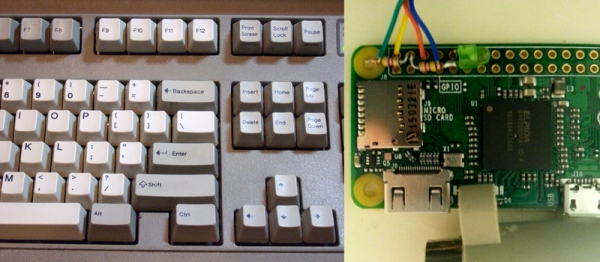
So when prolific Pi hacker [mincepi] set out to build a PS/2 adapter, some corners were cut. PS/2 is a clocked data protocol, but the good news is that the clock doesn’t start and stop all the time as in I2C or SPI. This means that if you poll the data line at just the right frequency, at least in principle you’ll be able to ignore the clock.

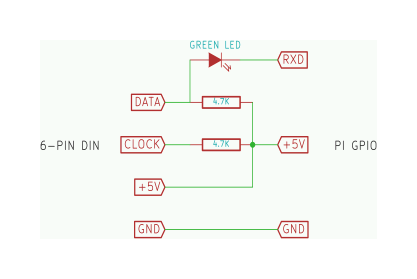
ps2-schematic_border

So that’s what [mincepi] did. As you can see in the schematic and the banner image, there’s nothing to it. Two resistors provide the pullup voltage for the clock and data lines. And here’s a gem: a green LED with a drop voltage of about 2 V converts the 5 V data line down to something that the Pi Zero’s 3.3 V won’t get fried with. Cute, and very much in keeping with the spirit of the hack. You might be tempted to scrounge up a 3.3 V zener diode from somewhere just to be on the safe side, but remember, it’s a five dollar computer you’re protecting.

The last piece is a custom kernel module for the Pi that polls the PS/2 data line at just the right frequency. If you’re not a Linux person and “compiling a kernel module” sounds scary, [mincepi] has even put together a nice guide for the Raspbian distribution that he’s using. It should work with minor tweaks for any other distro.

We said [mincepi] is a prolific Pi hacker and here’s the proof: we’ve covered his quick-and-dirty VGA output hack and a scheme to get analog sound input into the Pi Zero just in the last couple of weeks. Hack on!

Raspberry Pi Zero Round 1 Winners!

The Raspberry Pi Zero Contest presented by Adafruit and Hackaday has been going incredibly well! We currently have 132 projects entered, and there is still time for YOU to get in on the fun! The only problem entrants have had is getting their hands on these amazing $5 computers. We’ve made that easy by giving away ten Raspberry Pi Zero boards. The following projects were well documented, well thought out projects were selected by the judges. We’ve already informed the winners through Hackaday.io, and will be shipping out the Pi Zero boards to them right away.

Please join the judges and the entire Hackaday staff in congratulating the winners of the Pi Zero boards!

If you didn’t win, all is not lost! There is still time to enter the contest. The deadline is 11:59 pm PST on March 13, 2016. You’ll be in the running for one of three $100 gift certificates to The Hackaday Store!

Giving The Pi Zero USB, Ethernet, And Serial Over USB

Just as the USB port on your phone can serve as a serial connection, mass storage device, and a network connection, the Pi Zero can do the same. We’ve seen a few people turn the Zero into a single USB gadget, but what about turning the Zero into a USB HID device, network connection, and serial port all at the same time? That’s what [Tobias] did, and his method is even easier than the old one.

The old method of turning the Pi Zero into a USB device required the user to modify and recompile the kernel. Obviously, this isn’t an ideal solution. [Tobias]’ implementation fixes this by putting everything into userland. Everything is configurable through a script and a few tweaks to how the Pi starts up.

The result is a Raspberry Pi Zero that will appear as any USB peripheral. [Tobias] goes through the usual examples: setting the Pi up as a serial device for hacking and code cracking in a terminal, as an Ethernet device to give the Pi Zero networking capabilities, as a keyboard to send keypresses to another computer, and as a mass storage device so that other computers can read a small portion of the Pi’s SD card.

There are plenty more USB gadgets the Pi can emulate, from printers to audio devices to MIDI adapters to webcams. If you can wrap your head around what a Pi Zero could do when configured as one of these devices, drop a note in the comments.