Ello Is A Tiny Computer With A C — Interpreter?

When we talk about a retrocomputer, it’s our normal practice to start with the hardware. But with [KnivD]’s ELLO 1A while the hardware is interesting enough it’s not the stand-out feature. We are all used to microcomputers with a BASIC interpreter, but how many have we seen with a C interpreter? The way C works simply doesn’t lend itself to anything but a compiler and linker, so even with a pared-down version of the language it still represents a significant feat to create a working interpreter.

The hardware centres around a PIC32MX, and has onboard SD card, VGA, sound, and a PS/2 keyboard port. The PCB is a clever design allowing construction with either through-hole or surface-mount components to allow maximum accessibility for less advanced solderers. Full information can be found on the project’s website, but sadly for those wanting an easy life only the PCB is as yet available for purchase.

We’re privileged to see a huge array of retrocomputing projects here at Hackaday, but while they’re all impressive pieces of work it’s rare for one to produce something truly unexpected. This C interpreter certainly isn’t something we’ve seen before, so we’re intrigued to see what projects develop around it.

An Arduino With A Floppy Drive

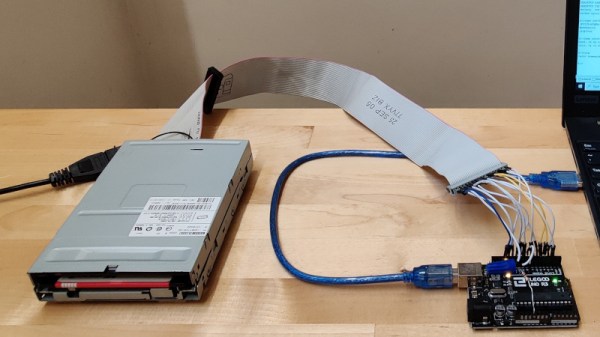
For many of us the passing of the floppy disk is unlamented, but there remains a corps of experimenters for whom the classic removable storage format still holds some fascination. The interface for a floppy drive might have required some complexity back in the days of 8-bit microcomputers, but even for today’s less accomplished microcontrollers it’s a surprisingly straightforward hardware prospect. [David Hansel] shows us this in style, with a floppy interface, software library, and even a rudimentary DOS, for the humble Arduino Uno.

The library provides functions to allow low level work with floppy disks, to read them sector by sector. In addition it incorporates the FatFS library for MS-DOS FAT file-level access, and finally the ArduDOS environment which allows browsing of files on a floppy. The pictures show a 3.5″ drive, but it also supports 5.25″ units and both DD and HD drives. We can see that it will be extremely useful to anyone working with retrocomputer software who is trying to retrieve old disks, and we look forward to seeing it incorporated in some retrocomputer projects.

Of course, Arduino owners needn’t have all the fun when it comes to floppy disks, the Raspberry Pi gets a look-in too.

4-bit Retrocomputer Emulator Gets Custom PCB

It might be fair to suspect that most people who are considered digital natives have very little to no clue about what is actually going on inside their smartphones, tablets, and computers. To be fair, it is not easy to understand how modern CPUs work but this was different at the beginning of the 80s when personal computers just started to become popular. People who grew up back then might have a much better understanding of computer basics thanks to computer education systems. The Busch 2090 Microtronic Computer System released in 1981 in Germany was one of these devices teaching people the basics of programming and machine language. It was also [Michael Wessel]’s first computer and even though he is still in proud possession of the original he just recently recreated it using an Arduino.

The original Microtronic was sold under the catchy slogan “Hobby of the future which has already begun!” Of course, the specs of the 4-bit, 500 kHz TMS 1600 inside the Microtronic seem laughable compared to modern microcontrollers, but it did run a virtual environment that taught more than the native assembly. He points out though that the instruction manual was exceptionally well written and is still highly effective in teaching students the basics of computer programming.

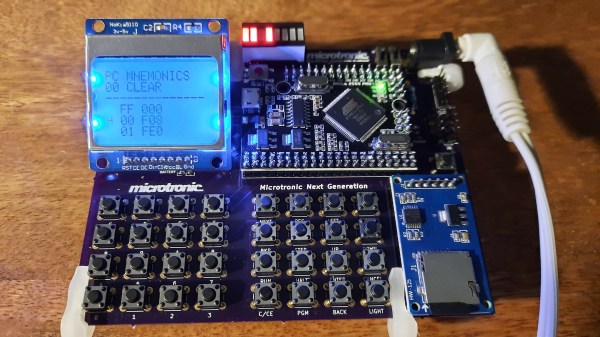
Already, a couple of years back he wrote an Arduino-based Microtronic emulator. In his new project, he got around to extending the functionality and creating a custom PCB for the device. The whole thing is based on ATMega 2560 Pro Mini including an SD card module for file storage, an LCD display, and a whole bunch of pushbuttons. He also added an RTC module and a speaker to recreate some of the original functions like programming a digital clock or composing melodies. The device can also serve as an emulator of the cassette interface of the original Microtronic that allowed to save programs with a whopping data rate of 14 baud.

He has certainly done a great job of preserving this beautiful piece of retro-tech for the future. Instead of an Arduino, retro computers can also be emulated on an FPGA or just take the original hardware and extend it with a Raspberry Pi.

Surfing The Web With 7400 Logic

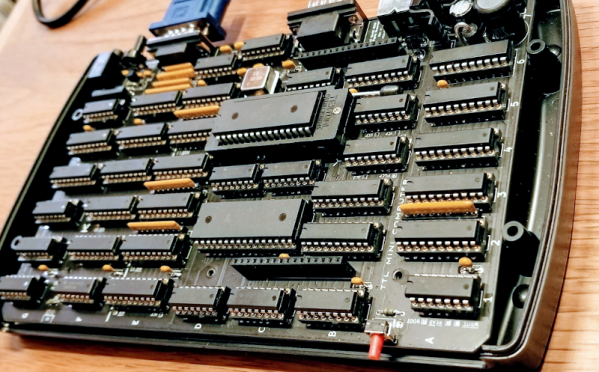
We see more computers built from logic gates than you might expect. However, most of them are really more demonstration computers and can’t do much of what you’d consider essential today. No so with [Alastair Hewitt’s] Novasaur. Although built using 34 TLL chips (and a few memory and analog chips, too, along with one PAL), it boasts some impressive features:

  • Dual Processor CPU/GPU (Harvard Architecture).
  • 33 MHz dot clock, 16.5 MHz data path, 8.25 MHz per processor (~3.5 CPU MIPs)
  • 256k ROM: 96k ALU, 64k native program, 64k cold storage, 32k fonts.
  • 128/512k RAM: 1-7 banks of 64k user, 60k display, 4k system.
  • 76 ALU functions including multiply/divide, system, and math functions.
  • Bitmapped Graphics: Hi-res mode up to 416×240 with 8 colors and 4 dithering patterns. Lo-res mode up to 208×160 with 256 colors, double-buffered.
  • Text Mode: 8 colors FG/BG, 256 line buffer, up to 104×60 using 8×8 glyphs, 80×36, and 64×48 rows using  8×16 glyphs.
  • Audio: 4 voice wavetable synthesis, ADSR, 8-bit DAC, 8Hz-4.8kHz.
  • PS2 Keyboard: Native interface built-in.
  • RS232 Serial Port: Full duplex, RTS/CTS flow control, 9600 baud.
  • Expansion Port: 7 addressable 8-bit register ports, 4 interrupt flags

Continue reading “Surfing The Web With 7400 Logic”

A CPU-Less Computer With A Single NOR-Gate ALU

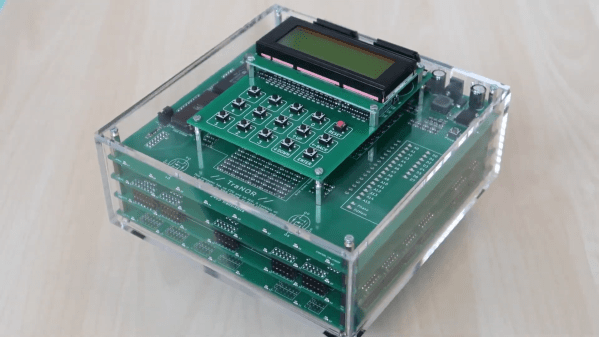
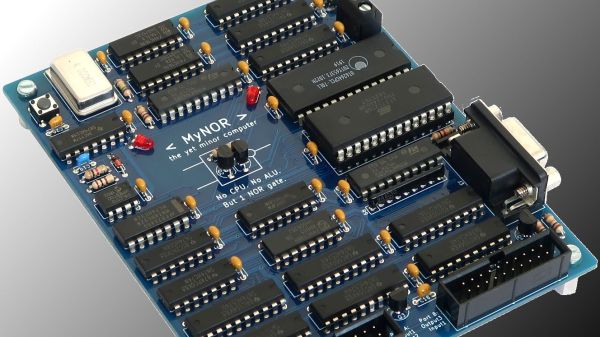
We see a lot of discrete-logic computer builds these days, and we love them all. But after a while, they kind of all blend in with each other. So what’s the discrete logic aficionado to do if they want to stand out from the pack? Perhaps this CPU-less computer with a single NOR-gate instead of an arithmetic-logic unit is enough of a hacker flex? We certainly think so.

We must admit that when we first saw [Dennis Kuschel]’s “MyNor” we thought all the logic would be emulated by discrete NOR gates, which of course can be wired up in various combinations to produce every other logic gate. And while that would be really cool, [Dennis] chose another path. Sitting in the middle of the very nicely designed PCB is a small outcropping, a pair of discrete transistors and a single resistor. These form the NOR gate that is used, along with MyNor’s microcode, to perform all the operations normally done by the ALU.

While making the MyNor very slow, this has the advantage of not needing 74-series chips that are no longer manufactured, like the 74LS181 ALU. It may be slow, but as seen in the video below, with the help of a couple of add-on cards of similar architecture, it still manages to play Minesweeper and Tetris and acts as a decent calculator.

We really like the look of this build, and we congratulate [Dennis] on pulling it off. He has open-sourced everything, so feel free to build your own. Or, check out some of the other CPU-less computers we’ve featured: there’s the Gigatron, the Dis-Integrated 6502, or the jumper-wire jungle of this 8-bit CPU-less machine.

Continue reading “A CPU-Less Computer With A Single NOR-Gate ALU”

Another Kind Of “Bare Metal”: 6502 Computer Powers RPN Calculator

[Mitsuru Yamada] states that one of the goals for this 6502 computer build was to make it strong enough to survive real-world usage. In that regard alone we’d call this a success; the die-cast aluminum enclosures used are a little blast from the past and lend a nice retro industrial look to the project. The main chassis of the computer fairly bristles with LEDs and chunky toggle switches for setting the data and address busses. The interior is no less tidy, with the 6502 microprocessor — date code from 1995 — and associated support chips neatly arranged on perf board. The construction method is wire wrapping, in keeping with the old-school look and feel. Even the hand-drawn schematic is a work of art — shades of [Forrest Mims].

As for programming, this machine is as low-level as it gets. Nothing but 6502 machine language here, entered manually with the toggle switches, or via an externally programmed ROM. The machine can only address 1k of memory, a limit which the code to support the RPN calculator add-on [Yamada] also built brushes up against, at 992 bytes. The calculator keypad has a 20-key matrix pad and an eight-digit dot-matrix LED display, and can do the four basic operations on fixed-point binary-coded decimal inputs. The brief video below shows the calculator in action.

We love the look of this build and we’re eager to see more like it. We’ve seen a ton of 6502 builds from discrete chips lately, and while we love those too, it’s nice to see one of the big old DIPs put back in action for a change.

Continue reading “Another Kind Of “Bare Metal”: 6502 Computer Powers RPN Calculator”

Retro Computer Trainer Gets A Raspberry Pi Refit

We know what you’re thinking: this is yet another one of those “Gut the retro gear for its cool old case and then fill it up with IoT junk” projects. Well, rest assured that extending and enhancing this 1970s computer trainer is very much an exercise in respecting the original design, and while there’s a Pi inside,  it doesn’t come close to spoiling the retro goodness.

Like many of a similar vintage as [Scott M. Baker], the Heathkit catalog was perhaps only leafed through marginally less than the annual Radio Shack catalog. One particularly desirable Heathkit item was the ET-3400 microcomputer learning system, which was basically a 6800-based computer surrounded by a breadboarding area for experimentation. [Scott] got a hold of one of these, but without the optional expansion accessory that would allow it to do interesting things such as running BASIC or even supporting a serial port. So [Scott] decided to roll his own expansion board.

The expansion card that [Scott] designed is not strictly a faithful reproduction, at least in terms of the original BOM. He turned to more modern — and more readily available — components, but still managed to provide the serial port, cassette interface, and RAM/ROM expansion of the original unit. The Raspberry Pi is an optional add-on, which just allows him to connect wirelessly if he wants. The card fits into a 3D-printed case that sits below the ET-3400 and maintains the original trainer’s look and feel. The longish video below shows the build and gives a tour of the ET-3400, both before and after the mods.

It looks as though trainers like these and other artifacts from the early days of the PC revolution are getting quite collectible. Makes us wish we hadn’t thrown some things out.

Continue reading “Retro Computer Trainer Gets A Raspberry Pi Refit”