TV Output From Arduino — 1980s Style!

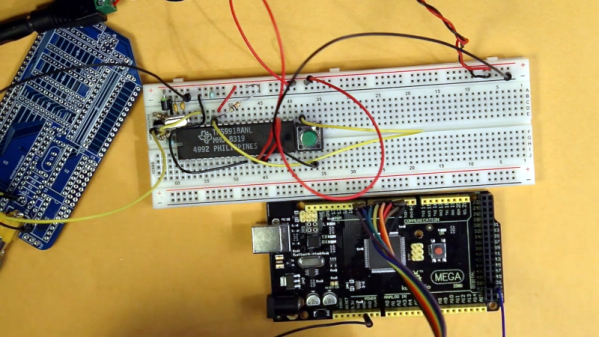
We’ll admit it, we’re all spoiled. A few bucks can now buy a computer that would have been the envy of everyone back in the late 1970s or early 1980s. So it’s no surprise that [krallja] was able to use an old-style video output chip to drive a TV with an Arduino. The TMS9918A is a venerable output device, and if the old computers could drive it then it makes sense that a modern computer could too. You can see a video of the whole experiment, below.

The Internet has also spoiled us, in that it’s dead simple to find datasheets for nearly anything, even these old chips. The only real problem with such aged silicon is that they typically expect a processor with a data and address bus, but most microcontrollers now keep all of that internal. But with enough fast I/O you can simulate a bus just fine. For now, the experiment just cycles through the color output.

Continue reading “TV Output From Arduino — 1980s Style!”

A Z80 Board With Very Few Parts

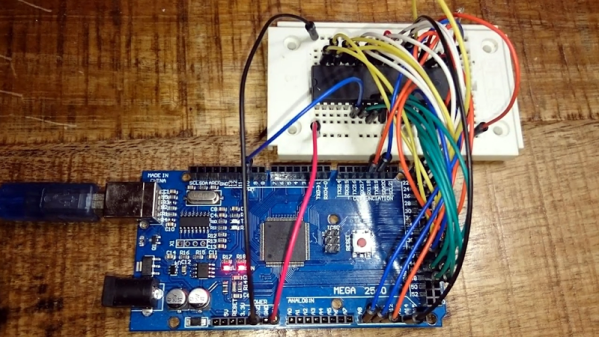
The Z80 is one of those old CPUs that is both obtainable and easy to work with — at least in some versions. [Doctor Volt] put together what may be the simplest possible setups to get a working Z80 system. He has the processor, of course. But everything else — clock, memory, and power — are from an Arduino Mega 2560. You could argue that’s two chips, but the board actually has several chips on it. On the other hand, you could probably pull off the same stunt with a bare ATMega 2560.

We’ve seen this done before, but usually with a few more support chips. If you are a purist, [Doctor Volt] also has some Z80 and CP/M experiments where the Arduino only acts as a disk drive for the computer and there are only two support chips. There are three videos for both projects that you can see below.

Continue reading “A Z80 Board With Very Few Parts”

Gigatron Hack Chat

Join us on Wednesday, June 24 at noon Pacific for the Gigatron Hack Chat with Walter Belgers!

There was a time when if you wanted a computer, you had to build it. And not by ordering parts from Amazon and plugging everything together in a case — you had to buy chips, solder or wire-wrap everything, and tinker endlessly. The process was slow, painful, and expensive, but in the end, you had a completely unique machine that you knew inside out because you put every bit of it together.

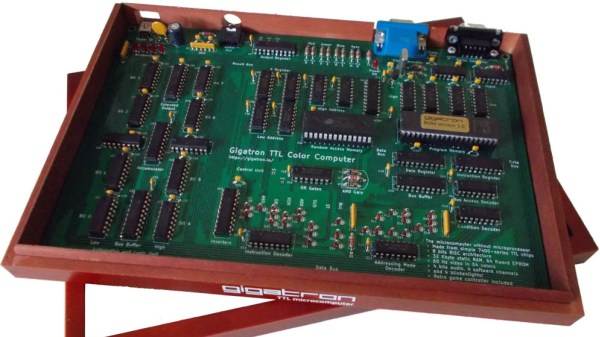
In some ways, it’s good that those days are gone. Being able to throw a cheap, standardized commodity PC at a problem is incredibly powerful, but that machine will have all the charm of a rubber doorstop and no soul at all. Luckily for those looking to get back a little of the early days of the computer revolution or those that missed them entirely, there are alternatives like the Gigatron. Billed as a “minimalistic retro computer,” the Gigatron is a kit that takes the builder back even further in time than the early computer revolution since it lacks a microprocessor. All the logic of the 8-bit computer is built up from discrete 7400-series TTL chips.

The Gigatron is the brainchild of Marcel van Kervinck and Walter Belgers. Tragically, Marcel recently passed away, but Walter is carrying the Gigatron torch forward and leading a thriving community of TTL-computer aficionados as they extend and enhance what their little home-built machines can do. Walter will stop by the Hack Chat to talk all things Gigatron, and answer your questions about how this improbably popular machine came to be.

join-hack-chatOur Hack Chats are live community events in the Hackaday.io Hack Chat group messaging. This week we’ll be sitting down on Wednesday, June 24 at 12:00 PM Pacific time. If time zones have you down, we have a handy time zone converter.

Click that speech bubble to the right, and you’ll be taken directly to the Hack Chat group on Hackaday.io. You don’t have to wait until Wednesday; join whenever you want and you can see what the community is talking about.
Continue reading “Gigatron Hack Chat”

An 8085 Retrocomputer From The Heart

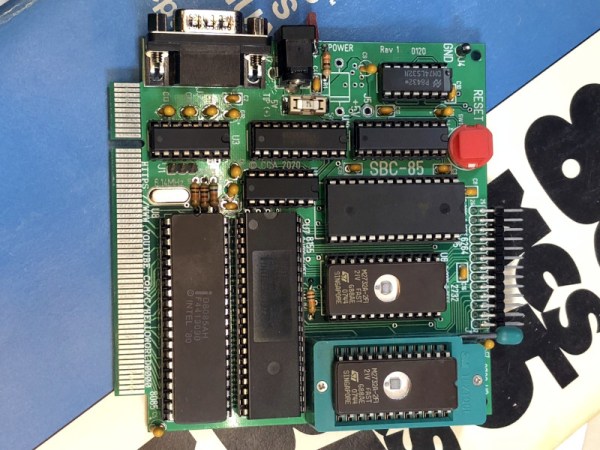
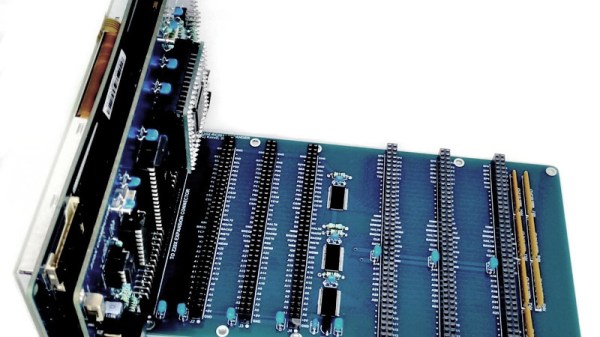
The world of 8-bit retrocomputing splits easily into tribes classified by their choice of processor. There are 6809 enthusiasts, 6502 diehards, and Z80 lovers, each sharing a bond to their particular platform that often threads back through time to whatever was the first microcomputer they worked with. Here it’s the Z80 as found in the Sinclair ZX81, but for you it might be the 6502 from an Apple ][. For [Craig Andrews] it’s the 8085, and after many years away from the processor he’s finally been able to return to it and recreate his first ever design using it. The SBC-85 is not wire-wrapped as the original was, instead he’s well on the way to creating an entire ecosystem based around an edge-connector backplane.

The CPU board is an entire computer in its own right as can be seen in the video below the break, and pairs the 8085 with 8k of RAM, a couple of 2732 4k EPROMs, and an 8155 interface chip. This last component is especially versatile, providing an address latch, timer, I/O ports, and even an extra 256 bytes of RAM. Finally there is some glue logic and a MAX232 level shifter for a serial port, with no UART needed since the 8085 has one built-in. The minimal computer capable with this board can thus be slimmed down significantly, something that competing processors of the mid 1970s often struggled with.

Craig’s web site is shaping up to be a fascinating resource for 8085 enthusiasts, and so far the system sports that backplane and a bus monitor card. We don’t see much of the 8085 here at Hackaday, perhaps because it wasn’t the driver for any of the popular 8-bit home computers. But it’s an architecture that many readers will find familiar due to its 8080 heritage, and could certainly be found in many control applications before the widespread adoption of dedicated microcontrollers. It would be interesting to see where Craig takes this next, with more cards, and perhaps making a rival to the RC2014 over in Z80 country.

Continue reading “An 8085 Retrocomputer From The Heart”

A Z80 Computer At The Next Level

At the close of the 8-bit home computer era there were some machines produced that attempted to bridge the gap between the 8- and 16-bit worlds, either by providing a 16-bit device with a backwards compatibility mode, or an 8-bit one with enhanced capabilities to compete with its newer rivals. These products largely fell by the wayside in the face of new 16-bit only platforms, but they and the various enhanced versions of 8-bit processors that appeared over subsequent decades present a fascinating glimpse of what might have been. It’s a theme [Konstantin Dimitrov] explores with his Z20X computer project, a machine using the Zilog eZ80 processor running at 20 MHz, with 512 kB of external memory, and an interface for a 7″ TFT screen module.

The eZ80 is a more recent development, a pipelined processor capable of much higher clock speeds and addressing up to 16 MB of memory while maintaining software compatibility with the Z80. Had it come to market in the late 1980s it would have been a sensation, but instead it has appeared in embedded computers and perhaps of most interest to Hackaday readers, in TI’s line of programmable calculators.

The Z20X is designed to be a through-hole board, with the only SMD component the eZ80 itself. We can understand the motivation behind this, but at the same time wonder whether its likely builders in 2020 will be people unfazed by SMD assembly. It has a system of processor modules in case of future upgrades, and an expansion backplane with an option of an RC2014-compatible bus. There are also PS/2 keyboard and mouse connectors, a serial bus, and an on-board sound chip. The website is short on details of any software, but we’d expect it to work with the typical Z80 retrocomputer offerings such as a BASIC interpreter and the CP/M operating system.

This machine is likely to appeal to retrocomputing enthusiasts, but had it appeared even without the display in a previous decade it would no doubt have become an object of desire. It does however serve as a reminder that the Z80 line has been updated, and though most of us will have moved on it still offers a few chips that could be of interest. Meanwhile for a comparison, take a look at last year’s review of the latest in the range of RC2014 retrocomputer boards.

Thanks [yNos] for the tip.

Catch The Old School BASIC Bug With This Computer Kit

Does the complexity of modern computing ever get you down? Do you find yourself longing for the old days, where you could actually understand what your desktop machine’s hardware and software was doing at any given moment? You aren’t alone, but unfortunately running a 40+ year old computer as your daily driver isn’t really a viable option.

But that doesn’t mean you don’t have options. [Kostas] writes in to tell us about the “CB2 micro”: a diminutive open source retrocomputer kit that can be built in as little as 30 minutes thanks to its through-hole construction and exceptionally low parts count. When completed the miniature computer is an all-in-one BASIC development platform; just connect up a display and a PS/2 keyboard, and you’ve got everything you need to write you own programs or run games and applications developed by the community. You don’t even need a floppy, as the ATmega644P powered board has enough internal flash to store eight programs for easy access through its graphical menu system.

Main menu of the CB2 micro

For many in the audience, a cheap little board that you can assemble yourself and use as a stand-alone BASIC experimentation platform is appealing enough. But thanks to a collection of hardware add-on boards, the CB2 micro can be augmented with some interesting capabilities.

Some are fairly obvious such as adding additional flash storage or RAM, but you can also run the computer on AA or AAA batteries, or add an S-Video port. [Kostas] even explains how to assemble a special serial cable that allows you to network multiple boards together. If you take the plunge and start building your own hardware modules, the sky’s the limit.

Of course, purists may balk because the CB2 micro isn’t using a “real” computer processor. Fair enough. For those that want a more authentic retro experience, you could always pick up a kit like the RC2014, or go all out and cram a Z80 into an Altoids tin so you can carry it around with you.

Building A Front Panel For The RC2014 Computer

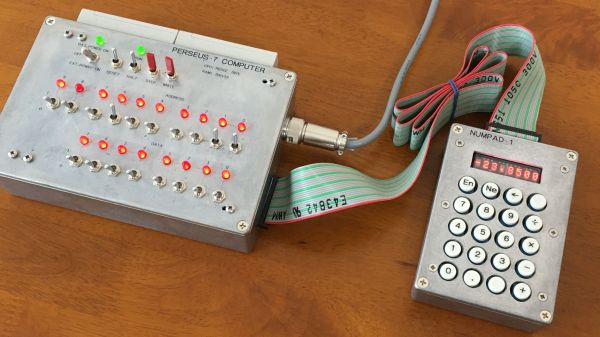
The RC2014 is a slick Z80 computer kit that’s graced these pages a number of times in the past. It allows anyone with a soldering iron and a USB-to-serial adapter to experience the thrill of early 1980s desktop computing. But what if you’re looking for an even more vintage experience? In that case, this custom RC2014 front panel from [James Stanley] might be just the thing to scratch that Altair itch.

The front panel allows you to view and alter the contents of memory with nothing more complex than toggle switches and LEDs, just like on the early microcomputers of the 1970s. If you’ve ever wanted to learn how a computer works on the most basic level, single-stepping through instructions and reading them out in binary is a great way to do it.

[James] says he was inspired to take on this project after reading a 1978 issue of Kilobaud Magazine (as one does), and seeing an article about building a homebrew Z80 machine with a front panel. Obviously he had to modify the approach a bit to mate up with this relatively modern variation on the venerable CPU, but the idea was essentially the same.

His documentation for the project is sure to be fascinating for anyone enamored with those iconic computers of yesteryear, but even readers with more modern sensibilities will likely find some interesting details. The way [James] coaxes the data and various status states out of the kit computer takes up the bulk of the write-up, but afterwards he talks about how he designed the PCB and wraps up with his tips for creating a professional looking front panel.

This isn’t the first time we’ve seen a modern Z80 computer kitted out with blinkenlights, but it’s certainly one of the most professional looking. If you combine the RC2014 kits available on Tindie with the details provided by [James], you’ll soon be learning the fine art of programming a computer with toggle switches.

Continue reading “Building A Front Panel For The RC2014 Computer”