Build A Barebones 68000

The 68000 chip was ubiquitous in the computing world well past its heyday in the 1980s. It was used as the basis for many PCs and video game consoles, and even in embedded microcontrollers. Now, one of its niche applications is learning about the internal functions of computers. 68000 builds are fairly common when building homebrew computers from scratch, but projects like these can be complicated and quickly get out of hand. This 68000 project, on the other hand, gets the job done with the absolute minimum of parts and really dives into the assembly language programming on these chips. (Google Translate from Spanish)

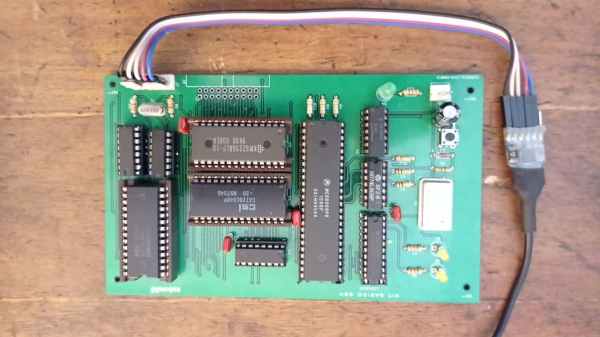
[osbox68] built this computer by first simulating its operation. Once he was satisfied with that, the next step was to actually build the device. Along with the MC68008 it only uses two other TTL chips, a respectable 32 kilobytes of ram, and additionally supports a serial port and an expansion bus. A few 74-series chips round out the build including a 74HC574 used for debugging support. With a custom PCB to tie everything together, it’s one of the most minimal 68000 builds we’ve seen that still includes everything needed to be completely functional.

After all, including the TTL and 74XX chips the entire circuit board only uses 10 integrated circuits and a few other passive elements for a completely functional retro computer. [osbox68] also includes complete schematics for building a PCB based on these chips to make construction that much easier. Of course, emulating an old microcontroller instead of using TTL components can save a lot of real estate on a PCB especially if you’re using something like an FPGA.

Fresh Paint Or Patina Of Ages, That’s The Antique Question

The world of antique furniture and the world of hackers rarely coincide, and perhaps the allure of the latest tech is greater for most of us than that of a Chipendale cabinet. But there are times when there are analagous situations in both worlds, so it’s worth taking a moment to consider something.

This late-17th-century dressing box would not be of such value or interest were a restoration to strip it of its patina. Daderot, CC0.

Antique furniture has survived for hundreds of years before being owned by today’s collectors. Along the way it picks up bumps and scrapes, wear, and even the occasional repair. Valuable pieces turn up all the time, having been discovered in dusty attics, cowsheds, basements, and all sorts of places where they may have been misused in ways that might horrify those who later pay big money for them. Thus there is a whole industry of craft workers in the field of furniture restoration whose speciality lies in turning the wreck of a piece of furniture into a valuable antique for the showroom.

The parallel in our community if you hadn’t already guessed, can be found in the world of retrocomputers. They are the antiques we prize, they come to us after being abused by kids and then left to languish in a box of junk somewhere. Their capacitors are leaking, their cases may be cracked or dirty, and they often possess the signature look of old ABS mouldings, their characteristic yellowing. This is caused by the gradual release of small quantities of bromine as the fire retardant contained within the plastic degrades under UV light, and causes considerable consternation among some retrocomputing enthusiasts. Considerable effort goes into mitigating it, with the favourite technique involving so-called Retr0bright recipes that use hydrogen peroxide to bleach away the colour.

Continue reading “Fresh Paint Or Patina Of Ages, That’s The Antique Question”

Chip Transplant Brings Timex 2048 Back From Grave

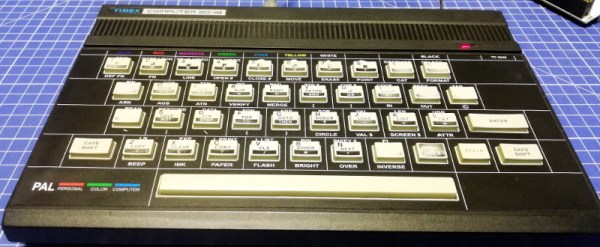
The 1984 Timex Computer 2048 that [Drygol] recently got his hands on was in pretty poor shape. Not only did it have the mangled exterior that comes from several decades of hard use and furious typing, but the internals appeared to be shot as well, with the machine showing nothing but vertical lines when powered up. Thankfully, this retro computer virtuoso was more than up to the challenge of bringing it back from the brink.

After a good cleaning and the installation of a reproduction front panel, the Timex was already looking much better. Unfortunately [Drygol] says he doesn’t currently have the equipment necessary to touch up the graphics and lettering on the key caps, but the fact that he had to qualify that statement with “currently” has us all sorts of excited to see what he’s planning down the line.

A bevy of fresh chips.

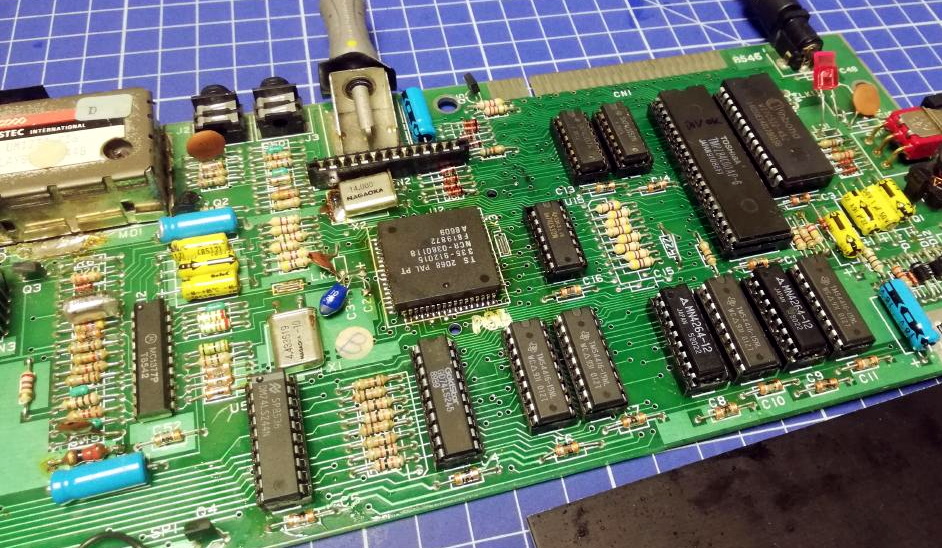
Of course beauty is only skin deep, and this particular TC-2048 was still bad to the bone. [Drygol] had a hunch its Z80 processor was dead, but after swapping it and its socket out, the machine still wouldn’t start. Though he did note that the garbled graphics shown on the screen had changed, which made him think he was on the right track. He then replaced all the RAM on the board, but that didn’t seem to change anything.

There isn’t a whole lot else to go wrong on these old machines, so the final step was to try and replace the ROM. Sure enough, after installing a new Winbond W27C512 chip with the appropriate software burned onto it, the nearly 40 year old computer sprang back to life.

Another classic computer saved from the trash heap, but it’s all in a day’s work for [Drygol]. Over the years we’ve seen him perform meticulous repairs on computer hardware that any reasonable person would have given up on. Even if you’re not into retro hardware, his restorations are always full of fascinating tips and tricks that can be applied when repairing gadgetry from whatever era happens to tickle your fancy.

See Acorn Archimedes Get Repaired And Refurbished, In Glorious Detail

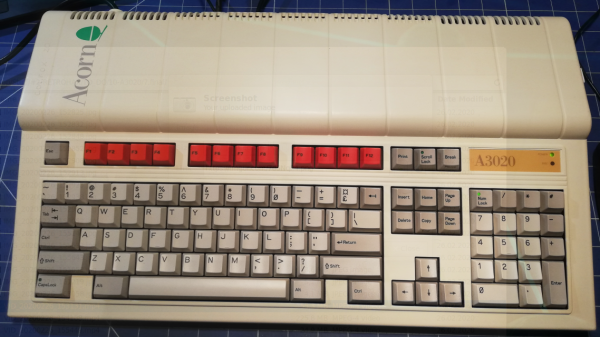
Want to see a 90s-era Acorn Archimedes A3020 home computer get opened up, refurbished, and taken for a test drive? Don’t miss [drygol]’s great writeup on Retrohax, because it’s got all that, and more!

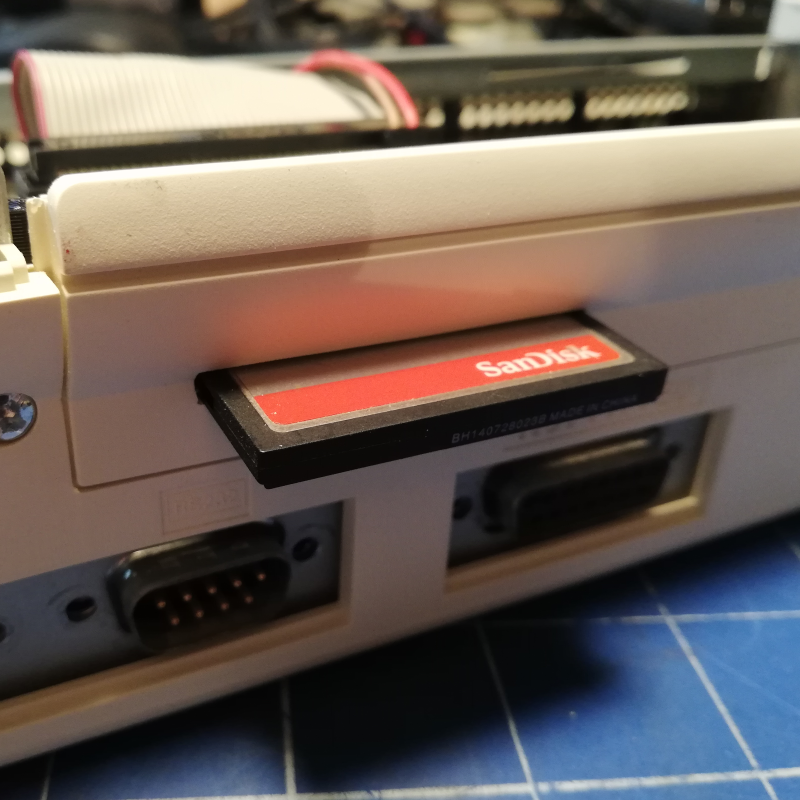
A modern upgrade allowing the use of a CF card in place of an internal hard drive, via a CF2IDE adapter and 3D-printed fixture.

The Archimedes was a line of ARM-based personal computers by Acorn Computers, released in the late 80s and discontinued in the 90s as Macintosh and IBM PC-compatible machines ultimately dominated. They were capable machines for their time, and [drygol] refurbished an original back into working order while installing a few upgrades at the same time.

The first order of business was to open the machine up and inspect the internals. Visible corrosion gets cleaned up with oxalic acid, old electrolytic capacitors are replaced as a matter of course, and any corroded traces get careful repair. Removing corrosion from sockets requires desoldering the part for cleaning then re-soldering, so this whole process can be a lot of work. Fortunately, vintage hardware was often designed with hand-assembly in mind, so parts tend to be accessible for servicing with decent visibility in the process. The keyboard was entirely disassembled and de-yellowed, yielding an eye-poppingly attractive result.

Once the computer itself was working properly, it was time for a few modern upgrades. One was to give the machine an adapter to use a CF card in place of an internal IDE hard drive, and [drygol] did a great job of using a 3D-printed piece to make the CF2IDE adapter look like a factory offering. The internal floppy drive was also replaced with a GOTEK floppy emulator (also with a 3D-printed adapter) for another modern upgrade.

The fully refurbished and upgraded machine looks slick, so watch the Acorn Archimedes A3020 show off what it can do in the video (embedded below), and maybe feel a bit of nostalgia.

Continue reading “See Acorn Archimedes Get Repaired And Refurbished, In Glorious Detail”

Growing Up With Computers

My son is growing up with computers. He’s in first grade, and had to list all of the things that he knows how to do with them. The list included things like mousing around, drawing ghosts with the paint program, and — sign of the times — muting and unmuting the microphone when he’s in teleconferences. Oh yeah, and typing emojis. He loves emojis.

When I was just about his age, I was also getting into computers. But home computers back then were in their early years as well. And if I look back, I’ve been getting more sophisticated about computers at just about the same pace that they’ve been getting more sophisticated themselves. I was grade school during the prime of the BASIC computers — the age of the Apple II and the C64. I was in high school for the dawn of the first Macs and the Amiga. By college, the Pentiums’ insane computational abilities just started to match my needs for them to solve numerical differential equations. And in grad school, the rise of the overclockable multi-cores and GPUs powered me right on through a simulation-heavy dissertation.

We were both so much younger then.

When I was a kid, they were playthings, and as a grownup, they’re powerful tools. Because of this, computers have never been intimidating. I grew up with computers.

But back to my son. I don’t know if it’s desirable, or even possible, to pretend that computers aren’t immensely complex for the sake of a first grader — he’d see right through the lie anyway. But when is the right age to teach kids about voice recognition and artificial neural networks? It’s a given that we’ll have to teach him some kind of “social media competence” but that’s not really about computers any more than learning how to use Word was about computers back in my day. Consuming versus creating, tweeting versus hacking. Y’know?

Of course every generation has its own path. Hackers older than me were already in high-school or college when it became possible to build your own computer, and they did. Younger hackers grew up with the Internet, which obviously has its advantages. Those older than me made the computers, and those younger have always lived in a world where the computer is mature and taken for granted. But folks about my age, we grew up with computers.

Build A New ZX81

[Retro Shack’s] ZX81 died, and while he tried to figure out the fix, he decided to build a new one. Of course, building a circa-1980-something computer from new parts is a bit daunting. Unless you start with an existing design that has it all ready to put together.

The PCB looks great and we like that the silkscreen shows acknowledgments of projects that helped the designer, [Alejandro Sebastian]. The case is, of course, 3D printed. At first, the power LED didn’t work, but voltages looked correct and the board powered up.

Continue reading “Build A New ZX81”

Inside The VIC-20

Commodore machines are well-loved around here, but usually when you think Commodore, you think about the Commodore 64, or maybe the PET or Amiga. But the Commodore 64 had an older sister, the VIC 20. This was the first computer to sell a million units and has a lot in common with its better-known successor. The machine was only made for a few years, and [Dubious Engineering] has been restoring one over a few videos. In the video below, he opens it up for a look inside, among other things.

If you want to get straight to the opening, you’ll need to fast forward about 5 and a half minutes. The keyboard pulls off and a nice old-fashioned set of cables made from individual wires connect to the skinny main board with all the smarts on it. No ribbon cables or flex PCBs!

Continue reading “Inside The VIC-20”