Start Me Up: What Has The Windows 95 Desktop Given Us 25 Years Later?

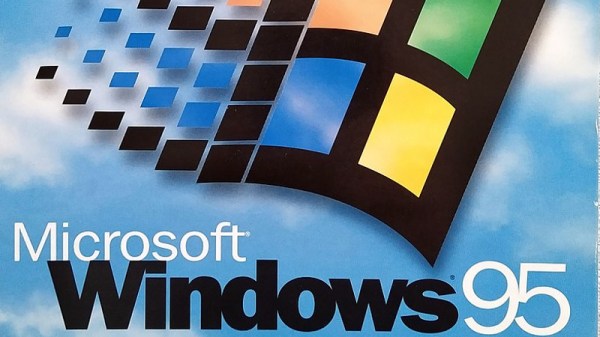
We’ve had something of an anniversary of late, and it’s one that will no doubt elicit a variety of reactions from our community. It’s now 25 years ago that Windows 95 was launched, the operating system that gave the majority of 1990s PC users their first taste of a desktop-based GUI and a 32-bit operating system.

To the strains of the Rolling Stones’ Start me up, Microsoft execs including Bill Gates himself jubilantly danced on stage at the launch of what was probably to become the company’s defining product, perhaps oblivious to the line “You make a grown man cry” which maybe unwittingly strayed close to the user experience when faced with some of the software’s shortcomings.

Its security may seem laughable by the standards of today and the uneasy marriage of 16-bit DOS underpinning a 32-bit Windows operating system was clunky even in its heyday, but perhaps now is the best time to evaluate it unclouded by technical prejudice. What can we see of Windows 95 in the operating systems we use today, and thus from that can we ask the question: What did Windows 95 get right? Continue reading “Start Me Up: What Has The Windows 95 Desktop Given Us 25 Years Later?”

Recreating Retrocomputers Hack Chat

Join us on Wednesday, August 12 at noon Pacific for the Recreating Retrocomputers Hack Chat with Mike Gardi!

Building the first commercial computers in the late 1950s and early 1960s was certainly a complex a task, but building the computer industry was even harder. Sure, engineers were already getting on board with designing in silicon and germanium instead of glass and tungsten, and all digital circuits are really just abstractions of analog designs most of them were already familiar with. But what about all the other people who would need to get up to speed on the workings of digital computers? What good is a tool if the only people who know how to use it art the ones who built it?

To make computers make money, companies needed legions of installers, operators, programmers, marketers, and salespeople, and all of them needed training. And so early computer companies put a lot of effort into building training devices to get people up to speed. These trainers helped teach everything from basic logic circuits and Boolean relationships to simple programming concepts, and each of them contributed in their own way to developing the computer industry that we know today.

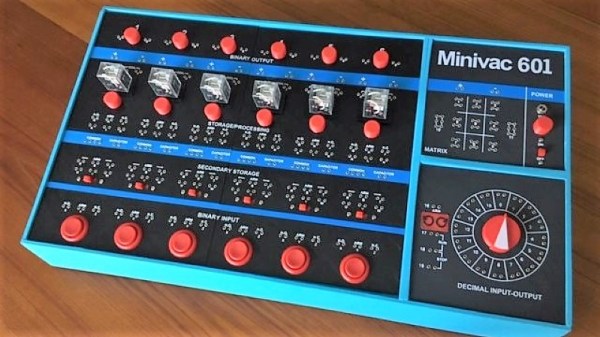
Mike Gardi has a unique hobby: among other things, he builds faithful replicas of some of the nicer examples of these lost bits of computing history. His reproduction of Claude Shannon’s Minivac 601 trainer is a great example of the art, as is the DEC H-500 Computer Lab build he’s currently working on. Along the way, he’s explored some side alleys on the road to our computerized world, like Dr. Nim and the paperclip computer. All his builds are lovingly created from 3D-prints and really capture the essence of the toys and tools of the time.

Join us as we take a trip inside this niche realm of retrocomputing and find out why Mike finds it fascinating enough to devote the time it obviously takes to build such exacting replicas. We’ll talk about what projects he’s got going on right now, what he has planned for the future, and maybe even dive into some of his secrets for such great looking 3D prints.

join-hack-chatOur Hack Chats are live community events in the Hackaday.io Hack Chat group messaging. This week we’ll be sitting down on Wednesday, August 12 at 12:00 PM Pacific time. If time zones baffle you as much as us, we have a handy time zone converter.

Click that speech bubble to the right, and you’ll be taken directly to the Hack Chat group on Hackaday.io. You don’t have to wait until Wednesday; join whenever you want and you can see what the community is talking about.

Continue reading “Recreating Retrocomputers Hack Chat”

An Amiga Sampler 30 Years Later

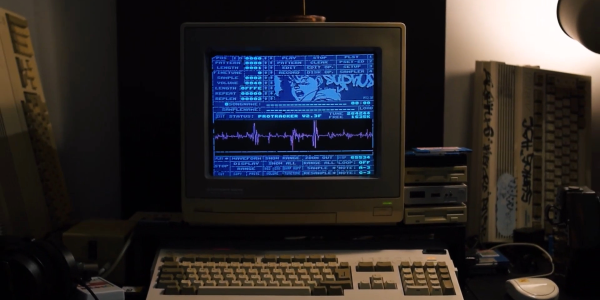
There was a magic moment for a few years around the end of the 1980s, when home computers were better than professional ones. That’s a mighty grand pronouncement, but it refers to the crop of 16-bit home computers that genuinely were far better than nearly all PCs at the time for multimedia tasks. You could plug a sampler cartridge into your Amiga and be in the dance charts in no time, something which sparked a boom in electronic music creativity. As retrocomputing interest has soared so have the prices of old hardware, and for those still making Amiga music that cart can now be outrageously expensive. it’s something [echolevel] has addressed, with an open-source recreation of an Amiga sampler.

As anyone who peered inside one back int he day will tell you, an Amiga sampler was a very simple device consisting of a commonly-available 8-bit A to D converter, a CMOS switch for right and left samples, and maybe an op-amp preamplifier. This is exactly what he’s produced, save fpr the CMOS switch as he points out that Amiga musicians use mono samples anyway. At its heart is an ADC0820 half-flash ADC chip, and the whole thing is realised on a very retro-looking through-hole PCB.

For a Hackaday scribe with a Technosound Turbo still sitting in a box somewhere it’s a real trip down memory lane. It was a moment of magic to for the first time be able to edit and manipulate audio on a computer, and we’re glad to see that something of those days still lives on. See it in action in the video below the break.

Continue reading “An Amiga Sampler 30 Years Later”

Homebrew 16-Bit Computer Is A Wire-Wrapped Work Of Art

Breadboard 8-bit computer builds seem all the rage these days, and with good reason: building your own CPU from the board up using discrete logic chips is a great way to really learn how microprocessors work. Not to mention that it’s an incredible flex. But once you’ve conquered the eight-bit, what do you do? Easy: build a 16-bit computer from 74HC logic chips.

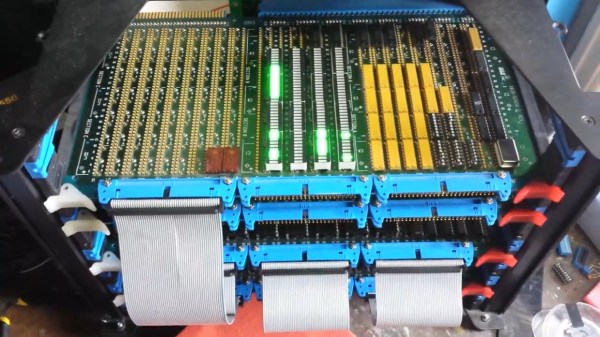
Attentive readers will likely remember this computer’s builder, [Paulo Constantino], from his previous work on 8-bit breadboard computers. As gloriously entropic as that tangled mass of wires was, it must have been a nightmare for [Paulo] to maintain. And so when the time came to upgrade, he wisely chose a more integrated construction method. The construction method is wire-wrapping, with multiple cards plugged into backplane and connected by ribbon cables. The whole card cage is far neater than the previous build, and seems to lend itself to rapid modifications. The top card in the cage acts as a control panel for now; eventually, [Paulo] planes to put a real front panel on the cage to support all the switches and blinkenlights such builds demand. Stretch goals include supporting audio and video and getting the machine online so anyone can log in.

The video below is an overview of the current state of the machine; earlier videos in the playlist cover the design and build in more detail. We hope to see schematics soon, and we’d love to know where to get some of those wire-wrap PCBs for projects of our own.

Continue reading “Homebrew 16-Bit Computer Is A Wire-Wrapped Work Of Art”

A Z80 Board With Very Few Parts

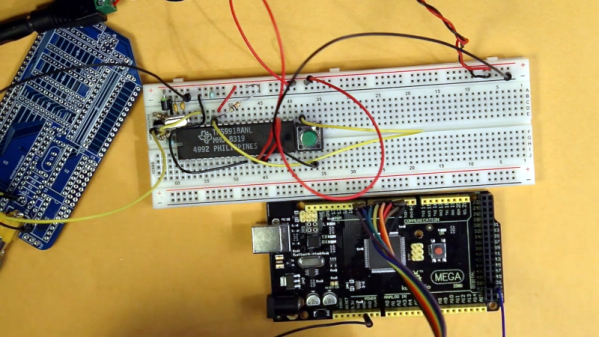
The Z80 is one of those old CPUs that is both obtainable and easy to work with — at least in some versions. [Doctor Volt] put together what may be the simplest possible setups to get a working Z80 system. He has the processor, of course. But everything else — clock, memory, and power — are from an Arduino Mega 2560. You could argue that’s two chips, but the board actually has several chips on it. On the other hand, you could probably pull off the same stunt with a bare ATMega 2560.

We’ve seen this done before, but usually with a few more support chips. If you are a purist, [Doctor Volt] also has some Z80 and CP/M experiments where the Arduino only acts as a disk drive for the computer and there are only two support chips. There are three videos for both projects that you can see below.

Continue reading “A Z80 Board With Very Few Parts”

Hackaday Links Column Banner

Hackaday Links: May 31, 2020

We begin with sad news indeed as we mark the passing of Marcel van Kervinck on Monday. The name might not ring a bell, but his project, the Gigatron TTL computer, certainly will. We did a deep dive on the microprocessor-less computer a while back, and Marcel was a regular at conferences and on the Gigatron forums, supporting users and extending what the computer can do. He was pretty candid about his health issues, and I’ll add that when I approached him a few weeks ago out of the blue about perhaps doing a Hack Chat about Gigatron, he was brutally honest about how little time he had left and that he wouldn’t make it that long. I was blown away by the grace and courage he displayed. His co-conspirator Walter Belger will carry on the Gigatron mission, including joining us for a Hack Chat on June 24. In the meantime, this might be a great time to pick up a Gigatron kit before they’re all sold out and get busy soldering all those delicious through-hole TTL chips.

May of 2020 is the month that never seems to end, and as the world’s focus seems to shift away from the immediate public health aspects of the ongoing COVID-19 pandemic to the long-term economic impact of the response to it, we happened across a very interesting article on just that topic. Mike Robbins from the Circuit Lab has modeled the economic impact of the pandemic using analog circuit simulations. He models people as charges and the flow of people between diseases states as currents; the model has capacitors to store the charge and allow him to measure voltages and filters that model the time delays needed for public policy changes to be adopted. It’s a fascinating mashup of engineering and policy. You can play with the model online, tweak parameters, and see what you come up with.

One of the things that the above model makes clear is that waiting to fully reopen the economy until a vaccine is ready is a long and dangerous game. But there has at least been some progress on that front, as Massachusetts biotech firm Moderna announced success in Phase 1 clinical trials of its novel mRNA vaccine against SARS-CoV-2. It’s important to temper expectations here; Phase 1 trials are only the beginning of human testing, aimed at determining the highest treatment dose that won’t cause serious side effects. Phase 2 and Phase 3 trials are much more involved, so there’s a long way to go before the vaccine, mRNA-1273, is ready for use. If you need to brush up on how these new vaccines work, check out our handy guide to mRNA vaccines.

In happier news, the “moar memory” version of the Raspberry Pi 4 is now on sale. Eben Upton announced that the 8GB version of the Pi 4 is now available for $75. The upgrade was apparently delayed by the lack of an 8GB LPDDR SDRAM chip in a package that would work in the Pi manufacturing process. They’ve also released a beta of a 64-bit version of the Raspberry Pi OS, if you’re interested in a bleeding-edge flex.

And finally, for those who missed the first wave of the computer revolution and never had a blinkenlight machine, you can at least partially scratch that itch with this Internet-connected Altair 8800. Jesse Downing has written a queueing system that allows users to connect to the machine via ssh and use Microsoft BASIC 5.0 on CP/M. Need to see those glorious front panels lights do their thing? Jesse has kindly set up a live stream for that, with an overlay of the current console output. It’s a great way to relive your misspent youth, or to get a taste of what computing was like when soldering skills were a barrier to entry.

60’s Natural Gas Pipeline Computer Retires To Play Games

Computer gaming has come a very long way since the 1960s. While computers of that era may not run Doom or anything even close to it, many of us had our first exposure to computers playing Hunt the Wumpus, Adventure, or Star Trek over a clackety old TeleType machine. If you missed those days, or if you simply miss them, you might enjoy the video from [somecomputerguy] who fires up an old retired gas pipeline computer and loads enough paper tape into it to play Lunar Lander. (Video embedded below.)

We don’t miss the days of toggling in a bootloader so you could load the paper tape for a second bootloader before you could enter the actual program you wanted to run.

Continue reading “60’s Natural Gas Pipeline Computer Retires To Play Games”