Framed Raspberry Pi Keeps Tabs On Spotify

Perhaps you’ve noticed, but we here at Hackaday have a slight obsession with the over-engineered. One could fairly say there’s a linear relationship between how likely we are to feature a project and how needlessly complex it is. That said, it isn’t as if we are unable to appreciate a minimalist approach. Taking the scenic route can be a lot of fun, but sometimes it’s nice to just get where you’re going before you run out of gas.

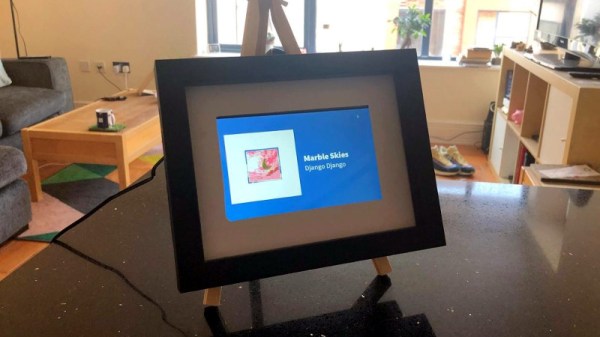
This very slick Spotify “Now Playing” display created by [Jon Ashcroft] is a perfect example of that principle. The hardware is so straightforward that it’s barely worth mentioning: a Raspberry Pi with a small HDMI display, tucked neatly into a photo frame. Nothing to get too excited about there. The real hook with this particular project is the software.

[Jon] is a web developer by trade, so it’s natural he would approach his personal projects with that same mentality. Rather than one of the “usual suspects” for a Pi project like Python, he wrote his software in ES6; which the Pi is running through Chromium in kiosk mode (full screen web content, no top bar). For those of you who aren’t keeping up on web languages, ES6 is short for EcmaScript 6: a new version of the standard on which JavaScript is based. It’s a bit heavier on resources than is strictly necessary, but it works well enough in the end.

Using Spotify’s excellent API, his software pulls down the current track information and stores it locally. It does this every ~4 seconds, checking to see if the track has changed. [Jon] isn’t thrilled with this brute force method, but it works for now. It displays the current playing song and artist, and uses a library called node-vibrant to extract a dominant color from the album art and use that to create a complementary background color. Very slick.

[Jon] provides all of his source code and made it easy to connect to your own Spotify account, so don’t be surprised if you see this running on a “Magic Mirror” near you soon.

Retro-Styled Raspberry Pi Radio

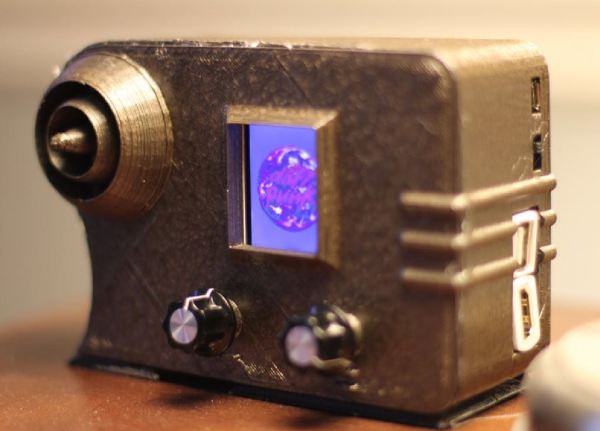
Ok, so you want a radio — but not just any radio. It has to be wireless, access a variety of music services, and must have a vintage aesthetic that belies its modern innards. Oh, and a tiny screen that displays album art, because that’s always awesome. This 1938 Emerson AX212-inspired radio delivers.

Building on the backbone of a Raspberry Pi Zero W and an Adafruit MAX 98357 mono amp chip, the crux of this single-speaker radio is the program Mopidy. Mopidy is a music player that enables streaming from multiple services, with the stipulation that you have a premium Spotify account. Once signed up, [Tinkernut] helpfully outlines how to set up Mopidy to run automatically once the Pi boots up. The addition of a screen to display album art adds flair to the design,  and Adafruit’s 1.8″ TFT LCD screen is small enough to fit the bill.

But wait — there’s more!

Continue reading “Retro-Styled Raspberry Pi Radio”

Boombox Doorjam Plays Your Theme Song When You Step In The Ring

Although many of us may have had childhood aspirations to be a famous wrestler in the WWE, not very many of us will ever realize those dreams. You can get close, though, if you have your own epic intro music theme that plays anytime you walk into a room. Although it’s not quite the same as entering a wrestling ring, [Matt]’s latest project will have you feeling just as good whenever you enter a room to your own theme song.

The core of the build consists of a boom box with an auxiliary input. The boom box is fed sound via a Raspberry Pi which also serves as the control center for the rest of the project. It runs Node.js and receives commands via websockets from a publicly accessible control server. The Pi is also running Spotify which allows a user to select a theme song, and whenever that user’s iBeacon is within range, the Pi will play that theme song over the stereo.

The project looks like it would be easy to adapt to any other stereo if you’re looking to build your own. Most of the instructions and code you’ll need are available on the project’s website, too. And, if you’re a fan of music playing whenever you open a door of some sort, this unique project is clearly the gold standard. It might even make Stone Cold Steve Austin jealous.

Raspberry Pi Radio Streaming Service Guts Yamaha Shelf System

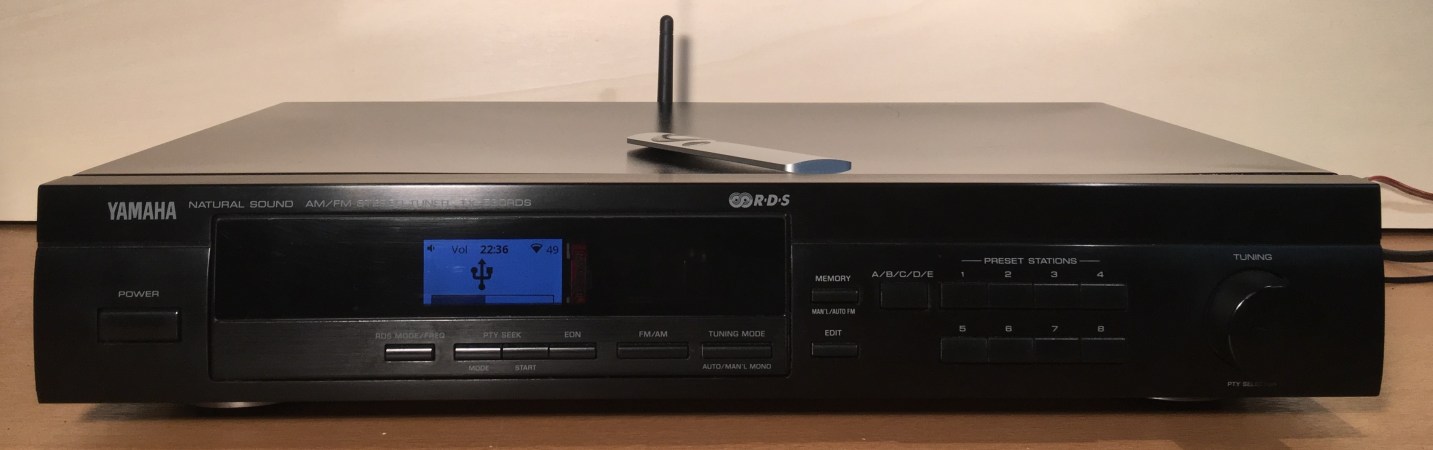
There are dozens — dozens! — of options to meet your music and streaming needs these days.  Looking to make something of his own that retains that 90’s vibe of having a dedicated stereo system but with modern wireless integration, [thk4711] turned an old Yamaha hifi into a Raspberry Pi streaming client.

As far as the case goes, a few modifications allowed [thk4711] to use all of the existing buttons, and a quick-swap of the back-plate and screen gave him a better enclosure than one he could fabricate himself. The power supply proved to be the most difficult part of the project due in part to some “digital noise” interference between the digital and analog components while they were wired to a common ground. This was solved by implementing two transformers, a LM2596 voltage regulator and a LT1084 low-noise power supply to smooth things out.

The Raspberry Pi 2-centered device supports internet radio, Spotify connect, Airplay, USB and auxiliary inputs.

Continue reading “Raspberry Pi Radio Streaming Service Guts Yamaha Shelf System”

Pi Musicbox 0.5 Released

Pi MusicBox Logo


Have an extra Raspberry Pi kicking around? Pi MusicBox provides a way to quickly turn it into a standalone streaming device that can fetch music from tons of sources. The latest release of Pi MusicBox adds a bunch of new features.

We took a look at this software over a year ago, and noted that it made streaming Spotify easy, and had support for controlling tracks using Music Player Daemon (MPD). The newest release supports AirPlay, DNLA, Google Music, SoundCloud, and several other music sources.

Since the analog audio output on the Pi isn’t great, Pi MusicBox includes support for a variety of USB sound cards. It’s also possible to use the HDMI port for digital audio output, which can be connected into your home theatre system.

If you want to build a standalone music device, this looks like a great place to start. The user community has built a variety of projects that run this software, which are featured on the Pi MusicBox homepage.

Pan Flute Hero

panflutehero

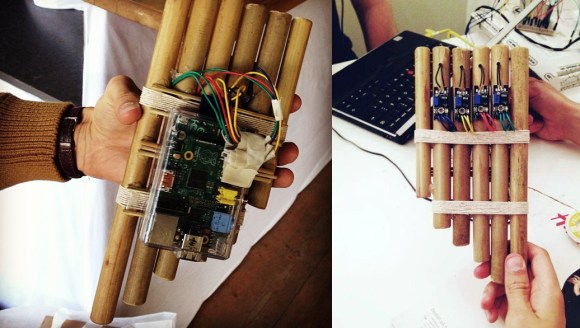
The latest creation in the never-ending collection of “____ Hero” instruments is this Raspi-infused pan flute, built by [Sven Andersson] and his team at the 2013 WOW Hackathon. The flute itself consists of varying lengths of bamboo from a local flower shop, cut short enough to be hand-held while still hiding the Pi from the front side. In the spirit of other ‘Hero’ instruments, the pan flute has no real musical functionality. Each pipe houses what appears to be an electret microphone breakout board, which they kept in place by sealing off the end of the pipe with glue.

The sensors connect to the GPIO connector on the Raspi, which communicates to a local TCP/IP server the team ran as a controller hub. The game is also their original creation, written entirely in LUA. They turned to Spotify to find suitable material for the player to experience, creating playlists with actual pan flute songs and using the libspotify SDK to access the music. You can see the end result of the project in a short demo video below.

Continue reading “Pan Flute Hero”

Home Audio And Lighting Taken Over By The Raspberry Pi

687474703a2f2f7777772e6265616b61626c652e636f6d2f696d672f707265766965772d312e706e67

We’re beginning to see a lot of momentum building for using Raspberry Pi boards as the basis of your home automation. This latest offering from [Iain Hamilton] combines lighting and audio control through a single web interface. His frontend is run as a web page from the RPi board. It even includes separate layouts for mobile devices and computers in order to maximize use of the screen real estate.

Three buttons at the top of the interface allow him to configure the settings and switch between lighting and audio controls. This audio control screen issues commands to the Spotify client running on the Pi. The Mopidy package takes care of almost everything (as we’ve seen with other single-board computer Spotify servers). Future iterations will offer other streaming services like SoundCloud. [Iain’s] home lighting system uses X10 modules for control. He’s using a USB dongle to facilitate control of that system.

Continue reading “Home Audio And Lighting Taken Over By The Raspberry Pi”