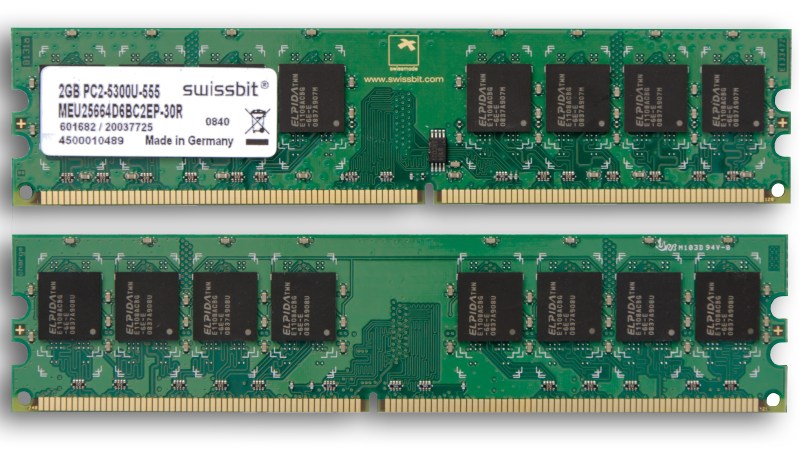
Swissbit 2GB PC2-5300U-555

Surviving The RAM Price Squeeze With Linux In-Kernel Memory Compression

You’ve probably heard — we’re currently experiencing very high RAM prices due mostly to increased demand from AI data centers.

RAM prices gone up four times

If you’ve been priced out of new RAM you are going to want to get as much value out of the RAM you already have as possible, and that’s where today’s hack comes in: if you’re on a Debian system read about ZRam for how to install and configure zram-tools to enable and manage the Linux kernel facilities that enable compressed RAM by integrating with the swap-enabled virtual memory system. We’ve seen it done with the Raspberry Pi, and the concept is the same.

Ubuntu users should check out systemd-zram-generator instead, and be aware that zram might already be installed and configured by default on your Ubuntu Desktop system.

If you’re interested in the history of in-kernel memory compression LWN.net has an old article covering the technology as it was gestating back in 2013: In-kernel Memory Compression. For those trying to get a grip on what has happened with RAM prices in recent history, a good place to track memory prices is memory.net and if you swing by you can see that a lot of RAM has gone up as much as four times in the last three or four months.

If you have any tips or hacks for memory compression on other platforms we would love to hear from you in the comments section!

This Week In Security: Zenbleed, Web Integrity, And More!

Up first is Zenbleed, a particularly worrying speculative execution bug, that unfortunately happens to be really simple to exploit. It leaks data from function like strlen, memcpy, and strcmp. It’s vulnerable from within virtual machines, and potentially from within the browser. The scope is fairly limited, though, as Zenbleed only affects Zen 2 CPUs: that’s the AMD Epyc 7002 series, the Ryzen 3000 series, and some of the Ryzen 4000, 5000, and 7020 series of CPUs, specifically those with the built-in Radeon graphics.

And at the heart of problem is a pointer use-after-free — that happens inside the CPU itself. We normally think of CPU registers as fixed locations on the silicon. But in the case of XMM and YMM registers, there’s actually a shared store of register space, and the individual registers are mapped into that space using a method very reminiscent of pointers.

Continue reading “This Week In Security: Zenbleed, Web Integrity, And More!”

Bye Bye Ubuntu, Hello Manjaro. How Did We Get Here?

Last week I penned a cheesy fake relationship breakup letter to Ubuntu, my Linux distribution of choice for the last 15 years or so. It had well and truly delivered on its promise of a painless Linux desktop for most of that time, but the most recent upgrades had rendered it slow and bloated, with applications taking minutes to load and USB peripherals such as my film scanner mysteriously stopping working. I don’t have to look far to identify the point at which they adopted Snap packages as the moment when it all went wrong. I’d reached the point at which I knew our ways must part, and it was time to look for another distro.

Continue reading “Bye Bye Ubuntu, Hello Manjaro. How Did We Get Here?”

Dear Ubuntu…

Dear Ubuntu,

I hope this letter finds you well. I want to start by saying that our time together has been one of creativity and entertainment, a time in which you gave me the tools to develop a new career, to run a small electronics business, make fun things, and to write several thousand articles for Hackaday and other publications, but for all that it’s sadly time for our ways to part. The magic that once brought us together has faded, and what remains is in danger of becoming a frustration.

In our early days as an item you gave me for the first time a Linux distro that was complete, fast, and easy to use without spending too much time at the CLI or editing config files to make things happen; you gave me a desktop that was smooth and uncluttered, and you freed me from all those little utilities that were required to make Windows usable. You replaced the other distros I’d been using, you dual-booted with my Windows machines, and pretty soon you supplanted the Microsoft operating system entirely.

Ubuntu and me and a trusty Dell laptop, Oxford Hackspace, 2017.
Me and Ubuntu in 2017, good times.

We’ve been together for close to two decades now, and in that time we’ve looked each other in the eye across a variety of desktop and laptop computers. My trusty Dell Inspiron 640 ran you for over a decade through several RAM, HDD, and SSD upgrades, and provided Hackaday readers with the first few years of my writing. Even the Unity desktop couldn’t break our relationship, those Linux Mint people weren’t going to tear us asunder! You captured my text, edited my videos and images, created my PCBs and CAD projects, and did countless more computing tasks. Together we made a lot of people happy, and for that I will always be grateful. Continue reading “Dear Ubuntu…”

Ubuntu 22.04 setup screen shown on the Google's Nest Hub display

Breaking Google Nest Hub’s Secure Boot

[frederic] tells a story about their team’s hack of a Google Nest Hub (2nd generation) — running Ubuntu on it, through bypassing Google’s boot image signature checks. As with many good hacks, it starts with FCC website pictures. Reverse-engineering a charger and USB daughterboard pin-out, they found a UART connection and broke it out with a custom adapter. With a debug console and insights into the process, they went on hacking, slicing through hardware and software until it was done with.

This story gives plenty of background and insight into both the code that was being investigated, and the way that attack targets were chosen. Through fuzzing, they found a buffer overflow in the bootloader code that could be triggered with help of a non-standard block size. USB flash drives tend to have these hard-coded, so they built a special firmware for a Pi Pico and shortly thereafter, achieved code execution. Then, they hooked into uboot functions and loaded Ubuntu, bypassing the boot image signature checks.

This is a wonderful documentation of a hacking journey, and an exciting read to boot (pun intended). The bug seems to have been patched for half a year now, so you probably can’t flash your Google Nest into Ubuntu anymore. However, you might be able to run an up-to-date Linux on your Amazon Echo.

We thank [Sven] for sharing this with us!

Building The Dolphin Emulator In Ubuntu On A Nintendo Switch

[LOE TECH] has made a habit of trying out various emulation methods on his Nintendo Switch and recording the results for our benefit. Of that testing, some of the best performance he’s seen makes use of the Dolphin emulator running in Ubuntu Linux, and he has made a tutorial video documenting how to build the project, as well as how to make some performance tweaks to get the most out of the mod.

We love seeing Linux run on basically anything with a processor. It’s a classic hack at this point. Nintendo has traditionally kept its consoles fairly locked down, though, even in the face of some truly impressive efforts; so it’s always a treat to see the open-source OS run relatively smoothly on the console. This Ubuntu install is based on NVIDIA’s Linux for Tegra (L4T) package, which affords some performance gains over Android installations on the same hardware. As we’ve seen with those Android hacks, however, this software mod also makes use of the Switchroot project and, of course, it only works with specific, unpatched hardware. But if you’ve won the serial number lottery and you’re willing to risk your beloved console, [LOE TECH] also has a video detailing the process he used to get Ubuntu up and running.

Check out the video below for a medley of Gamecube game test runs. Some appear to run great, and others, well… not so much. But we truly appreciate how he doesn’t edit out the games that stutter and lag. This way, we get a more realistic, more comprehensive overview of unofficial emulation performance on the Switch. Plus, it’s almost fun to watch racing games go by in slow motion; almost, that is, if we couldn’t empathize with how frustrating it must have been to play.

Continue reading “Building The Dolphin Emulator In Ubuntu On A Nintendo Switch”

Escalating Privileges In Ubuntu 20.04 From User Account

Ubuntu 20.04 is an incredibly popular operating system, perhaps the most popular among the Linux distributions due to its ease-of-use. In general, it’s a fairly trustworthy operating system too, especially since its source code is open. However, an update with the 20.04 revision has led to security researcher [Kevin Backhouse] finding a surprisingly easy way to escalate privileges on this OS, which we would like to note is not great.

The exploit involves two bugs, one in accountservice daemon which handles user accounts on the computer, and another in the GNOME Display Manager which handles the login screen. Ubuntu 20.04 added some code to the daemon which looks at a specific file on the computer, and with a simple symlink, it can be tricked into reading a different file which locks the process into an infinite loop. The daemon also drops its privileges at one point in this process, a normal security precaution, but this allows the user to crash the daemon.

The second bug for this exploit involves how the GNOME Display Manager (gdm3) handles privileges. Normally it would not have administrator privileges, but if the accountservice daemon isn’t running it escalates itself to administrator, where any changes made have administrator privileges. This provides an attacker with an opportunity to create a new user account with administrator privileges.

Of course, this being Ubuntu, we can assume that this vulnerability will be immediately patched. It’s also a good time to point out that the reason that open-source software is inherently more secure is that when anyone can see the source code, anyone can find and report issues like this which allow the software maintainer (or even the user themselves) to make effective changes more quickly.