Outlet Charging Station Retrofitted With The Guts Of A WiFi Router

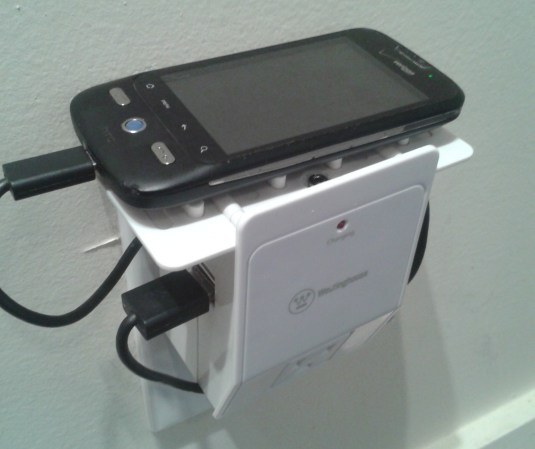
While wandering around the aisles of his local electronics store this Westinghouse USB charging station caught [James’] eye. He sized it up and realized it would make the perfect enclosure for a small WiFi router. And so began his project to turn a TP-Link TL-WR703N into a DIY Pwn Plug.

The basic idea is to include hidden capabilities in an otherwise normal-looking device. For instance, take a look at this ridiculously overpriced power strip that also happens to spy on your activities. It doesn’t sound like [James] has any black hat activities planned, but just wanted an interesting application for the router.

He removed the original circuit board from the charging station to make room for his own internals. He inserted a cellphone charger to power the router, then desoldered the USB ports and RJ-45 connector for the circuit board to be positioned in the openings of the case. He even included a headphone jack that breaks out the serial port. There’s a lot of new stuff packed into there, but all of the original features of the charging station remain intact.

Extracting Data With Keyboard Emulation

A common challenge for computer security specialists is getting data out of a very locked-down system. Of course all network traffic on these test machines is monitored, and burning a CD or writing to a USB Flash drive is out of the question. Where there’s a will there’s a way, so [András] figured out how to extract data from a computer by emulating a keyboard.

Emulating a USB HID device is nothing new; the newest Arduino can do it, as can any AVR with the help of V-USB. [András]’s build emulates a USB keyboard that can download data from a computer by listening to the NUM, CAPS and SCROLL lock LEDs.

Of course, [András] first needs an app to transmit data through these keyboard status LEDs. To do this, his build carries with it a Windows executable file on the AVR’s Flash memory. After plugging his device into the computer, it writes this program to disk and is then able to send data out through keyboard status LEDs.

It’s not very fast – just over one byte per second – but [András] did manage to extract data from a computer, circumventing just about every anti-leaking solution.

Driving An LCD Character Display Using Custom HID Codes

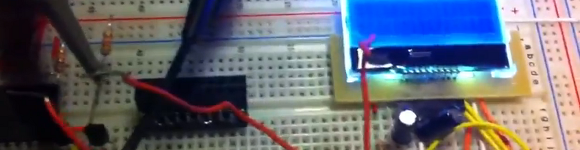
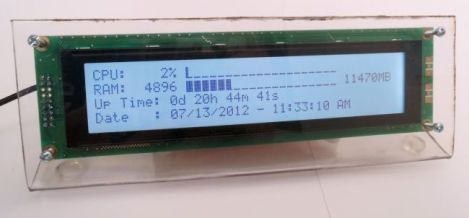
Here’s an external display meant to help you keep track of your computer’s status. It connects via USB and is driven by a PIC microcontroller. It listens for a small set of commands, using those to implement a simple control protocol to drive the screen.

[Andrew Gehringer] designed the device around a PIC 18F2550, which offers native USB control. He’s using Microchip’s USB stack to enumerate the module as an HID device. It listens for commands 0x10 through 0x23. These clear the display, write strings to each of the four lines of the display, and switch the LCD backlight. Of course the project includes a program [Andrew] wrote to feed the display. It  has a GUI which let’s him decide what information is displayed and how it is formatted. This helper app hangs out in the system tray for easy access.

SNES Emulator Has It’s Slot Sealed Shut

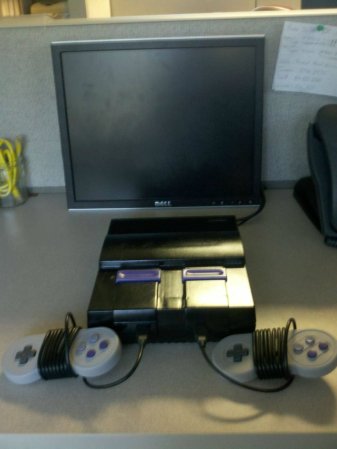
If you look closely you’ll notice there’s nowhere to put the game cartridge on this Super Nintendo system. That’s because this is a Rasberry Pi based SNES emulator that plays ROMs, not cartridges. Since the RPi board is used the only limit to what you can play is the board’s RAM and which ROMs you have on the SD card.

The case has basically been gutted and the unused cartridge slot was sealed with some Bondo before painting. In addition to the Rasberry Pi you’ll find a 7-port powered USB hub and a Teensy microcontroller board. The hub allows for the controllers to be connected via USB. The Teensy is recognized as a USB HID device and is used to connect the reset button to a functions on the emulator program. The power switch still works too. To make this happen [MIDItheKID] spliced a USB connector and a microB USB connector to the power switch. We think this draws power from the hub but we’re not 100% sure.

[MIDItheKID] mentions in the Reddit comments that he’s thinking of grabbing that new RPi that has more memory and doing some similar work on his dead PSX.

Exploiting DFU Mode To Snag A Copy Of Firmware Upgrades

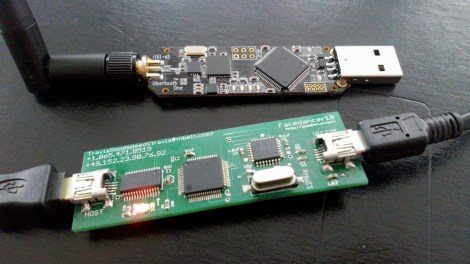
[Travis Goodspeed] continues his work at educating the masses on how to reverse engineer closed hardware devices. This time around he’s showing us how to exploit the Device Firmware Updates protocol in order to get your hands on firmware images. It’s a relatively easy technique that uses a man-in-the-middle attack to dump the firmware image directly to a terminal window. This way you can get down to the nitty-gritty of decompiling and hex editing as quickly as possible.

For this hack he used his Facedancer board. We first saw the hardware used to emulate a USB device, allowing the user to send USB commands via software. Now it’s being used to emulate your victim hardware’s DFU mode. This is done by supplying the vendorID and productID of the victim, then pushing the firmware update as supplied by the manufacturer. In most cases this shouldn’t even require you to have the victim hardware on hand.

Bootloader Brings USB, Firmware Updating To The ATtiny85

[Jenna] sent in a very cool bootloader she thought people might like. It’s called Micronucleus and it turns the lowly ATtiny 85 into a chip with a USB interface capable of being upgraded via a ‘viral’ uploader program. Micronucleus weighs in at just over 2 kB, making it one of the smallest USB-compatible bootloaders currently available.

The USB support comes from V-USB, a project that puts a virtual USB port on a suite of AVR microcontrollers. With V-USB, it’s easy to turn a Tiny85 into a keyboard, custom joystick, data logger, or computer-attached LED display.

One very interesting feature of Micronucleus is the ‘viral updater’ feature. This feature takes a new piece of firmware, and writes it to a Tiny85, disabling the current bootloader. If you’re designing a project that should have a means of updating the firmware via USB instead of the usual AVR programmer, this might be the bootloader for you.

Not bad for a bootloader that emphasizes small code size. At just over 2 kB, it’s possible to use this bootloader on the similar, smaller, and somewhat cheaper ATtiny45.

USB To RS-232 Adapter Hacked To Use RS485 Instead

[André Sarmento] needed to connect a computer to an RS-485 bus. A simple converter can be sourced online, but the only thing he could find locally that was even close was a USB to RS-232 converter. He used that component to craft his own USB to RS-485 bridge.

RS-485 is often used for remote sensors as it provides a method of connecting electronics over long distances. The converter which he started with seems to be encased in a hot-glue-like substance. A bit of time with a torch and he was able to get to the components on the board. There are two stages, one which converts RS-232 to TTL, and the other converts TTL to USB. [André] removed the RS-232 chip and patched his own board (shown on the left) into its TTL lines. He was also able to add a few more configuration options, like using an external power source, and having a few jumper-selected resistor options.