PIC-based USB Conversion For An NES Controller

[Andres] wrote in to share his USB for NES controller project (translated). It enumerates as a USB keyboard and is easily mapped on most emulators. Over the weekend we looked in on an AVR programmer used for this purpose. [Andres] went a different direction, using a PIC microcontroller and eventually incorporating his circuit into the body of the controller.

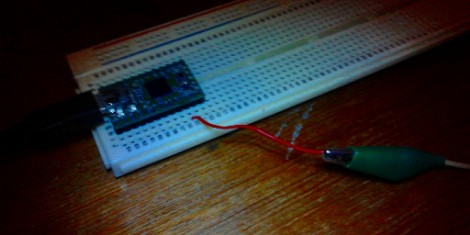
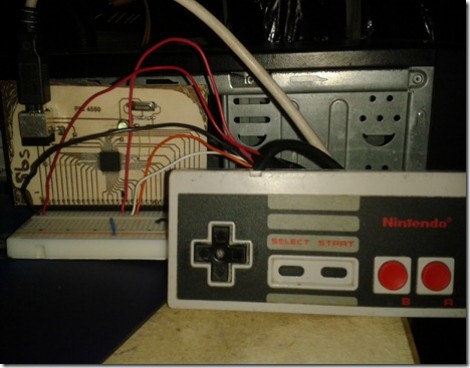
The prototype circuit can be seen above. [Andres] uses a breakout board for the PIC 18F4550 to test the circuit. The chip has native USB support, and reading the button states from the controller’s shift register is a snap. You can see him using this test rig to play Super Mario Bros. on an emulator in the video after the break.

The second iteration of the project moves from breadboard to a soldered circuit. A 18F2550 is used as it comes in a rather small DIP package. If the legs are flattened there’s room inside the controller case for it, along with a few capacitors and a crystal. The original controller cord is removed to make way for a USB cable.

Continue reading “PIC-based USB Conversion For An NES Controller”

Learning The Ins And Outs Of USB With A Simple Dev Board

We can’t count the number of projects we’ve seen on Hackaday with a USB port.  Unfortunately, most of these builds – from RepRap controllers to wireless data loggers – don’t use the full capabilities offered to them with USB. [Ben] came up with a very cool USB breakout board that allows you to explore the USB protocol with just a single inexpensive ATtiny.

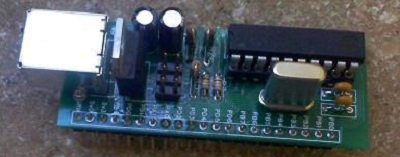
Instead of relying on an FTDI chip or otherwise sending serial data down a USB pipe, [Ben]’s project is meant to be the hardware compliment to his book on programming USB devices. His hardware board is exceedingly simple, just an ATtiny 2313, a USB port, and a handful of other components, but allows [Ben] to receive data on eight pins on a breadboard and send them over USB to a computer.

[Ben] had sent in his USB figure eight controller, a board that displays the numbers 0 through 9 according to what data is received via USB, a while ago. It’s a truly useless build aside from learning how USB works, but an excellent tool if you’d like to program your own USB device.

USB Business Card Packs An ARM Processor

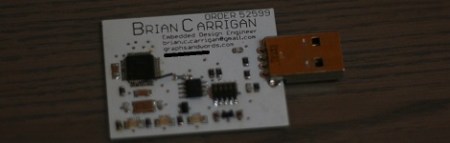
Over on the Hackaday forums, [Brian] introduced himself by showing off his new business card. Given his expertise is creating unique circuit boards, we can’t imagine a better way to show off his skills than an ARM-powered business card.

[Brian] posted a more detailed write-up on his blog that covers his development process. He decided to use a 48-pin LPC1343 ARM Cortex M3 as a USB Mass Storage Class device. All the heavy lifting for instantiating a USB storage device is handled by the microcontroller, so all [Brian] had to do was wire up a Flash memory chip and access it over an SPI interface.

The finished business card functions just like a USB thumb drive with a whopping 1 Megabyte of storage. That’s not a lot of storage, but it has more than enough room for [Brian]’s resume, a link to his website, and the full source code for his card.

PIC 18F4550 Dev Board

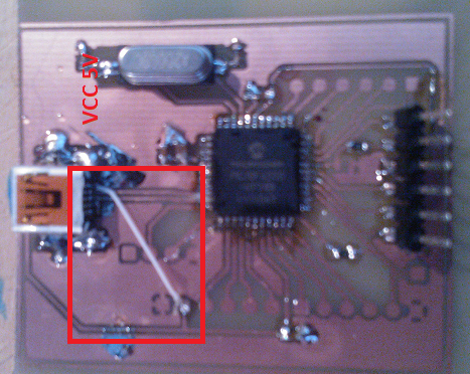
[Natsfr] was looking for a single-sided PCB to host a PIC 18F4550. Not finding one he designed his own in Kicad and is sharing (translated) the spoils of his labor.

This chip has USB capabilities which is why we see it used in a ton of projects. Almost all of them (including this USB input device post) use a very large DIP package. [Natsfr] went a different route, designing for the TQFP package to keep the drilling ot a minimum. The layout includes a crystal and USB-mini port, but it also breaks out the I/O pins on the chip. The red box above shows the quick fix he used on the VCC line as the board trace was shorting on the USB jack housing.

He didn’t drill out the holes for most of the breakout pins on this prototype. There’s just one header populated for programming the PIC chip. But he does have some plans for the first board. He’s going to use [Texan’s] AVR programming firmware for PIC to turn it into a USB AVR ISP programmer.

Automatic Speaker Control Via TV

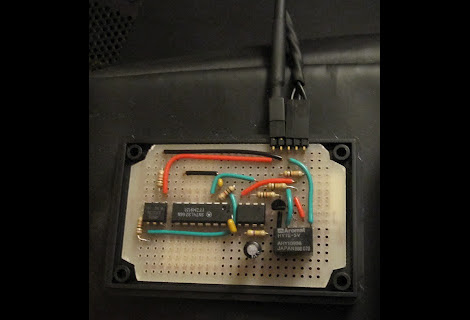
[Jon] wanted his speakers to come on and off along with his TV. The speaker heats up if left on so he didn’t want to do that. But killing the power also resets the volume level (this is an old set of PC speakers and the remote is wired, not IR) so using one of those switched power strips was out as well. He thought a bit about trying to use the power LED on the TV to build his own circuit when it dawned on him. It’s possible to monitor the USB port on the TV and use it to switch on the speakers.

The circuit above uses a couple of opto-isolators to protect both the television and the speakers. The 5V line from the USB port on the back of the TV is monitored by an XNOR gate (which helps to filter out some of the toggling at power-on). When that gate latches it activates a 555 timer which in turn fires up the speakers. Presumable this happens when power is cut as well, but we’ll let you work through the circuit logic yourself.

Work Station Includes A Smartcard Lock For USB Ports

The USB ports on this work station are locked. In order to use a USB device you’ll need to insert a Smartcard into the reader seen above. The interesting thing here is that this shouldn’t affect your ability to charge a USB device. When you visit the link above make sure to check out the worklog tab as it contains nine pages worth of build information.

The device is conceived of in two parts. There is one board which does the USB switching, and another that takes care of the Smartcard reader. That reader is based on a PIC 16F1939. It readers the Smartcard, verifies the data, then controls the USB switching board via SPI. An ADG714 chip completes the circuit on eight data lines making up the four USB ports. There is also a mechanical relay on the board which can cut USB power. Since this is separate from the data switching, the power could be left on for charging or toggled separately by a card that has permission to charge but not to use the data ports. You can see a demonstration of the system embedded after the break.

Continue reading “Work Station Includes A Smartcard Lock For USB Ports”

Reclaiming The Numpad For Laptop Users Everywhere

We have to agree with NYCResistor, the exclusion of numeric pads from laptops is a real loss for productivity. Ever try to working with a huge spreadsheet ledger without a 10-key? Sure, there are usually function key alternatives hiding somewhere on those reduced keyboards. But that’s hardly the same thing. We think it’s time to take back the numpad. This project shows you how easy it is by using some old time lab equipment to replace the missing keys.

They’re using a Teensy microcontroller board to translate the key matrix into USB inputs. Most of the work is already done for you because of the USB HID Keyboard library available for the development board. Scanning your own key matrix, or decoding the buttons from some rad hardware like this Walters 600E is up to you. A demo of the rig in action can be found after the jump.

Is there anyone else who wishes the 10-key had an ‘X’ on it for coding hex values? Perhaps that will be a future project for us.

Continue reading “Reclaiming The Numpad For Laptop Users Everywhere”