USB Man-in-the-middle Adapter

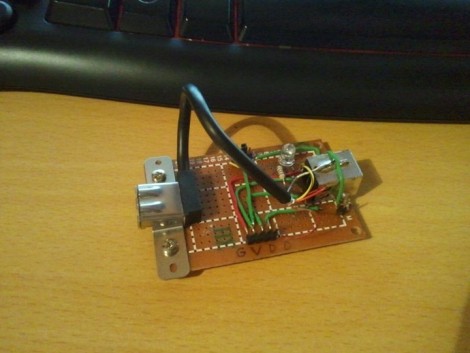
The module works as a pass through, providing access to data and power lines for a USB device. [BadWolf] built it in order to sniff out communications between peripherals and the Universal Serial Bus. For now it just provides access to the different signals, but we think there’s quite a bit of usefulness in that. First off, the power rail is mapped out to a jumper, making it dead simple to monitor the voltage stability or patch in a multimeter to get feedback on current consumption. But you can also see in the foreground that a pin socket makes it easy to tap into the board using jumper wires. We think it would be a great breadboard adapter for USB work that would continue being useful after you’ve populated your first PCB for the prototype.

[BadWolf] has other plans in store for it though. He wants to intercept and decipher the communications happening on the data lines. In the video after the break he mentions the possibility of using a Bus Pirate for this (we have our doubts about that) but plans to start his testing with an STM32 discovery kit. We can’t wait to see what he comes up with.

USB Dongle Hack Tethers DSLR Cameras At A Fraction Of The Price

wireless_usb_grip

[Neal] wanted to tether his DSLR to his computer, but he wasn’t about to fork out the $1,000 Nikon was asking for their wireless adapter. Instead, he opted to construct his own solution using two separate camera accessories which cost him less than $200 when finished.

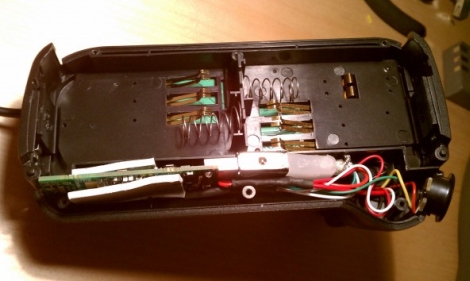
The two components he purchased were a wireless USB transmitter/receiver pair and an external battery grip. The battery grip allows him to use a pair of batteries to power his camera, while providing just enough space to wedge in the USB transmitter. He stripped the casing off the transmitter and connected it to a mini USB plug that he wired into the battery grip. He then added a small voltage regulator to step down the Nikon battery voltage from 7.2v to the 5v required by the USB transmitter.

The battery grip and transmitter were then hooked directly into his camera using the weatherproof plug built into the grip. Once he powered on his camera, it was connected to the PC immediately.

It’s amazing how the simplest hacks can save incredible amounts of money.  Nice job!

Be sure to check out the video embedded below to see the wireless adapter in action.

Continue reading “USB Dongle Hack Tethers DSLR Cameras At A Fraction Of The Price”

All About PS3 SixAxis Controller USB Communications

[Austyn] is currently working on reverse engineering a PlayStation 3 SixAxis controller’s USB communications. You may be thinking that this has already been done but [Austyn] was unable to find useful source code so he’s started his own project called libopenaxis.

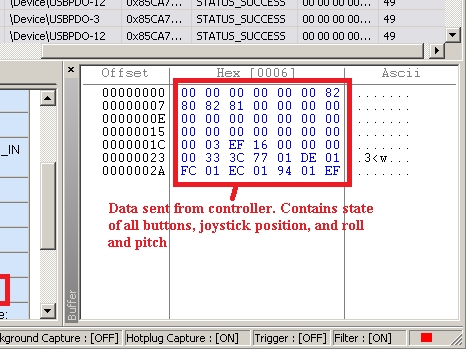
The process he used to sniff out USB communications makes for an interesting read. He utilized GlovePIE to get the USB request block for the controller. With that in hand he grabbed the Python script used in a DIY Kinect hacking tutorial to start dumping controller data. With each keypress the script reads out the full data packet, which is used to figure out how the data structures are organized.

The project has come as far as knowing all of the data types, but right now the purpose for the majority of those variables is unknown. Hopefully the blanks will be filled in over time. Two things are for sure; if you’re interested in writing Python code that can communicate with PS3 controllers this is a great source of info, and the Kinect hacking that was so fun to watch over the last few months is still bearing fruit.

Quick Hack Brings Wi-Fi To An Aging Laptop

usb_wifi_adapter

[Jarrod] has an older Compaq laptop he is still pretty keen on, but he has one niggling problem – the laptop doesn’t have a built-in wireless card. He recently changed security protocols on his home wireless network to WPA and realized that his old Linksys PC card only supports WEP. He decided it was time to find another way to connect wirelessly, so he started searching around for options.

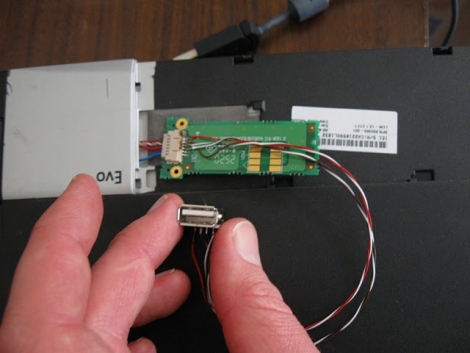
It turns out that his laptop does have the ability to accept a LCD-mounted add-on wireless card, but it costs about $100 and doesn’t support WPA. He figured that the card slipped into some sort of glorified USB port, and after disassembling the laptop, he found that he was right.

He quickly soldered a few wires and a USB adapter to the Bluetooth board that already occupied the card slot, then plugged in a wireless mouse to see what would happen. The mouse’s radio powered on without issue, and much to [Jarrod’s] delight, the port was USB 2.0 compatible.

Now that he knows the port is live, he plans on finding a small USB 802.11 G or N adapter to cram into the slot – with the deluge of miniature USB Wi-Fi adapters on the market, that shouldn’t be too hard.

Over-engineered Clock Finds Purpose As RSS Reader

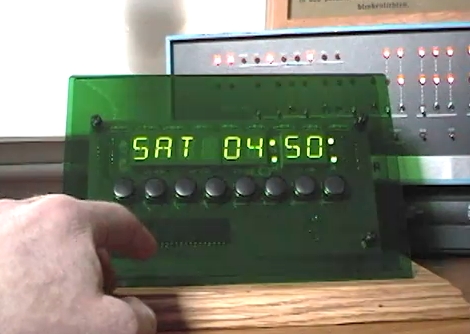
[Bob Alexander] admits that he over-engineered his clock, giving it eight control buttons, eight twelve-segment alpha-numeric display digits, a GPS module as a time source, and a beefy microcontroller to boot. But he’s found a way to get more for his money out of the device by adding RSS and weather features to it.

Since he’s using the PIC 18F4550 it’s a snap to add USB connectivity. From there he wrote a fantastic PC-side application for communicating with the display. Now he has the option of displaying time, RSS feeds, or weather by scrolling through the options with one of the buttons. Perhaps the best feature is the option to launch a browser on the PC and view the current story just by pressing a button on the display. Check out the two demos after the break; one shows the clock features and the other demonstrates the C# software.

Continue reading “Over-engineered Clock Finds Purpose As RSS Reader”

Classical’s Greatest Hits On Hardware’s Greatest Flops

We get a lot of tips about old hardware playing recognizable tunes. But once in a while one of these projects goes above and beyond the others and this is a shining example of great hardware music. [FunToTheHead] put together a music video (embedded after the break) that shows his custom MIDI device playing Bach’s Toccata in d minor. He left some comments that clue us into the way he did it. Most obviously, he’s using the stepper motors from four floppy drives to create precisely pitched sounds. Internally, a PIC 18F14K50 acts as a MIDI-over-USB device, taking commands for all 128 MIDI notes as well as the pitch bends associated with them. The first four channels are played directly on each drive and the other twelve are triaged among the hardware by the microprocessor. But for the results heard in the video you’ll need to code your MIDI files by hand.

Bonus points to the video editor for the Phantom’s floppy-laden appearance in the video… it’s good to laugh!

Continue reading “Classical’s Greatest Hits On Hardware’s Greatest Flops”

Hands-on With EZ430-F2013

At the beginning of the Month we came across a coupon code for a free eZ430-F2013 development stick. TI has given these things now and again so we took the opportunity to acquire one. It arrived yesterday and we’ve spent just a bit of time looking it over. Above you can see the first project completed; Hello World on a salvaged Nokia cell phone screen. Join us after the break for our thoughts on the device, as well as more pictures and details.

Continue reading “Hands-on With EZ430-F2013”