HID Crafting With A PIC And A Joystick

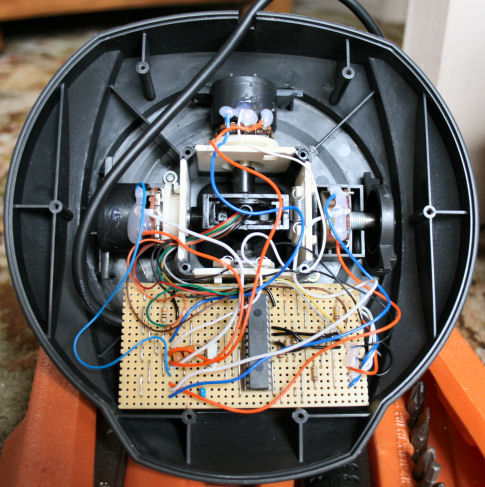
[Amr Bekhit] converted his gameport joystick to use as a USB joystick. Much like a universal USB joystick interface, this uses an additional microcontroller to talk to the serial bus while monitoring the controls on the stick. [Amr’s] discussion about creating HID descriptors is clear and easy to understand. What he’s laid out can be translated to any custom HID your heart desires. Give it a try with that old peripheral that’s been gathering dust in the corner.

Mass Storage Business Card

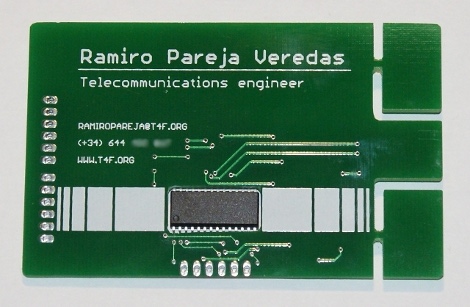
Just snap off the corners and this business card can be used as a mass storage device. Well sort of. The tab left over has four traces on the back to make it USB compatible. The PIC 24FJ64GB002 microcontroller on the card registers as a storage device and launches [Ramiro’s] resume and a cover letter loaded as an HTML file. He’s made it as useful as possible by including access to the SPI and I2C bus connections but he’s also included some firmware to act as a data logger or an oscilloscope. At about 5 euros a piece you won’t be distributing these willy-nilly but it’s not too much more than handing out breakout boards with your name all over them.

DB9 Form Factor USB-RS232 Replacement

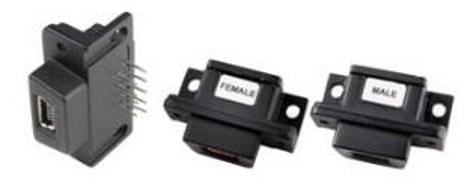
If you’re attached to that favorite DB-9 interfaced device you should look into this part. FTDI is selling a USB-RS232 adapter as a replacement for DB-9 connectors. They come with USB male or female connections depending on the application and have the same serial footprint and pinout to which you’re accustomed. Using converter cables is just fine but this simplicity requires a few minutes of desoldering, rather than redesigning, etching, and populating a board in order to give that older design built-in USB connectivity.

[Thanks Juan]

Custom Controllers For PlayStation 3

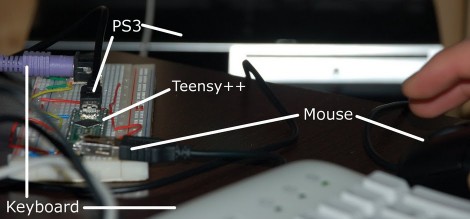
[Matlo] worked out a way to use a PS/2 Keyboard and USB mouse with a PlayStation3. The hard work is handled by a Teensy board, which is becoming a popular choice with controller hacks. It interfaces with the keyboard and mouse, translates their input, and sends joystick button commands to the PS3. He is limited to mapping the inputs from a PS3 controller but that is still enough options to work beautifully with first person shooters, especially if you’re used to gaming on a PC instead of a console. If you want to give this one a try, head over to the google code page to download the source code.

USB VU-meter

[youtube http://www.youtube.com/watch?v=jsg24MGNpRc&feature=player_embedded%5D

WaitingForFriday’s [Simon Inns] is quite possibly the USB interface and PIC master. This week he let us know about his VU-meter repurposed as a computer performance monitor using a PIC18F2550 and his open source USB Generic HID communication class. With PWM the meter’s needles and RGB LED can be accurately set and even dampened for CPU usage, network usage, HDD utilization, and even memory usage. Oddly enough, in his software we didn’t find the ability to use the device as a VU-meter – go figure.

Just The Right Controller For Any Game

[Patrice] hacked all of his classic controllers for use when playing games on an emulator. He made the base station starting with a USB gaming controller. From there he soldered wires connecting the PCB pads for all of the buttons to the pins of a d-sub connector. The same is done on the classic controller, allowing him to switch them out at will. If you do the wiring correctly you only need to configure your emulator buttons once. This is a lot easier than trying to find and use classic controller connectors but you do have to alter that vintage hardware.

PICMAN, A Diy Prototyping Setup

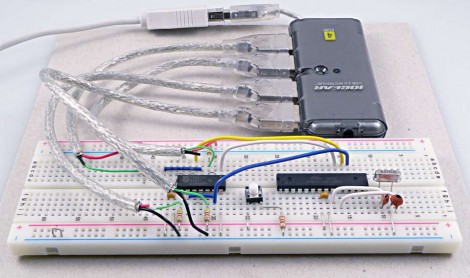
[Ytai Ben-Tsvi] wanted a rapid prototyping tool that could be easily and cheaply built at home. He came up with the PICMAN, a breadboard compatible PIC based board that has everything you need to get the ball rolling. He’s using a PIC18LF4553 which has built-in USB support that can be used with a bootloader for programming. The board also features a voltage regulator for non-USB power sources, some indicator LEDs, a user-defined button, and a reset button. The chip is on the underside and a combination of through-hole and surface-mount parts make for a one-sided PCB that can easily be etched using the toner transfer method. You will need a PIC programmer to burn the bootloader firmware the first time but once that’s done this becomes a self-contained package.