Super Refined Kinect Physics Demo

kinect_demo

Since the Kinect has become so popular among hackers, [Brad Simpson] over at IDEO Labs finally purchased one for their office and immediately got to tinkering. In about 2-3 hours time, he put together a pretty cool physics demo showing off some of the Kinect’s abilities.

Rather than using rough skeleton measurements like most hacks we have seen, he paid careful attention to the software side of things. Starting off using the Kinect’s full resolution (something not everybody does) [Brad] took the data and manipulated it quite a bit before creating the video embedded below. Skeleton data was collected and run through several iterations of a smoothing algorithm to substantially reduce the noise surrounding the resulting outline.

The final product is quite a bit different than the Kinect videos we are used to seeing, and it drastically improves how the user is able to interact with virtual objects added to the environment. As you may have noticed, the blocks that were added to the video never rarely penetrate the outline of the individual in the movie. This isn’t due to some sort of digital trickery – [Brad] was able to prevent the intersection of different objects via his tweaking of the Kinect data feed.

We’re not sure how much computing power this whole setup requires, but the code is available from their Google Code repository, so we hope to see other projects refined by utilizing the techniques shown off here.

[via KinectHacks]

Continue reading “Super Refined Kinect Physics Demo”

According To Pete – New Online Video Series

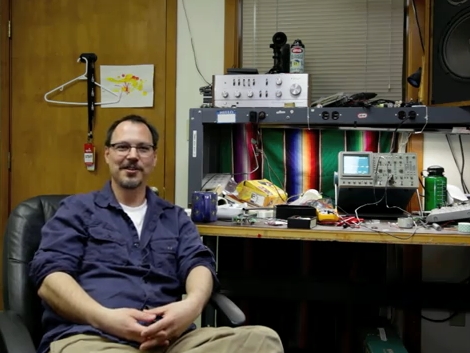
This is [Pete Dokter], the fourth employee that Sparkfun ever had and currently Director of Engineering there. As you can see, they’re not letting [Peter] come out of his hole. Instead of designing new breakout boards they’ve given him a camera that he’ll be using to record his occasional pontifications. ‘According to Pete’ will become a regularly occuring online show where he answers questions from around the Internets. We’ll admit that the first episode, embedded after the break, is a bit content thin – serving only as an introduction. But we think [Pete] has a pleasant manner and we look forward to what blossoms out of this modest beginning.

We’ve long been fans of engineering-oriented online shows such as [Dave Jones’] EEVBlog, [Bill Hammack’s] The Engineer Guy, A collaboration between [Chris Gammell, Dave Jones, and Jeff Keyzer] call The Amp Hour, [Jeri Ellsworth’s] A-Z Videos and her upcoming series, [Ben Heck’s] The Ben Heck Show…. and we could go on.

With offerings like these you don’t need to wait for traditional TV to transition to IP delivery. Just stop watching crap and start watching these interesting shows.

Continue reading “According To Pete – New Online Video Series”

DIY Camera Stabilizer Keeps Your Video Shake Free On The Cheap

diy_camera_stabilizer

Commercial vest-based camera stabilizer systems are quite expensive, sometimes bearing price tags in the $700-$800 dollar range. Photographer [Miguel Vicente] has a pretty well-stocked workshop and decided there was no way he would shell out that much cash for a rig, so he simply built his own.

“Simply” is a bit of a misstatement, to be honest. The system looks relatively complex, judging by the build videos embedded below. Constructed of steel tubing, custom-built springs, and a really snazzy vest, the rig is adjustable in almost every direction. He has tested its capacity up to 2.5 Kg (roughly 5.5 pounds), though he says it’s pretty unruly to manage at that weight. [Miguel] says that 1.5 Kg (3.3 pounds) is a far more reasonable limit, and that the stabilizer works quite well at or below that weight.

While it looks pretty good to us, he says that there are plans to improve the design even further. One particular point that he wants to address is the ability for the stabilizer to accept asymmetric camera setups, i.e. cameras with attached lighting and microphones.

Stick around to see a short “highlight” film of the build process, as well as a video featuring a more thorough documentation of the stabilizer’s construction.

Interested in more DIY camera equipment?  Check out this overhead camera dolly and this DIY gimbal mount we featured a short while back.

[via Make]

Continue reading “DIY Camera Stabilizer Keeps Your Video Shake Free On The Cheap”

Oscilloscope Thinks It’s A Video Monitor

There is nothing wrong with your television set. Do not attempt to adjust the picture.

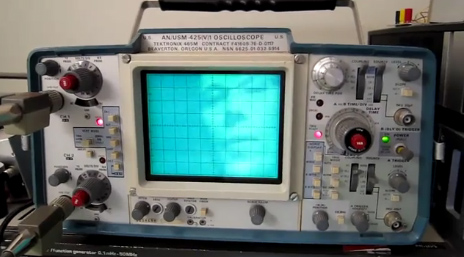
Where would we be if we listened to advice like that? [Eric] writes that with a fairly simple circuit, he’s able to split a composite video signal into its constituent X and Y ramp signals for display on his trusty Tektronix 465m. A LM1881 IC does the bulk of the heavy lifting. After running the signal through a few passive components, the generated ramp signals are ready for consumption by his venerable ‘scope. All that’s needed past that is some additional glue logic to invert the levels so the image shows up properly. The end result is a display that has an almost ethereal quality to it, like an old TV set or something out of the movie Brazil.

Hit the break to catch a video of the circuit in action.

Continue reading “Oscilloscope Thinks It’s A Video Monitor”

Kinect Two-fer: MoCap Movie And Robot Control

kinect_twofer

It’s no mystery that we like the Kinect around here, which is why we’re bringing you a Kinect two-fer today.

We have seen video hacks using the Kinect before, and this one ranks up there on the coolness scale. In [Torben’s] short film about an animation student nearly missing his assignment deadline, the Kinect was used to script the animation of a stick figure model. The animation was captured and built in Maya, then overlaid on a separate video clip to complete the movie. The overall quality is great, though you can notice some of the typical “jitter” that the Kinect is known for, and there are a few places where the model sinks into the floor a bit.

If you want to try your hand at animation using the Kinect, all of the scripts used to make the movie are available on the creator’s site for free. [via Kinect-Hacks]

Our second Kinect item comes in the form of a gesture driven Lego MindStorms bot. Using OpenNI along with Primesense for body tracking, [rasomuro] was able to use simple motions to drive his NXT bot around the house. His movements are tracked by the Kinect sensor which are translated into commands relayed to the robot via his laptop’s Bluetooth connection. Since the robot has two motors, he mapped couple of simple arm motions to drive the bot around. We’ll be honest when we say that the motions remind us of Will Farrell’s “Frank the Tank” scene in Old School, but [rasomuro] says that he is trying to simulate the use of levers to drive the bot.  Either way, it’s pretty cool.

Videos of both hacks are embedded below for your perusal.

If you are interested in seeing some more cool Kinect hacks be sure to check out this Minecraft interface trio, this cool Kinect realtime video overlay, and this Kinect-Nerf gun video game interface.

Continue reading “Kinect Two-fer: MoCap Movie And Robot Control”

Real-time Wireframe Video Effect Overlay With Kinect

linedance

[Francois] over at 1024 Architecture has been working on a project we think you’ll be likely to see in a professional music video before too long. Using his Kinect sensor, ha has been tracking skeletal movements, adding special effects to the resulting wire frame with Quartz Composer. While this idea isn’t new, the next part is. He takes the QC tweaked video stream and then projects it back over the performer using MadMapper to match the video to the body movements, recording the resultant display.

The project started out with a few hiccups, including a noticeable delay between the body tracking and the display. It caused the performer to have to move more slowly than he would like, so things had to be tweaked. [Francois] first tested the latency between his computer and the projector by displaying a timecode representation on the screen as well as via the projector. He found the projector to have a latency of 1 frame at 60 fps, which wasn’t too bad. This led him to believe the culprit was his Kinect, and he was right.  There was a 6 frame delay, so he locked the video output to 30 fps in hopes of cutting that delay in half.

The effect is slightly reminiscent of Tron, but with more distortion. We can’t wait to see more projects similar to this one in the future.

The resulting video embedded below is pretty cool in our opinion, but you can judge for yourself.

Continue reading “Real-time Wireframe Video Effect Overlay With Kinect”

Commandeering Public Video Screens: Real Or Fake?

It’s time for everyone’s favorite comment thread game: Real or Fake? This week’s edition comes in from a tip that [Phil] sent about a way to take over video screens in Times Square. Watch the video after the break to see the hackers using a two-part solution to rebroadcast video from an iPhone onto a screen in the busy urban setting. The first part is a transmitter that plugs into the iPhone, the second is a signal repeater that, when held close to a video screen, overrides the clip currently being displayed with the video from the handheld. The image above shows the repeater being floated up to the big screen using a giant red balloon which you can make out in the black bar to the left of the replayed video.

Our first thought is that someone just watched Tron: Legacy and wanted to have a little Sci-Fi fun with the Internets. We can’t imagine a hardware solution that would actually make this work, but please do share your thoughts about that in the comments. We’d suspect this is more of a video hack that uses After Effects, similar to how the stopped motion candle video of the eyelid shutter glasses videos were faked. But apparently there is a follow-up video on the way that will show how the prototype was made so we could be wrong.

update: [Phil Burgess] points out that the “repeater” looks awfully familiar.

Fake for a variety of already-stated reasons (e.g. video out the headphone jack?). But the smoking gun, watching the 720P video on YouTube, is that I plainly recognize the hardware they’re using as the “repeater”: it’s simply the internals from a Digipower JS1-V3 cell phone USB boost charger (having torn apart a few myself):

Continue reading “Commandeering Public Video Screens: Real Or Fake?”