How To Download Books From Google

If you want books, but don’t want to pay for them, there is a better way than walking into your local book store and pocketing them. Try grabbing them online, from Google!

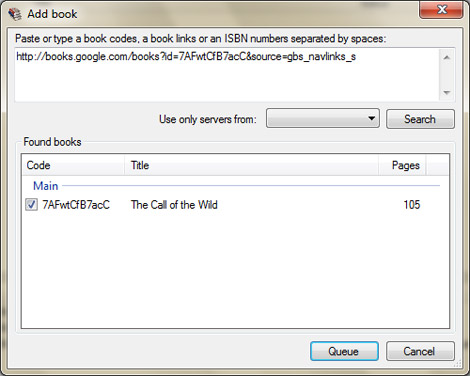
Everyone must be aware of the Google Books Library project by now. If you’re not, it’s basically a way for Google to ensure all of the world’s book content is accessible and searchable. Through the Book Project, Google works with libraries to scan and archive their older and out of print materials. Up until recently, viewers of books in the Google Library Project web space were limited to viewing books within the browser. Not any more. Google Book Downloader is a utility that rips books from Google and saves them as PDFs so you can view them with any device or desktop that can view this file format. Using Microsoft’s .NET framework, the Google Book Downloader application allows users to enter a book’s ISBN number or Google link to pull up the desired book and begin a download, fishing off with exporting the file to a PDF. Full setup instructions and download are available on Codeplex.

12kW Solar Collector

[youtube=http://www.youtube.com/watch?v=jTvAL7ty53M]

Though not much info is readly available about it on the web, [Joe Carruth] is trying to build publicity (and venture capital) for his home-built solar electric generator. At its essence, it is a Stirling dish system with an adjustable composite mirror surface. This means that instead of having to rotate the entire contraption in order to follow the Sun, [Joe] only has to make  the mirror segments pivot. A Stirling steam engine at the tip converts the energy into the movement used to generate electricity. Solar power plants (or ‘farms’) that are emerging are beginning to consider the advantages of using more efficient Stirling dishes rather than less efficient solar panels. If anyone has an idea as to how [Joe] can automate sun tracking for the mirrors, please post it in the comments. A couple more videos on the topic (in general) are available below: Continue reading “12kW Solar Collector”

Drilling Precise Grids

precision_hole_drilling

Drilling precise grids without a CNC machine can be tough to pull off. [Ookseer] has come up with a nifty method for dilling aligned holes with a drill press. He uses a right-angle jig on a Dremel drill press with stacks of business cards as spacers. The same number of cards is added between the substrate and the jig to space each new hole evenly. This method comes in handy when drilling grids in an enclosure for speakers, temperature sensors, or for an aesthetically pleasing design.

Apple Gives C64 Emulator The Boot

apple_boots_c64_emulator

After making it to the top 20 in most regions, Apple has removed the c64 emulator for the iPhone from the App Store. Apparently the thorough app review process didn’t discover that the BASIC system had not been removed from the app, but was instead merely hidden.

Another revision of the emulator has been submitted for review but how long will that take?  What is the review process for if they’re not looking deep enough to find specific functions they don’t want an app to have? Approving apps and pulling them a few days later is another Hot Coffee waiting to happen.

[POCKET GAMER via Slashdot]

Rotating IPhone Dock From Legos

lego_rotating_iphone_dock

Hot on the heels of the aluminum dock and the Lego camera mount, [Steve] sent in his iPhone/iPod Touch dock made out of Lego bricks. It’s very stylish with a black and grey theme but we think the function makes this DIY spectacular. In the design [Steve] has included the ability to rotate the cradle so that the iPhone can be presented either vertically or horizontally. A step-by-step guide is not yet available but resourceful Lego lovers should be able to build this using his flickr set.

Trim The Fat From Gmail

minimal gmail

Google’s Gmail is a highly viable option for email. With numerous features and options like widgets, a task list, labels, and chat, Gmail has a slight tendency to get overwhelming and might force us to loose focus on what it is really all about: email.

What can make Gmail better? For starters, how about no ads; they are cluttering and distracting. What about getting rid of the widgets and unnecessary features like labels and chat that we think are supposed to make us more productive but really only make us lose our focus to send, read and reply to email? Nobody knows Zen better than [Leo] at Zen Habits. We weren’t surprised that he and his friends (with Firefox and Greasemonkey) have found a way to trim all the unnecessary elements from Gmail and make it into an email powerhouse that focuses on a basic productive email client. The minimalist inbox for Gmail consists of Greasemonkey scripts for:

  • Removing gadgets
  • Hiding labels, chat and footer
  • Removing ads
  • Removing stars
  • Getting rid of the Gmail logo and searchbar
  • Removing menu navigation bar
  • Cleaning up and removing unnecessary buttons

To get started focusing on email, and only email, head on over to ZenHabits for a list of associated scripts and what exactly they can do to help you on your road to the minimalist Gmail.

Create A Temporary Phone Number With Inumbr

Maybe you don’t want that one person that has barged into your life to know your private phone number? Could be a salesperson or a co-worker who you aren’t that impressed with, but have to get in contact with. Check out inumbr.

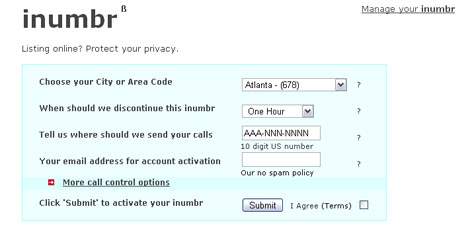
inumbr is a free online service that gives US users the ability to set up a unique phone number, have it forwarded to any number within the US and then have it set to expire without a trace when finished with it. The unique inumbr’s are never reused, and can be extended if longer terms are required. Users choose from a list of 22 area codes from major US cities like Chicago, Los Angeles and New York, select an expiry date and set a number that it should be forwarded to. When the term is up, the number is expired from the system, and never used again for any other user. If you wish to use the number at a later date, you can log into the inumbr system and reactivate it.

As we are becoming more and more mobile and security conscious, the desire for these types of services grows. A phone number can now be given out at will, with security and privacy remaining intact. Google Voice is a major player in this arena. A somewhat similar service, they allow for a unique number with voice mail to forward to other numbers at will, creating a masked or unidentified private number that can be used to give out to 3rd parties. inumbr makes this process simpler with the ability to cut off and reactivate numbers as desired.