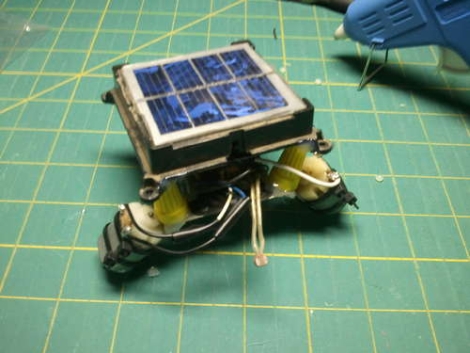
Solar-powered Junkbot

solar_powered_junkbot

Instructables user [martzsam] recently built a simple robot using miscellaneous junk he found around his house. The first parts he scrounged up were a pair of 1.5v electric motors and some wire scraps, after which, he went to work on an old garden light. He detailed how to carefully remove the light’s solar panel as well as the charging circuit, which he used to power his robot. The pieces were mounted on some old erector set parts after a bit of rewiring, then the bot was set in motion. [martzsam] also mentions that he tweaked the solar panel’s charging circuit and battery to run the motors at half speed until light is shone on the panel, at which point the robot runs at full speed.

This project would be great to do with kids as it teaches the concepts of re-purposing common household items as well as allows them to use their imagination in designing a fun, yet simple robot. Gather up some old junk and your kids/nieces/nephews and get going!

Continue reading to see a quick video of the robot in action.
Continue reading “Solar-powered Junkbot”

Thingiverse Receives First DMCA Takedown

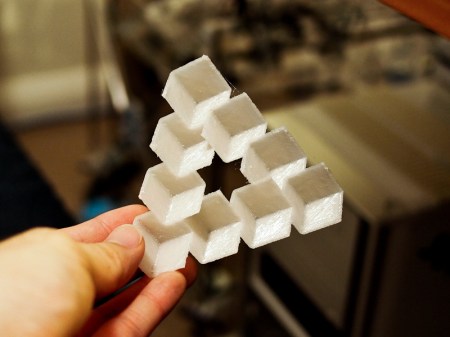
A landmark in home 3d printing was set when [Dr. Ulrich Schwanitz] sent a DMCA takedown notice to Thingiverse.com on users [artur83] and [chylld’s] takes on his Penrose triangle model. ([chylld’s] take is pictured above) While the takedown itself is highly debatable, we do think it’s cool that home 3d printing has come far enough to begin infringing on the copyrights of objects themselves. Right now media pirating has the front stage, but it’s not hard to look a little further into the crazy sci-fi universe that is our future and see a battle being fought over the rights to physical objects.

[via Thingiverse Blog]

Analog To Digital Converter Build

analogue_digital_converter

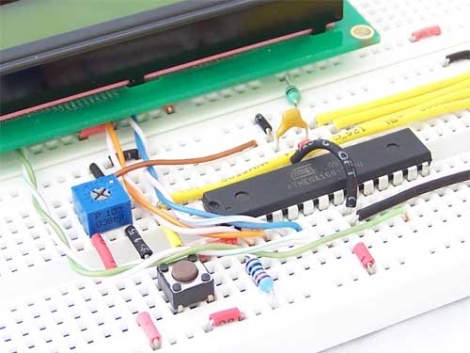
[Daniel Garcia] sent us a quick tutorial he put together demonstrating how to use an ATmega168 to perform analog to digital conversions. This timely tutorial would make for a nice complimentary project for those of you who decided to build your own digital to analog converter after reading our post from a few days ago.

The ATmega168 has six pins that are typically used for digital I/O, but they can be used for analog input as well. In his example, he uses a trimpot as an analog input device, connecting it to one of the aforementioned analog pins. Its value is returned as a 16-bit number which is then displayed on the attached LCD. The LCD display and the breadboard layout used in this project are covered in his previous writeups, so be sure to give those a read through before working through this tutorial.

Power Adapter For Digital Cameras Without An External Jack

[Kusnick] is into using digital camera rigs for book scanning. The problem is that keeping the batteries charged is a pain, but there’s no external AC adapter jack which would allow him to use the mains. His solution was to build his own adapter to replace the batteries.

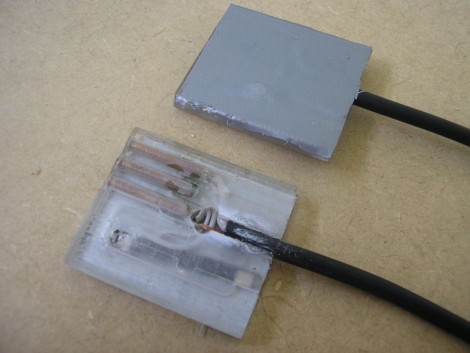
There are some fancy book scanning setups that allow you to just flip through the pages, but it’s much simpler to build a rig that uses two cameras. [Kusnick’s] setup is the latter, which means he’s found two inexpensive cameras that don’t need to be mobile. The first attempt at making an adapter featured a block of acrylic with the positive and negative contacts connected to a shielded cord which he then hooked to an external supply. The camera would come on and then turn off citing that the cameras were “for use with compatible battery only”. Turns out there’s some type of verification circuit built into the proprietary batteries. But the solution to that came quite easily; remove the circuit board from the battery and insert it in the adapter to trick the camera.

[Thanks Daniel]

Free (…as In ‘free Beer’) ARM Kit

NXP holds a lot of market share for their ARM based solutions as it is. That’s why we were a little surprised when we found a link on their website announcing that they were giving away free LPCXpresso development boards, based on their Cortex-M0 line.

Catches? Unfortunately there are a few to get the board shipped and running. In order to do so, you must…

  • register with a corporate email address
    …the promo is targeted at engineers
  • use the crippled IDE supplied with the board
    …due to hard to find (non-existent?) documentation for the integrated LPC-Link
  • upload an original video of the physical destruction of a competing board to the NXP website

While killing your Arduino may not sound like the most fun, some qualified readers may be interested in moving up to 32-bits for a price that is hard to beat.

Bluetooth Tomy Omnibot Hack


tomy_omnibot_hack

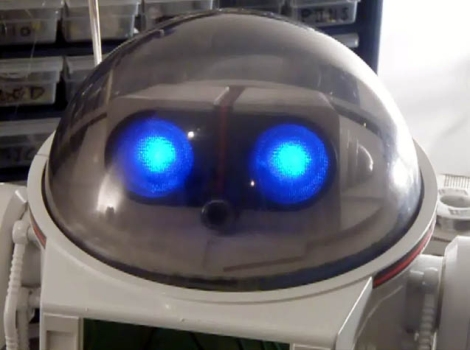
[DJ Sures] sent us his most recent hack, and it’s one that is sure to please those who enjoy a good dose of 80’s nostalgia. He located a Tomy Omnibot on eBay and snatched it up immediately. While he was waiting for it to arrive, he planned out what he would add to it once it showed up at his door. Once the robot was delivered, he cleaned it up, painted it, then got down to business.

The original robot had no ability to move its arms or head, so he immediately added servos to enable those actions. A wireless camera was inserted between the Omnibot’s eyes, and a wireless mic was mounted in his chest. He has also added some features found in his previous projects, such as voice recognition, visual recognition, voice synthesis, and the ability to remotely control the bot. He plans on adding an ultrasonic ping sensor and IR floor sensors in the near future. This is a great build so far, and it sounds like he has plenty more in store.

Be sure to stick around for a video of the robot in action, and if you are interested in some of [DJ Sures’] previous work, check these out as well.

Continue reading “Bluetooth Tomy Omnibot Hack”

Emulating Oric-1 Floppy Disk Hardware

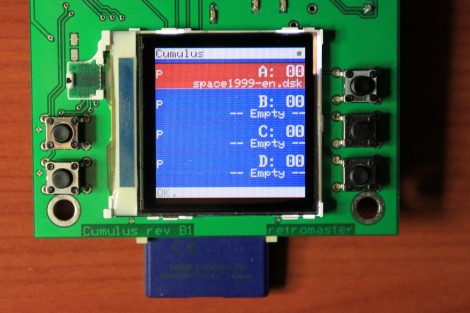
This device is called the Cumulus and it’s used to emulate the floppy disk hardware for Oric-1 and Oric Atmos computers. These 1980’s era computers included an expansion slot to which you could connect a floppy drive. That module, called a Microdisc system, also included the driver circuit which means you can’t just use a modern-day floppy drive as a replacement. [Retromaster] sidestepped the need for magnetic media all together by building an SD card interface which emulates the original module. We can tell by the use of a color screen and clean board layout that a lot of love went into the project. A CPLD implements the communications protocol used by the Microdisc system and creates all of the registers that would have been found on the original hardware. A PIC takes care of the SD card communications and the user interface.

With the exception of comforting noises, we’d bet there are few who have fond memories of using floppy disks. No wonder we’ve been seeing hacks to replace them quite a bit lately.