Chibikart: Step-by-step Lets You Build Your Own Tiny-wheel Racer

[cHaRlEsg] posted a rant, then posted full instruction on how to build this electric go-kart for yourself.

Now the rant calls this an unobtainium-free sibling to the Chibikart. We’re sad to report that the unobtainium he’s talking about are the hyper-awesome hand-wound hub motors that powered the original kart which left us dumbstruck after seeing it for the first time. But look, few mortals have the skills and tools necessary to manufacture those circular marvels of modern engineering.

So you’ll just need to settle for stuff you can buy to assemble the tiny kart seen here. It’s all-electric, using two DC motors to power the rear wheels. You can catch it racing around the hallways in the video after the break. The only thing we can see missing from the equation (other than red shells and the like) is a helmet and bumpers (you’ll see why at the end of the clip).

Continue reading “Chibikart: Step-by-step Lets You Build Your Own Tiny-wheel Racer”
This Is Not Real: Lifelike Renderings From Eagle Files

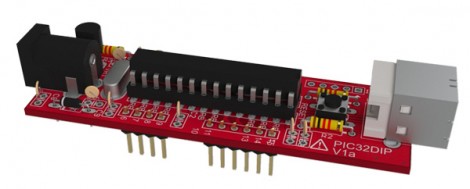
Look at it. Just look at it! This board is a lie. It doesn’t exist (at least not what’s seen in the image here). Instead this is a lifelike rendering made from Eagle CAD files.

We’ve already seen that it is rather easy to pull Eagle CAD files into Google SketchUp thanks to the EagleUp package. You’ll get a 3D model that looks quite nice but it’s hardly photo-realistic. This process starts exactly the same way. But you’re going to want to process the SketchUp file one more time.

A program called Kerkythea does this for you. It’s an open source project aimed at producing realistic renderings. It has a plugin which will process any SketchUp model and apply the textures and shadings that look so wonderful in the image above. It’s not a one-click process, but reminds us of the mountain of options you’d find in a program like Blender3D. You’ll need to map out settings for each different material you’d like to map, but the guides found at the link above do a good job of showing how it’s done.

Simple Power Adapter Thumbs Its Nose At Proprietary Connectors

[Mike Worth] wanted to use his camera for some time-lapse photography. Since it’s used to take many pictures over a long period of time, he doesn’t want to deal with batteries running low. But there’s no standard power jack on the side; instead the official charger consists of an adapter that is inserted in place of the batteries. Rather than break the bank with the special cable, [Mike] made his own battery compartment A/C adapter.

You can see that it is made up of two parts. The first is a standard wall wart that outputs the correct voltage and has an acceptable current rating. The other part is the adapter cable that connects to the camera on one end, and has a barrel jack on the other. [Mike] rolled some paperboard around a pencil until it matched the diameter of a AA battery. Once of the cylinders has a thumb tack for the negative lead, and the other uses a screw and washer for the positive side. He soldered some wire to these and he’s in business.

He must be snapping photos frequently enough to avoid the auto-shutoff feature. That or he’s disabled it with the use of some custom firmware.

Open Hardware Moodlamp With ATmega

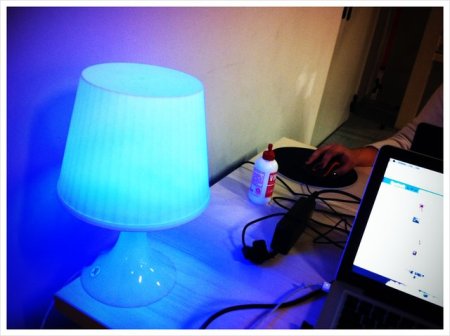
[Daniel Andrade] has built a pretty cool mood lamp circuit. He was initially inspired by [Toon Beerton’s] Ikea lamp, but found he just didn’t have the knowledge to proceed with the PIC processor. He rushed out and bought an arduino to begin learning. Once he figured out how to properly make a mood lamp function, he created a custom circuit to utilize an ATmega chip instead of his whole arduino.  He’s now on his second revision of the circuit and is sharing all the files with whoever would like to download them.

His circuit utilizes a 3wRGB LED and any ATmega 8/168/328. He has left some space for expansion on the board as well just in case you’d like to add sensors of some kind (he mentions a temp sensor).


Bike Alert Tells Drivers To Back Off

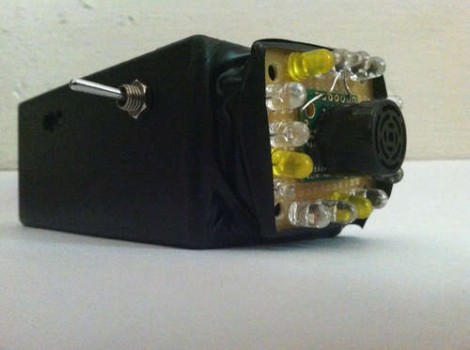
Bicycle commuters are often in a battle with drivers for space on the road. [Hammock Boy] does all of his commuting on two human-powered wheels, and is quite interested in not getting hit by a car. He decided to ply his hobby skills to build a device that helps keep him safe. It’s not just a tail light, it’s a sensor that shines brighter the closer a car is to the back of the bike.

The sensor portion is the ultrasonic range finder seen in the center of the protoboard. Surrounding it is a set of LEDs. Each is individually addressable with the whole package controlled by an Arduino. The sketch measures the distance between the back of the bike and whatever’s behind it. If there’s nothing, one Red led is illuminated. If there is an object, the lights shine brighter, and in different patterns as the distance decreases.

Certainly the next iteration could use a standalone chip without the need for the whole Arduino. This could even work with two battery cells and no voltage regulator. We also think the use of any other color than Red LEDs is suspect but we do love the concept.

Color Multiplexing Through Fiber Optics

If you want to go high bandwidth, fiber optics is the way to go. From trans-oceanic cables to the yet-unseen ‘fiber to every home,’ fiber optics allows a lot more bandwidth than a copper cable. In low-bandwidth applications, fiber optic cable transmits data using one color of light. There’s a way to get more bandwidth out of a fiber optic cable, as [Shahriar] found out while experimenting with an RGB LED.

For his experiment, [Shahriar] used a BlinkM programmable RGB LED and a Sparkfun color sensor. In fiber optic lines with one light, it is possible to send many simultaneously using PWM, but noise becomes a problem at high data rates. Using an RGB LED, [Shahriar] sends three levels of Red, Green, and Blue to transmit 9 bits at a time – perfect for sending a byte with a parity check in one quick light burst.

[Shahriar]’s technique is exactly how the pros pump massive amounts of data through a single fiber optic cable. All the tools, code, and MATLAB functions are available on [Shahriar]’s site, ready to be used by anyone wanting to experiment for themselves.

In the video after the break, [Shahriar] breaks everything down, including the tools, theory, and actual circuits. It’s an amazing video demo, so thorough we’re wondering if [Shahriar] has any teaching ambitions.

Continue reading “Color Multiplexing Through Fiber Optics”

Tunes In The Icebox

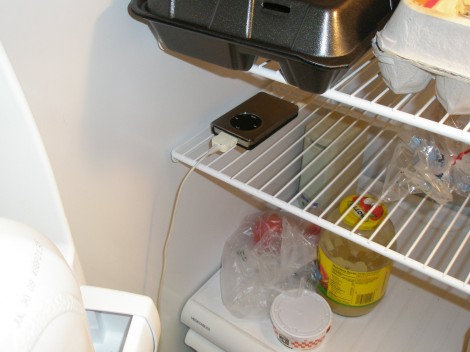
A couple of years back [Bryan’s] iPod went on the fritz. It wasn’t completely broken, as long as he kept it really cold it still worked. So what was he to do with the crippled device? We’ve all heard of elevator music. [Bryan] decided to invent refrigerator music.

First he needed some speakers. A trip to the Goodwill store netted him a pair for under $5. They need A/C power, and the project depends on sensing when the door to the refrigerator is open. He killed two birds with one stone by adding a light socket outlet adapter. This provides a place to plug in the speakers’ power adapter, and it only gets juice when the door is opened. The gimpy iPod just constantly loops through the tracks stored within, but you’ll only hear it when the door is open and the speakers receive power. Of course the iPod will eventually run its own battery down so [Bryan] ran an extension cord out the side of the door to a wall outlet. This interrupts the door seal and we wish there were another way to keep it contained within.