Tank Router Defends Your Pets?

The guys over at Section9 Hackerspace in Springfield, Missouri just finished building this treaded robot. Despite the juxtaposition of the cat, it really doesn’t defend anything. The project is a reconnaissance robot controlled over the network with video feedback.

The team started off with some lofty goals. They wanted to the robot to be able to climb stairs and to feature a detachable flying portion in order to get a better look at hard to reach places. Cost and complexity are cited as the reasons they ditched the idea of the flyer. The rest of the features came out much as planned. The motor controller for the treads is connected to an Arduino. This uses an Ethernet shield to connect to the WRT54G router which is also coming along for the ride. This seems a bit over-powered but it makes it easy to connect the webcam on the front (also via Ethernet).

On the software side they wrote an Android app. It controls the movement of the robot, as well as that of the camera. Of course you need to see where you’re going so they went the extra mile to include video from the webcam. Check out their show-and-tell video after the break.

Continue reading “Tank Router Defends Your Pets?”

Adding Features To A DX6i Transmitter

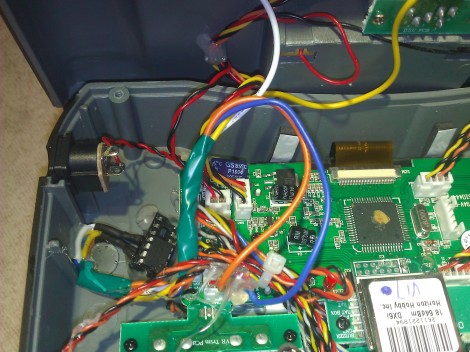
About thirty cents and some wire are all it takes to start hacking extra features into this DX6i transmitter. The DX6i is a six-channel, two-mode transmitter used to control hobby airplanes and helicopters. There are several built-in features but [Ligius] found an easy way to add a few more. In the upper left portion of the case you can see the eight-pin microcontroller he brought to the project.

It’s a PIC 10F222 mounted in a DIP socket so that it may be removed for reprogramming. The hardware page of the wiki shows the connections he made. By reading from the throttle, and tapping into the trainer wire, he is able to add features without any apparent alterations to the controller (no extra buttons, etc). You can see in the clip after the break that the throttle position when power is switched on selects between different modes. This can be the delay for turning off the LCD backlight, or presets for helicopter or airplane modes. [Ligius] thinks there’s a lot more potential here, even the possibility of fixing a bug in this particular model of transmitter.

Continue reading “Adding Features To A DX6i Transmitter”

IMac Reborn With Present-day Parts

[Paul] spent his summer bringing an iMac G3 into this decade. There’s plenty of room to work with since he removed the CRT which originally occupied most of the computer’s space. The final project is much more powerful and since he preserved most of the metal mounting parts inside it remains quite strong.

He started by swapping flat screen monitors with his Grandma (who incidentally runs Linux… nice!). She had a 15″ model which would fit nicely in the case so he upgraded her to 17″ and took the old one. With bezel removed it fits perfectly where to old tube had been. Next comes the power supply. It’s mounted on the bracket which held the back of the tube, with a bit of metal removed to clear the air intake. To mount the motherboard he fabricated a bracket at one end where the iMac’s stage drops away. In retrospect he wishes he had rotated the board to make the I/O panel more accessible. The hard drive mounts on the original carriage, and he did some creative gluing to make his replacement DVD drive align with the original optical drive opening. The finished product looks great from the front and sides, with the cables running out the back as the only indication that it’s had some major work done on it.

Mess Of Wires Is Actually A One Instruction Computer

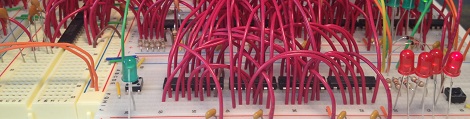
If you’re going to build your own computer, it probably wouldn’t do you well to exactly emulate the computer you’re looking at right now. The modern x86 and x64 chips that power your desktop or laptop contain hundreds of individual instructions, and the supposed RISC CPUs found in ARM-powered devices contain nearly as many. No, if you’re going to build your own computer you should make it easy on yourself, just as [Jack Eisenmann] did  when he built the DUO Compact, a one-instruction set computer made on a breadboard.

Instead of dozens or hundreds of individual instructions, a one instruction computer has – like its name implies – only one way of manipulating bits. For the DUO Compact, [Jack] chose a NOR and fork conditionally instruction. Each line of assembly written for the DUO Compact has four memory instructions: a source address, destination address, skip address 1, and skip address 2. [Jack] explains exactly how this operation can allow him to compute everything:

Three steps occur when executing the instruction:

  1. Load the byte at the first and second address. NOR these bytes together.
  2. Store the result of step 1 in the second address.
  3. If the result of step 1 was zero, then skip to the instruction at the fourth address; otherwise, skip to the instruction at the third address.

As if designing a one instruction computer built using only basic logic and memory chips wasn’t impressive enough, [Jack] went as far as writing an emulator for his system, a compiler, an operating system, and even a few programs such as a square root calculator and a text-based adventure game.

By any measure, [Jack] has finished an amazing build, but we’re blown away by the sheer amount of documentation he’s made available. He’s even gone so far as to write a tutorial for building your own DUO Compact.

You can check out a few videos of the DUO Compact after the break. Of course, if you’re looking for a project to tackle, you’re more than welcome to design a PCB from the DUO Compact schematic. We’d certainly buy one.

Continue reading “Mess Of Wires Is Actually A One Instruction Computer”

Winning A No Holds Barred Pinewood Derby

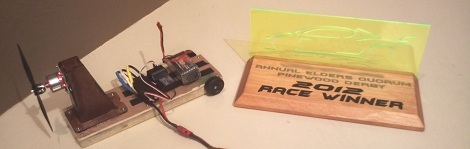
Every year, [ilektronx] and a few other guys get together and compete in a ‘no holds barred’ pinewood derby for kids of all ages. Of course this results in an immense amount of engineering to push a wooden block with wheels down a track, and [ilektronx]’s car is no exception. He won the competition with electronics from a remote control airplane bolted on to a piece of wood.

The electronics for [ilektronix]’s build are pretty much what you’d find in any small electric RC plane: a cheap transmitter / receiver combo sends commands to an ESC which powers a small brushless motor with a small LiPo battery.

Like all good pinewood derby cars, the success of [ilektronix]’s entry relied on the overall design. The wooden chassis cleverly hugs the raised guide in the track, and the slight downward angle of the propeller keeps the car from popping a wheelie when it is released from the starting line.

You can check out a video summary of the pinewood derby competition after the break. Also shown are a few of the other derby cars, including an amazing futuristic tank entry built by [Ken Cook]. [Ken] spent the better part of a year on his build, and the amazing detail of making his own tank treads by hand made him a shoe-in for the winner of the ‘style’ competition.

Continue reading “Winning A No Holds Barred Pinewood Derby”

Meet The Teensy 3.0

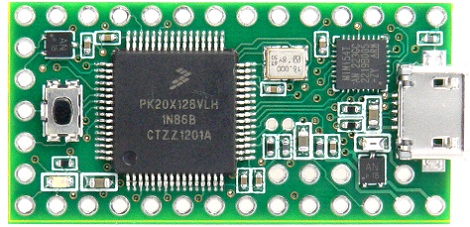
[Paul Stoffregen], the brains behind the popular and very capable Arduino-compatible Teensy development board, has offered his contribution to the explosion of ARM-powered boards with the Teensy 3.0.

The original Teensy is an AVR-based development board that goes far beyond the official Arduino offerings. The new and improved Teensy 3.0 improves upon an already wonderful platform with a 32 bit ARM Cortex-M4 microcontroller running at 48 MHz. There’s also a lot of pins available for whatever project you have in mind: the Teensy 3.0 supports 14 analog inputs, 10 PWM outputs, a USB host mode, and an I2S audio interface that will be very useful when accessing the microcontroller’s DSP functions.

There are a couple neat features on the Teensy 3.0 [Paul] somehow managed to work in. In addition to supporting a real-time clock, there are also a few extra IO pins in the middle of the board. [Paul] says the extra pins are due to Kinetis not releasing a 48 pin version of the microcontroller in time for production. It may not be what [Paul] originally had in mind, but we’ll take the upgraded board just the same.

Of course the Teensy 3.0 will be compatible with the Teensyduino Arduino IDE add-on, so if you’d like to run your Arduino sketches on a very powerful piece of hardware, this will be the board to use.

70 Watt Amp Uses An ATtiny

If you’re looking for a DIY amplifier project made with a minimum of parts, this is the build for you. [Rouslan] created a 70 watt class D amplifier using an ATtiny45 and just a few dollars worth of additional components.

A class D amplifier simply switches transistors of MOSFETs on and off very rapidly. By passing the signal produced by these MOSFETs through a low pass filter and connecting a speaker, a class D amp is able to amplify a signal very efficiently. Usually, these sort of amp builds use somewhat esoteric components, but [Rouslan] figured out how to use a simple ATtiny microcontroller to drive a set of MOSFETs.

In [Rouslan]’s circuit, the audio signal is passed into the analog input of an ATtiny45. Inside this microcontroller, these analog values are sent to the MOSFETs through a PWM output. [Rouslan] threw in a few software tricks (explained in revision 2 of his build) to improve the sound quality, but the circuit remains incredibly simple.

[Rouslan] posted a video going over the function of his ATtiny amp, and from the audio demo (available after the break), we’re thinking it sounds pretty good. Amazingly good, even, if you consider how minimalistic this 70 watt amp actually is.

Thanks [Alec] for sending this one in.

Continue reading “70 Watt Amp Uses An ATtiny”