Hacking An AC Outlet Timer For Project Use

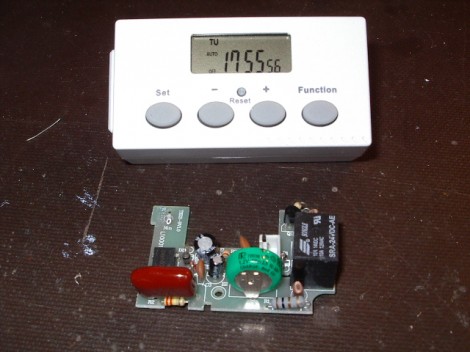
[Karl] needed a programmable real-time clock for one of his projects. He considered adding an RTC chip, LCD screen, and some buttons for use with a microcontroller. That’s not necessarily hard, but it takes time and can be considered a project in itself. Instead, he headed to the hardware store to look for a cheap solution. He was able to get this AC outlet timer for a song. It’s got everything he needs; twenty programmable on/off events, a calendar to track time and day of week, and a user interface made up of a low-power LCD and four buttons. He cracked open the case and patched into the electronics for use with any project.

You can see the solder-tab battery in the middle of the board (green coin-cell). That actually runs the timer circuitry and display. It’s topped off when the unit is plugged into mains, but [Karl] ended up replacing it with a much higher capacity AA rechargeable battery. The device works just like a thermostat, using very little power and driving a relay at the appropriate time. Batteries in thermostats seem to last forever and we can expect the same performance from this device. [Karl] rerouted the trigger signal from the relay to his own 2N2222 transistor. This way the device can switch loads running at voltages other than its own 1.2V operating level.

Stock timers are great. They’re mass-produced which makes them cheap, and you can do some interesting stuff with them. We really enjoyed see this other mechanical version hacked for hydroponic use.

Wire Loop Game Penalizes For Touches By Shrinking Your Wand

We really like this take on a conductive wire maze game. It’s the result of a 48-hour hackathon in Belgium which required that all projects stemming from the event use an Arduino. We think [Jan] and [Kristof] made perfect use of the prototyping device in the time allotted. The event organizers thought so too because this took top prize.

As you can see, the gaming area is two-sided, and consists of some copper wire bent into a maze. There’s a wand made out of a PVC pipe with a loop of braided cable running through it. The loop surrounds the copper track and each player needs to get from the beginning to the end, touching checkpoints along the way without coming in contact with the track.

Pretty standard, right? Well there’s a twist. At each checkpoint the Arduino signals a servo motor in the wand to make the loop smaller. Add to that a penalty/reward system: if you touch the track, your loop gets smaller and your opponent’s loop grows larger. Don’t miss the head-to-head action after the break.

This reminds us of that wire-based cave racer from a few years back. Continue reading “Wire Loop Game Penalizes For Touches By Shrinking Your Wand”

Kicad Symbol Generating Script Shows Promise

Kicad is a fantastic PCB layout tool. We think creating a part for use with Kicad is in many ways easier than in Eagle, but it never hurts to have a few shortcuts. Here’s a new way to quickly get your parts into the schematic editor. It’s a Python script that generates symbols from an XML input file. You create the XML file with a list of all the pins on your part and the function they will serve. The Python script will then format that as a library file which can be imported by Kicad.

It’s a little bit clunky due to the number of steps in the process. But it is possible to use a CSV file generated in a spreadsheet program to create the XML needed by the script. We’ve used the online component builder ourselves, and appreciate the possibility of mass pin assignments instead of the drop-box for every pin as used by the web interface. One time we were 20 pins into the naming process and accidentally refreshed the page… ugh!

The code is available in their git repository, with a description of the XML format, and a wiki tutorial outlining the component building process. After you give it a try we’d love to hear what you think in the comments.

Rapid Fire Update Brings Many New Features

[Shawn McCombs] has been spending some time refining his Xbox 360 rapid fire hack. This time around he’s got a lot more features, many of which we haven’t really seen before.

When we looked at the original project he had added an ATtiny85 which read a potentiometer to set the rapid fire speed for one of the buttons. This time around he’s opened up settings for individual weapons in the game. For instance, if you have a hand-gun and a rifle, you can set different rapid fire rates for each to account for the reload speed for those guns. He patched into the ring of LEDs on the controller in order to indicate which preset is currently chosen. There are three tactile switches on the underside of the controller too. One of them is a reset button which gets you back to your primary weapon and the default rapid fire rate. Settings for each weapon are saved to the EEPROM so you won’t lose them when the controller goes to sleep. Check out [Shawn’s] description of the project in the video after the break.

Continue reading “Rapid Fire Update Brings Many New Features”

384-LED Ball Receives Animation Wirelessly And Knows Its Orientation

We get a ton of tips about Kickstarter projects. Here is a great example of what we need to see in order to feature one of them. This LED Blinky Ball developed by Null Space Labs is the target of a rather ambitious fundraising campaign. But in addition to the fundraising write-up they’ve shared extensive details about the prototype.

The ball is made up of sixteen slices; each is its own circuit board hosting an LED driver. All slices use the same PCB design, but one of them has an ATmega328 populated on the board to act as master. Optional components on the master board include an accelerometer, and a Bluetooth module to receive animation data. To get the full effect of the most recent prototype you’re going to want to see the video on their Kickstarter page.

Think this ball looks familiar to you? The original design was developed by [Nikolai] as a performance piece for a friend. This version was inspired by our feature of that earlier project.

So, use this as a template if you’re planning to submit your Kickstarter links to Hackaday’s tips line. We want to juicy details on the project!

Microswitch Keyboard Gives Those Lazy Thumbs A Workout

Upon first sight there will be no doubt in anyone’s mind that this is a hacker’s keyboard. [Tim Tyler] built the odd-looking conglomeration of keys a few years ago with the goal of improving the man-machine interface. Why waste all that thumb space with just one long keyboard when you can have at least nine keys per thumb?

After some additional consideration this isn’t all that unorthodox. We’ve seen keyboards that split the hands; in fact you can buy them. This just adds the thumb matrices and that rack of programmable keys above the alpha-numeric portion. It’s rather organ-like with its multiple ranks, don’t you think? Check out the demonstration video after the break. It certainly has a keystroke sound that is all its own. The sound is different from the clackity “M” keyboard and its modern relatives thanks to the microswitches that make up each key.

Continue reading “Microswitch Keyboard Gives Those Lazy Thumbs A Workout”

Arduino Saves You A Bundle When It Comes To Guitar Pedal Effects

[Deadbird] wanted to recreate some guitar pedal effects that he heard on a music video. The thing is, you can end up spending a bundle on hardware unless you’re crafty like he was. He grabbed a Whammy 4 pedal, but decided to forego using a $125 MIDI controller and sourced an Arduino to perform MIDI-based alterations instead.

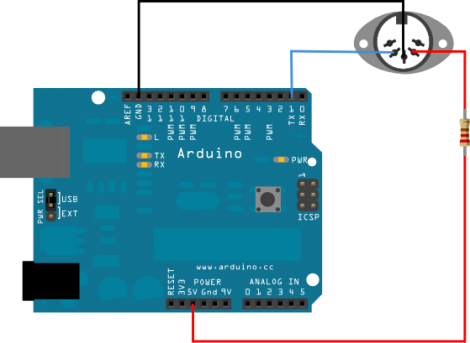
The Whammy 4 was chosen for its ability to perform the sound processing he desired, but also because it can be MIDI controller. By hooking up the Arduino to that port (as seen in the diagram above) he’s able to program changes that would be difficult or impossible with just the pedal. For instance, [Deadbird] illustrates a command which jumps from the lowest to highest setting of an effect without hitting any of the values in the middle. With that under his belt he goes about programming loops of changes with delays in between them. The best part is, you’re only limited by your ability to craft the MIDI commands as Arduino code.