3d Printer Software Tutorials

It’s no secret that the 3D printer community is extremely fragmented. With three models of RepRaps, three printer kits from Makerbot, and hundreds of ‘printers of the week,’ it’s extremely frustrating for beginners to wrap their heads around the pros and cons of each machine. The software for these printers is segmented nearly as much as the hardware itself, but thankfully [Mike] has put up a series of videos so beginners can wrap their head around all the software packages.

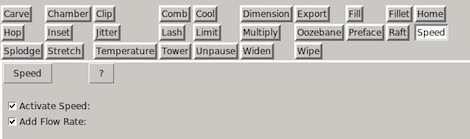
[Mike] used Alibre 3D CAD software to generate the .stl files for all his printable objects. These .stl files were converted into printer-readable GCode by the very popular Skeinforge. The GCode is sent over to [Mike]’s SUMPOD with ReplicatorG, an awesome program that serves as the front end to a printer.

Although we’d like to see a tutorial for Sfact, the new hotness in .stl to GCode conversion, [Mike] does a very good job at breaking down the complexity of Skeinforge into manageable bites.
Etching PCBs With Vinegar

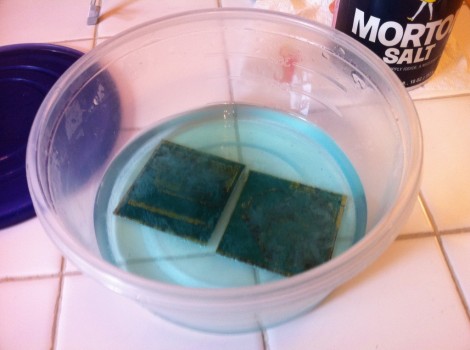
When we hear about etching PCBs at home we assume that either Ferric Chloride or Cupric Chloride were used to eat away unmasked copper from the boards. But [Quinn Dunki] just wrote up her PCB etching guide and she doesn’t use either of those. Instead, she combines vinegar, hydrogen peroxide, and salt. It’s easier to find vinegar than muriatic acid (Cupric Chloride is made using this, peroxide, and adding the copper) so this is something to keep in mind if you’re in a pinch (or a Macgyver situation).

The rest of the process is what we’re used to. She’s using photoresistant boards which can be masked with a sheet of transparency instead of using the toner-transfer method. Once they take a bath in the developer solution she puts them in a shallow dish of vinegar and hydrogen peroxide along with a teaspoon of salt. She wipes the surface with a foam brush every minute or so, and inspects them every ten minutes to see if they’re done.

She does discuss disposal. Seems that she throws the solution in the garbage after each use. The liquid will contain copper salts which are bad for wildlife. We’ve heard that you should neutralize the acid and make a block of concrete using the liquid, then throw it in the garbage. Does anyone have a well-researched, ethical, and environmentally friendly way of getting rid of this stuff?

Building A Keyboard From Scratch

After over a year of work, [dmw] is nearly done with his Humble Hacker Keyboard. It’s a keyboard that has been influenced by some pretty crazy looking designs, but meets all of [dmw]’s needs for a compact, programmer-oriented key layout that’s easy to type on.

[dmw] posted a pseudo-build log  over at the geekhack keyboard forums. Every single part of this keyboard is custom-made. The key caps were made by Signature Plastics, the case was made by Shapeways, and the custom PCB for the key switches came directly from Express PCB. The key switches are blue Alps sliders (one of the best key switches available) with a few white Alps switches taken from an old Apple keyboard.

After soldering a hundred diodes and switches, [dmw] installed a Teensy++ to convert the closing key switches to something his computer can understand. This turned out to be a perfect of the Teensy because of the USB peripheral libraries that already exist. The source is up on github, so if you’ve ever wanted to replace your Model M with something more ergonomic, here’s your chance.

Improving Your Flight Sim Experience With Hall Effect Sensors

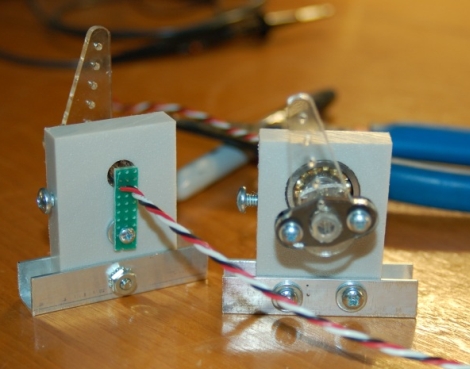
hall-effect-controls

[Gene Buckle] built himself a nice custom cockpit for playing Flight Simulator, but during use he found that the gimbal he constructed for the pitch and roll controls was nearly unusable. He narrowed the problem down to the potentiometers he used to read the angle of the controls, so he set off to find a suitable and more stable replacement.

He figured that Hall effect sensors would be perfect for the job, so he picked up a pair of Allegro 1302 sensors and began fabricating his new control inputs. He mounted a small section of a pen into a bearing to use as an input shaft, attaching a small neodymium magnet to either side. Since he wanted to use these as a drop-in replacement for the pots, he had to fabricate a set of control arms to fit on the pen segments before installing them into his cockpit.

Once everything was set, he fired up his computer and started the Windows joystick calibration tool. His potentiometer-based controls used to show a constant jitter of +/- 200-400 at center, but now the utility displays a steady “0”. We consider that a pretty good result!

[Thanks, Keith]

MITx First Course Announce – 6.002x: Circuits And Electronics

The Massachusetts Institute of Technology just announced the first course offering in their new online classes program. Great news, it’s an analog design course which is right up our alley. The prototype session will be 6.002: Circuits and Electronics.

If you’re a fan of our links posts you may remember hearing about the MITx program a month ago. After seeing the popularity of the Stanford program MIT is throwing their hat into the ring too. So what is this all about? How does it work and what will you learn? There’s bits of information all over the place. We recommend reading the news link at the top of this feature first. Next you should wade through the 6.002x FAQ and if you’re still interested there’s a big maroon enrollment button at the bottom of the course summary page.

Whew, that’s a lot of links. Anyway, expect to spend 10 hours a week on the class; but it’s all free. Future offerings will be free as well, but MIT plans transition to a pay-for-certificate option: “students who complete the mastery requirement on MITx will be able to receive the credential for a modest fee.” If you still haven’t made up your mind take a gander at the promo clip after the jump.

Continue reading “MITx First Course Announce – 6.002x: Circuits And Electronics”

Arduino Lawn Care Is Web-controlled

[Joe Fernandez] is fairly new to the hardware side of the hobby, but he seems to have easily found his way on this project. He wanted to build his own web-bridge for his Toro lawn sprinkler system. He pulled it off with style and shows off the spoils of his work in the clip after the break.

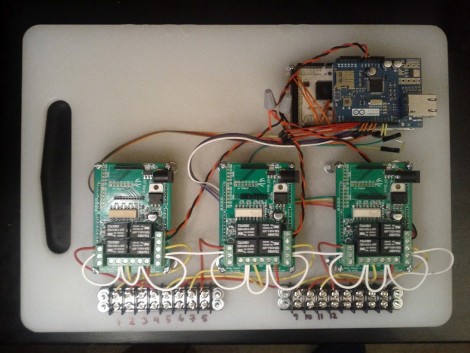
He started with an Android ADK, crafting some web magic to use a REST interface and JSON packets as a communications scheme. This makes it possible to control the system from anywhere as long as you have an Internet connection. The rest of the hardware evolved as his needs became clear. The first hunk was to add an Ethernet shield so that he didn’t need to have his Android phone connected to the system for it to work. From there he needed to control the solenoid valves on the system and grabbed three relay shields from Seeed Studios for this purpose.

As you can see, all of that hardware has a home on a polyethylene cutting board. The terminal blocks at the bottom keep the connections nice and neat as they interface with the sprinkler system. We were happy to hear that the stock controller still works, this add-on doesn’t permanently alter it in any way. That’s going to be important if he ever wants to sell the home.

Still using a traditional sprinkler instead of an in-ground system? Perhaps this variable range hack is for you.

Let There Be Light Inside Your Epilog Laser Cutter

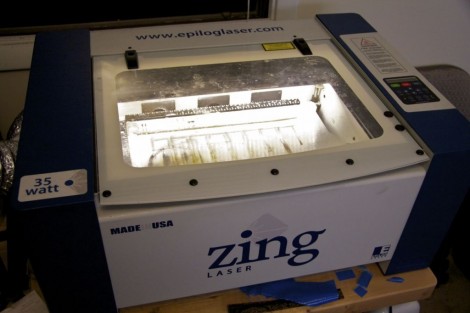
[Bradley Gawthrop’s] biggest gripe about his laser cutter is the lack of Mac support. We don’t think we’d have any gripes if we owned one of these (yeah, that’s a lie…) but we can understand his second biggest issue which is the inability to see the work piece once it’s inside the machine. He figured out a very easy way to light the area as the cutter gets to work.

It occured to him that the optical head is always directly above the part of the work piece he was interested in seeing. He had been using a flashlight to shed some light, but what if he just added lighting to that head? The circuit is certainly nothing hard; some LEDs, resistors and a power source will do the trick. But routing the power is where things get more difficult. You need flexible wiring strung just right so as not to restrict motion on the X/Y axes. Most of his time was spent routing some 14 gauge stranded speaker wire for this task. He added his own 5V DC supply to power the adhesive LED strip which enjoys a resting place on the bottom rail of the head unit. Boom, problem solved.