Retrotechtacular: The IBM System/360 Remembered

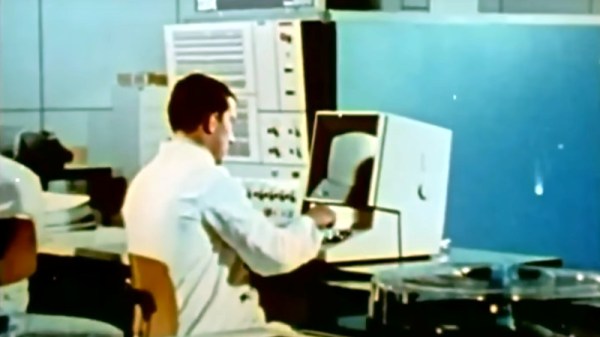
Before IBM was synonymous with personal computers, they were synonymous with large computers. If you didn’t live it, it was hard to realize just how ubiquitous IBM computers were in most industries. And the flagship of the mainframe world was the IBM System/360. For a whole generation that grew up in the late 1960s and early 1970s, a 360 was probably what you thought of when someone said computer. [Computer History Archive Project] has a loving recollection of the machine with a lot of beautiful footage from places like NASA and IBM itself. You can see the video below.

Not only was the 360 physically imposing, but it had lots of lights, switches, and dials that appealed to the nerdiest of us. The machines were usually loud, too, with a Selectric terminal, card punches and readers, noisy 9-track tape drives, and a line printer or two.

Continue reading “Retrotechtacular: The IBM System/360 Remembered”
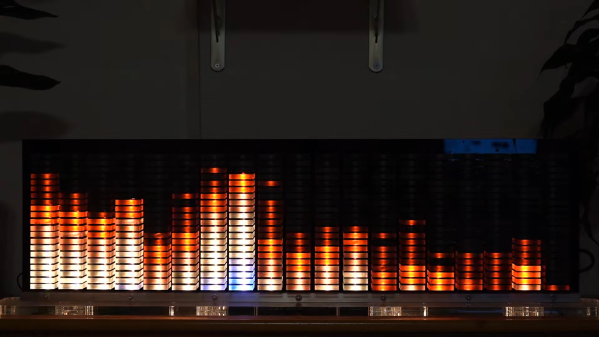
Big Audio Visualizer Pumps With The Music

A spectrum analyzer is a great way to create exciting visuals that pulse in time with music. [pyrograf] wanted a big one as a display piece, so set about whipping up something of their very own.

An ESP32 microcontroller serves as the heart of the build, with its high clock rate and dual cores making it a highly capable choice for the job. Audio from a microphone is amplified and pumped into the ESP32’s analog input. Core 0 on the ESP32 then runs a Fast Fourier Transform on the input audio in order to determine the energy in each frequency band. The results of this FFT are then passed to Core 1, which is used to calculate the required animations and pipe them out to a series of WS2812B LEDs.

Where this build really shines, though, is in the actual construction. Big chunks of acrylic serve as diffusers for the LEDs which light up each segment of the spectrum display. Combine the big pixel size with a nice smooth 30 Hz refresh rate on the LEDs, and the result is a rather large spectrum analyzer that really does look the business.

We’ve seen some similar builds over the years, too. Video after the break.

Continue reading “Big Audio Visualizer Pumps With The Music”

Round LCDs Put To Work In Rack Mount Gauge Cluster

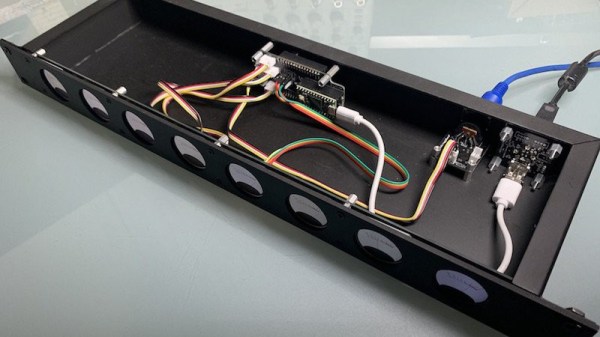
Like many of you, we’re intrigued by the possibilities offered by the availability of affordable round LCD panels. But beyond the smartwatches they were designed for, it’s not always easy to come up with an appropriate application for such non-traditional displays. Digital “steam gauges” are one of the first ideas that come to mind, so it’s perhaps no surprise that’s the direction [Tom Dowad] took his project. But rather than just one or two gauges, he decided to go all out and put eight of them in a 1U rack mountable unit.

What do you need eight faux-analog gauges for? Beats us, but that’s not our department. Now [Tom] has a whole row of indicators that can be used to show whatever it is he likes to keep an eye on. The fact that the device is actually controlled via MIDI may provide us a clue that there’s a musical component at play (no pun intended), but then, it wouldn’t be the first time we’d seen MIDI used simply as a convenient and well supported way of synchronizing gadgets. Continue reading “Round LCDs Put To Work In Rack Mount Gauge Cluster”

Absolute Encoder Teardown

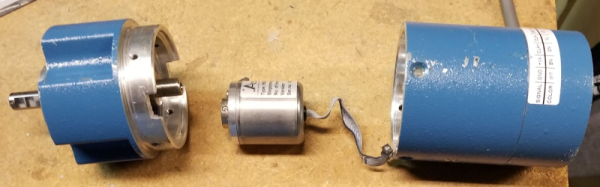
According to [Lee Teschler], the classic representation of encoders showing code rings is out of date. His post says that most industrial absolute encoders use a special magnetic sensor known as a Wiegand wire to control costs. To demonstrate he does a teardown of an encoder made by Nidec Avtron Automation, and if you’ve ever wondered what’s inside something like this, you enjoy the post.

This is a large industrial unit and when you open it up, you’ll get a surprise. Most of the inside is empty! There is a very small encoder inside. The main body protects the inside and holds the large bearings. The real encoder looks more like a toy car motor than anything else.

The inner can is nearly empty, too. But it does have the part we are interested in. There’s a Melexis Hall effect sensor The Weigand wire is a special magnetic wire with an outer sheath that is resistant to having its magnetic field reversed and an inner core that isn’t. Until an applied magnetic field reaches a certain strength, the wire will stay magnetized in one direction. When the field crosses the threshold, the entire wire changes magnetic polarity rapidly. The effect is independent of the rate of change of the applied magnetic field.

In other words, like old core memory, the wire has strong magnetic hysteresis. Between pulses from the Weigand wire and information from the Hall effect sensor, you can accurately determine the position of the shaft.

It is always amazing to us how many modern pieces of gear are now mostly empty with the size of the device being driven by physical constraints and not the electronics within.

NVIDIA Releases Drivers With Openness Flavor

This year, we’ve already seen sizeable leaks of NVIDIA source code, and a release of open-source drivers for NVIDIA Tegra. It seems NVIDIA decided to amp it up, and just released open-source GPU kernel modules for Linux. The GitHub link named open-gpu-kernel-modules has people rejoicing, and we are already testing the code out, making memes and speculating about the future. This driver is currently claimed to be experimental, only “production-ready” for datacenter cards – but you can already try it out!

The Driver’s Present State

Of course, there’s nuance. This is new code, and unrelated to the well-known proprietary driver. It will only work on cards starting from RTX 2000 and Quadro RTX series (aka Turing and onward). The good news is that performance is comparable to the closed-source driver, even at this point! A peculiarity of this project – a good portion of features that AMD and Intel drivers implement in Linux kernel are, instead, provided by a binary blob from inside the GPU. This blob runs on the GSP, which is a RISC-V core that’s only available on Turing GPUs and younger – hence the series limitation. Now, every GPU loads a piece of firmware, but this one’s hefty!

Barring that, this driver already provides more coherent integration into the Linux kernel, with massive benefits that will only increase going forward. Not everything’s open yet – NVIDIA’s userspace libraries and OpenGL, Vulkan, OpenCL and CUDA drivers remain closed, for now. Same goes for the old NVIDIA proprietary driver that, I’d guess, would be left to rot – fitting, as “leaving to rot” is what that driver has previously done to generations of old but perfectly usable cards. Continue reading “NVIDIA Releases Drivers With Openness Flavor”

Hackaday Podcast 168: Math Flattens Spheres, FPGAs Emulate Arcades, And We Can’t Shake Polaroid Pictures

Join Hackaday Editor-in-Chief Elliot Williams and Staff Writer Dan Maloney as they review the top hacks for the week. It was a real retro-fest this time, with a C64 built from (mostly) new parts, an Altoids Altair, and learning FPGAs via classic video games. We also looked at LCD sniffing to capture data from old devices, reimagined the resistor color code, revisited the magic of Polaroid instant cameras, and took a trip down television’s memory lane. But it wasn’t all old stuff — there’s flat-packing a sphere with math, spraying a fine finish on 3D printed parts, a DRM-free label printer, and a look at what’s inside that smartphone in your pocket — including some really weird optics.

Check out the links below if you want to follow along, and as always, tell us what you think about this episode in the comments below!

Direct Download link.

Continue reading “Hackaday Podcast 168: Math Flattens Spheres, FPGAs Emulate Arcades, And We Can’t Shake Polaroid Pictures”

Open Database Shares Resin 3D Printing Settings

3D printing is much like CNC milling or welding or just about any physical manufacturing process, in that good results fundamentally come down to having the right settings. In an effort to aid those working in the resin printing space, [Adam Bute] has put together a community database of resin printing settings.

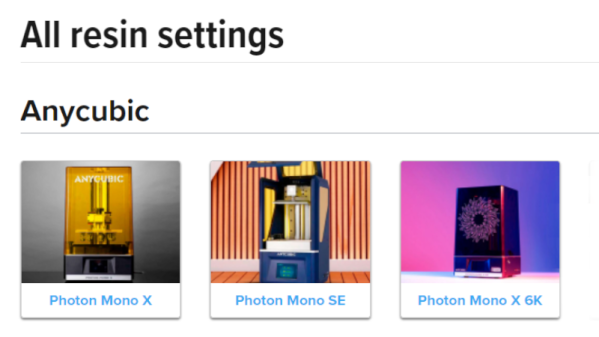
The site has sections relevant to a variety of resin 3D printers, sorted by manufacturer. Those eager to find the right settings for their given resin and printer merely need to click through and look up the appropriate data. The settings are crowdsourced, provided by manufacturers, community members, and users of [Adam]’s Maker Trainer website.

While it’s still important to run validation tests on a resin printer to get the best results, having a community-sourced list of settings can help users get up and running much more quickly than they otherwise might. It appears that community contributions can’t directly be made yet, but we suspect such a feature is in the works.

We’ve seen similar material databases before for melty-plastic printers, and those have proven to be valuable to the community. We’re sure this resin database will be received in much the same way. If you know about other great resources for printing tips and tricks, do drop us a line!