The Butt Lamp: Light From Where The Sun Don’t Shine

[Trent] is one of those guys who can make things happen. A friend of his gifted him a  mannequin derriere simply because he knew [Trent] would do something fun with it. “Something fun” turned out to be sound reactive LED butt. At first blush, this sounds like just another light organ. This butt has a few tricks up its …. sleeve which warrant a closer look. The light comes from some off the shelf 5050 style RGB LED strip. The controller is [Trent’s] own design. He started with the ever popular MSGEQ7 7 Band Graphic Equalizer Display Filter, a chip we’ve seen before. The MSGEQ7 performs all the band filtering and outputs 7 analog levels corresponding to the amplitude of the input signal in that band. The outputs are fed into an ATTiny84, which drives the RGB strip through transistors.

The ATTiny84 isn’t just running a PWM loop. At startup, it takes 10 samples from each frequency band. The 10 samples are then averaged, and used to create a noise filter. The noise filter helps to remove any ambient sound or distortions created by the microphone. Each band is then averaged and peak detected. The difference between the peak and the noise is the dynamic range for that band. The ATTiny84 remaps each analog sample to be an 8 bit value fitting within that dynamic range. The last step is to translate  the remapped signal values through a gamma lookup table. The gamma table was created to make the bright and dark colors stand out even more. [Trent] says the net result is that snare and kick drum sounds really pop compared to the rest of the music.

Without making this lamp the butt of too many jokes, we’d like to say we love what [Trent] has done. It’s definitely the last word in sound reactive lamps. Click through to see [Trent’s] PCB, and the Butt Lamp in action.

Continue reading “The Butt Lamp: Light From Where The Sun Don’t Shine”

Body Of A Trinket, Soul Of A Digispark

TrinketDigispark

Adafruit’s Trinket and digiStump’s Digispark board are rather close cousins. Both use an ATtiny85 microcontroller, both have USB functionality, and both play nice with the Arduino IDE. [Ray] is a fan of both boards, but he likes the Trinket hardware a bit better. He also prefers the Digispark libraries and ecosystem. As such, he did the only logical thing: he turned his Trinket into a Digispark. Step 1 was to get rid of that pesky reset button. Trinket uses Pin 1/PB5 for reset, while Digispark retains it as an I/O pin. [Ray] removed and gutted the reset button, but elected to leave its metal shell on the board.

The next step was where things can get a bit dicey: flashing the Trinket with the Digispark firmware and fuses. [Ray] is quick to note that once flashed to Digispark firmware, the Trinket can’t restore itself back to stock. A high voltage programmer (aka device programmer) will be needed. The flashing process itself is quite a bit easier than a standard Trinket firmware flash. [Ray] uses the firmware upload tool from the Micronucleus project. Micronucleus has a 60 second polling period, which any Trinket veteran will tell you is a wonderful thing. No more pressing the button and hoping you start the download before everything times out! Once the Trinket is running Digispark firmware, it’s now open to a whole new set of libraries and software.

Gamecube Robot Is More Than Meets The Eye

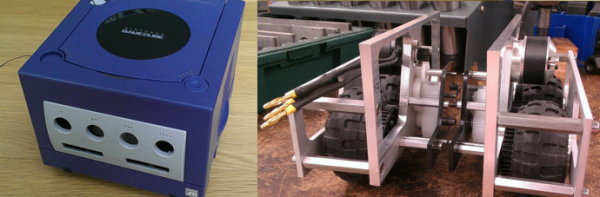
[Joshua] had his old Gamecube kicking around. Rather than let it gather dust, he took it into the machine shop at Harvey Mudd College and used its body as the shell of a mobile robot. With a bit of thought, it turns out that you can fit quite a lot inside the rather small Gamecube case. [Joshua] started with a couple of R/C plane style brushless outrunner motors. These motors generally give more torque and spin slower than their inrunner counterparts. Several thousand RPM was still too fast to directly drive the LEGO tires though. He needed a gear reduction.

Gears and tight spaces usually send people running for the SDP/SI website. We’ve used SDP/SI parts before, and have found that they make incredibly accurate gears and assemblies. Things can get pricey, however, when you’re buying two of everything. In search of a solution a bit more within his college-student-budget, [Joshua] looked at radio control servos. R/C servos have some rather strong output gears, especially the metal gear variety. Even with strong gears, parts do break in crashes, so replacement gear sets are available and cheap. [Joshua] settled on gears made for Hitec servos. His next problem was finding a pinion gear for his motors. That turned out to be easy, as 64 pitch gears commonly used in RC cars mesh with metric servo gears.  The final results are great. His robot has tons of torque and plenty of speed to zip around. The only thing it’s missing is a brain. Videos after the break.

Continue reading “Gamecube Robot Is More Than Meets The Eye”

A Quick And Simple Filament Joiner For Multi-Color Prints

Filament splicer

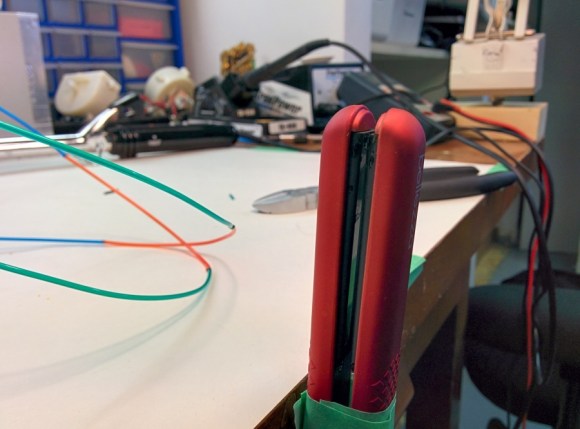
[Malcolm] was having a grand time with his new 3D printer. He was getting tired of monochromatic prints, though. Not having a machine with multiple extruders, he went looking for a way to join pieces of filament. There were a few designs on Thingiverse, but they required milled parts that he didn’t have the tools to recreate. Rather than invest in a mill, [Malcolm] decided to build his own filament joiner. He started by raiding his wife’s hair care tools. His first test was a curling iron. It had the heat, but lacked a good surface to join the filament. [Malcolm’s] next test was a ceramic hair straightener, which he found to be the perfect tool.

The splicing process is simple. Start with a hot iron, then lay two pieces of filament on top of the short end of the iron. They soften quickly and melt together. [Malcolm’s] real trick is to slightly pull the joint once the two pieces have joined. Pulling causes the filament to stretch, slightly reducing the diameter of the joint. A thinner joint helps prevent extruder jams as the joint passes through. This method works great for PLA. We’d love to see if it works for ABS as well.

Click past the break for an example piece and for [Malcom’s] instructional video.

Continue reading “A Quick And Simple Filament Joiner For Multi-Color Prints”

Lux: A 100% Open Source Camera

luxCamera

[Kevin Kadooka] recently finished his open source camera. The Lux Camera is 100% open source. Lux uses no parts from other cameras – not even a lens! To date we’ve only seen this with achieved with pinhole cameras. [Kevin] isn’t new to camera hacking. He was the man behind the Duo camera, which had a successful Kickstarter campaign in February of 2013. Duo is a DIY camera, but it still required lenses from Mamiya-Sekor, and a shutter from Seiko. Lux is a different animal. It has a manual focus 65mm f/5.6 Single Element lens. The shutter is [Kevin’s] own solenoid based leaf shutter design. Just as in the original shutter, an Arduino controls shutter operation and timing.

The main camera body and many of its parts are 3D printed. [Kevin] got some very nice quality parts from Shapeways 3D printing service. We have to say that some of the assemblies look a bit complex for desktop printers. However since everything is open source, anyone willing to put the time in could adapt them for the average RepRap or Ultimaker. [Kevin] has posted detailed build photos, as well as some photos taken with the Lux on his flickr stream. The pictures have  a decidedly holga-esque look to them, due in part to the single element lens. Even with this limitation, we love the idea of having a brownie style camera built completely from scratch.

[Ben Krasnow] Did It All For The (Perfect) Cookie

[Ben Krasnow] is on a mission. He’s looking for the perfect chocolate chip cookie. To aid him in this noble endeavor, he’s created the cookie perfection machine. From cleaning with plasma, to a DIY CT scanner, to ruby lasers, to LED contact lenses, [Ben] has to be one of the most prolific and versatile hackers out there today. What better way to relax after a hard day of hacking than to enjoy a glass of milk and a perfect chocolate chip cookie?

This is actually an update to the machine we first saw back in 2012. [Ben] has loaded his machine up with ingredients, and has everything under computer control. The machine will now dispense the exact amount of ingredients specified by the computer, measured by a scale. Everything happens one cookie at a time. The only downside is that the machine doesn’t have a mixer yet. [Ben] has to mix a single cookie’s worth of dough for every data point. His experiments have returned some surprising results. Too little flour actually results in a crisper cookie, as the wetter dough spreads out to a thinner layer. [Ben] also found that adding extra brown sugar also doesn’t result in a more chewy cookie. Even though he’s still in the early experimentation phases, [Ben] mentions that since it’s hard to make a bad chocolate cookie, even his failures taste pretty good.

Continue reading “[Ben Krasnow] Did It All For The (Perfect) Cookie”

R/C Rock Crawler Prepped To Become Stair Climbing Robot

rc-robot-frame

[Starlino] is working on an autonomous mobile robot. Like many before him, he looked to the radio controlled car world for a base frame. He found a good candidate in a rock crawler model called “Mad Torque”. Crawlers have been around for years, but they’ve recently been getting more popular. As always, popularity leads to lower priced entry-level models, which puts this crawler at a reasonable price for a robot frame. As the name implies, rock crawlers are all about crawling. Relatively low speeds, locked differentials, four-wheel drive, and (optional) four-wheel steering.

Of course, [Starlino] had to test drive his frame out before tearing it down to install electronics. As long time R/C modelers ourselves, we can’t blame him. Testing uncovered one major problem. The Mad Torque wasn’t quite mad enough to climb the stairs in his house. The front tires would grab and pull over the first step, but the wheelbase wasn’t quite long enough for the rear wheels to grab hold.

[Starlino’s] solution was to extend the wheelbase. For most 4WD R/C cars or trucks this would be a major problem, as the motors are mounted amidships. An extended wheelbase would mean also extending the drive shafts or belts. This isn’t a problem with rock crawlers. Crawlers need to support huge amounts of suspension articulation. Rather than create complex drive linkages, the common design is to place an electric motor on each axle. This isn’t the greatest idea in terms of unsprung mass, but it does make for easy wheelbase changes. [Starlino] found that the design was so modular he could bolt a second chassis up to the original. The new rear chassis bolted to the front at the top shock mounts. An extra set of battery brackets formed a lower brace. The new extended truck was long enough to clear the steps, though it does still struggle a bit, as can be seen in the video. We think larger diameter tires might help a bit here. [Starlino’s] next step is to ditch the R/C unit and give this ‘bot a brain!

Continue reading “R/C Rock Crawler Prepped To Become Stair Climbing Robot”