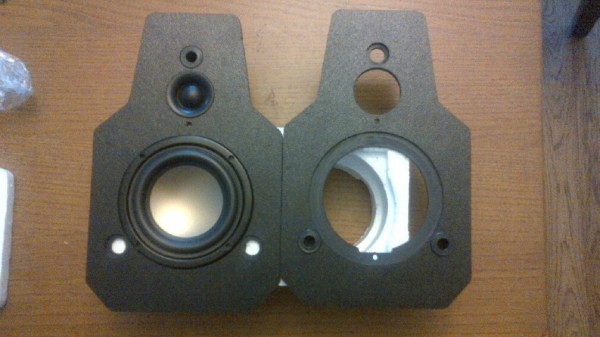
DIY Speaker Build

There is something refreshing about a neat, portable audio hack – especially one than involves making a DIY Speaker Box from scratch. [Dave] had some time to spare and his ShapeOko was lying idle and hankering for some attention. He needed a small speaker that he could place outside when entertaining guests. After some quick homework, he zeroed in on the speakers he would use.

Using some online resources , he did some basic math to figure out the box size and shape, but then eventually threw caution to the wind and went ahead with the design he had in mind. Most speaker box builds use some form of wood or MDF. [Dave] had 9mm thick ABS sheets lying around and decided to use them instead. He used an interesting technique for putting the box together. The front and rear panels had slots milled in to them to follow the shape of the side panels. The two side panels had strategically cut slots half way through the thickness of the ABS to make it easier to heat bend them. He then used a heat gun to bend the side panels to fit them to the slots on the front and back panels. In the end, we’re guessing he used just four pieces of ABS to build a complex shape. Since the HiVi B3N speakers are full range, he also built a 1st order crossover to make sure the highs were diverted to the tweeters. All in all, a neat, clean build.
OK Google, Open Sesame

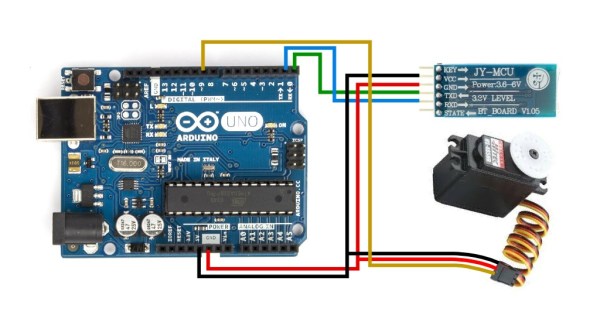
There are a myriad of modern ways to lock and unlock doors. Keypads, Fingerprint scanners, smart card readers, to name just a few. Quite often, adding any of these methods to an old door may require replacing the existing locking mechanism. Donning his Bollé sunglasses allowed [Dheera] to come up with a slightly novel idea to unlock doors without having to change his door latch. Using simple, off the shelf hardware, a Smartwatch, some code crunching and a Google Now app, he was able to yell “OK Google, Open Sesame” at his Android Wear smartwatch to get his apartment  door to open up.

The hardware, in his own words, is trivial. An Arduino, an HC-05 bluetooth module and a servo. The servo is attached to his door latch using simple hardware that looks sourced from the closest hardware store. The code is split in to two parts. The HC-05 listens for a trigger signal, and informs the Arduino over serial. The Arduino in turn activates the servo to open the door. The other part is the Google Now app. Do note that the code, as he clearly points out, is “barebones”. If you really want to implement this technique, it would be wise to add in authentication to prevent all and sundry from opening up your apartment door and stealing your precious funky Sunglasses. Watch a video of how he put it all together after the break. And if you’re interested, here are a few other door lock hacks we’ve featured in the past.

Continue reading “OK Google, Open Sesame”

Nordic NRF24L01+ – Real Vs Fake

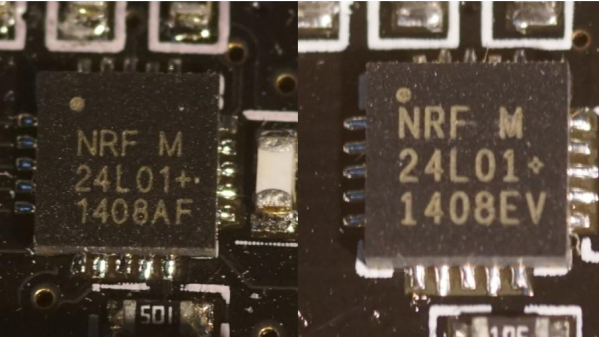
[zeptobars], the folks behind all the decapping hard work and amazing die shots are at it again. This time they decided to look under the hood of two identical looking Nordic nRF24L01+ chips.

The nRF24L01+ is a highly integrated, ultra low power (ULP) 2Mbps RF transceiver IC for the 2.4 GHz ISM (Industrial, Scientific and Medical) band. Popular, widely used and inexpensive – and the counterfeit foundries are drawn to it like honey bees to nectar. But to replicate and make it cheaper than the original, one needs to cut several corners. In this case, the fakes use 350 nm technology, compared to 250 nm in the original and have a larger die size too.

These differences mean the fakes likely have higher power usage and lower sensitivities, even though they are functionally identical. The foundry could have marked these devices as Si24R1, which is compatible with the nRF24L01 and no one would have been wiser. But the lure of higher profits was obviously too tempting. A look through Hackaday archives will dig up several posts about the work done by [zeptobars] in identifying fake semiconductors.

Making A Homemade Stephen Hawking

It isn’t easy communicating when you have any form of speech impairment. In such cases, a Speech-generating device (SGD) becomes essential to help you talk to the world. When coupled with other ailments that limit body movement, the problem becomes worse. How do you type on a keyboard when you can’t move your hands, and how do you talk when your voice box doesn’t work. Well known Scientist Stephen Hawking has been battling this since 1985. Back then, it took a lot of hardware to build a text entry interface and a text to speech device allowing him to communicate.

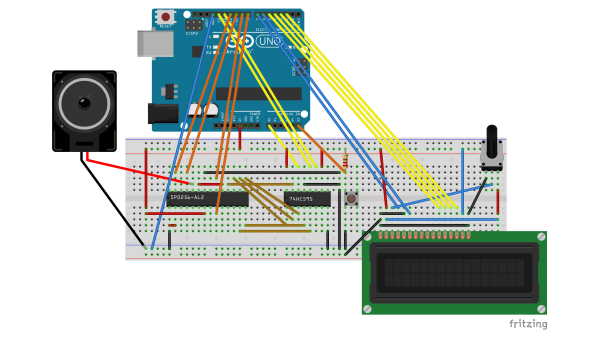
But [Marquis de Geek] did a quick hack using just a few parts to make a Voice Box that sounds like Stephen Hawking. Using an arcade push button to act as a single button keyboard, an Arduino, a 74HC595 shift register, a 2-line LCD, and the SP0256 hooked to an audio amplifier / speaker, he built the stand-alone speech synthesizer which sounds just like the voice box that  Stephen Hawking uses. Although Dr. Hawking’s speech hardware is quite complex, [Marquis de Geek]’s hack shows that it’s possible to have similar results using off the shelf parts for a low cost solution.

There aren’t a lot of those SP0256-AL2 chips around. We found just a couple of retailers with small stock levels, so if you want to make one of these voice boxes, better grab those chips while they last. The character entry is not quick, requiring several button presses to get to the character you want to select. But it makes things easier for someone who cannot move their hands or use all fingers. A lot of kids grew up using Speak and Spell, but the hardware inside that box wasn’t the easiest to hack into. For a demo of [Marquis de Geek]’s homemade Hawking voice box, check the video below.

Continue reading “Making A Homemade Stephen Hawking”

ESP8266 ESP07 Module DoA Fix

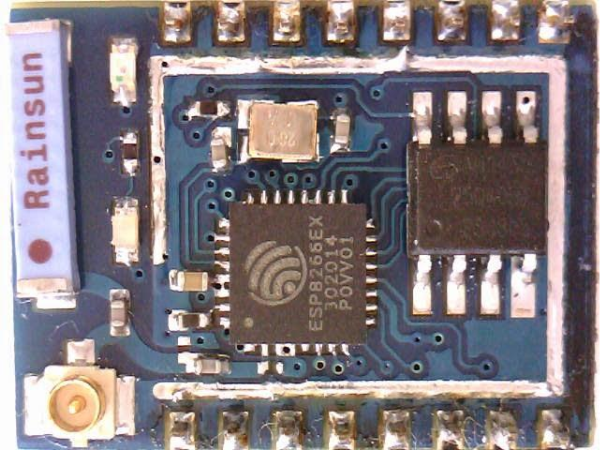
It seems the Far-East factories can’t churn out ESP8266 based modules fast enough to feed all the world’s hackers. Well, Pick-n-Place machines are human too, so it’s not too long before you end up with a messed up batch from a factory. [Tracker Johnny] found a bunch of ESP07 modules which had their resonator mounted the wrong way around, effectively making them DoA. The resonator mounting isn’t consistently wrong too – most have reported them 90 deg offset, while others had them 180 deg. off.

Unfortunately, you need some tools and skills to fix the error. The ESP07 modules have a metal shield which needs to be removed to access the resonator. This is best done using a hot air gun. With the cover removed, you need to de-solder the resonator, and put it back in the right orientation as shown in the pictures on [Tracker Johnny]’s blog. You can find other people reporting the same fault at this forum thread. Coming in the wake of the problem with magic smoke from ESP8266 based ESP01 modules we reported earlier, it seems obvious that quality comes at a cost.

Turn Your BeagleBoneBlack In To A 14-channel, 100Msps Logic Analyzer

The BeagleBoneBlack is a SoC of choice for many hackers – and quite rightly so – given its powerful features. [abhishek] is majoring in E&E from IIT-Kharagpur, India and in 2014 applied for a project at beagleboard.org via the Google Summer of Code project (GSoC). His project, BeagleLogic aims to realize a logic analyzer using the Programmable Real-Time units on board the AM335X SoC family that powers the BeagleBone and the BeagleBone Black.

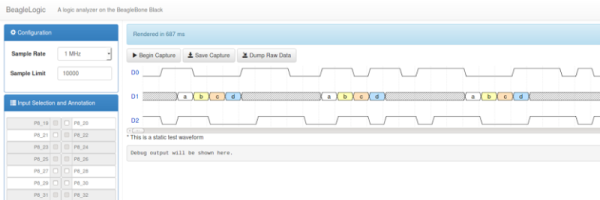
The project helps create bindings of the PRU with sigrok, and also provides a web-based front-end so that the logic analyzer can be accessed in much the same way as one would use the Cloud9 IDE on the BeagleBone/BeagleBone Black to create a new application with BoneScript.

Besides it’s obvious use as a debugging tool, the logic analyzer can also be a learning tool that can be used to understand digital signals. BeagleLogic turns the BeagleBone Black into a 14-channel, 100Msps Logic Analyzer. Once loaded, it presents itself as a character device node /dev/beaglelogic. In stand-alone mode, it can do binary captures without any special client software. And when used in conjunction with the sigrok library, BeagleLogic supports software triggers and decoding for over 30 different digital protocols.

The analyzer can sample signals from 10Hz upto 100MHz, in 8 or 16 bits and up to a maximum of 14 channels. Sample depth depends on free RAM, and upto 320MB can be reserved for BeagleLogic. There’s also a web interface, which, once installed on the BeagleBone, can be accessed from port 4000 and can be used for low-volume captures (up to 3K samples).

[abhishek] recently added the BeagleLogic Cape which can be used to debug logic circuits up to 5V safely. Source files for BeagleLogic as well as the Cape are available via his github repos. [abhishek] blogged about his project on his website where there’s a lot more information and links to be found. Catch a video of BeagleLogic after the break.

Continue reading “Turn Your BeagleBoneBlack In To A 14-channel, 100Msps Logic Analyzer”

Blackboard Digitization For Under $40

Digital White/Black Boards or “Smart Boards” are very useful in modern classrooms, but their high cost often makes it difficult to convince administrators from loosening their purse strings. Cooper Union’s 2nd annual HackCooper event in New York wanted students to design and build hardware and software projects that both solve real problems and spark the imagination. At the 24 hour hackathon, the team of [harrison], [david] and [caleb] decided to put together a low-cost and simple solution to digitizing classroom black board content.

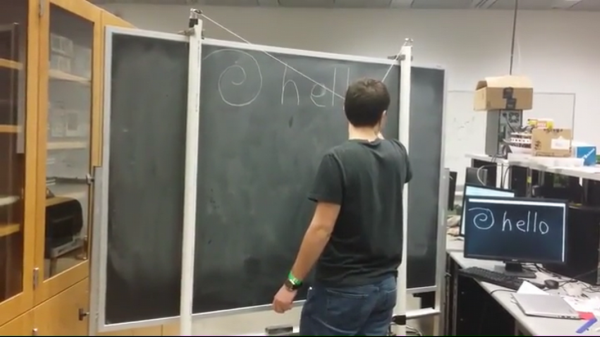
A chalk-holder is attached to two strings, each connected over a pulley to a weight. The weights slide inside PVC pipes at the two sides of the black board. Ultrasonic sensors at the bottom of each tube measure the distance to the weights. The weights sit in static equilibrium, so they serve the purpose of keeping the string taut without negatively interfering with the writer.

With a couple of calibration points to measure the extent of displacement of each weight, board width can be determined, making it easy to adapt to different sizes of boards. Once calibrated, the system can determine position of the chalk over the board based on some trigonometrical calculations. Since they had just 24 hours to hack the system together, they had to use a hand operated radio with a couple of buttons to provide user control. Pressing the “Write” button starts transmitting chalk movements to the digital screen. A second button on the radio remote serves to “Erase” the digital screen. After receiving the chalk position data, they had to do a fair amount of processing to eliminate noise and smooth out the writing on the digital screen.

A server allows the whole class to receive the chalk board data in real time. After each “Erase” command, the chalk board state is saved and logged on the server, thus allowing previous content to be viewed or downloaded. If only text is written, optical character recognition can be used to further digitize the content.

What makes the project really useful is the low cost. The sensors cost a dollar. The other parts – PVC pipe, weights/pulleys, Arduino and the Radio key fob – were all bought for under 40 dollars. For some additional cost (and maybe more time in their case) they could have automated the detection of when the chalk was actually doing the writing. The team have made their code available on Github. For a Chalk board at the other end of the cost spectrum, check this one out. Video below.

Continue reading “Blackboard Digitization For Under $40”