Hackaday Prize Entry: SunLeaf

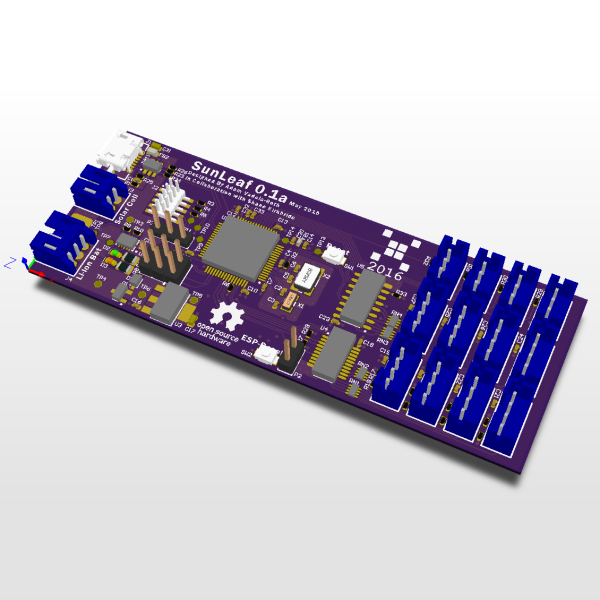
If there’s one place where the Internet of Things makes sense, it’s agriculture. From vast fields of soybeans, corn, and a different variety of corn, to the backyard garden, knowing how much sun, and rain crops get can vastly increase yields. For their Hackaday Prize project, [Adam] and [Shane] are building  a board designed explicitly for plants. It’s called the SunLeaf, and it has all the sensors and radios a good remote sensing board needs.

The SunLeaf is built around an ARM Cortex M4 microcontroller with an ESP8266 module for WiFi connectivity. Sensors are important for any remote sensing board, and for this the guys are going with SeeedStudio Grove connectors, providing four UARTs, four I2C, and four analog ports.For remote sensing applications, you generally can’t rely on mains power, so SunLeaf includes a port for a solar panel and a battery charger.

Although this project was originally a redesign of [Adam] and [Shane]’s Hackaday Prize entry from last year, what they’ve come up with is a great device for data logging, autonomous control, and environmental sensing for anything, from farms to weather stations.


The HackadayPrize2016 is Sponsored by:

Crowdfunding: A Wireless Oscilloscope

One of the most ingenious developments in test and measuring tools over the last few years is the Mooshimeter. That’s a wireless, two-channel multimeter that can measure voltage and current simultaneously. If you’ve ever wanted to look at the voltage drop and power output on a souped up electrified go-kart, the Mooshimeter is the tool for you.

A cheap, wireless multimeter was only the fevered dream of a madman a decade ago. We didn’t have smartphones with Bluetooth back then, so any remote display would cost much more than the multimeter itself. Now this test and measurement over Bluetooth is bleeding over into the rest of the electronics workbench with the Aeroscope,  a wireless Bluetooth oscilloscope.

[Alexander] and [Jonathan], the devs for the Aeroscope got the idea for this device while debugging a mobile robot. The robot would work on the bench, but in the field the problem would reappear. The idea for a wireless troubleshooting tool was born out of necessity.

The specs for the Aeroscope are about equal to the quite capable ‘My First Oscilloscope’ Rigol DS1052E. Analog bandwidth is 100MHz, sample rate is 500 Msamples/second, and the memory depth is 10k points. Resolution per division is 20mV to 10V, and the Aeroscope “Deluxe Package” that includes a few leads, tip, clip, USB cable, and case is about the same price as the Rigol 1052E. The difference, of course, is that the Aeroscope is a single channel, and wireless. That’s fairly impressive for two guys who aren’t a team of Rigol engineers.

As is the case with all Bluetooth test and measurement devices, the proof is in the app. Right now, the Aeroscope only supports iOS 9 devices, but according to the crowdfunding campaign, Android support is coming. Since the device is Open Source, you can always bang something out in Python if you really need to.

While this is a crowdfunding campaign, it’s hosted on Crowd Supply. Crowd Supply isn’t Indiegogo or Kickstarter; there are people at Crowd Supply vetting projects. The campaign still has a month to go, but the first few pledges are putting the Aeroscope right on track to a successful campaign.

Hackaday Prize Entry: A 400MHz Modem

The Internet of Things has been presented as the future of consumer electronics for the better part of a decade now. Billions have been invested, despite no one actually knowing what the Internet of Things will do. Those billions need to go somewhere, and in the case of Texas Instruments, it’s gone straight into the next generation of microcontrollers with integrated sub-GHz radios. [M.daSilva]’s entry to the 2016 Hackaday Prize turns these small, cheap, radios into a portable communicator.

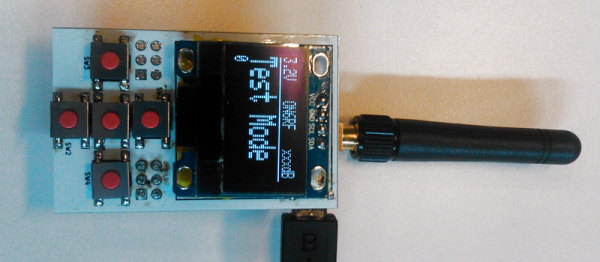
This ‘modem for the 400 MHz band’ consists simply of an ATmega microcontroller, TI’s CC1101 sub-GHz transceiver, an OLED display, and a UHF power amplifier. As far as radios radios go, this is as bare bones as it gets, but with the addition of a USB to serial chip and a small program this radio can send messages to anyone or anything in range. It’s a DIY pager with a couple chips and some firmware, and already the system works.

[M.daSilva] has two use cases in mind for this device. The first is an amateur radio paging system, where a base station with a big power amp transmits messages to many small modules. The second use is a flexible mdoule that links PCs together, using Ham radio’s data modes. With so many possibilities, this is one of the best radio builds we’ve seen in this year’s Hackaday Prize.

The HackadayPrize2016 is Sponsored by:

Hackaday Prize Entry: A Raspberry Pi Project

There’s no piece of technology that has been more useful, more influential on the next generation of sysadmins and engineers, and more polarizing than the Raspberry Pi. For $35 (or just $5), you get a complete single board computer, capable of running Linux, and powerful enough to do useful work. For the 2016 Hackaday Prize, [Arsenijs] has created the perfect Raspberry Pi project. It’s everything you expect a Pi-powered project to be, and more.

While the Raspberry Pi, and the community surrounding the Raspberry Pi, get a lot of flak for the relatively simple approach to most projects which are effectively just casemods, critics of these projects forget the historical context of tiny personal computers. Back in the early ‘aughts, when Mini ITX motherboards were just being released, websites popped up that would feature Mini ITX casemods and nothing else. While computers stuffed into an NES, an old radio, or the AMD logo are rather banal projects today, I assure you they were just as pedestrian 15 years ago as well. Still, the creators of these Mini ITX case mods became the hardware hackers of today. It all started with simple builds, a Dremel, and some Bondo.

[Arsenijs] takes his Raspberry Pi project a bit further than a simple casemod, drawing influence from a Raspberry Pi smartphone, a Raspberry Pi security system, a Portable Raspberry Pi, and a Raspberry Pi wrist computer. These are all excellent projects in their own right, but [Arsenijs] is putting his own special twist on the project: he’s using a Raspberry Pi, and a few Raspberry Pi accessories.

While this project is first and foremost a Raspberry Pi project, [Arsenijs] isn’t limiting himself to the platform with the Broadcom chip. The team behind this Raspberry Pi project was busy porting the project to Odroid when the Banana Pi came out. This changed everything, a refactor was required, and then the Orange Pi was announced. Keeping up with technology is hard, and is a big factor in why this Raspberry Pi project hasn’t delivered yet. You can say a lot of things about the Raspberry Pi foundation, but at least their boards make a good attempt at forward compatibility.

Already [Arsenijs]’ Raspberry Pi project is one of the more popular projects on Hackaday.io, and is in the running for being one of the most popular projects in this year’s Hackaday Prize. Whether that popularity will translate into a minor win for this year’s Hackaday Prize remains to be seen, but it seems for [Arsenijs] that doesn’t matter; he’s already on the bleeding edge of Raspberry Pi projects.

The HackadayPrize2016 is Sponsored by:

Books You Should Read: The Car Hacker’s Handbook

I just had my car in for an inspection and an oil change. The garage I take my car to is generally okay, they’re more honest than a stealership, but they don’t cross all their t’s and dot all their lowercase j’s. A few days after I picked up my car, low and behold, I noticed the garage didn’t do a complete oil change. The oil life indicator wasn’t reset, which means every time I turn my car on, I’ll have to press a button to clear an ominous glowing warning on my dash.

For my car, resetting the oil life indicator is a simple fix – I just need to push the button on the dash until the oil life indicator starts to blink, release, then hold it again for ten seconds. I’m at least partially competent when it comes to tech and embedded systems, but even for me, resetting the oil life sensor in my car is a bit obtuse. For the majority of the population, I can easily see this being a reason to take a car back to the shop; the mechanic either didn’t know how to do it, or didn’t know how to use Google.

The two most technically complex things I own are my car and my computer, and there is much more information available on how to fix or modify any part of my computer. If I had a desire to modify my car so I could read the value of the tire pressure monitors, instead of only being notified when one of them is too low, there’s nowhere for me to turn.

2015 was the year of car hacks, ranging from hacking ECUs to pass California emissions control standards, Google and Tesla’s self-driving cars, to hacking infotainment systems to drive reporters off the road. The lessons learned from these hacks are a hodge-podge of forum threads, conference talks, and articles scattered around the web. While you’ll never find a single volume filled with how to exploit the computers in every make and model of automobile, there is space for a reference guide on how to go about this sort of car hacking.

I was given the opportunity to review The Car Hacker’s Handbook by Craig Smith (259p, No Starch Press). Is it a guide on how to plug a dongle into my car and clear the oil life monitor the hard way? No, but you wouldn’t want that anyway. Instead, it’s a much more informative tome on penetration testing and reverse engineering, using cars as the backdrop, not the focus.

Continue reading “Books You Should Read: The Car Hacker’s Handbook”

Hackaday Prize Entry: Reverse GPS

Every time you watch a SpaceX livestream to see a roaring success or fireball on a barge (pick your poison), you probably see a few cubesats go up. Everytime you watch a Soyuz launch that is inexplicably on liveleak.com before anywhere else, you’re seeing a few cubesats go up. There are now hundreds of these 10 cm satellites in orbit, and SatNogs, the winner of the Hackaday Prize a two years ago, gives all these cubesats a global network of ground stations.

There is one significant problem with a global network of satellite tracking ground stations: you need to know the orbit of all these cubesats. This, as with all Low Earth Orbit deployments that do not have thrusters and rarely have attitude control, is a problem. These cubesats are tumbling through the rarefied atmosphere, leading to orbits that are unpredictable over several months.

[hornig] is working on a solution to the problem of tracking hundreds of cubesats that is, simply, reverse GPS. Instead of using multiple satellites to determine a position on Earth, this system is using multiple receiving stations on Earth’s surface to determine the orbit of a satellite.

The hardware for [hornig]’s Distributed Ground Station Network is as simple as you would expect. It’s just an RTL-SDR TV tuner USB dongle, a few antennas, a GPS receiver, and a Raspberry Pi connected to the Internet. This device needs to be simple; unlike SatNogs, where single base station in the middle of nowhere can still receive data from cubesats, this system needs multiple receivers all within the view of a satellite.

The modern system of GPS satellites is one of the greatest technological achievements of all time. Not only did the US need to put highly accurate clocks in orbit, the designers of the system needed to take into account relativistic effects. Doing GPS in reverse – determining the orbit of satellites on the ground – is likewise a very impressive project, and something that is certainly a contender for this year’s Hackaday Prize.

The HackadayPrize2016 is Sponsored by:

Fallout 4 Gets Logic Gates, Is Functionally Complete

Fallout logic. This is literally called Fallout logic. This is far more confusing than it should be.

Fallout 4, the latest tale of post-apocalyptic tale of wasteland wanderers, got its latest DLC yesterday. This add-on, Contraptions Workshop, adds new objects and parts to Fallout 4‘s settlement-building workshop mechanic. This add-on brings more building pieces, elevators, and most importantly logic gates to Commonwealth settlements.

The Fallout logic gates are used in conjunction with electric generators, lights, and automated sentries used to build settlements. Although a simple NAND would do, there are several types of logic gates including AND, OR, XOR, NOT, NAND, NOR, and XNOR.

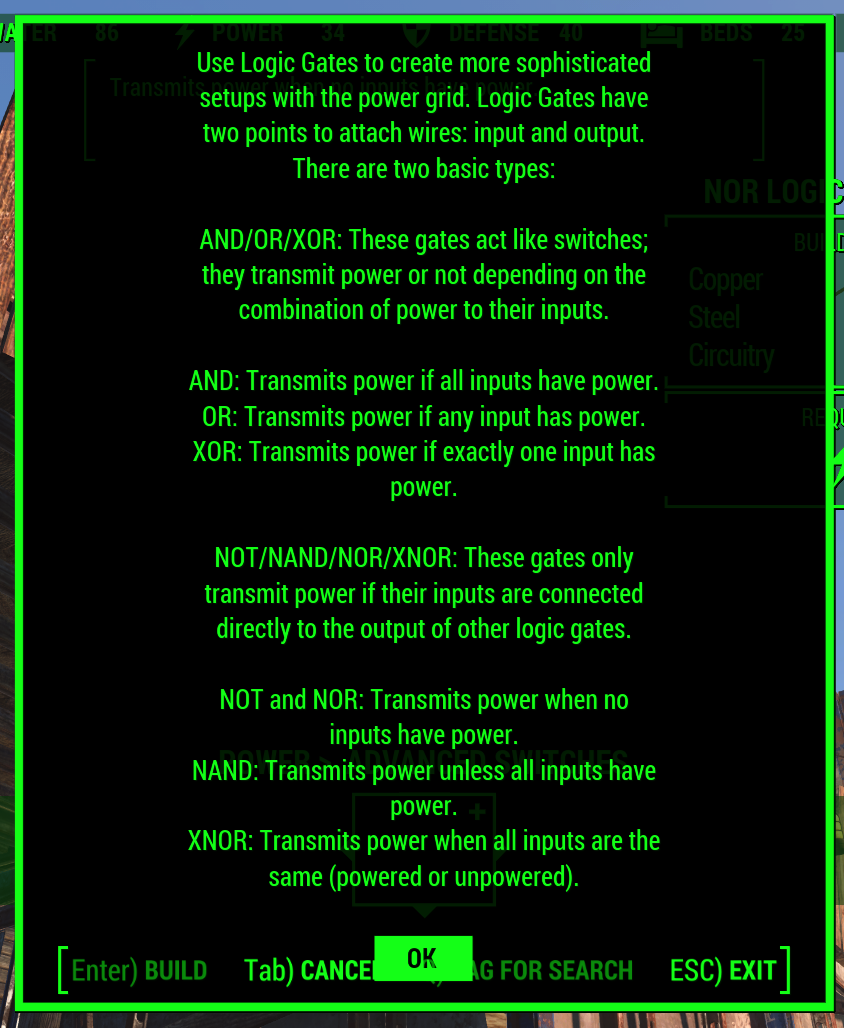
The in-game explanation for these gates is very, very weird. AND, OR, and XOR “transmit power or not depending on the combination of power to their inputs”. NOT, NAND, NOR, and XNOR are apparently different, “only transmitting power if their inputs are connected directly to the output of other logic gates”. The reason for this arbitrary distinction between different sets of gates is currently unknown except to a few programmers and project leaders at Bethesda. It should be noted {AND, OR, XOR} is not functionally complete.

With implementations of logic gates in video games comes some very interesting if useless applications. Already Fallout 4 has light boxes, allowing for huge animated billboardsFallout speakers, the wasteland’s equivalent of Minecraft’s note block, can be used to play simple melodies. You can do anything with a NAND, so we would expect automated, sequenced versions of animated billboards and monophonic synthesizers to appear in short order.

Functional completeness can add a lot to a game. Since Minecraft added redstone logic to the game, we’ve seen some very, very impressive block-based builds. The Minecraft CPU generally regarded as being the first, most complete CPU took about three months to design and build. This build didn’t use later additions to the redstone toolbox like repeaters, pistons, and the now-cheaty command blocks.