Decypering The Hackaday.io Illuminati

A few months ago, a strange account popped up on hackaday.io. Whoever is behind this count is based in Bielefeld, Germany – a place that doesn’t exist. They are somehow related to the Berenstain / Berenstein Bears dimensional rift, and they may be responsible for giving Cap’n Crunch only three rank insignia on his uniform. There is something very, very strange about this account. Since August, a black and white image of static, 98 pixels wide and 518 pixels tall has sat on this account profile. The Illuminati has given us enough clues, but until now, no one has managed to crack the code.

The first person to make sense out of the patterns in static is [Moritz Walter]. What’s in the code? More codes. While that’s not really helpful, it is to be expected.

SecretCodes2The hackaday illuminati included one additional piece of information with their encoded static image: a 12×12 pixel bitmap. When this bitmap was XORed with the main image, symbols appeared. In total, there are only seven unique symbols in the image. These symbols seem to be stolen from the Fez alphabet, but there are some significant differences. These symbols are rotated multiples of 90 degrees, and are surrounded by a one pixel border that is either black or white (we’re calling the border a ‘sign’ bit). In total, these seven symbols arranged in four different rotations with two different signs yields forty unique variations of a symbol in the decoded image. At this point, it should be noted 7*2*4 = 56.

As of now, cracking the illuminati’s cyphered machinations has hit a roadblock. There’s a dead image file on the illuminati’s profile. Until that image is rehosted, there is no way to progress any further. That’s not going to stop people from trying, though: the chat channels on hackaday.io have been buzzing about the newly decrypted images. Hopefully, with time, someone will figure out what it all means.


Better Networking With A Macintosh Classic

While it may not be the case anymore, if you compare a Mac and a PC from 1990, the Mac comes out far ahead. PCs suffered with DOS, while the Mac enjoyed real, non-bitmapped fonts. Where a Windows PC required LANMAN to connect to a network, the Mac had networking built right into every single machine. In fact, any Mac from The Old Days can use this built-in networking to connect to the Internet, but most old Mac networking hacks have relied on PPP or other network to serial conversion. [Pierre] thought there was an incomplete understanding in getting old Macs up on the Internet and decided to connect a Mac Classic to the Internet with Apple’s built-in networking.

Since the very first Macintosh, Apple included a simple networking protocol that allowed users to share hard drives, folders, and printers over a local network. This networking setup was called LocalTalk. It wasn’t meant for internets or very large networks; the connection between computers was basically daisy chained serial cables and later RJ-11 (telephone) cables.

LocalTalk stuck around for a long time, and even now if you need to do anything with a Mac made in the last century, it’s your best bet for file transfer. Because of LocalTalk’s longevity, routers and LocalTalk to Ethernet adapters can be found fairly easily. The only problem is finding a modern device that speaks both TCP/IP and LocalTalk. You can’t use a new Mac for this; LocalTalk has been gone from OS X since Snow Leopard. You can do it with a Raspberry Pi, though.

With a little bit of futzing about with MacTCP and a few other pieces of software from 1993 or thereabouts, [Pierre] can even get his old Mac Classic online. Of course the browsers are all horribly outdated (making the Hackaday retro edition very useful), but [Pierre] was able to load up rotten.com. It takes a while with an 8MHz CPU and 4MB of RAM, but it does get the job done.

You can check out [Pierre]’s demo video below.

Continue reading “Better Networking With A Macintosh Classic”

Clamps, Cauls, And The Mother Of Invention

If there’s one thing you need in a woodshop, it’s more clamps. There are bar clamps, pipe clamps, spring clamps, and trigger clamps, but for one task in the workshop, no clamp does the job just right. Gluing up panels – a few wide pieces of wood joined on edge – either requires more clamps than you have or cauls, devices that press down on the boards vertically while the clamps press the board together horizontally.

[Andrew Klein] has just invented a new type of clamp for this task, proving once again that not all problems are solved, and there’s still some places where an invention can pop out of mid-air.

The new clamps are a modification to traditional bar clamps that allow for two clamps to interlock. On each of the ‘working’ ends of the clamps, there are two adjustment handles. The first screws the clamp horizontally, just like any bar or pipe clamp. The second adjustment handle moves a bearing up and down. When this bearing meshes with a riser on the mating end of another clamp, the two clamps are pressed together vertically.

The new clamps are effectively clamps and cauls, able to push material together from side to side and top to bottom. The new clamps work, too. In the video below, you can see [Andrew] gluing up a panel. When the vertical adjustment wheel is loosened, the boards come apart vertically. When the vertical adjustment wheel is tightened, the boards are perfectly in line with each other, both edge to edge and face to face.

Continue reading “Clamps, Cauls, And The Mother Of Invention”

Augmenting Human Vision With Polarimetric Cameras

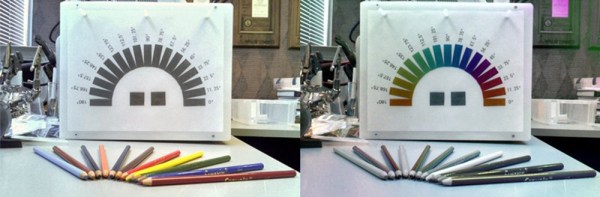
Light is just a wave, and the wavelength of light determines its color and determines if it can cook food like microwaves, or if it can see through skin like x-rays. There’s another property of waves human’s don’t experience much: polarization, or if the light wave is going up and down, side to side, or anywhere in between.

[David Prutchi]’s project for the Hackaday Prize was like many projects – a simple, novel idea that’s easy and relatively cheap to implement. It’s a polarimetric camera meant to see what humans can’t. By seeing the world in polarized light, the DOLPi can see landmines, cancerous tissue, and air pollution using only a Raspberry Pi and a few Python scripts He gave a talk at this year’s Hackaday SuperConference about polarization cameras and the DOLPi project. After enjoying the video, join us after the break for more details.


Continue reading “Augmenting Human Vision With Polarimetric Cameras”

FAA Releases Rules Governing Unmanned Aerial Systems

The US Department of Transportation and the FAA have just released their guidelines that require registration of Unmanned Aerial Systems. This is the regulation that covers model aircraft, drones, quadcopters, and flying toys of all kinds. These rules have been anticipated since last month to be in place for the holiday season.

As expected, the FAA is requiring registration for all aircraft, regardless of being ‘model’ aircraft or not, weighing more than 250 grams (0.55 pounds) and less than 55 pounds. The maximum weight is a holdover from previous regulations; model aircraft weighing more than 55 pounds were never really legal without a permit. It should be noted that anyone can build a quadcopter with cameras and video transmitters weighing less than 250 grams. These quadcopters are not ‘toys’ by any means, but are not required to be marked with a registration number and the pilot is not required to actually register. As expected, most rules governing the actual flight of these aircraft remain in place – don’t fly above 400 feet, don’t fly within five miles of an airport.

Registration is by pilot, not aircraft, and costs $5. A registration number must be put on every aircraft the pilot owns, and penalties for not registering can include up to $27,500 in civil penalties and up to $250,000/3 years imprisonment in criminal penalties. The full rules are available in this 200-page PDF. As with most government regulations, there will be a 30-day RFQ period beginning December 21st on regulations.gov. The docket number is FAA-2015-7396.

Hackaday’s Omnibus Vol. 2, Now In Stock

Last month, we announced a preorder for volume two of the Hackaday Omnibus, a collection of content written over the course of this year that is the best we have to offer. Now, there is a warehouse full of deceptively heavy boxes, and the Hackaday Omnibus Vol. 2 is now in stock.

bus9Inside the second edition of the Hackaday Omnibus is 128 pages of actual, real content. There are zero ads, no sponsored content, and absolutely nothing that tells you to go out and buy something. Opening it is an experience unlike anything. Where can you read something for minutes at a time with no interruptions, no email, no Twitter, no Facebook, no text messages, and no ads? You won’t find something like this anywhere else.



The electronics, trade, and tech magazines have a long and storied history. In the 1930s, there were magazines that would teach you how to build a radio. In the 1950s, there were print articles saying fusion power was just fifty years away. The Hackaday Omnibus continues this tradition with relevant content for today: everything from car hacking and open source insulin, to retrospectives on oft-forgotten parts of our digital heritage are included. This is the best we have to offer, and we’re doing it without selling out.

Volume Two of the Hackaday Omnibus isn’t the end for our print endeavours – we’re just getting started. We’re committed to producing the best content in an interruption-free format. Print is dead, after all, and that’s why we put a skull on it.

You can purchase the Hackaday Omnibus Volume Two on the Hackaday Store.

Adding A Second Drive To A Forgotten Commodore

Commodore would never release a laptop, or really much of anything resembling the chunky luggable portable computers of the 1980s. This doesn’t mean a ‘Commodore LCD’ wasn’t designed – it’s sitting in [Bil Herd]’s basement. Of the entire Commodore lineup, the only computer that could remotely be called ‘portable’ is the SX-64, the ‘executive’ version that came with a built-in 5″ monitor, the usual C64 circuitry, one floppy drive, and an empty hole that could obviously hold a second floppy drive. Something must be done about that missing floppy drive, and it only took thirty years for someone to do something about it.

While the conversion requires mucking around in an already tight enclosure, the parts for this conversion are readily available thanks to a few people trying to repair an SX-64, giving up, and parting the whole thing out on eBay. These parts include the 1541 controller relabeled as the ‘FDD’ board in the SX-64, and of course the floppy drive itself. With the right teardown guide, putting the new drive in this old computer isn’t that hard; just remember to cut a jumper to assign the new drive a number other than 8.

The missing floppy drive of the SX-64 is what happens when marketing is put in charge of engineering. There were a few of these dual drive Commodore luggables back in ’83, and we have the computer magazine clippings to prove it. The official story is the power supply wasn’t beefy enough to handle the second drive. This mod, though, seems to work well enough, albeit with a distinct lack of somewhere to store a few floppies.

Find yourself getting sentimental while reading about this great hardware? Keep those feelings going by listening to [Bil] recount some stories from his time at Commodore.