SGX Deprecation Prevents PC Playback Of 4K Blu-ray Discs

This week Techspot reported that DRM-laden Ultra HD Blu-ray Discs won’t play anymore on computers using the latest Intel Core processors. You may have skimmed right past it, but the table on page 51 of the latest 12th Generation Intel Core Processor data sheet (184 page PDF) informs us that the Intel Software Guard Extensions (SGX) have been deprecated. These extensions are required for DRM processing on these discs, hence the problem. The SGX extensions were introduced with the sixth generation of Intel Core Skylake processors in 2015, the same year as Ultra HD Blu-ray, aka 4K Blu-ray. But there have been numerous vulnerabilities discovered in the intervening years. Not only Intel, but AMD has had similar issues as we wrote about in October.

This problem only applies to 4K Blu-ray discs with DRM. Presumably any 4K discs without DRM will still play, and of course you can still play the DRM discs on older Intel processors. Do you have a collection of DRM 4K Blu-ray discs, and if so, do you play them via your computer or a stand-alone player?
Old Firewall Reborn As Retro PC

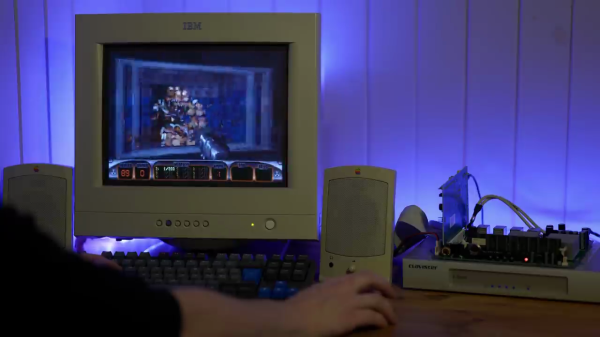
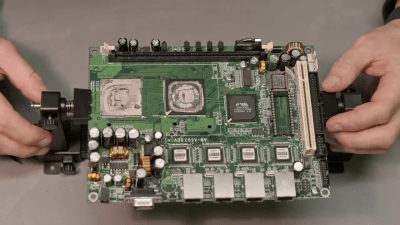
We like projects where old gear is given a new life. [Splashdust] has a twenty-year old business firewall that’s build like a tank. He cracks it open and finds a complete x86 embedded motherboard inside, and sets off to restore it and turn it into a retro gaming computer (see the video from his Odd & Obsolete YouTube channel below the break).

This business firewall and router box is from a small Swedish firm Clavister, part of their S-Series from the early 2000s. The motherboard appears to be a generic one used in other equipment, and is powered by a VIA Eden ESP 4000 running at 400 MHz. The Eden line of x86 processors were low-power chips targeting embedded applications. The graphics chip is a Twister T by S3 Graphics which was purchased by VIA in 2000. After replacing the electrolytic capacitors, and making a few cables, [Splashdust] pops in a PCI sound card and boots up into Windows 98 from a CF card (we like the compact PCB vise he uses).

In two follow-up videos (here and here), he builds an enclosure (instructions on Thingiverse) and tries out several other operating systems. He was able to get the Tiny Core Linux distribution running with the NetSurf browser, but failed to get Windows 2000 or XP to work. Returning to Windows 98, he tweaks drivers and settings and eventually has a respectable retro-gaming computer for his efforts. The next time you’re cleaning out your junk bins, have a peek inside those pizza-box gadgets first — you may find a similar gem.

Continue reading “Old Firewall Reborn As Retro PC”

Open Source Replacement For EzCAD

[Bryce] obtained a fiber laser engraver to use for rapid PCB prototyping last Fall. But he was soon frustrated by the limitations of the standard EzCAD software that typically comes with these and similar devices — it is proprietary, doesn’t have features aimed at PCB manufacturing, only runs on Windows, and is buggy. As one does, [Bryce] decided to ditch EzCAD and write his own tool, Balor, named after the King of the Fomorians.

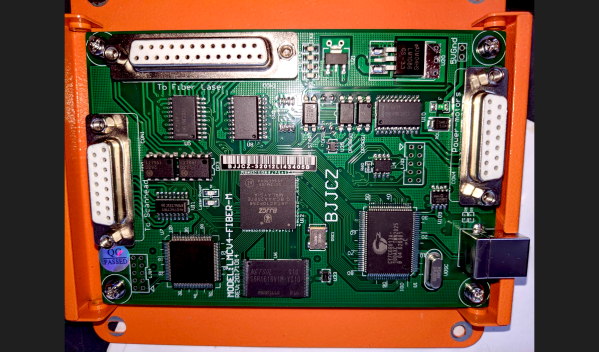
The controller board in [Bryce]’s machine is a Beijing JCZ LMCV4-FIBER-M board, containing an Altera FPGA and a Cypress 8051 USB controller. So far, he hasn’t needed to dump or modify the FPGA or 8051 code. Instead, he sorted out the commands by just observing the USB operations as generated by a copy of EzCAD running know operations. A lot of these engraving systems use this control board, but [Bryce] want’s to collect data dumps from users with different boards in order to expand the library.

Balor is written in Python and provides a set of command line tools aimed at engineering applications of your engraver, although still supporting regular laser marking as well. You can download the program from the project’s GitLab repository. He’s running it on Linux, but it should work on Mac and Windows (let him know if you have any portability issues). Check out our write-up from last year about using these lasers to make PCBs. Are you using a laser engraver to make rapid prototype boards in your shop? Tell us about your setup in the comments.

Thirty Seconds At 100 Megakelvins

Back in Dec 2020 we wrote about the Korea Superconducting Tokamak Advanced Research (KSTAR) magnetic fusion reactor’s record-breaking feat of heating hydrogen plasma up to 100 megakelvins for 20 seconds. Last month it broke its own record, extending that to 30 seconds. The target of the program is 300 seconds by 2026. There is a bit of competition going, as KSTAR’s Chinese partner in the International Thermonuclear Experimental Reactor (ITER), the Experimental Advanced Superconducting Tokamak (EAST) did a run a week later reaching 70 million degrees for 1056 seconds. It should be noted that KSTAR is reaching these temperatures by heating ions in the plasma, while EAST takes a different approach acting on the electrons.

The news reports seem to be using Celsius and Kelvins interchangeably, but at millions of degrees, that’s probably much smaller than measurement error. These various milestones are but stepping stones along the path to create a demonstration large fusion reactor, the goal of the global ITER mega-project. Currently China, the EU including Switzerland and the UK, India, Japan, Russia, South Korea, and the United States are members of ITER, and Australia, Canada, Kazakhstan, and Thailand are participants. The ITER demonstration reactor is being constructed at the Cadarache facility located 60 km northeast of Marseille, France, and is on track for commissioning phase to begin in 2025, going operational ten years later.

Serial Studio One Year On

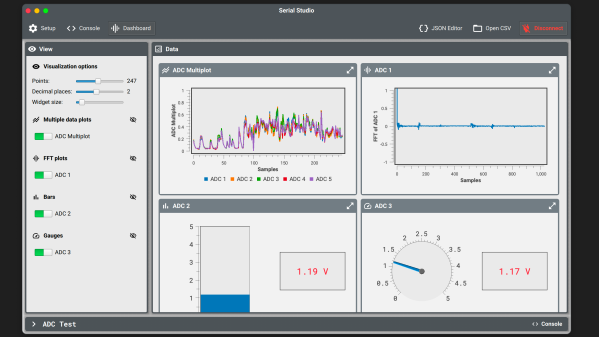
Last year we wrote about [Alex Spataru]’s Serial Studio project, which started life as serial port data visualizer, like a souped-up version of the Arduino serial plotter. [Alex] has been actively improving the project ever since, adding a variety of new features, including

  • JSON editor for data formats
  • TCP, UDP, and Multicast
  • New and more flexible display widgets
  • Multi-signal plots
  • FFT and logarithmic plots
  • VT-100 emulation
  • Support for plugins and themes
  • Added MQTT support

[Alex] originally came up with Serial Studio because he was involved in ground station software for various CanSat projects, each one with similar yet slightly different data formats and display requirements. Rather than make several different programs, he decided to make Serial Studio which could be configured using JSON descriptor files.

The program is open-source and multi-platform. You can build it yourself or download pre-compiled binaries for Windows, Linux, and Mac. See the project GitHub repository for more details. In addition to English, it has also been translated into Spanish, Chinese, and German. What is your go-to tool for visualizing serial data telemetry these days? Let us know in the comments below.

Smart Sutures Become WiSe

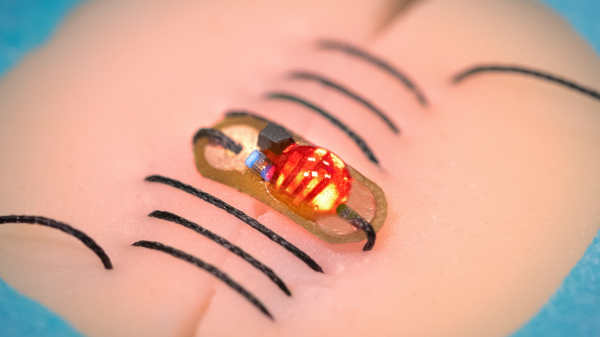
A team at the Wireless Bioelectronics Lab at the National University of Singapore led by [Dr John Ho] announced the results of their new Wireless Sensing (WiSe) smart sutures program last month. Their system consists of a specially prepared patch of polymer gel (the sensor) which is sewn into the wound using a silk suture coated with a conductive polymer. An external reader scans the sensor to monitor the status of the wound.

The concept is not unlike a NFC public transportation card, although with simplified electronics. There is no microcontroller or digital data being transferred. Rather, the sensor behaves like a tuned tank. The gel on the sensor was designed to degrade if the wound becomes infected, changing capacitance of the sensor structure and thus shifting its resonant frequency.

If you’ve ever had the misfortune to experience surgery, no doubt the surgeon and nurses drove home the importance of diligent monitoring of the wound for early signs of infection. These smart sutures allow detection of wound infection even before symptoms can seen or felt. They can be used on internal stitches up to 50 mm inside the body. More details can be read in this paper, and we covered another type of smart sensor back in 2016.

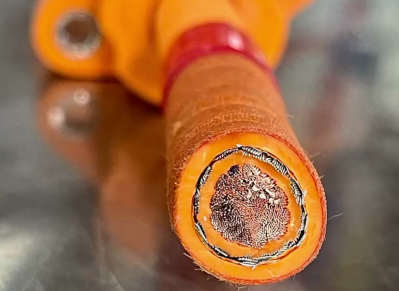
Exploring Tesla Model S High Voltage Cabling

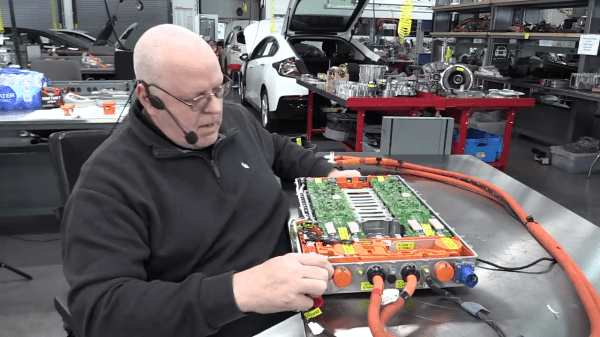
When he’s not busy with his day job as professor of computer and automotive engineering at Weber State University, [John Kelly] is a prolific producer of educational videos. We found his video tracing out the 22+ meters of high voltage cabling in a Tesla Model S (below the break) quite interesting. [John] does warn that his videos are highly detailed and may not be for everyone:

This is not the Disney Channel. If you are looking to be entertained, this is not the channel for you.

We ignored the warning and jumped right in. The “high” voltages in the case of an electric vehicle (EV) like the Model S is approximately 400 volts. Briefly, external input via the charge connector can be single or three phase, 120 or 250 VAC, depending on your region and charging station. This get boosted to a nominal 400 VDC bus that is distributed around the various vehicle systems, including the motors and the battery pack.

Rear Modules

    • Charge receptacle
    • On-board charger module
    • Rapid splitter
    • Rear motor inverter

Front Modules

    • High voltage junction block
    • Cabin air heater
    • DC to DC converter
    • Battery coolant heater
    • Air conditioning compressor
    • Front motor inverter

He goes through each module, showing in detail the power routing and functionality, eventually assembling the whole system spanning two work benches. We liked his dive into the computer-controlled fuse that recently replaced the standard style one, and were impressed with his thorough use of labels.

If you’ve ever been curious about the high voltage distribution of a EV, grab some popcorn and check out this video. Glancing through his dozens of playlists, [John]’s channel would be a good place to visit if you’re interested any topic related to hybrids and electric vehicles, drive trains, and/or transmissions. We’ve written about some Tesla teardowns before, the Model 3 and the Model S battery packs. Have you worked on / hacked the high voltage system in your EV? Let us know in the comments below.

Continue reading “Exploring Tesla Model S High Voltage Cabling”