VGA Library For The Raspberry Pi Pico

[Miroslav Nemecek] really pushes the limits of the Pico with his PicoVGA project, which packs a surprising number of features. His main goal with this library is to run retro games which can fit within the limited RAM and processing power of the Pico, but the demo video below shows a wide array of potential applications.

The library provides a whole slew of features, including frame buffering, sprites, overlays, and resolutions up to 1280×960 in either NTSC or PAL timings. A PWM-driven audio output channel is also included in the package. His library takes full advantage of the programmable I/O module functionality and uses the second core which is dedicated to video processing. However, with care, the second core can perform application tasks in certain circumstances. The VGA analog output signals are provided by resistor ladders, and pixel color is 8-bit R3G3B2 format. To be clear, [Miroslav] does cheat a little bit here in one regard — he overclocks the processor up to 270 MHz to meet the timing demands in some of the resolutions.

[Miroslav] has developed these tools using ARM-GCC on Windows, but he lacks the experience to make a Linux build. He welcomes help on that front from anyone familiar with Linux. And stay tuned — there may be more coming from [Miroslav] in the future. He notes that the PicoVGA library was created as part of a retro gaming computer project which is still under development. We look forward to hearing more about this when it gets released.

A couple of weeks ago we wrote about a monochrome VGA version of Pong for the Pico by [Nick Bild]. It’s exciting to see these projects which are exploring the limits of the Pico’s capabilities. Have you seen any boundary-pushing applications for the Pico? Let us know in the comments below. Thanks to [Pavel Krivanek] for sending this project to our tip line.

Continue reading “VGA Library For The Raspberry Pi Pico”

Survey Of Simple Logic Simulators

A few months ago, a tweet by [Ken Shirriff] asking about simple digital simulators caught my attention. The topic came up again in May when a repair video by [CuriousMarc] featured one such simulator called Logisim-evolution. It made me want to take a fresh look on what’s out there and which features set the different simulators apart.

So today, let’s take a quick survey of a few such simulators that I found. I’m focusing on plain logic simulators, analyzing ones and zeros using Boolean logic. They are not doing SPICE-like analog analysis of transistor logic gates, but they’re still quite handy for proofing out designs.

Continue reading “Survey Of Simple Logic Simulators”

Improved Technique For Resistive Divider Keypads

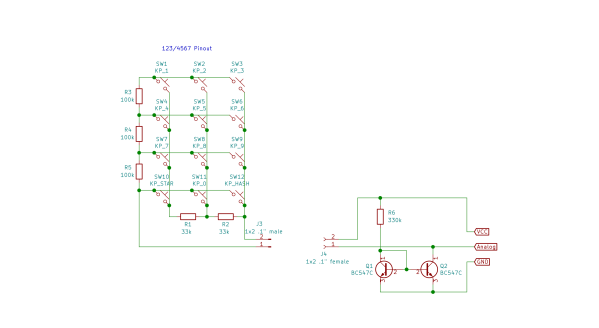
[Lauri Pirttiaho] from the [Swiss Knife of Electronics] channel explains how to simplify your resistive divider keypad design on Hackaday.io.

The usual method involves building a resistive ladder that gives unique and equally spaced voltages for each keypress. If you have just four or five discrete buttons, it isn’t terribly difficult, but if you have a 12- or 16-keypad matrix, things get complicated. [Lauri] looked into the past to come up with a better way, specifically a 646 page, 1 kg textbook from 1990 — Analogue Ic Design: The Current-Mode Approach by Toumazou, Lidgey, and Haigh. He learned that sometimes what’s hard to do in the voltage domain is easy in the current domain.

Normally you’d throw in some resistors to form different voltage dividers depending on which key is pressed, and read the resulting voltage off of a voltage divider with an ADC. But that means using the voltage divider equation, and the difference in voltage between keys can get very small. Dropping the voltage divider and measuring the current through a current mirror generates a linear voltage across its output load resistor that can be easily read by your microprocessor. And [Lauri] has posted an example of just such a program on his GitHub repository for an Arduino.

Heavy analog electronics, for sure, but something to keep in mind if you’re reading more than 12 keys. Do you have any examples of solving problems by looking into old and/or less-common techniques? Let us know in the comments below.

Continue reading “Improved Technique For Resistive Divider Keypads”

Cerberus 2080 — Three-Headed Retro Computing Project

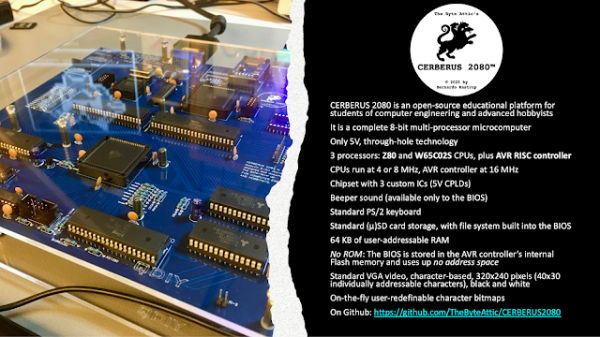
For seven months, [Bernardo Kastrup] at [TheByteAttic] has been realizing his childhood dream of building his own computer. It was this dream that steered him into the field of computer design at the age of 17. After thirty years in the industry, he finally has some time to design the computer he dreamt about as a kid. His requirements are ambitious: fully open design, gate-level details, thru-hole or PLCC for easy hacking, well-established processors with existing tool chains, low-cost development tools for CPLDs, no FPGA, standard ITX case compatible, and so on. He quite reasonably decides to use more modern electronics for video (VGA), keyboard (PS/2), and program storage (flash drive). Along the way, he chooses to put three processors on the board instead of one:

  • Zilog Z84C0010 (Z80)
  • WDC W65C0256 (6502)
  • AVR ATMEGA328 (RISC Controller)

When coming up with the concept and requirements, [Bernardo] had a fictitious alternate history in mind — one where there were follow-ups to the ZX80, PET/CBM, or TRS-80 from the late 1970s that were extensions to the original systems. But he also wanted a clean design, without cost-cutting gimmicks, in order to make it easier for learners to focus on computing itself — a didactic architecture, as he describes it. Turn the crank for seven long months, and we have the Cerberus 2080. [Bernardo] has put the design on GitHub, and made a video series out of the whole process, of which the introduction video is below the break. There’s even an online emulator developed by retro hacker  [Andy Toone].

We wrote about the 6502-based ERIC-1 project back in 2014 which shared the bus with an ATMEGA simulating ROM. The Minty Z80 project from 2019 also uses a similar technique. Thanks to [Frédéric] for sending us the tip.

Continue reading “Cerberus 2080 — Three-Headed Retro Computing Project”

Is 32-bits Really Dead?

While some of us are still clinging onto our favorite 8-bit microprocessors, ARM announced they will be killing off the 32-bit architecture in 2022 and/or 2023. Over on the GaryExplains YouTube channel, [Gary Sims] posted a great review of the current 32- vs 64-bit state-of-affairs — not just for ARM but for Intel and AMD processors as well. And it’s a dismal outlook for you 32-bit fans.

ARM announced last Fall that there would be no more 32-bit support as of 2022, then this March they made a similar announcement but with a 2023 deadline. [Gary] tries to parse these statements, and takes an educated guess at what the disparity means (spoiler alert — he predicts that one more 32-bit core will soon be released).

[Gary] clearly breaks down the 32-bit situation by operating systems such as Linux, Windows, MacOS, Android, and iOS, and how all of these have been transitioning to 64-bits over recent years. He does a thorough job, and concludes that the transition is already well underway. And while Linux and Windows have not completely dropped 32-bit support, the writing is on the wall.

Take note, however, that this discussion regards the Cortex-A family of cores found in smart phones, tablets, computers, and powerful embedded applications like autonomous vehicles. The popular 32-bit Cortex-M family of low-cost / low-power cores that are used in so many embedded system designs will remain 32-bits for the foreseeable future.

After watching [Gary]’s presentation, if you want to learn more, check out the writeup that [Maya Posch] did on the details of the latest ARMv9 ISA a few weeks ago. Also watch this 8-bit vs 32-bit presentation by our Editor-in-Chief [Mike Szczys]. Despite being from five years ago, it is still quite applicable today. What about 16-bit MCUs — the old Intel/AMD embedded 80186 processor, the 8051 follow-ons like the 80C196, 80C251, or 8051XA, the 6502 follow-ons like the 65C816, Zilog’s Z8000, the Renesas M16C, etc. — is anyone using them anymore? If so, or if you’re using a 4-bit MCU these days, let us know in the comments below.

Continue reading “Is 32-bits Really Dead?”

Old Textbooks Galore

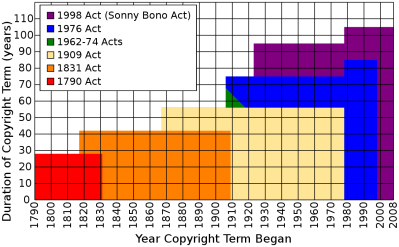
This collection of public domain books proclaims to not be about survival, but for survivors. It is a extensive collection of text books, manuals, etc., in over 150 categories from Accounting to Woodworking. Because of the copyright duration laws, most are around one hundred years old.

You might not want to have your appendix removed by someone who has only learned surgery from reading Dr John Sluss’s 1908 tome, “Emergency Surgery for the General Practitioner, with 584 illustrations, some of which are printed in colors“. But some knowledge is timeless. And much is of historical interest as well, helping us get a better appreciation of what bodies of knowledge people had in the beginning of the last century. There are books on farming, forging and casting, steam engines, clockmaking, telegraph and telephone, and even back issues of Scientific American and 73 magazines, just to name a few.

Here’s a random sampling of a few illustrations from electronics-related books.

High speed electrons from “Inside the Vacuum Tube” by John F. Rider, 1945, a relatively modern book from this collection. This book alone is worth downloading just to see the excellent illustrations. Mr Rider wrote so many technical books that he formed his own publishing company.

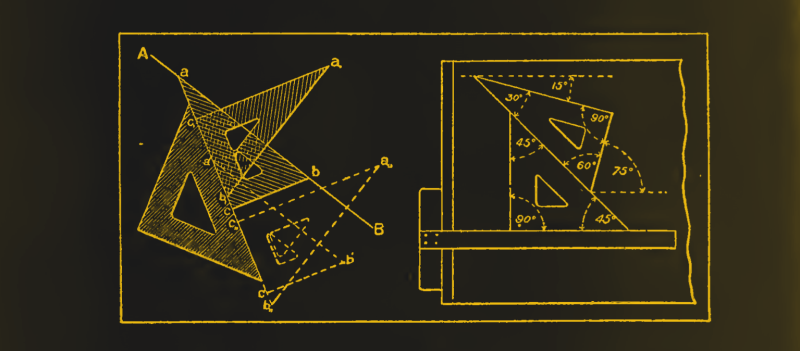
Using triangles from “Mechanical Drawing, Prepared for the Students of the Massachusetts Institute of Technology” by Linus Faunce, 1898.

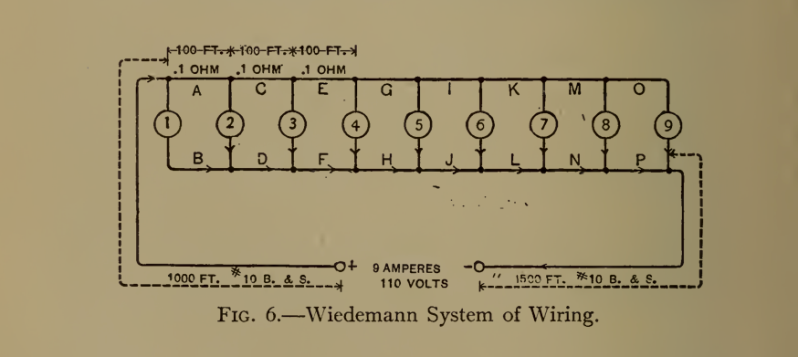
The Weidemann system of wiring lamps, from “Electric-Wiring, Diagrams and Switchboards” by Newton Harrison E.E., published in 1906, complete with “one hundred and five illustrations showing the principles and technics of the art of wiring”. This system employed equal lengths of wires between each lamp in a (failed) attempt to make the voltage drop the same for each bulb.

Do you have any timeless reference or text books you like to use? Let us know down below in the comments. And thanks to [David Gustafik] for the tip.

Home Automation Controller Uses Chalk

Responding to the Rethink Displays challenge of the 2021 Hackaday Prize contest, freelance design engineer [Rick Pannen] brings a retro look to his DIY home automation controller. You could be forgiven for not even realizing it is a controller at first glance. [Rick] built this using a magnetic chalk board and installed all the control electronics on the back. The main processor is a Raspberry Pi 400 running Raspian with IOBroker and Node-Red. Panel lettering and graphics are done free-hand with, you guessed it, chalk.

The controls on this panel are an eclectic hodgepodge of meters, switches, and sensors that [Rick] scored on eBay or scavenged from friends. We are curious about the simple-looking rotary dial that sends a pulse train based on the number set on the dial — this seems to have all the functionality of an old phone’s rotary dial without any of the fun.

But [Rick]’s design allows for easy changes — dare we say, it encourages them — so maybe we’ll see a salvaged rotary dial added in future revisions. Also note the indoor lighting ON/OFF switch that must be a real joy to operate. We wonder, is there any way the controls could be magnetized and moved freely around the board without permanently attaching them? Maybe an idea for version 4 or 5.

This design has a lot of possibilities, and we look forward to any upgrades or derivative versions of this unique home automation controller. Let us know in the comments below if you have any suggestions for expanding upon this idea.