From what we can understand, [ompuco] has built a 2D audio output on top of the Unity game engine, enabling him to output X and Y values from his stereo soundcard straight to an oscilloscope in XY mode. His code simply scans through all the vertexes in the scene and outputs the right voltages into the left and right audio streams. He’s using this to create some pretty incredible animations. Check out the video “additives” below for an example. (See if you can figure out what’s being “added”.)
Author: Elliot Williams1502 Articles
UV Photographic Printer Lets You Use Strange Chemistries
There is a family of old photographic chemistries based on iron compounds which, like the blueprint, are exposed using UV light. Ironically, the digital camera revolution which has made everything else in our photographic lives much easier, has made it harder to experiment around with these alternative methods. [David Brown] is making a UV photographic printer to change that.
[David]’s application has a lot in common with PCB printers that use a UV-sensitive resist, only [David] needs greyscale, and it might also be nice if it could work with wet paper. This makes it a more challenging project than you might think, but we like the cut of [David]’s jib.
Like some of the other UV exposer projects, [David]’s uses a rotating mirror to scan across the to-be photograph’s surface. Unlike the other ones that we’ve seen, the exposer hangs from two linear rails. Other printers move the paper underneath a stationary scanning head, which seems a mechanically simpler arrangement. We’re excited to see how this goes.
There’s a lot of interest in UV PCB printers right now. We’ve seen one made from junked CD-ROM drives on one end of the spectrum to one made by retrofitting a delta robot on the other. And don’t disregard the work done by folks interested in UV-curing 3D printers, either.
Minimal 433 MHz Web Home Automation
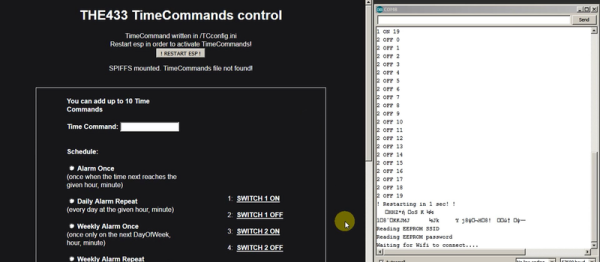
How minimal can a decent home automation setup be? If you need an HTML frontend, you’re going to need a webserver. An ESP8266 will do the trick. And then you need to be able to control your electronics. The cheapest and easiest way to do that is with the ubiquitous 433 MHz remote-controlled outlets and a $1 radio unit from an online auction site. Add in a cheap ESP8266 module, and your total outlay is going to be under $20.
That’s exactly what [Nikos Kantarakias] did. He combined a bunch of available ESP8266 Arduino libraries — one for driving the 433 MHz radio modules, [Paul Stoffregen]’s libraries for keeping time and for setting alarms, and another for keeping track of time zones — with some of his own code for setting up WiFi access, and it’s done.
It’s all available on GitHub for your perusal. The code does some strange things — like requiring a complete reboot every time you set an alarm — but it does let you set recurring and one-off activations of the attached devices with a web interface that’s served off the ESP8266 itself. If you want your coffee machine to turn itself on in the mornings, and want a system that’s easy for the other inhabitants of your house to configure, something like this might be just the ticket.
But if you’re looking for a project on the other end of the ESP-tech spectrum, [CNLohr] wrote a standalone Ethernet controller for the thing. Woah.
Is It A Stepper? Or Is It A Servo?
Almost everyone who is involved with 3D printing thinks to themselves at some point, “this could all be done using a closed-loop system and DC motors”. Or at least everyone we know. There’s even one commercial printer out there that uses servo control, but because of this it’s not compatible with the rest of the (stepper-motor driven) DIY ecosystem.
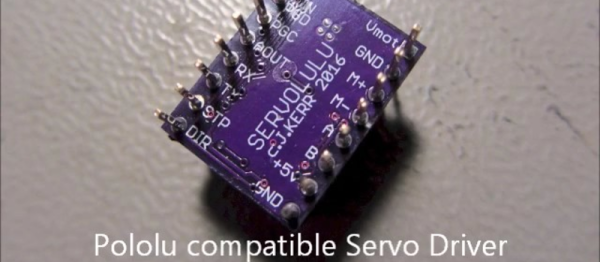
[LoboCNC] wanted to change this, and he’s in a unique position to do so, having previously built up a business selling PIC-based servo controllers. His “servololu” is essentially a microcontroller and DC motor driver, with an input for a quadrature encoder for feedback. The micro takes standard step/direction input like you would use to drive a stepper motor, and then servos the attached DC motor to the right position. It even signals when it has an error.
Continue reading “Is It A Stepper? Or Is It A Servo?”
Don’t Tempt The Demo Gods
Including a live technical demonstration as part of a presentation is a lot like walking a tightrope without a net. Which isn’t to say that we don’t do it — we just keep our fingers crossed and bring our lucky horseshoe. The demo gods have smote [Quinn] a mighty blow, in front of a class at Stanford, no less.

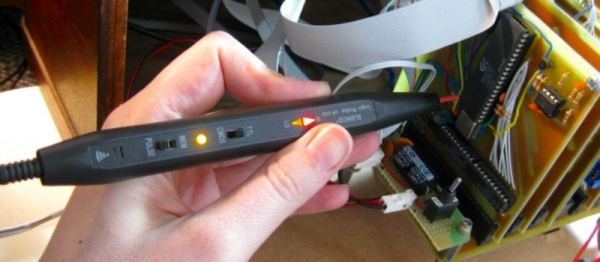
[Quinn]’s scratch-built computer, Veronica, failed to boot in front of a hall of eager students. When the pressure was off, in the comfort of her own lab, [Quinn] got to debugging. You should read her blog post if you’re at all interested in retrocomputing or troubleshooting of low-level hardware bugs. But if you just can’t spare the five minutes for a pleasant read, here’s a spoiler: watch out for flaky card-edge connectors. All’s well that ends well, with a game of pong.
We’ve been following Veronica from her very first clock cycles, so we’re happy to see her back on her feet again. Good job, [Quinn]!
Saving Lives With Open-Source Electrocardiography
A few months ago, MobilECG wowed us with a formidable electrocardiograph (ECG, also EKG) machine in the format of a business card, complete with an OLED display. We’ve seen business card hacks before, but that was the coolest. But that’s peanuts compared with the serious project that it supports: making an open-source ECG machine that can actually save lives by being affordable enough to be where it’s needed, when it’s needed.
The project, MobilECG, is an open-source, wearable device that supports all of the major ECG modes. In their talk, [Péter Isza] and [Róbert Csordás] taught us a lot about what that exactly entails and how the heart works. We learned a lot, and we’ll share some of that with you after the break.
Continue reading “Saving Lives With Open-Source Electrocardiography”
Connect All Your IoT Through Your Pi 3
If you’re playing Hackaday Buzzword Bingo, today is your lucky day! Because not only does this article contain “Pi 3” and “IoT”, but we’re just about to type “ESP8266” and “home automation”. Check to see if you haven’t filled a row or something…
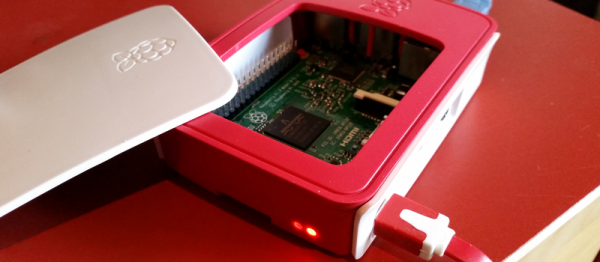
Seriously, though. If you’re running a home device network, and like us you’re running it totally insecurely, you might want to firewall that stuff off from the greater Interwebs at least, and probably any computers that you care about as well. The simplest way to do so is to keep your devices on their own WiFi network. That shiny Pi 3 you just bought has WiFi, and doesn’t use so much power that you’d mind leaving it on all the time.
Even if you’re not a Linux networking guru, [Phil Martin]’s tutorial on setting up the Raspberry Pi 3 as a WiFi access point should make it easy for you to use your Pi 3 as the hub of your IoT system’s WiFi. He even shows you how to configure it to forward your IoT network’s packets out to the real world over wired Ethernet, but if you can also use the Pi 3 as your central server, this may not even be necessary. Most of the IoT services that you’d want are available for the Pi.
Those who do want to open up to the world, you can easily set up a very strict firewall on the Pi that won’t interfere with your home’s normal WiFi. Here’s a quick guide to setting up iptables on the Pi, but using even friendlier software like Shorewall should also get the job done.
Still haven’t filled up your bingo card yet? “Arduino!”