3D-Printing The Most Ornate Room

It’s no secret that we like 3D printing, but Artist and architect [Michael Hansmeyer] really likes 3D printing. So much so that he’s based his entire career around exploring the artistic possibilities of what he calls “computational architecture”.

live9We first fell in love with [Michael]’s work “Columns” because it was both daring and relatively low-budget at the same time. He made a series of architectural-sized columns out of cross-sections of laser-cut cardboard. Why cardboard? Because his goal was to make the columns as complex as possible and the current range of 3D printers couldn’t give him the resolution he wanted.


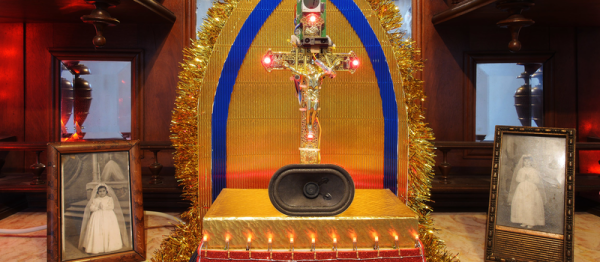
installation3Fast-forward to “Digital Grotesque”. Now [Michael] has access to a large-scale sand printer, and the license to go entirely nuts. He makes a space reminiscent of a Rococo grotto, but full of so much detail that you can’t really take it all in: it’s nearly fractal. Some stats: 11 tons of printed sandstone, 260 million surfaces, 30 billion voxels. We’re stoked that we don’t have to dust it!


arabesque_wall11His latest piece, “Arabesque Wall” is partly organic and elegant, and part Aliens. If we can play art critic, we think it’s beautiful. Go click through the portfolio. (And although they never got printed, we really like some of the “Voxels” series of cellular-automata pieces.)

From new paint materials opening up new color possibilities to new instruments enabling entirely different types of music, art, and technology mutually inform each other much more than we often appreciate. In ten years time, we’ll be looking back on this work and saying “this piece looks good” and “that piece looks bad” instead of “wow, amazing tech!”. But for now, we’re also content to wallow in the “wow”.

Squash Your ESP-8266 Bugs With ESP-gdbstub

We hope we’re not insulting you by suggesting this, but it’s possible that even the best among us may be faced with bugs in our embedded code from time to time. And while we’re great fans of printf debugging over the serial port, and its high-speed equivalent — flipping a GPIO pin — there’s a time when your bug is so deep that having a real debugger is the best way to dig it out.

[slaff] has been doing some great work documenting C/C++ programming on the ESP-8266, mostly using Eclipse and some of the Arduino libraries. In the fourth part of his series of posts, he walks through using a couple debugger options for the ESP. What makes this all work is the ESP-gdbstub code from Espressif themselves. gdbstub looks great — it works both with the standard SDK as well as with FreeRTOS, so you can debug your ESP-8266 code whether it’s in an OS or on the bare metal. And all this just using the standard serial connection that’s used for programming.

Now, this still may not help with timing-related bugs. ESP-gdbstub uses the serial port, after all. But having the ability to set breakpoints and interactively inspect what’s going on in the chip’s memory is priceless, and doing so with no extra hardware connections is brilliant.

Continue reading “Squash Your ESP-8266 Bugs With ESP-gdbstub”

Encryption For Arduino With Spritz

Hackaday.io user [Abderraouf] has written an implementation of the new(ish) Spritz cipher and hash for Arduino. While we’re not big enough crypto-nerds to assess the security of the code, it looks like it’s going to be pretty handy.

Spritz itself is a neat cipher. Instead of taking in fixed blocks of data and operating on them, it allows you to process it in (almost) whatever chunks it comes in naturally, and then extract out the encrypted results piecewise. It works both as a two-way cipher and as a one-way hash function. It looks like Spritz is a one-stop-shop for all of your encryption needs, and now you can run it on your Arduino.

In case you are afraid of new implementations of new ciphers (and you should be), Spritz’s pedigree should help to put you at ease: it was developed by [Ron Rivest] to be a successor to his RC4 algorithm, and it incorporates a lot of the lessons learned about that algorithm over the past. This doesn’t exclude subtle flaws in the implementation of the library (no offence, [Abderraouf]!) or your work downstream, but at least the underlying algorithm seems to be the real deal.

[Abderraouf] links it in his writeup, but just for completeness, here’s the Spritz paper (PDF). What crypto libraries do you currently use for Arduino or microcontroller projects? We’ve been fans of XXTEA for ages, but more because it’s simple and small than because it’s secure. Spritz may be simple enough to implement easily, and still more secure. Sweet.

Beautiful Sidewalk Graffiti Machine

Our hero [Alex] just built a sidewalk graffiti machine, and it’s a beauty to behold, so make sure you check out the video below the break. But don’t neglect [Alex]’s blog, and the build videos throughout. (Nice t-shirt in the wheel-making video, BTW.)

The machine itself is basically a two-meter wide printer where the roller is replaced with drive wheels. The frame, made of plywood, looks great and helps keep the machine light weight. Everything is done with DC motors and timing belts, which means motor encoders and closed-loop control in the firmware. It connects via a WiFi serial bridge, made with an ESP8266, to [Alex]’s cell phone.

Everything, from plans to software, is available on [Alex]’s GitHub for the project.

Continue reading “Beautiful Sidewalk Graffiti Machine”

Embed With Elliot: Debounce Your Noisy Buttons, Part II

If you’ve ever turned a rotary encoder or pushed a cursor button and had it skip a step or two, you’ve suffered directly from button bounce. My old car stereo and my current in-car GPS navigator both have this problem, and it drives me nuts. One button press should be one button press. How hard is that to get right?

In the last session of Embed with Elliot, we looked into exactly how hard it is to get right and concluded that it wasn’t actually all that bad, as long as you’re willing to throw some circuitry at the problem, or accept some sluggishness in software. But engineers cut corners on hardware designs, and parts age and get dirty. Making something as “simple” as a button work with ultra-fast microcontrollers ends up being non-trivial.

And unsurprisingly, for a problem this ubiquitous, there are a myriad of solutions. Some are good, some are bad, and others just have trade-offs. In this installment, we’re going to look at something special: a debouncer that uses minimal resources and is reasonably straightforward in its operation, yet which can debounce along with the best of ’em.

In short, I’ll introduce you to what I think is The Ultimate Debouncer(tm)! And if you don’t agree by the end of this article, I’ll give you your money back.

Continue reading “Embed With Elliot: Debounce Your Noisy Buttons, Part II”

Texel: Art Tracks You, Tracks Time

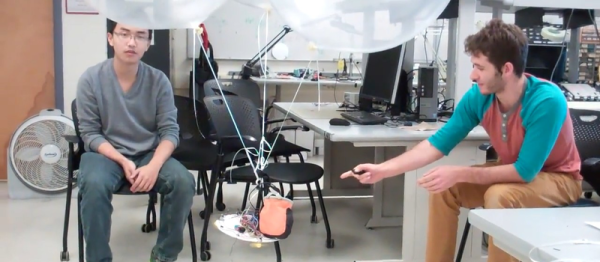
French robot-artist [Lyes Hammadouche]  tipped us off to one of his latest works: a collaboration with [Ianis Lallemand] called Texel. A “texel” is apparently a time-pixel, and the piece consists of eight servo-controlled hourglasses that can tip themselves over in response to viewers walking in front of them. Besides making graceful wavelike patterns when people walk by, they also roughly record the amount of time that people have spent looking at the piece — the hourglasses sit straight up when nobody’s around, resulting in a discrete spatial representation of people’s attentions to the piece: texels.

We get jealous when we see artists playing around with toys like these. Texel uses LIDAR scanners, Kalman-filtered naturally, to track the viewers. openFrameworks, OpenCV, and ROS. In short, everything you’d need to build a complex, human-interactive piece like this using completely open-source tools from beginning to end. Respect!

Continue reading “Texel: Art Tracks You, Tracks Time”

Raspberry Pi $2 WiFi Through Epic SDIO Hack

These are the times that we live in: the Raspberry Pi Zero comes out — a full freaking Linux computer on a chip for $5 — and people complain that it doesn’t have this or that. Top place on the list of desiderata is probably a tie between audio out and WiFi connectivity. USB is a solution for both of these, but with one USB port it’s going to be a scarce commodity, so any help is welcome.

Hackaday.io hacker [ajlitt] is looking for a way out of the WiFi bind. His solution? The Raspberry Pi series of chips has a special function on a bunch of the GPIO pins that make it easier to talk to SDIO devices. SDIO is an extension of the SPI-like protocol that’s used with SD memory cards. The idea with SDIO was that you could plug a GPS or something into your PDA’s SD card slot. We don’t have PDAs anymore, but the SDIO spec remains.

[ajlitt] dug up an SDIO driver for the ESP8089 chip, and found that you can liberate the ESP8266’s SPI bus by removing a flash memory chip that’s taking up the SPI lines. Connect the SPI lines on the ESP8266 to the SDIO lines on the Raspberry Pi, and the rest is taken care of by the drivers. “The rest”, by the way, includes bringing the ESP’s processor up, dumping new firmware into it over the SPI/SDIO lines to convince it to act as an SDIO WiFi adapter, and all the rest of the hardware communication stuff that drivers do.

The result is WiFi connectivity without USB, requiring only some reasonably fine-pitch soldering, and unlike this hack you don’t have to worry about USB bus contention. So now you can add a $2 WiFi board to you $5 computer and you’ve still got the USB free. It’s not as fast as a dedicated WiFi dongle, but it gets the job done. Take that, Hackaday’s own [Rud Merriam]!

Thanks [J0z0r] for the tip!