Odd Inputs And Peculiar Peripherals: The Morse Keyboard

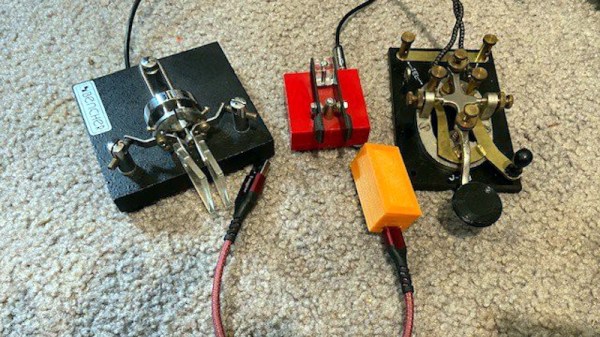
When it comes to rendering text input into an electronic form,the newest keyboards use USB for wired interfacing, while the oldest Morse keys use a single conductor. Shall the two ever meet? For [Matthew Sparks] the answer is yes, with his “The Gadget” Morse-to-USB HID interface which presents a Morse key to a computer as though it were a USB keyboard.

At its heart is a Seeduino Arduino clone, upon which the Morse key waggles a pin, and which through the extensive magic of software recognizes the keyed characters and converts them into USB key presses for the computer. It’s thus a surprisingly simple project, and the write-up spends far more time proselytizing the art of the carrier wave than it does on Arduino code.

Morse is simultaneously a manual art form, an efficient means of communicating through congested radio bands, and an anachronism, which probably explains its continued appeal in the radio amateur fraternity. We’re not sure how many keyboard warriors will switch to the single key with this project, but we can see that it might be a useful aid to learning as well as a pretty quick input method for the owner of an experienced fist.

Morse has featured in many projects here before, not least in this assistive Morse keyboard.

Odd Inputs And Peculiar Peripherals: Touch This Macro Pad

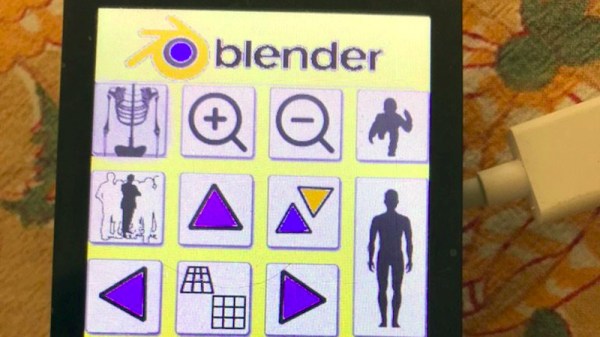
The need to provide custom controls for complex software packages has been satisfied in many ways, the most usual of which is to have a configurable keypad. It’s a challenge [Meir Michanie] has taken up in a slightly different way, by creating a custom touch-screen macro pad. Unlike the buttons, this allows entirely custom layouts with different shaped keys in any configuration.

At its heart is a versatile ESP32 touch screen development board of the type that can be found easily among the pages of your favorite online electronics mart. The Arduino IDE has been used to program the device, and configuration is as simple of providing it with a PNG of the desired layout, and a CSV file to define the buttons. The whole then connects via BLE where it’s presented to the host computer as a keyboard. The result is one of the coolest macro pads we’ve ever seen, with a limitless number of options.

With such a neat idea it’s perhaps no surprise among the numbers of macro pads that have made it to these pages there might be another take on the same idea.

Odd Inputs And Peculiar Peripherals: A MacroPad With A Handy Layout Screen

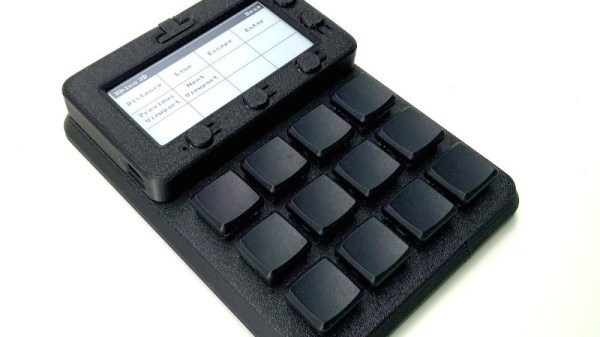
The idea of a macro keypad is a great one, a set of keys programmable with frequent but complex tasks. But once programmed, how can the user keep track of which key does what? To save the world from grubby, hand-written sticky labels, here’s [Andreas Känner] with the Badger 2040 keypad — a macro pad with a display to show keymap info that’s fully programmable using CircuitPython.

At its heart is a Pimoroni Badger 2040 e-ink screen and RP2040 board which sits in a 3D-printed enclosure which in turn magnetically attaches to a 3D-printed keyboard enclosure. Inside is an I/O expander board, which is hand-wired to the switches. The firmware allows for easy configuration and even extension of the keypad itself, and presents itself to the host computer through USB. It’s even possible to have multiple different layouts on the same device.

Full details can be found in a comprehensive write-up on his website, and all the files are in a GitHub repository. If this doesn’t satisfy your need for customisable input goodness, then it’s not the first macro keypad we’ve shown you.

Odd Inputs And Peculiar Peripherals: The Simplest Of Pi 400 Cyberdecks

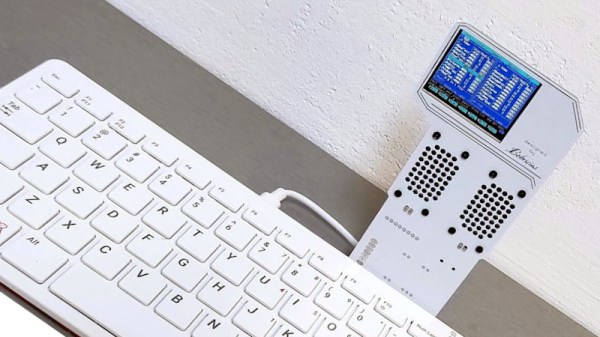
The trend for making cyberdecks has seen the Raspberry Pi emerge as a favourite for these home-made computer workstations, with the all-in-one Raspberry Pi 400 providing a particularly handy shortcut to integrating the computer and keyboard components. There’s still the question of the cyberdeck chassis and screen though, and it’s one that [bobricius] has answered in what may be the simplest manner possible, by means of a riser PCB from the expansion port holding a 320×240 SPI display.

If this is starting to look familiar, then you’d be right to recognise it as a slightly higher-quality version of those cheap LCD screens that have been available for the Pi for quite a few years. Alongside the screen is a pair of speakers, and the whole thing extends upwards from the back of the Pi 400. We’d question how much load can be taken by the expansion connector, but in practice it seems not to be taking too much.

The device in use can be seen in the video below the break. It’s definitely not the largest of displays, and when used as a desktop, it’s rather cramped, but it seems adequate for a terminal. It has the advantage over many cyberdecks that when the novelty has waned, it can be removed, and the Pi 400 used with a conventional display.

The Pi 400 has been with us for nearly a couple of years now, and perhaps hasn’t had the recognition it deserves. If you’ve never tried one, take a look at our review from when it came out.

Continue reading “Odd Inputs And Peculiar Peripherals: The Simplest Of Pi 400 Cyberdecks” →

A Secure Phone Fit For A Prime Minister

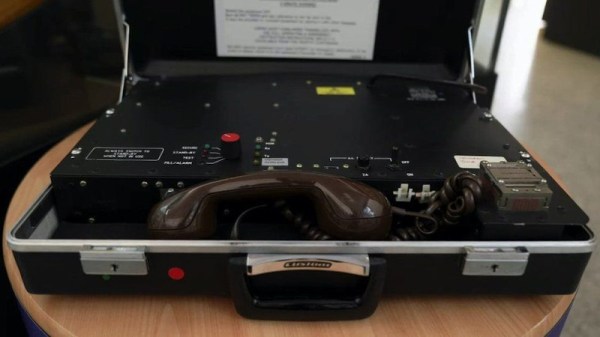
The curtain of state secrecy which surrounds the type of government agency known primarily by initialisms is all-encompassing and long-lived, meaning that tech that is otherwise in the public domain remains top secret for many decades. Thus it’s fascinating when from time to time the skirts are lifted to reveal a glimpse of ankle, as has evidently been the case for a BBC piece dealing with the encrypted phones produced by GCHQ and used by Margaret Thatcher in the early 1980s. Sadly, it’s long on human interest and short on in-depth technology, but nevertheless from it can be deduced enough to work out how it most likely worked.

We’re told that it worked over a standard phone line and transmitted at 2.4 kilobytes per second, a digital data stream encoded using a paper tape key that was changed daily. If we were presented with this design spec to implement in a briefcase using 1980s components, we’d probably make an ADPCM (Adaptive Differential Pulse Code Modulation) system with an XOR encryption against the key, something we think would be well within the capabilities of early 1980s digital logic and microprocessors. We’re wondering whether the BBC have made a typo and that  should be kilobits rather than kilobytes to work on a standard phone line.

No doubt there are people in the comments who could tell us if they were willing to break the Official Secrets Act, but we’d suggest they don’t risk their liberty by doing so. It’s worth noting though, that GCHQ have been known to show off some of their past glories, as in this 2019 exhibition at London’s Science Museum.

A Lab-Grade Measurement Microphone For Not A Lot

The quality of any measurement can only be as good as the instrument used to gather it, and for acoustic measurements, finding a good enough instrument can be surprisingly difficult. Commonly available microphones can be of good quality, but since they are invariably designed for speech or music, they need not have the flat or wide enough response and low noise figure demanded of an instrumentation microphone.

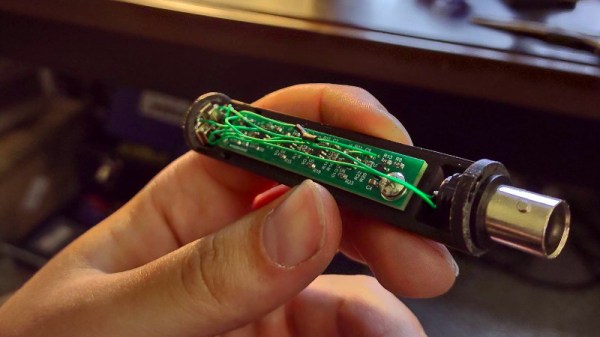
Microphones for measurement purposes can be had for a very large outlay, but here’s [Peter Riccardi] with a unit designed around an array of MEMS capsules that delivers comparable performance for a fraction of the cost.

The result is both an extremely interesting project for those of us with an interest in audio, and a thorough delve into some aspects of its design for those who are merely curious. It uses four capsules in an effort to cancel out induced electrical noise, and boasts some impressive comparative measurements when tested against a commercial measurement microphone. We could almost see ourselves building this project.

Interested in audio technology? Try our Know Audio series.

Live Subtitles For Your Life

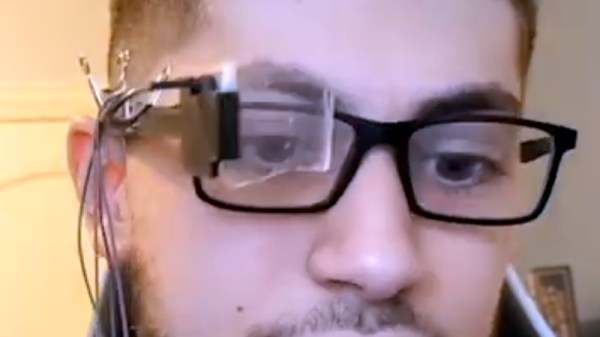
Personal head-up displays are a technology whose time ought by now to have come, but which notwithstanding attempts such as the Google Glass, have steadfastly refused to catch on. There’s an intriguing possibility in [Basel Saleh]’s CaptionIt project though, a head-up display that provides captions for everyday situations.

The hardware is a tiny I²C OLED screen with a reflector and a 3D-printed mount attached to a pair of glasses, and it’s claimed that it will work with almost any ARM v7 SBC, including more recent Raspberry Pi boards. It uses the vosc speech recognition toolkit to read audio from a USP audio device, with the resulting text being displayed on the screen.

The device is shown in action in the video below the break, and without trying it ourselves we can’t comment on its utility, but aside from the novelty we can see it could have a significant impact as an accessibility aid. But it’s as an electronic Babel fish coupled with translation software that we’d like to see it develop, so that inadvertent but hilarious international misunderstandings can be shared by all.

Regular readers will know that we’ve brought you plenty of HUD tomfoolery in the past.

Continue reading “Live Subtitles For Your Life” →