If you are a follower of futuristic high-speed transport systems you’ll have had your fill of high-speed trains, you’ll mourn the passing of Concorde and be looking forward to future supersonic passenger aircraft. Unless you have a small fortune to pay for a spaceplane tourist flight at an unspecified time in the future, life is going to feel a little slow.
There is one spark of light in this relative gloom though, in the form of Elon Musk’s Hyperloop. A partially evacuated tube in which vehicles, or “pods” can accelerate to very high speeds. SpaceX may not be pursuing it themselves, but they’ve made it available for others and to promote it they are running a competition in which they have invited teams to submit pod designs. And as a significant number of teams have made it through the first round and are prepared to compete outside SpaceX’s headquarters, Business Insider have a look at all the teams and their prototype pods. Continue reading “Take A Look At The Hyperloop Competition Entries”→
A pleasing development for those with an interest in audio equipment from decades past has been the recent resurgence in popularity of vinyl records. Whether you cleave to the view that they possess better sound quality or you simply like the experience of a 12″ disk with full-size cover art and sleeve notes, you can now indulge yourself with good old-fashioned LPs being back on the shelves.
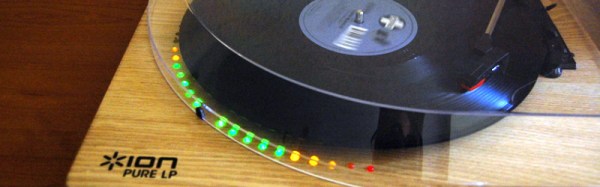
[Michael Duerinckx] is a fan of older trance records, and has an Ion Pure LP turntable which is fortunately for him not such an exclusive piece of audio equipment that it can’t be readily hacked. The hack he’s applied to it is a relatively simple one but nonetheless rather attractive, he’s added a set of LED VU meters in a ring round the edge of the platter.
Behind the LEDs is the trusty LM3915, an integrated circuit which will no doubt be familiar to any reader whose earlier life was spent among 1970s and 1980s audio gear. Internally it’s a stack of comparators and a resistor ladder, and it simply turns on the required number of outputs to match the level on its input. He’s put a pair of them on a little PCB with an associated PSU regulator, and mounted the LEDs in a row of holes drilled in the MDF base board of the turntable following the edge of the platter. Power and audio come from the turntable’s circuit board, which contains a preamplifier and the USB audio circuitry. A traditional turntable with a low-level output would not be able to drive an LM3915 directly.
This is a relatively straightforward project and the turntable itself isn’t necessarily the most accomplished on the market, but it’s very neatly executed and looks rather pretty.
When we take a new Wi-Fi router from its box, the stock antenna is a short plastic stub with a reverse SMA plug on one end. More recent and more fancy routers have more than one such antenna for clever tricks to extend their range or bandwidth, but even if the manufacturer has encased it in mean-looking plastic the antenna inside is the same. It’s a sleeve dipole, think of it as a vertical dipole antenna in which the lower radiator is hollow, and through which the feeder is routed.
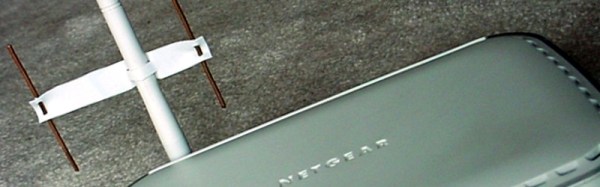
These antennas do a reasonable job of covering a typical home, because a vertical sleeve dipole is omnidirectional. It radiates in all horizontal directions, or if you are a pessimist you might say it radiates equally badly in all horizontal directions. [Brian Beezley, K6STI] has an interesting modification which changes that, he’s made a simple Yagi beam antenna from copper wire and part of a plastic yoghurt container, and slotted it over the sleeve dipole to make it directional and improve its gain and throughput in that direction.
Though its construction may look rough and ready it has been carefully simulated, so it’s as good a design as it can be in the circumstances. The simulation predicts 8.6 dB of gain, though as any radio amateur will tell you, always take antenna gain figures with a pinch of salt. It does however provide a significant improvement in range, which for the investment put in you certainly can’t complain at. Give it a try, and bring connectivity back to far-flung corners of your home!
One of the most famous lectures in the history of technology was delivered by [Douglas Engelbart] in December 1968, at a San Francisco conference. In it he described for the first time most of what we take for granted in our desktop computers and networking today, several years before even the first microprocessor made it to market. It is revered not only because it was the first airing of these ideas, but because it was the event that inspired and influenced many of those who developed them and brought them to market. You may have heard of it by its poplar name: the Mother of All Demos.
This was an exciting time to be a technologist, as it must have been obvious that we lay on the brink of an age of ubiquitous computing. [Engelbart] was by no means alone in looking to the future and trying to imagine the impact that the new developments would have in the decades to come. On the other side of the Atlantic, at the British Post Office Telephone research centre at Dollis Hill, London, his British counterparts were no less active with their crystal ball gazing. In 1969 they produced our film for today, entitled complete with misplaced apostrophe “Telecommunications Services For The 1990’s” , and for our 2017 viewpoint it provides a quaint but fascinating glimpse of what almost might have been.
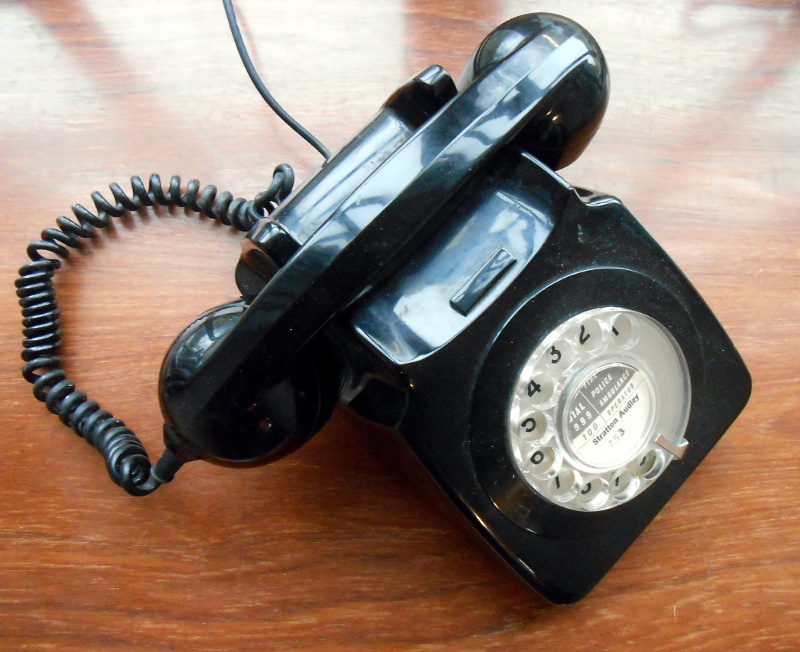
You can have any phone you want, as long as it’s state-owned! A GPO 746 telephone from the early 1970s.
Until the 1980s, the vast majority of British telephone services were a tightly regulated state monopoly run as part of the Post Office. There were only a few models of telephone available in the GPO catalogue, all of which were fixed installations with none of the phone sockets we take for granted today. Accessories such as autodiallers or answering machines were eye-wateringly expensive luxuries you’d only have found in offices, and since the fax machine was unheard of the height of data transfer technology was the telex. Thus in what later generations would call consumer information technology there really was only one player, so when they made pronouncements on the future they were a good indication of what you were likely to see in your home.
The film starts with a couple having a conversation, she in her bedroom and he in a phone box. Forgotten little touches such as a queue for a phone box or the then-cutting-edge-design Trimphone she’s using evoke the era, and the conversation leaves us hanging with the promise that their conversation would be better with video. After the intro sequence we dive straight into how the GPO thought their future network would look, a co-axial backbone with local circuits as a ring.
The real future-gazing starts with an office phone call to an Australian, at which we’re introduced to their concept of video calling with a colour CRT in a plastic unit that could almost be lifted from the set of The Jetsons. The presenter then goes on to describe a mass information service which we might recognise as something like our WWW, before showing us the terminal in more detail. Alongside the screen is a mock-up of a desktop console with keypad, cassette-based answerphone recorder, and a subscriber identity card slot for billing purposes. Period touches are a brief burst of the old harsh dial tone of a Strowger exchange, and mention of a New Penny, the newly-Decimalised currency. We’re then shown the system transmitting a fax image, of which a hard copy is taken by exposing a photographic plate to the screen.
Perhaps the most interesting sequence shows their idea of how an online information system would look. Bank statements and mortgage information are retrieved, though all with the use of a numeric keypad rather than [Englebart]’s mouse. Finally we see the system being used in a home office, a situation shown as farcical because the worker is continually harassed by his children.
Scorecard
This was the cutting edge in 1980, at least for people who hadn’t seen France’s Minitel. Fair use, via Wikimedia Commons.
So nearly five decades later, what did they get right and how much did they miss? The area you might expect them to be most accurate is oddly the one in which they failed most. The BT telecommunications backbone is now fibre-optic, and for the vast majority of us the last mile or two is still the copper pair it would have been a hundred years ago. In terms of the services though we have all of the ones they show us even if not in the form they envisaged. Fax and answering machines were everyday items by the 1980s, and though it didn’t gain much traction at the time we had video calling as a feature of most offices by the 1990s. We might however have expected them to anticipate a fax machine with a printer, after all it was hardly new technology. Meanwhile the online service they show us is visibly an ancestor of Prestel, which they launched for the late 1970s and which failed to gain significant traction due to its expense.
Another area they miss is wireless. We briefly see a pager, but even though they had a VHF radio telephone service and the ancestors of our modern cellular services were on the drawing board on the other side of the Atlantic at the time, they completely miss a future involving mobile phones.
The full film is below the break. It’s a charming period production, and the wooden quality of the action shows us that while the GPO engineers might have been telephone experts, they certainly weren’t actors.
Human input devices are a consumable on our computers today. They are so cheap and standardised, that when a mouse or a keyboard expires we don’t think twice, just throw it away and buy another one. It’ll work for sure with whatever computer we have, and we can keep on without pause.
On earlier machines though, we might not be so lucky. The first generation of computers with mice didn’t have USB or even PS/2 or serial, instead they had a wide variety of proprietary mouse interfaces that usually carried the quadrature signals direct from the peripheral’s rotary sensors. If you have a quadrature mouse that dies then you’re in trouble, because you won’t easily find a new one.
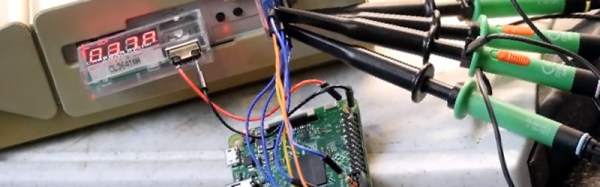
Fortunately there is a solution. In the intervening decades the price of computing power has fallen to the extent that you can buy a single board computer with far more than enough power to interface with a standard USB mouse and emulate a quadrature mouse all at the same time. This was exactly the solution [Andrew Armstrong] took to provide a replacement mouse for his Atari ST, he used a Raspberry Pi as both USB host and quadrature mouse emulator (YouTube link) through its GPIOs.
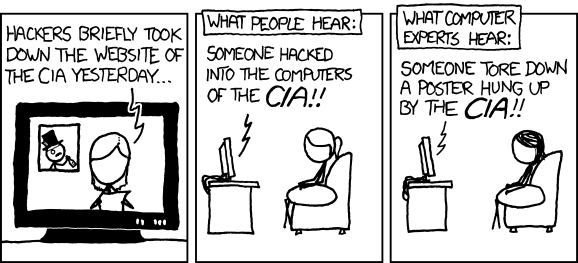
To a casual observer it might seem as though our community is in the news rather a lot at the moment. It’s all about hacks on our TV screens in the soap opera of Washington politics, who hacked this, whether those people over there helped that lot hack the other lot, or even whether that person’s emails could have been hacked on that server. Keeping up with it as an outsider can become a full-time job.
Of course, as we all know even if the mainstream journalists (or should I refer to them colloquially as “hacks”?) don’t, it’s not us they’re talking about. Their hackers are computer criminals, while we are people with some of the hardware and software skills to bend technology to our will, even beyond what its designers might have intended. And that divergence between the way we use the word in a sense of reappropriation and they use it in disapprobation sometimes puts us in an odd position. Explaining to a sober-suited businessman as the director of a hackspace, that no, we’re not *those*hackers can sometimes feel like skating on thin ice.
[Bithead942]’s ten-year-old niece is a huge Star Wars fan, and also a violinist. Which of course has led her to learn to play some of the music from the film franchise, and then to ask her uncle to make her violin bow light up like a lightsaber.
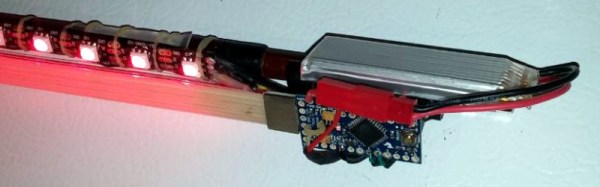
His solution might seem fairly straightforward at first sight, simply attach a strip of DotStar addressable LEDs to a bow and drive them from an Arduino Pro Mini to gain the required animation of a saber power-up. But of course, there’s another dimension to this project. Not only does the bow have to do its lightsaber trick, it also has to be a playable bow. The electronics must not impede the musician by being too heavy or intrusive, but the result must have enough power in reserve to keep the lights burning for the duration of a performance.
After experimentation with AAA cells and CR2032s the power requirement was satisfied by a tiny Li-po cell attached to the top of the end of the bow with industrial Velcro, and the LED strip was glued and further secured using tiny rubber bands of the type used by orthodontists.
A short demonstration of the bow’s lightsaber action is shown below the break, we’re sure it’ll impress the young violinist’s audience.