A DIY Pulse Tube Cryocooler In The Quest For Home-Made Liquid Nitrogen

What if you have a need for liquid nitrogen, but you do not wish to simply order it from a local supplier? In that case you can build your very own pulse tube cryocooler, as [Hyperspace Pirate] is in the process of doing over at YouTube. You can catch part 1 using a linear motor and part 2 using a reciprocating piston-based version also after the break. Although still very much a work-in-progress, the second version of the cryocooler managed to reduce the temperature to a chilly -75°C.

The pulse tube cryocooler is one of many types of systems used for creating a cooling effect. Commercially available refrigerators and freezers tend to use Rankine cycle coolers due to their low cost and effectiveness at (relatively) warmer temperatures. For cryogenic temperatures, Stirling engines are commonly used, although they find some use in refrigeration as well. All three share common elements, but they differ in their efficiency over a larger temperature range.

In this video series, the viewer is taken through the physics behind these coolers and the bottlenecks which prevent them from simply cooling down to zero Kelvin. Despite the deceptive simplicity of pulse tube cryocoolers — with just a single piston, a regenerator mesh, and some tubing — making them work well is an exercise in patience. We’re definitely looking forward to the future videos in this series as it develops.

Continue reading “A DIY Pulse Tube Cryocooler In The Quest For Home-Made Liquid Nitrogen”
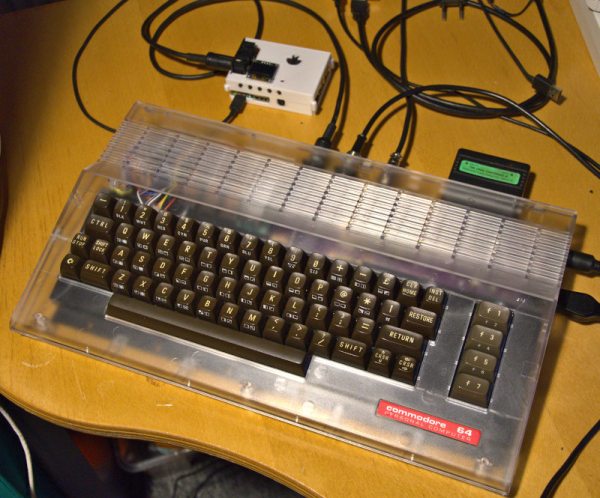
Building A New Commodore 64 In 2022 With All New Components

Call it fake or simply new, but when [DusteD] set out to build a brand-new Commodore 64 with only new parts, it resulted in Project MaxFake64 that is electrically and binary compatible with any genuine C64 out there. While not really ‘fake’ in the sense that a C64 emulator is fake, it is in the sense that it uses no parts produced before this millennium. This might actually be easier than getting a used C64 in fully working condition these days.

In total, the project contains an aftermarket C64 power supply by Electroware, a brand new C64C case, a C64 (ASSY NO 250407) mainboard based on the genuine board, a generic RF modular module, an FPGA-based Kawari VIC-II replacement, a 6502 MPU using a 6502-to-6510 adapter by Monotech PCs, a dual-GAL-based PLA replacement, EPROMs for the kernal, character and BASIC ROMs (with in-socket hacks), and a SinSID Nano as (temporary) SID replacement.

Issues discovered during the process include some cracking on the (transparent) C64C case and lack of availability on CIA replacements like the J6526. The keyboard will also be replaced at some later point, and items like the joystick ports were salvaged from an old C64 rather than purchased brand new. None of which are fundamental problems, and might actually make financial sense when it comes to finding replacement parts in the future.

DietPi Releases 8.12 With Support For The Rockchip RK3588 SoC

This month DietPi released version 8.12 of this SBC-oriented Linux distribution. Most notable is the addition of support for the NanoPi R6S and the Radxa ROCK 5B SBCs. The ROCK 5B features the new flagship Rockchip RK3588 SoC with quad Cortex-A76 and quad Cortex-A55. What makes DietPi interesting as an operating system for not just higher end SBCs but also lower-end SBCs compared to options like Debian, Raspberry Pi OS and Armbian is that it has a strong focus on being the most optimized. This translates in a smaller binary size, lower RAM usage and more optimized performance.

The DietPi setup experience is as straightforward as with the aforementioned options, except that right from the bat you get provided with many more options to tweak. While the out of the box experience and hitting okay on the provided defaults is likely to be already more than satisfactory for most users – with something like the optional graphical interface easy to add – enterprising users can tweak details about the hardware, the filesystem and more.

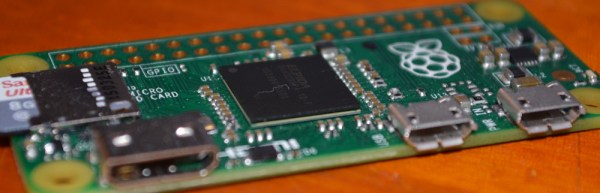
When we set up DietPi on a Raspberry Pi Zero, it definitely feels like a much more light-weight experience than the current Debian Bullseye-based Raspberry Pi OS. Even though DietPi is also based on Debian, it leaves a lot more RAM and storage space free, which is a definite boon when running on a limited platform like a Raspberry Pi Zero. Whether it’s polite to state in public or not, DietPi definitely rubs in that many standard SBC images are rather pudgy these days.

Connecting Commercial 433 MHz Sensors To MQTT And Home Assistant With RTL-SDR

When [Elixir of Progress] was looking at setting up environmental sensors around their home to keep track of temperature, humidity and such, the obvious ideas of using WiFi-connected sensors didn’t work due to lack of WiFi range. Although Zigbee (Z-wave) sensors have longer range than WiFi, they are decidedly more expensive, proprietary and require a special transceiver hub. That’s where 433 MHz sensors for weather stations come into the picture.

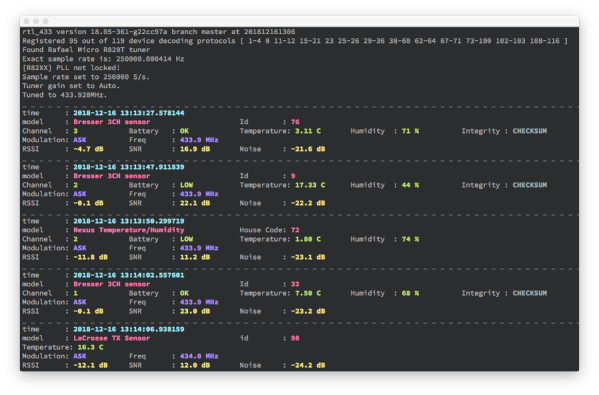
The idea is simple: virtually all of those sensors – many of them rated for outdoor use – use the unlicensed 433 MHz spectrum that can easily be captured using cheap RTL-SDR (software defined radio) USB dongles. With the data stream from these sensors captured, the open source rtl_433 project enables automatic decoding of these data streams for a wide range of supported sensors.

While Realtek RTL2832-based and other RTL-SDRs can be found for quite cheap, it should be noted that these can run quite hot. Rather than heatsinking the IC, for this project it was elected to only listen sporadically and allow the RTL-SDR receiver to cool down in between listening sessions.

Getting the data from there into Home Assistant, InfluxDB or similar is easy, as rtl_433 can output the decoded data directly to an Influx database, MQTT broker as well as other formats. In this case, the data was sent via MQTT with the Home Assistant instance configured to treat these MQTT topics as sensors. With each sensor’s location carefully registered, this allows for setting up a dense, very low-power network of 433 MHz sensors for monitoring and home automation purposes.

Turning A Microchip MPLAB Snap Into A UDPI AVR Programmer

The Unified Program and Debug Interface (UPDI) is Microchip’s proprietary interface for programming and on-chip debugging, and has become the standard on AVR MCUs after Microchip’s purchase of Atmel. Being a proprietary interface means that even entry-level programmers like the Atmel-ICE are rather expensive at over $100. That’s when for [Scott W Harden] the question arose of whether the much cheaper MPLAB Snap board (~$34) could be used as well for AVR UDPI purposes.

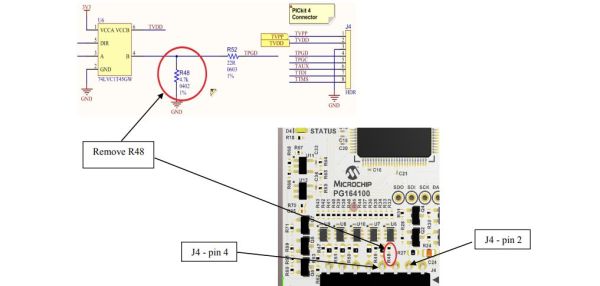
The stages of grief that [Scott] went through before he had it working involved among others the updating of the MPLAB Snap board firmware, getting yelled at by the Microchip Studio IDE when attempting to use the Snap for AVR MCU programming, and ultimately fixing the board following the relevant Microchip Engineering Technical Note (ETN #36) that specifies the removal of a 4.7 kΩ pull-down resistor (R48) on the Snap board. This allows the UDPI line to be pulled high by the MCU.

As the ETN notes, an external pull-up may also be used to override the pull-down, which would leave the ICSP functionality of of the Snap intact. As [Scott] mentions in his conclusion, it feels as if UDPI AVR support with the Snap is really an afterthought for Microchip. Meanwhile there are also more DIY solutions as [Scott] adds, which are useful for just flashing the MCU. An example is with a USB-TTL serial adapter and pymcuprog.

The problem with DIY solutions like jtag2updi, ftdi2updi, and their kin is the effort required to assemble them, and the uncertainty of long-term support as the UPDI ecosystem keeps evolving with new devices and new features. The MPLAB Snap with resistor mod may be just that middle ground between an Atmel-ICE and reverse-engineered OSS projects.

(Featured image: MPLAB Snap resistor mod illustrated, from Microchip ETN #36)

Laser Fusion Ignition: Putting Nuclear Fusion Breakthroughs Into Perspective

This month the media was abuzz with the announcement that the US National Ignition Facility (NIF) had accomplished a significant breakthrough in the quest to achieve commercial nuclear fusion. Specifically, the announcement was that a net fusion energy gain (Q) had been measured of about 1.5: for an input of 2.05 MJ, 3.15 MJ was produced.

What was remarkable about this event compared to last year’s 1.3 MJ production is that it demonstrates an optimized firing routine for the NIF’s lasers, and that changes to how the Hohlraum – containing the deuterium-tritium (D-T) fuel – is targeted result in more effective compression. Within this Hohlraum, X-rays are produced that serve to compress the fuel. With enough pressure, the Coulomb barrier that generally keeps nuclei from getting near each other can be overcome, and that’s fusion.

Based on the preliminary results, it would appear that a few percent of the D-T fuel did undergo fusion. So then the next question: does this really mean that we’re any closer to having commercial fusion reactors churning out plentiful of power?

Continue reading “Laser Fusion Ignition: Putting Nuclear Fusion Breakthroughs Into Perspective”

Getting Root On A Chinese IP Camera

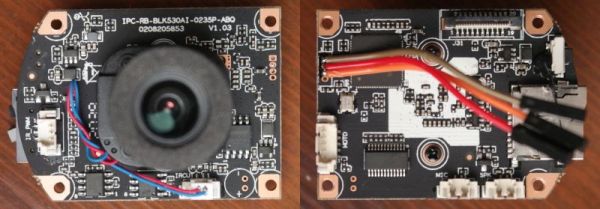
With so many cheap network-connected devices out there being Linux-powered, it’s very tempting to try and hack into them, usually via a serial interface. This was the goal of [Andrzej Szombierski] when he purchased a cheap Chinese IP camera using an XM530 ARM-based SoC to explore and ultimately get root access on. This camera’s firmware provides the usual web interface on its network side, but it also has a UART on its PCB, courtesy of the unpopulated four-pin header.

Merely firing up a serial terminal application and connecting to this UART is not enough to get access, of course. The first obstacle that [Andrzej] struggled with was that U-Boot was configured to not output Linux kernel boot messages. After tackling that issue with some creative hacking, the next challenge was to figure out the root password, using a dump of the firmware image, which led to even more exploration of the firmware and the encoding used for the root password.

Even if some part of these challenges were possibly more accidental than on purpose by the manufacturer, it shows how these SoC-based Linux devices can put up quite a fight. This then leaves the next question, of what to do with such an IP camera after you have gained root access?