Your Theme Song Greets You At The Front Door

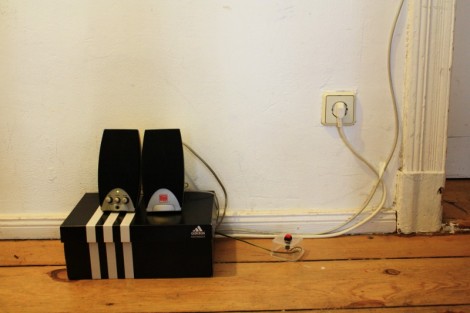
One thing you can look forward to when arriving at home after a long, arduous day at the office is some peppy theme music when you walk in the door. [Sebastian Sommer] built the system, and shows it off in the video after the break by dancing to James Brown’s I feel good.

The setup uses an Arduino as a microcontroller. It monitors a hall effect sensor on the jamb which detects a passing magnet on the door. We guess this means the system doesn’t know if you’re coming or going but perhaps a future upgrade would add an infrared beam to detect your legs as head out the door. The music itself is played by an SparkFun MP3 shield which has a decoder chip, microSD slot, and audio jack for the powered speakers. [Sebastian] grabbed a copy of [Bill Porter’s] mp3 shield library to get the project up and running quickly.

This is a pretty cool addition if you’re already using an Arduino for a door lock or vice versa. Or maybe you’re not home enough to make this hack worth it, in which case you simply must take this music playing Tesla coil hat along on your commute.

Continue reading “Your Theme Song Greets You At The Front Door”

Giant Pencil Used As An Etch A Sketch Stylus

The gang over at Waterloo Labs decided to add a team-building aspect to a plain old Etch a Sketch. Instead of just twisting the two knobs with your own mitts, they’re converting this giant pencil’s movements into Etch a Sketch art.

The challenge here is figuring out a reliable way to track the tip of the pencil as it moves through the air. You may have already guess that they are using a Microsoft Kinect depth camera for this task. The Windows SDK for the device actually has a wrapper that helps it to play nicely with LabView, where the data is converted to position commands for the display.

On the Etch a Sketch side of things they’ve chosen the time-tested technique of adding gears and stepper motors to each of the toy’s knobs. As you can see from the video after the break, the results are mixed. We’d say from the CNC ‘W’ demo that is shown there’s room for improvement when it comes to the motor driver. We can’t really tell if the Kinect data translation is working as intended or not. But we say load it up and bring to a conference. We’re sure it’ll attract a lot of attention just like this giant version did.

Continue reading “Giant Pencil Used As An Etch A Sketch Stylus”

Brewing Up Gunpowder With Household Products

When the zombiepocalypse comes you’re not going to want to run out to the store for more ammo. But you can always reload great grandpa’s musket with some homemade gunpowder. All kidding aside, the invention and proliferation of gunpowder had a profound effect on the world. Here you can see just how easy it is to make with chemicals that are common in our modern world.

The two compounds that go into this experiment are ammonium nitrate and potassium chloride. Where can you get your hands on these materials? Instant cold packs use ammonium nitrate and water to start an endothermic reaction. The potassium chloride can be found in the grocery store as a table salt alternative.

The chemicals need to be measured by weight. [William Finucane] didn’t have a digital scale on hand so he made a balance using a wooden ruler, two plastic component drawers, and a Bic lighter as a fulcrum. With approximately equal parts of the two materials he sets about dissolving in water, filtering, and heating of the concoction to produce saltpeter. Combine this with powdered sugar and you’ve got gun powder. Don’t believe that it works? You can see the fiery goodness in the clip after the break.

Flammable and explosive materials are dangerous to work with, so you probably shouldn’t do this yourself. But then again, it can’t be as dangerous as working with thermite. Continue reading “Brewing Up Gunpowder With Household Products”

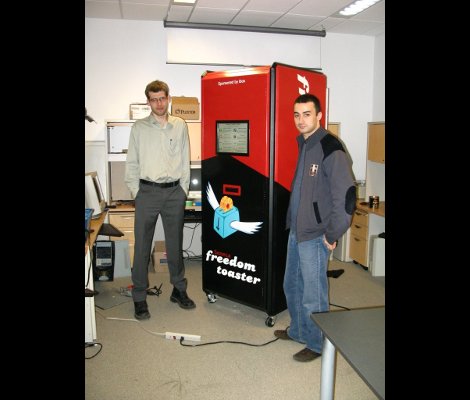
Freedom Toaster Dispenses FOSS… For Free

The Seneca College Linux Club figured out a fantastic way to help promote Linux to a wider audience. They took some surplus hardware and made an Open Source software vending machine. That is and isn’t a play on words. The project itself is an open source project, and the goal is to dispense other open source software in the form of CDs and DVDs.

Their build page shares all of the details. They acquired an older server cabinet which was on the way out from the IT department. It’s more than large enough to fit a person inside, which is overkill but it makes it much less likely that someone will try to walk off with the thing. Inside you’ll find a computer, two monitors (one is a touch screen for consumer use, the other is just an extra hidden inside for maintenance.

You must bring your own blank CD-R or DVD-R (but the burning is free). You can see the DVD shelf at waist-level on the fully painted kiosk above. The only thing we think is missing here is a USB port for brewing up a bootable USB stick.

[Thanks MS3FGX]

Interesting Substrate Used To Position LEDs Of This Word Clock

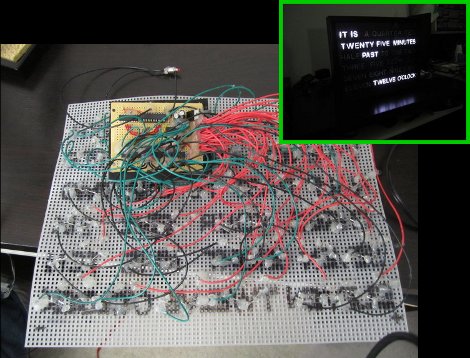
[Ivan] decided to build a Word Clock as holiday gift for his parents. He pulled it off, but as you can see above, it meant a lot of point-to-point soldering. One small piece of proto-board is used to host the power supply and a few integrated circuits, with the rest of the device mounted on an interesting choice of material.

The substrate that holds the LED array for the display is a plastic mesh. You’ll find the stuff in any craft store, it’s meant for use in yarn work. It comes rated in several different sizes designated by holes-per-linear-inch. This is fantastic because it makes precision spacing a snap. The face plate itself looks great, especially when you consider that all of the letters were cut out from a piece of black foam board by hand. This bezel was then put in a picture frame, with a bit of tissue paper as a diffuser.

They tell us that the code was written in assembly for an ATtiny2313 microcontroller. It uses a DS1305 RTC chip to keep time and you might be interested to see how the communication protocol was implemented in assembly. The project is based on [Doug’s] Word Clock which we covered in this links post.

Dual-monitor Work Stations Aims To Keep You On The Treadmill Longer

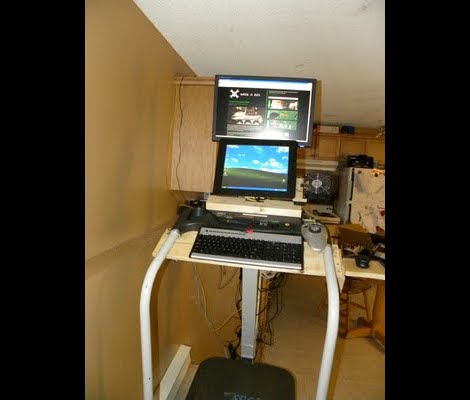
In an effort keep his workout schedule on track [Jamie] built himself this dual-screen treadmill work station. He picked up the treadmill for about $50 on eBay, and after some follies with its shoddy construction, ended up with a pretty nice setup.

The first rendition of this project was just a wooden shelf to hold a laptop. But after the treadmill fell apart, sending his laptop tumbling, he reinforced the machine and added a bunch of stuff in the process. There’s now some custom electronics used to track his progress. He painted a white square on the black belt that makes up the running surface. That is monitored by a PIC microcontroller via a phototransistor and op-amp. He uses a USB data acquisition card to feed the belt-revolution count to the computer for use in tracking his workouts.

The presence of a computer in his setup would make Internet logging a snap too. The exercise bike we looked at on Saturday used a direct Ethernet connection for its logging, but [Jamie’s] setup could be used in the same way. He just needs a script to bridge the collected data with an Internet logging site’s API.

8-bit Computer Project Lands In A Philco Radio Case

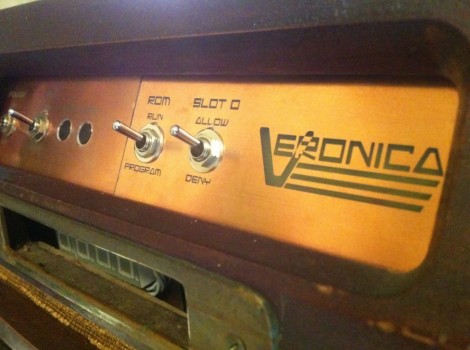
We’ve enjoyed seeing the development progress of Veronica, [Quinn Dunki’s] 8-bit computer project. It started out on a breadboard, then moved to edge-connected PCBs, and now [Quinn] has given Veronica a body of her own.

The donor is a Philco Model 42-327T and was produced in 1942. It was chosen because it is non-functional and missing several pieces. We wonder about the collector’s value of the piece but since [Quinn] snagged it from eBay there can’t be in huge demand right now. The teardown images are priceless. There seems to be no reasoning behind component placement for the beast. It looks more like a junk drawer packed full of relic components than something that actually worked once upon a time.

But we digress. After gutting the retro wooden case [Quinn] set out to fabricate her own face plate. Since she’s comfortable working with copper clad, she whipped up a negative design and etched the dashboard seen above. It mounts in the original dial opening, and hosts all of the controls she needs to work with the 8-bit computer. Just below is where the present buttons used to be located. You can just see the hexout display for reading data from the registers mounted in that void.