Loading Programs Onto A TRS-80 Model 100

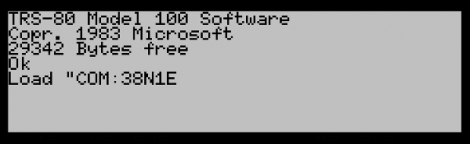
We’d guess that you don’t have a TRS-80 Model 100 computer sitting around. But we’ve heard that the decades-old hardware is built like a tank so if you search around you can probably get your hands on a working unit. The Model 100 boasted some nice features, one of which was a 300 baud modem allowing you to transfer data onto the device. [MS3FGX] wanted to give it a try but had to do some work to get the Model 100 to communicate with modern hardware.

This could have been a much more involved process, but since the Model 100’s modem uses common communications standards it’s really just a matter of hooking it up and choosing the right COM port settings on a computer. In this example a Linux box is used with the program Minicom. It is configured to communicate at 300 baud 8N1 (8 data bits, no parity bit, and one stop bit).

With software in place you’ll need to make your own cable. [MS3FGX] does this using a DB-25 connector for the Model 100 side, and a DB-9 connector for the serial port on the Linux box. He’s got a pin-out for the cable on the second page of his guide. It sounds like it should be no problem to use a USB-serial converter if you don’t have a serial port.

Once everything is in place you’ll be able to transfer BASIC programs from your computer to the Model 100.
Pop-up Dragonfly Robot Could Be The Future Of Business Cards

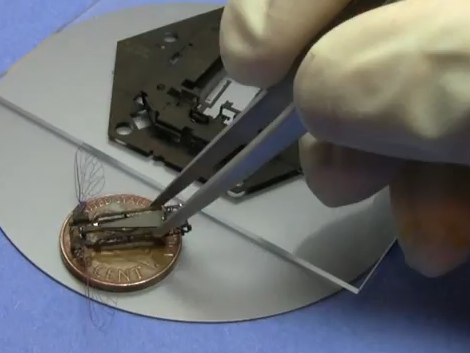
Engineers trying to be memorable at a job interview would be wise to pull one of these pop-up robots out of a wallet. This marvel of engineering uses a laminate construction technique to build a robot as a pop-up assembly. You can see the base used during the process, it’s a hexagon that serves as a scaffolding during the laminating process, and includes mechanical linkages that facilitate assembly.

The design calls for multiple layers of materials to be laser-cut to exacting specifications. Once all parts are completed, they are stacked using rods to align them, then fused together. One more trip through the laser cutter finishes the milling and the machine is ready for assembly. But with parts this small, you’ll want a solid method for putting everything together. The linkages we mentioned before allow for this when two parts of the scaffolding are separated. The only thing that makes this impossible as a business card is the need for a trip through the solder bath to cement the pieces in place. But perhaps some type of clasping mechanism could remove this need in the future.

Don’t miss the video after the break that explains the entire process. You’ll even get to see the little guy flap his wings. That’s all that it does for now, there isn’t any steering mechanism available as of yet.

Continue reading “Pop-up Dragonfly Robot Could Be The Future Of Business Cards”

Easy Workout Logging With Ethernet-enabled Exercise Bike

It will be easy to keep your exercise routine on track if you don’t have to do anything at all to log your workouts. [Reefab] developed this add-on hardware for his exercise bike that automatically logs his workout on the Internet.

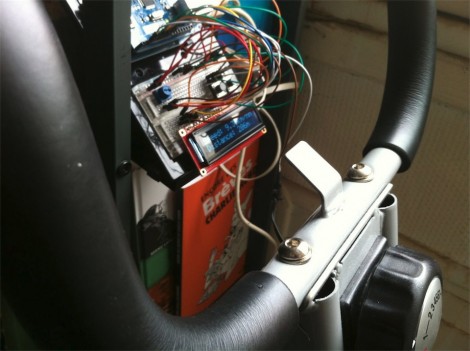
He’s using RunKeeper to store and display the workout data. They offer a token-based API which [Reefab] implemented in his Arduino sketch. The hardware to grab data from the exercise bike is quite simple to set up. A rare-earth magnet was added to the fly-wheel with a reed switch positioned next it in order to measure the number and speed of rotations. This is exactly how a consumer bicycle computer works, needing just one accurate measurement corresponding to how far the bike travels with each revolution of that wheel.

In addition to the networked-logging feature [Reefab] included a character display so you can follow your speed and distance data during the workout.

Snake-the-Planet Makes A Game Board Out Of Your Surroundings

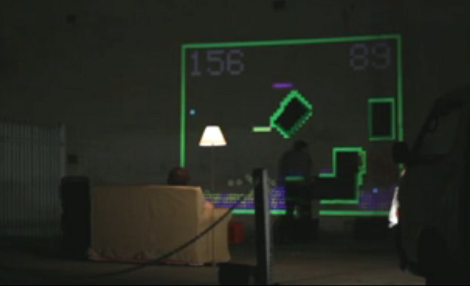
It’s Friday night and these guys are driving around town looking for a good spot to play a head-to-head game of Snake. It’s not that they need somewhere to sit (they travel with a couch and floor lamp for that purpose) it’s that they’re using a projector and camera to make a game out of their surroundings.

A white Mystery-Machine-style van has room for everything they need to make the traveling arcade happen. A mobile power supply provides juice to the camera and projector. To get started, the system takes a high-contrast black and white photo of the surface in front of it. Everything that appears below the white threshold becomes a wall on the game board, everything else is a playable area. Obstacles are formed by windows, doorways, pipes, signs, pieces of foam board the guys hang on a wall, and even your body if you stand in the way during scanning. From there the guys each grab a joystick and play the hacker-favorite game of snake.

After the break you can watch a description of how the system works. Continue reading “Snake-the-Planet Makes A Game Board Out Of Your Surroundings”

Using The Parallel Port As A Logic Sniffer

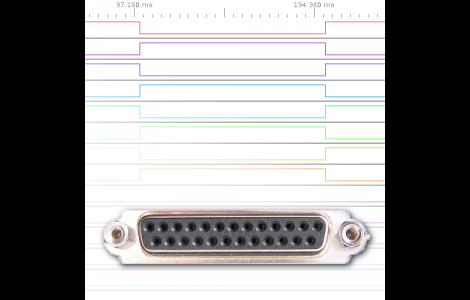
[Fernando] wrote in to share his take on building a logic analyzer. He’s using the parallel port to capture data and feed it to the display software of your choice.

The method depends on a custom kernel which alters the way the parallel port works. The kernel he compiled includes a method of intercepting the signals coming in from the hardware, passing that data to the /dev/parport* as it should, but also sending a copy to /dev/parportsnif*. It also creates a log file which is in the OpenBench Logic Sniffer format for easy use with various display software.

Of course this is easiest to use with a Linux system, but can also be run as a virtual machine under Windows. We’d plan on using a virtual machine within Linux as well since this is a custom kernel and will probably only see occasional use.

Simple Hardware And Python Drive This Splunk LED Meter

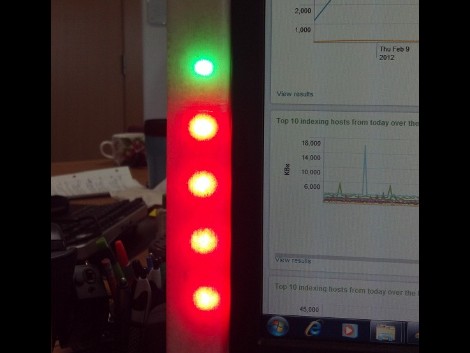
Want to monitor the company system without continually loading up the Splunk dashboard? It turns out that they’ve got their own Python package which makes pulling down data a snap. All [Rick] needed to do was hook up an LED meter as an external display.

It used to be that this would take a lot of wire and bit of soldering (or some special Christmas lights), but the advent of affordable LED strips has really taken the guess-work out of it. He’s using an RGB version acquired from Adafruit Industries. These strips are driven using SPI and multiple-colors mean you can display multi-dimensional data using one column. He chose to use a Teensy microcontroller, grabbing some plastic packaging for welding rods as the enclosure. These strips are extremely bright and to help soften the impact he added wax paper to the inside of the enclosure to act as a diffuser.

Looking for more projects that use strips like this one? They make fantastic addressable accent lighting for your home.

R2R Ladder Connects Multiple Buttons To One ADC Pin

If you’ve run out of I/O pins on a project and need a way to add user input you can find a slew of port expanders that work with various communications protocols like I2C and 1-Wire. But if you just want to add in some buttons without reaching for an extra IC you’ll love this hack. [John Boxall] shows how to add four buttons using one ADC pin.

The concept is nothing new. The buttons make up an R2R resistive ladder. When one of them is pressed, it completes the circuit for a voltage divider. The results are measured by the analog-to-digital converter of an IC to tell which button was pressed. The difficult part is calculating the resistor values. [John] is using eight resistors made up of just two different values. Every button and every combination of buttons has a unique voltage result which can be discerned by the chip. He even made a truth table so you don’t have to.

The example circuit seen in the video after the break uses an Arduino. But this concept is directly applicable to any microcontroller. And it should be quite easy to use an ADC interrupt to drive all of the button-read events. Continue reading “R2R Ladder Connects Multiple Buttons To One ADC Pin”