Beginner Concepts: Using A Low-pass Filter To Smooth PWM Output

Microcontrollers are digital devices at heart. They can do fancy things like convert analog signals into a digital value but going the other direction is a bit tougher. Pulse-Width Modulation is used to approximate an analog output but what you’re actually doing is turning the operating voltage on and off very quickly to achieve an average value somewhere in between. This is the method most commonly used to dim an LED. But generating a smooth voltage in this way takes just a few more parts.

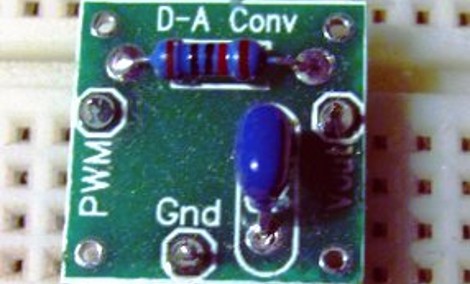
[Scott Daniels] spent some time discussing the process of smoothing a PWM output by using a low pass filter. This is a compilation of digital and analog circuitry to produce a smoother signal than PWM can achieve on its own. As you can see above, the low pass filter is made up of one resistor and one capacitor. The theory is not hard to understand, and with [Scott’s] help you’ll become much more comfortable with choosing the component values for your own filters. His examples center around an Arduino using the analogWrite() function but the techniques can be applied universally.


We’ve Got A Real Bone To Pick With This Mouse

Finally, there’s a way you can feel like a real bad-ass while you’re formatting those TPS reports. It’s all thanks to this computer mouse built inside the skull of a dog. [Shannon Larratt] dug through his collection of skulls and came up with this one because it fits nicely in the palm of your hand.

Before you get too grossed out, this is not actually part of an animal’s body like another notable mouse hack that comes to mind. [Shannon] started with the skull of a small dog, making a mold for the pieces used in the finished version above. He was quite creative when fitting the electronic parts inside of his reproduction. He pulled the PCB from a $10 Logitech mouse and had no trouble getting it to fit into the base of the skull. But when it came to the buttons he ended up engineering a couple of rockers and used a belt to reposition the scroll-wheel. Not wanting to lose the middle-click feature there’s an additional lever for that functionality. We’d also like to compliment him on the quality of his write-up. Fantastic!

Celebrating The Design Principles Behind Cellphones

Want to improve the finished look of your projects? There’s a lot you can learn by looking at the choices made in consumer electronics. [Bill Hammack] explores what is perhaps the most refined electronic device out there, the cell phone. Specifically, he discusses the seven design constraints that face every cellphone maker. They are: compactness versus usability, consumer preference, availability of energy, economic resources and available infrastructure, knowledge of materials, societal needs, and cultural constraints.

Anyone who’s whipped out their hacked-together project in a public space understands cultural constraints. Especially when forgetting your backpack in a public place can put the bomb squad of full alert these days. But aside from the anecdotal issues, [Bill’s] look at now-and-then cellphones really shows off the smart design that we enjoy thanks to the evolutionary process that went into what has become the wristwatch of the 21st century. See what he has to say in the video after the break.

Continue reading “Celebrating The Design Principles Behind Cellphones”

Excuse Me IPad, May I Cut In?

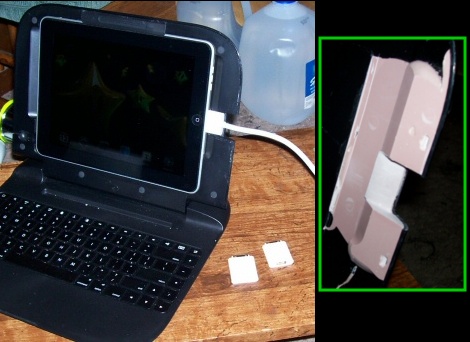
[LostSpawn] loves his clamshell keyboard for the iPad, but he had one major beef with the design. When the tablet is installed in the landscape orientation there’s no way to plug in a dock connector for charging or other uses. He pulled out the cutting tools and altered the case to meet his needs.

The case is a Rocketfish iCapsule which provides a Bluetooth keyboard when you need to do a lot of typing. The hard shell does a great job of protecting the iPad, but who wants to pull it out to charge it? The thing that we can’t believe is that there’s a slot milled in the other side of the bezel so that you can plug in headphones. How did they overlook the dock connector?

To add it himself, [LostSpawn] started by drilling a dotted line along the portion that he wanted to remove. He finished shedding material with a Dremel and then set about sanding it flat. To make sure it didn’t look too much like a hack he used Bondo to build up the working edge and then sanded and painted for a factory finish. Now he can plug in the cable or an SD card adapter like the one seen to the right of the keyboard.

Simple Clock Uses RTC Chip And Character Display

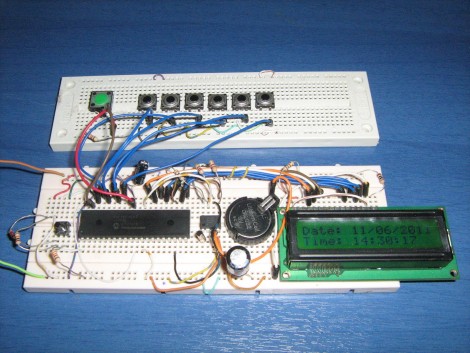
[Giorgos Lazaridis] just finished building a simple clock on a breadboard. It uses a common real time clock chip, the DS1307. This is less expensive that its full-featured older brother, the DS3232. The difference between the two is that the 1307 requires an external 32.768 kHz crystal and it is not temperature compensated. This means it will not be quite as accurate over the long-haul (it may wander as much as one minute per month), but it still blows the accuracy of using a microcontroller as an RTC out of the water and includes a backup battery which will keep time when the rest of the circuit is switched off.

This design uses a PIC 16F1937 to display the time and date on a 16×2 character LCD screen. Six buttons are dedicated to incrementing one specific chunk of data (ie: one button changes the year, another the day, etc.). A seventh button can be held down when using the other six in order to decrement the setting. We’re always interested in how the button code is written. [Giorgos] did share his code, but he wrote it in assembly so it’s of little use to us as we tend to stick to C code.

See the walk through video after the break.

Continue reading “Simple Clock Uses RTC Chip And Character Display”

Disappearing Kitchen Island

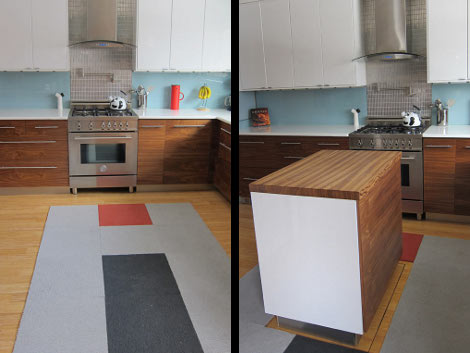
[Tim Thaler] has been redoing his home, adding some fancy automation here and there. But when it came to the kitchen, he went all-out by installing an iPhone controlled disappearing island. In the video clip after the break you can see [Tim] dial up some extra counter and storage space from his smart phone. One click causes it to slowly rise from the depths, shedding the carpet tiles as it goes.

Directly beneath the kitchen is an unfinished storage room. [Tim] framed a hole in the floor above, and sourced a used scissor lift for about $380 to do the heavy lifting. It operates smoothly and isn’t all that loud. It sure makes for an interesting feature if he ever decides to sell the place.

We thought it was a nice touch that the storage room hiding the mechanical parts of the hack has a hidden entrance. You must travel through the billiards room in the basement to access it, turning the ball rack to unlatch the entrance.

Continue reading “Disappearing Kitchen Island”

Magnetism Makes Silly Putty Fun Again

The image above is a screen capture from a video clip where the black ooze gobbles up that rare-earth magnet. It’s actually a blob of Silly Putty which was slightly altered to add magnetic properties. [Mikeasaurus] grabbed some ferric iron oxide powder from an art supply store and donned gloves and a dust mask while massaging it into the silicone polymer. If you get the right mix of the two materials you end up with a flowing substance that performs mysteriously when exposed to a magnetic field.

Check out the video after the break to see some of the tricks that [Mikeasaurus] can do. The putty really looks like it has a life of its own. It will stretch a remarkable distance to get close to the magnets (amorphous stretch). If left in contact with one it will fully engulf it and then form an orb.

Now, is there any way to use this with electromagnetic fields to build a morphing robot?

Continue reading “Magnetism Makes Silly Putty Fun Again”