DIY Battery Reconditioner Saves Old Rechargeable Batteries From The Landfill

rechargeable_battery_reconditioner

Instructables user [msuzuki777] had amassed quite a collection of batteries over the years, but was finding that some of his rechargeable AA and AAA cells seemed to be at the end of their useful life. After reading some information at the Battery University regarding the restoration process for nickel-based batteries, he figured he might as well try building a battery reconditioner of his own.

He worked through several designs that either flat-out did not work, or had issues that limited the number of batteries he could simultaneously recondition. After reading about this rechargeable battery capacity tester we featured a few months back, he was ready to give the project one more try.

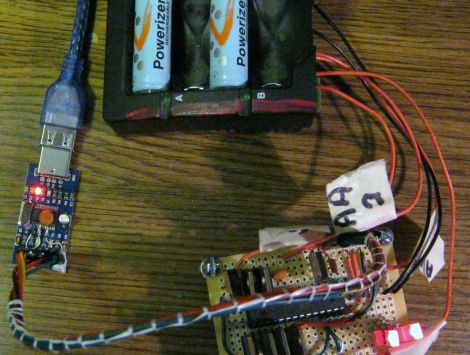
It seems that the third try was the charm, because his FET-based design worked quite well. He ended up wiring two FETs to each battery, which are connected via a relay. The batteries get discharged until the voltage drops down to 1V, at which point one FET is turned off, allowing the batteries reach their target voltage of 0.4V more slowly.

Despite the self-proclaimed messy layout of his circuit, [msuzuki777] is quite happy with the results. He has been able to recover several batteries, which is a fantastic alternative to letting them decay in a landfill.

Electronics Lessons For Beginners

electronics

Hackaday reader [grenadier] wrote in to share a series of tutorials he is working on, where he discusses the basics of electricity and electronics. The first lesson titled, What is Electricity?” has been wrapped up, and is available for free on his site.

For any of our regular readers, the lesson will seem pretty basic (and likely full of things to nitpick). However, we imagine his lessons would be quite helpful to anyone looking to expand their electronics know-how.

Now don’t get us wrong, we love the series of electronics tutorials that Jeri has been periodically releasing, but we think there’s plenty of room on the Internet for other willing teachers as well. If his first lesson is any indicator, his tutorials will be easy to understand, sprinkled with a little bit of humor, and chock full of fun videos that demonstrate the subject at hand.

Take a quick look his way if you get a chance – you or someone you know might find his tutorials and reference guides insightful.

[Image courtesy of Electronicsandyou]

Ring Ring Ring Ring Ring Ring Ring Emotiphone!

emotiphone

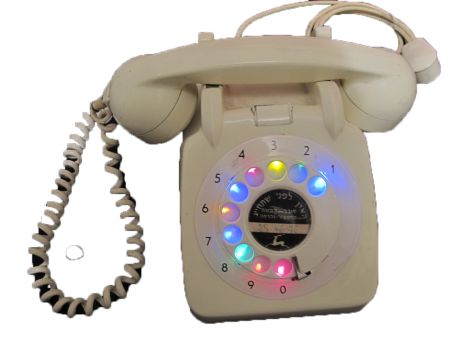
Instructables user [zvizvi] was working on putting together a portfolio for his application into Industrial Design school, and thought it would be neat to repurpose an old rotary phone that used to belong to his grandmother.

He originally had pretty lofty goals for the phone, but eventually pared back his vision to include one-way communications to Twitter. After gutting the phone of its unnecessary parts, he got busy installing LEDs behind the dialer’s finger holes. The LEDs were connected to an MCP23017 I/O expander, which takes its direction from an Arduino he crammed into the phone’s shell.

When the receiver is lifted from the cradle, the Arduino initiates a connection to the Internet via the WiFly shield he installed. Once he dials a number, the Arduino translates the digit into a predefined emoticon, posting it to his Twitter page. While the emoticons are not quite as descriptive as the messages from the Tweeting Roomba we featured earlier this week, they relay his mood just fine.

It’s a fun project, and it happened to get [zvizvi] into the design school he was applying at, so we can’t ask for much more than that.

Super Mario Coin Block Lamp Is A Nintendo Fanboy’s Dream Come True

super_mario_coin_block_lamp

[Laurence] was racking his brain coming up with potential birthday gifts for his friend when the idea of a Super Mario Bros. coin block lamp popped into his head. The block is constructed from drain pipe, a few pieces of plywood, some perspex, and a whole lot of awesome.

He wanted the lamp to make sounds when it was turned on and off, so he put together an audio circuit based on [LadyAda’s] WaveShield. His design is similar, though he swapped out the DIP packages for SOIC versions, adding a DAC, Op amp, and an audio buffer to fit his needs.

Once he had his electronics in order, he started construction of the lamp, painting the drain pipe green and mounting it under his light’s base. He built a large perspex box to serve as the coin block itself, printing the familiar graphics on tracing paper which he then glued into place. An arcade button adorns the top of the box, making for a very appropriate and fun light switch.

Be sure to check out the video below to see the lamp in action. We’re just a bit jealous of [Laurence’s] friend, and we sure wouldn’t mind having one of these in our office to sit alongside this mechanical coin block we featured a while back.

Continue reading “Super Mario Coin Block Lamp Is A Nintendo Fanboy’s Dream Come True”

Keeping Tabs On Your Pets’ Busy Lives

mouse_wheel_tracking

[Stephen’s] daughter has a pair of mice she keeps as pets, who happen to be quite active at night. After they kept her awake for an entire evening by running like mad in their treadmill, they were moved from her bedroom. Since they were so active in the treadmill, [Stephen] thought it would be cool to try measuring how much the mice actually ran each night.

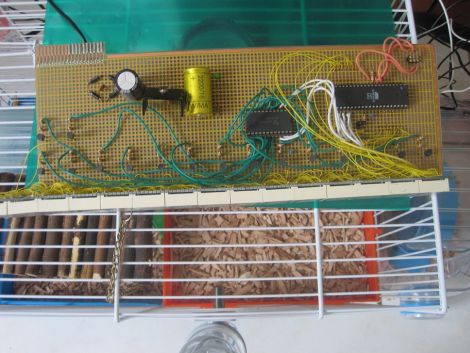
To keep track of their activity, he built a simple circuit that records how many rotations the treadmill makes. He fitted it with a rare earth magnet, installing a reed switch on the outside of case that ticks off each spin of the wheel. Any time the wheel starts moving, his PIC begins counting the rotations, displaying them on a 7-segment LED display. To mitigate data loss in the event of a power outage, the PIC stores the current number of rotations in its EEPROM every 10 seconds or so.

The counter keeps track of the total number of rounds the mice have completed, which his daughter uses to manually calculate their running sessions. Since they started tracking the mice, they have run over 700,000 rounds, sometimes completing as many as 20,000 in an evening.

We think it’s a pretty cool project, especially since it makes it fun for his daughter to stay involved in her pets’ lives.

“Zero Overhead” Z80 Computer Focuses On Performance

z80_wirewrap_computer_zero_overhead

There’s something quite satisfying about building your own computer. Nowadays, constructing your own desktop PC is relatively easy, so if you really want to get your hands dirty, you have to take a step back in time and give some vintage hardware a spin.

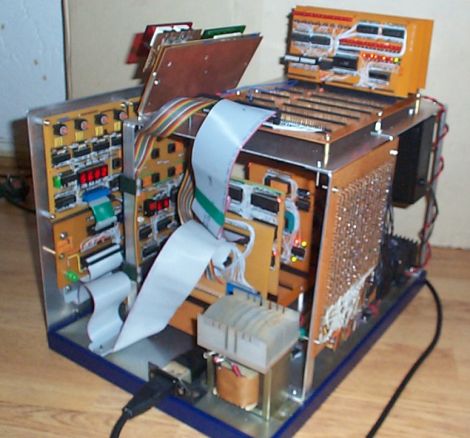
[YT2095] has spent a good portion of the last two months building a computer based on the classic Z80 CPU. His machine, called “Z Eighty Development” or “ZED” for short is an amazing build, and most definitely a labor of love. He has put an estimated 700+ hours into this machine and it’s a beaut! When closed, the machine is pretty unassuming, but once he folds down the keypad, you can see that all of his time has been put to good use.

Most of the board’s components are connected together via wire wrap, including the large 48k memory card he built, as you can see from the link above. The wide array of add on cards all work together to accomplish his goal of “zero overhead” – freeing up the Z80 from having to do any unnecessary processing, such as I/O, etc.

It’s quite an impressive build, and ranks up there with some of the best Z80 based computers we have seen through the years.

Enhancing Simple Circuit Kits With Microcontrollers

picaxe_powered_circuit_learning_kits

[manuka], aka [Stan Swan] is a teacher in New Zealand who enjoys enlightening his students on the wonders of electrical circuits. He primarily uses “snap connector” circuit kits, sold under the BrainBox name in NZ, for his interactive labs as they can be easily manipulated by pupils of all ages.

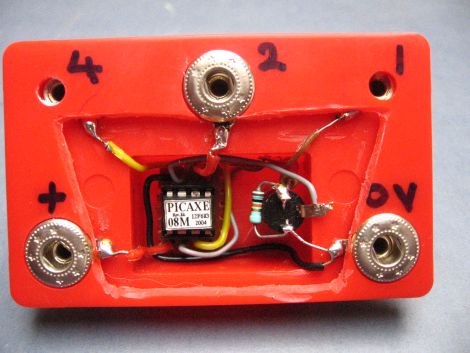
While the kits are great, he says that the range of experiments they provide can be a bit limited, so he decided to swap out the kit’s sound module for something far more useful – a PICAXE-08M. The space left by removing the sound module was pretty small, but [Stan] got everything to fit without too much hassle. His modification allows his students to program the PICAXE, as well as utilize four of the uC’s output pins.

Needless to say, the addition of the PICAXE module was a huge hit with his students, allowing them to create far more exciting circuits. [Stan] has been revising his system over the years, adding extra output pins, enabling lamp and motor control, as well as tweaking his setup to respond to IR commands.

We think [Stan’s] work is pretty awesome, and we’re still wondering how this flew under our radar for so long. He says that his students vary from preschool kids to centenarians, so if you’ve got someone that you would like to introduce to the fun world of electronics, we suggest picking up one of these kits and getting to work.

[Thanks Haku]