Low-cost, Low-bandwidth Wireless Arduino To Android Communications

android_nfc

[Joe] was experimenting with his Arduino when he started thinking about how he could get it to communicate wirelessly with his Android phone. Bluetooth is an option, but it requires some extra components, and Google’s ADK works as well – just not wirelessly.

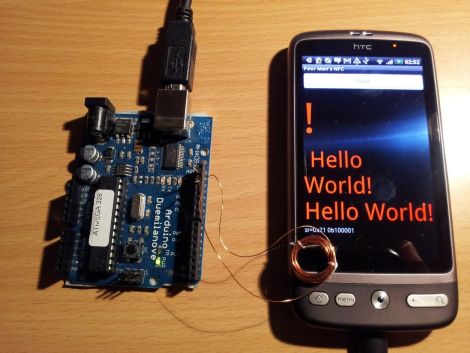
Instead, he thought it would be neat to see if he could get the two devices to communicate with a simple magnetic coil. He constructed a small 1cm diameter coil, connecting it to the Arduino via a resistor and diode. Using the Android Tricorder app, he was able to locate his phone’s magnetometer, after which he ran some tests to narrow down the best sample rate and frequency range for communications.

To transfer data between the two devices, he had to bit bang the signal in software, since the Arduino’s UART has a lower limit far faster than the 7 bps data rate he was able to achieve with the magnetometer.

While his wireless Arduino to Android bridge isn’t likely to win any awards for throughput, it is a great proof of concept project. Be sure to check out the video below to see his “poor man’s NFC” in action.

Continue reading “Low-cost, Low-bandwidth Wireless Arduino To Android Communications”

l3pdesk

My Desk IS My Computer Case

If you think that your water cooled rig is pretty sweet, check out this creation by Dutch PC enthusiast [Peter Brands] (Google Translation).

With his computer tweaked as far as he could imagine, he decided to spruce up his office a bit. In the process, he ended up tweaking his computer just a little bit more. After seeing a build put together by another computer enthusiast, he set off to construct a desk in which he could show off his computer. He spent some time drawing up plans with Google Sketchup and with the help of a friendly neighbor, started construction of his desk/PC case.

The desk is constructed from 3mm thick aluminum, and houses most of his computer’s components under a thick piece of glass. The only portion of the computer that is not enclosed in the desk is the 9-fan radiator he used for his water cooling setup. That part resides in his crawl space, which he connects to his PC via a pair of large water hoses he punched through his tile floor. If you are interested, you can see all 800+ pictures of the build here.

Simply awesome!

[Thanks duchie]

Wall Climbing Robot Uses Supersonic Grippers

supersonic_wall_gripper

Watch out Spidey, there’s a new wall climber in town!

Researchers [Matthew Journee, XiaoQi Chen, James Robertson, Mark Jermy, and Mathieu Sellier] recently unveiled their wall climbing wonder bot at the 2011 IEEE International Conference on Robotics and Automation. Like most other wall climbing bots, theirs operates on the Bernoulli principle to keep it stuck to the surface, but that’s where the similarities end.

Unlike other Bernoulli-based climbers, this robot’s gripper never actually touches the surface it is climbing. The researchers were able to accomplish this feat by designing a specialized gripper which forces air through a 25 μm gap, creating a very powerful low pressure vortex. The gripper’s design compresses the air by shape alone, causing the air flow to reach speeds of Mach 3, without relying on powerful pumps or increased air volume.

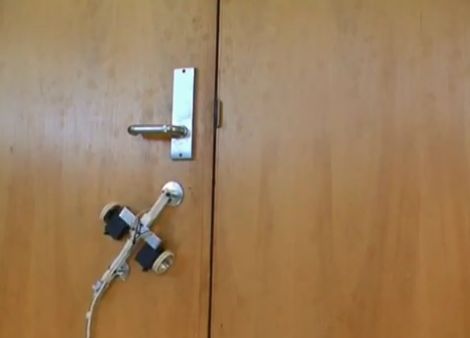
The researchers state that their supersonic gripper can support about five times the weight of a conventional Bernoulli gripper, and as you can see in the video below it also has no problem climbing a wide variety of surfaces.

Window-washing Roomba, here we come!

[via Make]

Continue reading “Wall Climbing Robot Uses Supersonic Grippers”

Adding GPS To A Viewsonic G-Tablet

gtablet_gps

The hackers over at the xda-developers forum always seem to have something awesome brewing, and [fosser2] is no exception. He bought himself a Viewsonic G-tablet, but was a bit disappointed in its lack of a GPS module. He pried the tablet open in hopes of finding a spot where he might be able to cram one in, and was happily surprised at what he found.

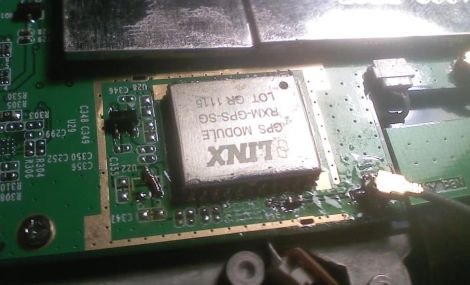
It turns out that either Viewsonic had plans to include a GPS module and scrapped them, or they are planning on adding GPS to a future SKU. The tablet’s mainboard already had a spot laid out for the module, as well as the GPS antenna. He carefully soldered in a compatible module from Digikey, and then got to work adding the various other components required to get it working properly.

While the hack doesn’t require that you add a ridiculous amount of parts to the board, you had better make sure your soldering skills are up to snuff before giving it a shot. Those who can’t reliably solder SMD components should probably stay away from this one.

[via Engadget]

Long-range Canon DSLR Remote Video Trigger

canon_60D_remote_video_trigger

Instructables user [Justin] generally enjoyed shooting video with his Canon 60D DSLR, though there was one small problem. The only way that the camera could be remotely triggered to shoot video was via a small IR remote with a paltry 10 foot range. Even worse, the remote had to be pointed directly at the front of the camera to work at all. To remedy the situation, he decided to rig up his own long-range trigger mechanism.

He cobbled together an Arduino with components he had sitting around, mounting it in a project box on top of the camera. A commercially available RF remote shutter release is also mounted on the top of the camera, and wired to the Arduino using a small 2.5mm plug. When he activates the RF remote, it sends a pulse to the Arduino, which in turn sends the appropriate signal to his camera via a small IR LED.

While he readily admits that he could have likely used a much simpler configuration, the Arduino does its job, and he’s quite happy with his solution. We agree with him about the Arduino, but it’s hard to argue with saving money by using components you already have on-hand.

The Ins And Outs Of Lithium-based Battery Packs

lithium_batteries

So, you’ve got your awesome project built and are ready to take it on the go, but how are you going to power it? You could use a couple alkaline cells or perhaps swipe a Litihium battery pack from some infrequently used portable device – however before you do that, why not check out what [Lady Ada] has to say on the subject?

The detailed tutorial on her site discusses the different types of Lithium-based batteries and their form factors, as well as the strengths and weaknesses of each type. Voltage ratings are covered, as well as why it is important to choose a Lithium battery pack that fits the task at hand. The dangers of improperly handling batteries are clearly noted, highlighting the importance of selecting a proper charger and resisting the urge to ever wire Lithium batteries together to increase capacity.

While the bulk of the information presented is nothing new to most of our readers, it’s definitely a worthwhile read for those just starting to use Lithium battery technology in their projects.

Extracting Secured Firmware From Freescale Zigbee Radios

decapped_MC13224

[Travis Goodspeed] recently tore down the Freescale MC13224 wireless radio chip in an effort to demonstrate how the device’s firmware could be read, even when locked down in “secure” mode. While you might not recognize the Freescale MC13224 radio by name alone, you are certainly familiar with some of its practical applications. Found in the QuahogCon and Ninja Party badges among other consumer goods, the popular Zigbee radio turned out to be a fairly easy conquest.

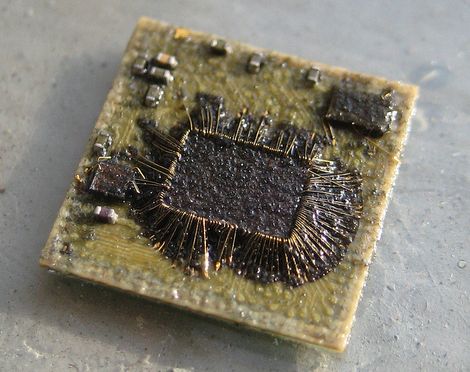
[Travis] first used acid to decap one of the microcontrollers to see what was going on under the plastic casing. Inside, he discovered a discrete flash memory chip, which he removed and repackaged using a wedge wire bonder. He was easily able to extract the firmware, however decapping and repackaging a flash chip isn’t necessarily the most user-friendly process.

After digging further, he discovered that holding one of the chip’s pins low during boot would allow him to run custom code that recovers the firmware image once the pin is pulled high once again. This far more practical means of firmware recovery can be easily facilitated via a circuit board revision, as [Travis] mentions in his blog.