The CarolinaCon 16 Badge Slithers Into Life

It’s something of an unwritten rule at this point that you can’t hold a hacking conference without providing a badge with at least a few LEDs on it. Not only can they be a great way to learn electronics for the attendees that tinker with them, but they’re a keepsake to commemorate the event. As a perfect example, [Matt Agius] recently wrote in to tell us about the badge he’s made for the upcoming CarolinaCon 16.

As [Matt] explains, the idea with this badge was to make it as easy as possible for attendees to assemble. In the final version there are only going to be three components that need to be soldered, so even if they’ve never touched SMD components before, they should still be able to get their badge lit up.

The badge largely makes up for its simplistic electronics with some fantastic board art on the flip side. The two red LEDs illuminate the eyes of a rather sinister looking octopus that’s ensnaring the unsuspecting state of North Carolina in its tentacled grip. The art was originally done by [Katie Dorn], with [Matt] spearheading its conversion into something that could be sent out for PCB fabrication.

Anyone looking to add this latest entry to their growing collection of badges will need to attend CarolinaCon on April 10th and 11th, where you’ll be able to catch a talk [Matt] is giving on the subject called “How to design Printed Circuit Boards for Hacking and for Art”.

MakerBot Targets Schools With Rebranded Printers

MakerBot was poised to be one of the greatest success stories of the open source hardware movement. Founded on the shared knowledge of the RepRap community, they created the first practical desktop 3D printer aimed at consumers over a decade ago. But today, after being bought out by Stratasys and abandoning their open source roots, the company is all but completely absent in the market they helped to create. Cheaper and better printers, some of which built on that same RepRap lineage, have completely taken over in the consumer space; forcing MakerBot to refocus their efforts on professional and educational customers.

This fundamental restructuring of the company is perhaps nowhere more evident than in the recent unveiling of “SKETCH Classroom”: an $1,800 package that includes lesson plans, a teacher certification program, several rolls of filament, and two of the company’s new SKETCH printers. It even includes access to MakerBot Cloud, a new online service that aims to help teachers juggle student’s print jobs between multiple SKETCH printers.

Of course, the biggest takeaway from this announcement for the average Hackaday reader is that MakerBot is releasing new hardware. Their last printer was clearly not designed (or priced) for makers, and even a current-generation Replicator costs more than the entire SKETCH Classroom package. On the surface, it might seem like this is a return to a more reasonable pricing model for MakeBot’s products; something that could even help them regain some of the market share they’ve lost over the years.

There’s only one problem, MakerBot didn’t actually make the SKETCH. This once industry-leading company has now come full-circle, and is using a rebranded printer as the keystone of their push into the educational market. Whether they were unable to build a printer cheap enough to appeal to schools or simply didn’t want to, the message is clear: if you can’t beat them, join them.

Continue reading “MakerBot Targets Schools With Rebranded Printers”

MQTT And The Internet Of Conference Badges

Today, nearly every modern consumer device wants to connect to the Internet for some reason. From your garage door opener to each individual smart bulb, the Internet of Things has arrived in full force. But the same can’t be said for most of our beloved conference badges. Wanting to explore the concept a bit, [Ayan Pahwa] set out to create his own MQTT-connected badge that he’s calling CloudBadge.

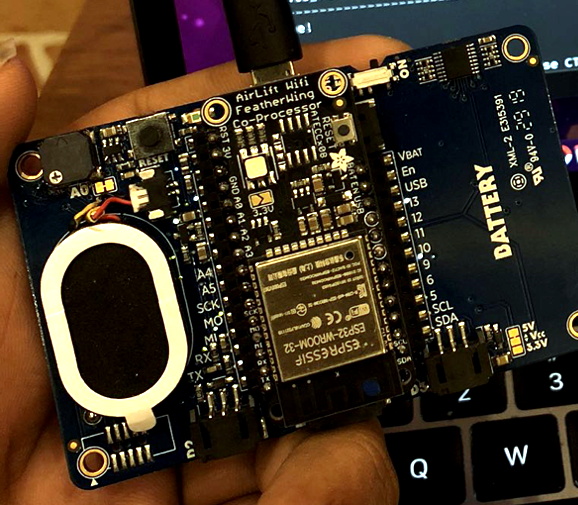
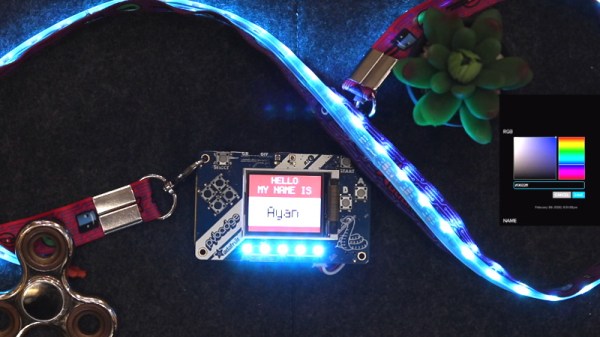
As this was more of a software experiment, all of the hardware is off-the-shelf. The badge itself is an Adafruit PyBadge, which doesn’t normally have any networking capabilities, but does feature a Feather-compatible header on the back. To that [Ayan] added a AirLift FeatherWing which allows him to use the ESP32 as a co-processor. He also added a strip of NeoPixel LEDs to the lanyard, though those could certainly be left off if you’re not looking to call quite so much attention to yourself.

The rest was just a matter of software. [Ayan] came up with some code that uses the combined hardware of the PyPadge and ESP32 to connect to Adafruit.io via MQTT. Once connected, the user is able to change the name that displays on the screen and the colors of the RGB LEDs through the cloud service. If you used something like this for an actual conference badge, the concept could easily be expanded to do things like flashing the badge’s LEDs when a talk the wearer wanted to see is about to start.

The modern conference badge has come a long way from simple blinking LEDs, offering challenges that you’ll likely still be working on long after the event wraps up. Concerns over security and the challenge of maintaining the necessary infrastructure during the event usually means they don’t include networking features, but projects like CloudBadge show the idea certainly has merit.

Continue reading “MQTT And The Internet Of Conference Badges”

This Servo Actuated Multimeter Does The Twist

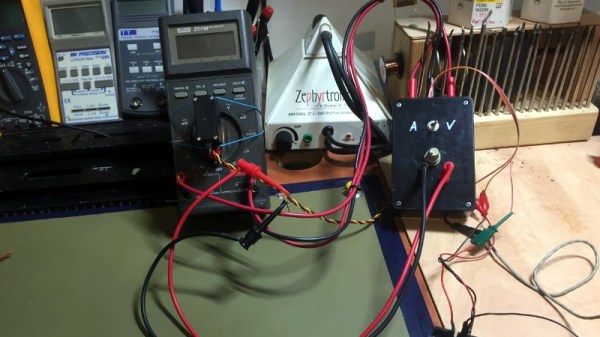
This tip comes our way courtesy of [Elad Orbach], who’s been experimenting with a device that uses a servo to turn the function dial on a multimeter. It’s something you can put together in a few minutes with leftovers from the parts bin, and as you can see in the video after the break, the basic concept seems to be sound enough.

As to finding a practical reason for spinning the switch on your meter with a servo, that’s left largely as an exercise for the reader. [Elad] hints at the possibility of using such a setup to help automate repetitive testing, which we could see being useful especially in combination with a foot pedal that allows you to switch modes without having to put the probes down. The same basic idea could also be helpful as an assistive device for those who have difficulty grasping or limited dexterity.

Whether top of the line or bottom of the barrel, the multimeter is easily the hardware hacker’s most frequently used tool (beyond the screwdriver, perhaps). We’ve seen plenty of projects that try to graft additional features onto this common gadgets, though automation isn’t usually among them.

Continue reading “This Servo Actuated Multimeter Does The Twist”

A Little Rewiring Teaches A Creality Ender 3 New Tricks

The Creality Ender 3 is part of the new wave of budget 3D printers, available for less than $250 from many online retailers. For the money, it’s hard to complain about the machine, and it’s more than suitable for anyone looking to get make their first steps into the world of FDM printing. But there’s certainly room for improvement, and as [Simon] shows in a recent blog post, a little effort can go a long way towards pushing this entry-level printer to the next level.

The first step was to replace the printer’s stepper drivers with something a bit more modern. Normally the Ender 3 uses common A4988 drivers, but [Simon] wanted to replace them with newer Trinamic drivers that offer quieter operation. Luckily, Trinamic makes a drop-in replacement for the A4988 that makes installation relatively easy. You’ll need to change out a few caps and remove some resistors from the board to make everyone play nice, but that shouldn’t pose a challenge to anyone who knows their way around a soldering iron.

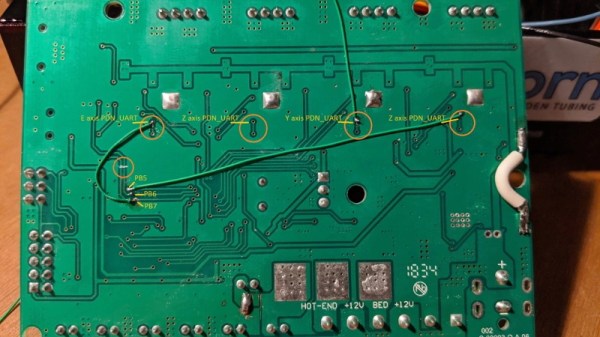
Beyond quieter running steppers, the Trinamic TMC2208 drivers also offer direct UART control mode. Of course the Ender’s board was never designed for this, so the MCU doesn’t have enough free pins to establish serial communications with the three drivers (for the X, Y, and Z axes). But [Simon] realized if he sacrificed the SD card slot on the board, the six pins that would free on the controller could be cut and rewired to the driver’s UART pins.

Combined with the Klipper firmware, these relatively minor modifications allows him to experiment with printing at speeds far greater than what was possible before. Considering the kind of headaches that a ~$200 printer would have given you only a few years ago, it’s impressive what these new machines are capable of; even if it takes a few tweaks.

Emulating A Bluetooth Keyboard With The ESP32

Most people associate the ESP family of microcontrollers with WiFi, which makes sense as they’ve become the solution of choice for getting your project online quickly and easily. But while the WiFi capability might be the star of the show, the ESP32 also comes equipped with Bluetooth; we just don’t see people using it nearly as often. If you’re looking to get started using Bluetooth on the ESP32, then this simple wireless macro keypad from [Brian Lough] would be a great way to get started.

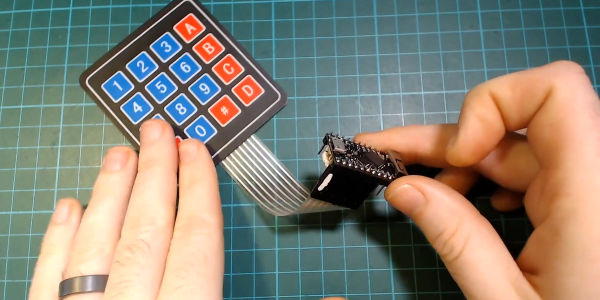
From a hardware standpoint, this project is incredibly straightforward. All you need to do is connect a membrane keypad up to the GPIO pins on the ESP32. Adding in a battery is a nice touch, and you probably would want to put it into a enclosure of some sort, but as a proof of concept it doesn’t get much easier than this. In this case [Brian] is using the TinyPICO board, but your personal ESP32 variant of choice will work just as well.

The rest of the project is all software, which [Brian] walks us through in the video after the break. There’s a preexisting library for Bluetooth Human Interface Device (HID) emulation on the ESP32, but it needs to be manually installed in the Arduino IDE. From there, he demonstrates how you can build up a functioning keyboard, including tricks such as sending multiple virtual keys at once.

In the past we’ve seen the ESP32 used to create a Bluetooth game controller, but the ability to emulate a keyboard obviously offers quite a bit more flexibility. With a practical demonstration of how easy as it is to turn this low-cost microcontroller into a wireless input device, hopefully we’ll start seeing more projects that utilize the capability.

Continue reading “Emulating A Bluetooth Keyboard With The ESP32”

Sniffing Signals To Teach Old Speakers New Tricks

Like many of the stories you’ll find on these pages, this one starts with a user being annoyed about their device’s inability to perform a simple task. All [Jay Tavares] wanted was for his Bose Cinemate speakers to turn themselves on and off as needed. It seems like a reasonable enough request, and indeed, is exactly the point of HDMI’s Consumer Electronic Control (CEC) feature. But in this case, it would take a bit of custom hardware to get similar functionality.

Unfortunately, the speakers [Jay] has only support optical audio; so any interoperability with HDMI-CEC (hacked or otherwise) was immediately out the window. Still, he reasoned that he should be able to detect when the TOSLINK audio source is actually active or not, and give the speaker system the appropriate signal to either power on or shut down. You might think this would require some kind of separate stand-alone device, but as it turns out, all the necessary information was available by reverse engineering the connection between the receiver and the subwoofer.

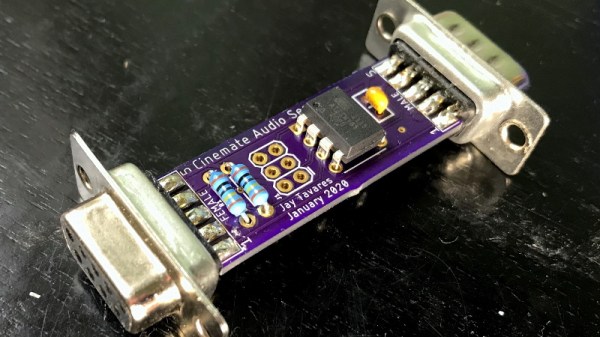
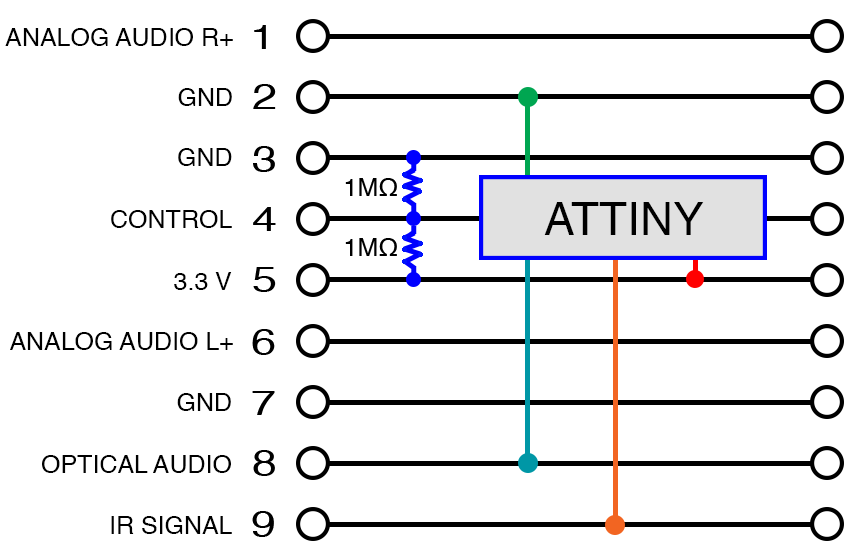
After some investigation, [Jay] found that not only was the content of the TOSLINK audio source being sent over this DB9 cable, but so were the control signals required to turn the system on and off. So he designed a simple pass-through device with an ATtiny85 and a couple passives that latches onto the relevant lines in the cable.

When audio is detected over the optical connection, the MCU will inject the appropriate signals on the control line to simulate the user pressing the “Power” button the remote. When the chip hasn’t detected audio after 10 seconds, it sends the signal to shut the speakers off.

While [Jay] notes he can’t guarantee this works on anything other than the particular Bose Cinemate GS Series II system he has, we’d be willing to bet the concept could be adapted to other models or even brands that use a similar cable to link their principle components. If all else fails, you could always add an ESP8266 to your sound system and control it over WiFi.