Local LLMs Can Work Better Than Claude, At Least For Some

This is going to be a very personal question, because when you’re talking cloud vs local anything, it comes down to this: how much are you willing to pay for independence? The local option might save you long term, or it might never pay off the capital investment. It will almost certainly cost you your time to set up and maintain your own system — but what you get back is independence. With LLMs, traditionally you lose quite a bit of performance, but as [Anurag Singh] points out on XDA Developers, a lesser model might actually let you get more done, depending on your workflow.

[Anurag] had been on the 20$/month plan with Anthropic when he decided that the scratch just wasn’t worth the sniff– he was hitting usage limits he couldn’t stand at that level, but couldn’t justify a higher tier of access. So he decided to try a local LLM, even though all he had was a 16 GB MacBook Air M5, not a beefy workstation. Since his workflow isn’t so much ‘vibe code the whole thing for me’ as ‘help me find where I went wrong here, electronic rubber duck’, Qwen2.5 Coder 14B proved more than adequate for his use case.

It can’t understand all the moving parts of a large project as well as Claude can — not surprising given how old it is and how much memory it has to work with — but that’s [Anurag]’s job. He’s the programmer, it’s just the assistant. For his use case, he can make use of his existing hardware and having the the LLM right in VS Code is allows for a speedy workflow.

Your millage may vary, but if you want to get into locally running LLMs, we can point you at the easy ways to get started. Depending on your hardware, you might want to grab another GPU.
Sick Of Wayland Vs. Xorg? How About GEM?

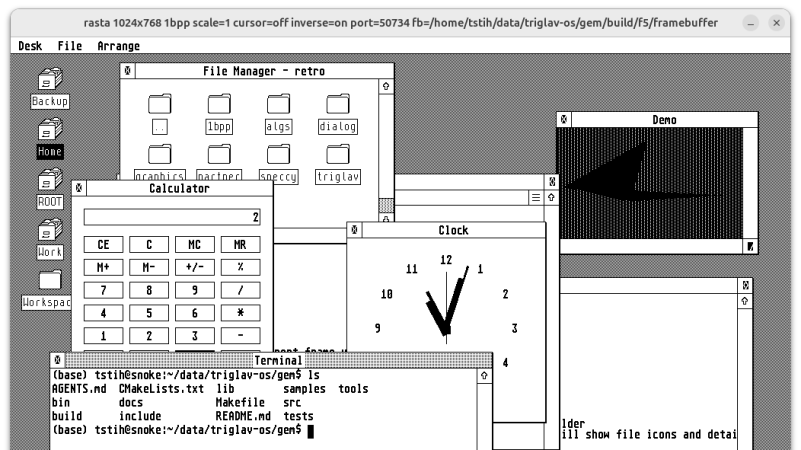
Between lawsuits from Apple, and Microsoft being Microsoft, Digital Research’s GEM desktop for DOS never really had a chance. It did have another life on Atari home computers, but it’s the DOS version that provided the code for [Tomaz Stih]’s Linux port of the GEM graphical desktop — which isn’t a WM or DE for X or Wayland, for the record. It is entirely it’s own graphical display that will live in the framebuffer of a minimal Linux installation.

[Thomaz] is leveraging DR’s original code — or at least what started as DR’s code before a series of acquisitions and open sourcing — via OpenGEM and FreeGEM. Sample applications include the clock and calendar, but [Thomaz] says the APIs are compatible with Atari ST applications; presumably given the codebase the it will match the DOS version as well.

Much like when it was originally crushed betwixt Macintosh System and Microsoft Windows, we doubt many will be rushing out to use GEM instead of Wayland or XServer on Linux, but there may well be some use cases. If nothing else, it’s got to be lightweight.

If you missed the Digital Research GEM saga, this might get you up to date. If the idea of it running on Linux tickles your funny bone, you might enjoy seeing GEM on an AlphaSmart word processor.

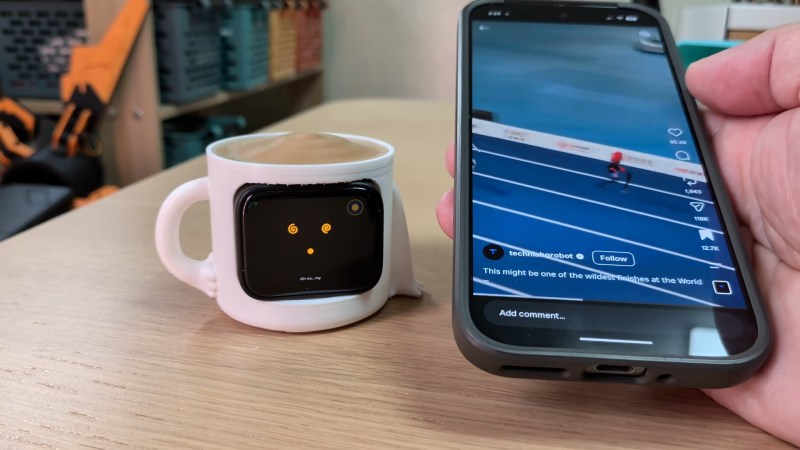
The virtual pet showing a distressed face while a phone is in use

Anti-Doomscroll Tamagotchi Only Lives If You Do

The odds are, you have a device deliberately designed to be addictive in your pocket or on the table next to you if you aren’t staring at it right now– your smartphone. We’ve seen a number of projects that try and help people control or moderate their phone usage using a variety of techniques; this vitual pet by [brenpoly] does it by weaponizing human empathy, and our bizzare ability to pack-bond with literally anything.

The virtual pet itself is based on an ESP32 in a cutesy 3D-printed case, and we think it would probably work well enough if it just had hard-coded behaviors based on hooks in what you’re doing on your phone– the “my little buddy is sick because I’m doomscrolling” should be effective enough on its own, and that part is hardcoded on the ESP32 along with the regular virtual pet behaviour–but this is the year of our Llama 2026, so there has to be an LLM in there somewhere, right?

Some people would leave this part out, but we think [brenpoly]’s use of a local LLM on the phone does improve the project. The local agent doesn’t just have access to his screen time, but his notifications, too, and runs a whisper model linked to a microphone in the virtual pet via bluetooth. So you can get the contents or a summary of your notifications without looking at your phone, or just ask the little guy to tell you a joke. Giving the pet a voice with a the local piper model is also more effective at getting you to put your phone down when you hit the limits.

They’ve put the whole thing up on GitHub if you want to make your own– and if we can keep one person from strapping themselves to a shock collar, then this project is doing good in the world. If helps [brenpoly] or any of his fans do less scrolling and more hacking, that’s even better. Of course there’s a whole spectrum between “electrocute yourself” and “lovable virtual pet” when it comes to controlling your phone use, a spectrum that includes phone stands or even smart vaults for your device.

Thanks to [brenpoly] for the tip! Remember, all of your doomscrolling is justified if you find something to send to our tipsline. 

Continue reading “Anti-Doomscroll Tamagotchi Only Lives If You Do” →

ESP32-P4 Powers Video Alarm Clock

Once upon a time, you had the option of waking up to a bell, a harsh buzzer, or whatever happened to be on the radio that morning. Now that it’s the 21st century, we’ve gotten used to being able to set our alarms to whatever sound or song we want, but what if you don’t just want to wake up to sound? Enter [Impossible_Agent1436] a.k.a. [brunokeymolen]’s Video Alarm Clock that will wake you up to whatever clip you want, as long as it fits on the 720 pixel square display.

That display is a pre-built Waveshare module powered by an ESP32-P4, which looks like a handy bit of kit aside from being out of stock at the moment. The dev board makes this almost entirely a software project– the only hardware [bruno] had to come up with was the 3D-printed stand to hold it on his bedside. That’s not a slight to [bruno]; it was a good choice in the spirit of “work smarter, not harder”. Sometimes you want to reinvent the wheel, and sometimes you just want an alarm clock.

The module’s RTC means it keeps good time, and the built-in SD card reader means you can load up a whole library of clips to wake up to. The only caveat is that those files have to be AVI containers holding 720×720 MJPEG video with PCM stereo audio at 44.1 kHz, and you’re limited to old FAT filename rules: eight characters, and none of them special.

This is an easier project and a better idea than the exploding capacitor alarm clock, but there’s no arguing which would get us out of bed faster. If you miss the old days of clock radios, you can always bring them back with the right microcontroller.

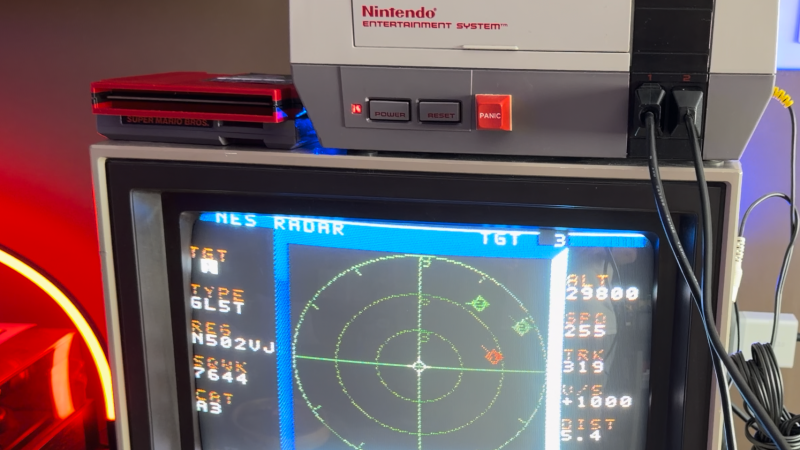
NES Radar Tracks Flights At 9600 Baud

Air traffic visualizers seem to be having a bit of a moment right now, and now that moment has come to the venerable NES thanks to [k6lcm]’s NES Radar project, which is open-source under the GPL on GitHub. In spite of the name, there’s no Radio Direction or Range-Finding involved in this project– no radio at all, in fact, which makes this a bit interesting. It’s just an NES cartridge and a carefully constructed cable.

Continue reading “NES Radar Tracks Flights At 9600 Baud” →

Is This The Year Of The Linux… Television?

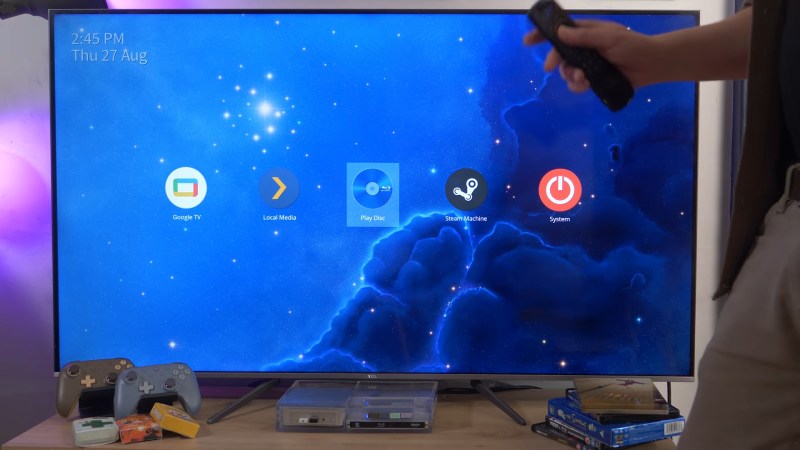
The Year of the Linux Desktop hasn’t been on its way for quite as long as nuclear fusion plants, but somehow it seems to recede into the horizon at just about the same rate. Every year, it’s another year in the future. You know what isn’t a desktop? A television. [Haggis on Toast] makes a case that while there may be barriers to desktop adoption, there’s no reason not to use Linux for a set-top box, and shows one such build in a recent YouTube video.

Continue reading “Is This The Year Of The Linux… Television?” →

This Clavichord Is A Well-Tempered Project

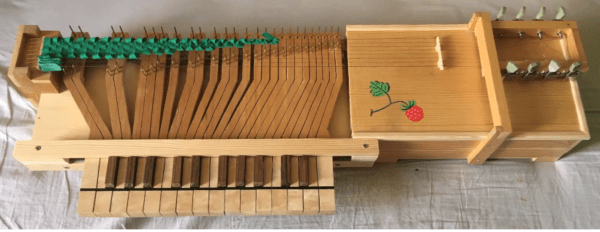
The Clavichord needs no introduction to fans of Early Music, and a lengthy one to literally everyone else. Even classical music buffs who have heard of Bach’s works for the “Well-Tempered Clavier” — another word for clavichord — will mostly have heard them performed on Piano. That is perhaps fitting, as the clavichord is a distant ancestor of the modern piano. It has keys — though fewer of them than a piano — whose action strikes strings — though much, much fewer of those than a piano, as each string is required to generate multiple notes. [Ian Summers] has an excellent guide on how he built his, though be warned that that link goes to a PDF and the SSL certificate was having problems as of this writing. If you aren’t comfortable grabbing a PDF over old-style HTTP, we’ve embedded the demo/build video below so you can give a listen to what this pre-piano instrument sounds like.

Continue reading “This Clavichord Is A Well-Tempered Project” →