Reject Modernity, Return To 80s, Learn C.

We’re not exactly sure how old [SnailMail] is, but he’s probably a member of Generation Alpha considering that to our wizened eyes the lad looks only slightly older than a fetus– which makes it all the more impressive that he’s written his own text editor, from scratch, in C– on a 386. See, [SnailMail] tried to learn the modern way, with IDEs that have code completion and AI integration, but his thoughts couldn’t gel in the modern environment. So he went online and bought an old IBM-compatible complete with monochrome amber monitor, and a whole 4MB of RAM. Big spender that he is, [SnailMail] upgraded that to 8MB.

Rather than fall victim to the siren song of Wolfenstien 3D or SimCity, he set out to learn to code: C, specifically, since that language bridges four decades between [SnailMail] and his new PC. Even more specifically, he got ahold of disks for Borland Turbo C and Turbo C++, which brings back memories for some of us. Of course the lad also had to learn how to use a DOS PC at the same time, but a teen in the 80s with a fresh box would have climbed the same steep learning curve. Some of you probably remember doing so yourselves. Just like you–or the hypothetical teen in the 80s–[SnailMail] did it not by googling or begging Claude for answers, but by digging into books. Many books.

After all the reading, he started with a text editor, something we remember being a pretty big project not given to first year students. Video evidence suggests he pulled it off. He describes how his solution works from about 8:00 in the video, so you greybeards in the audience can judge his work for yourself.

If you’re a member of Gen Alpha reading this and looking to learn to program, we cannot recommend this technique highly enough– [SnailMail] is going to have a better understanding of the underlying logic of computer science than a lot of CS grads being frocked today. Especially when you consider he ends by promising to learn assembly, something we heartily endorse.

Continue reading “Reject Modernity, Return To 80s, Learn C.” →

3D Printed Scooter Fits In Your Luggage, Some Assembly Required

Though [Ivan Miranda] calls the 3D printed vehicle in his recent video a motorbike, what he ultimately pulls out of his suitcase is clearly a scooter. Linguistic confusion aside, the “Mirandetta” looks like an awesome build and pulling a scooter out of your suitcase and whizzing past everyone in the taxi line just sounds amazing, especially knowing you made it yourself.

Aside from a whole lot of filament, he’s got a couple of tool batteries for hot-swappable energy that Airport security shouldn’t mind too much — provided you carry them with you, anyway — plus the usual e-bike motor and electronic speed control you might expect, and lawnmower tires which you might not. The narrow 3D printed rims round over the normally-flat tires to make them usable for this application. He seems particularly taken with the bi-stable mechanism he built for the kickstand, and we can’t blame him as we love seeing that kind of thing ourselves. The TPU seat is also a nice touch to keep with ‘everything printed’ vibe.

Now while the finished product does indeed fit into his suitcase, it needs to be completely disassembled. Well, unless you have an over-sized suitcase, perhaps. So our dreams of zooming away from the luggage line from the first paragraph were perhaps a bit premature. Still, from the footage at Prague Maker Faire at the end of the video, it looks like it was a fun enough ride that we can forgive [Ivan] for our overactive imaginations.

If you want an open-source e-bike, we’ve seen those too — but that won’t fit in any kind of suitcase.

Continue reading “3D Printed Scooter Fits In Your Luggage, Some Assembly Required” →

Radio-Gaga Is A Toddler Friendly Remote In A Radio

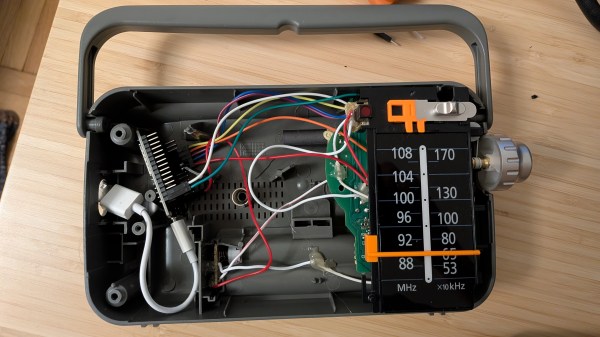
Humans of all ages like music, but you can’t exactly pass a toddler the aux cable. That’s not to say the younger set don’t have their own particular tastes– they absolutely do, and they absolutely love to take control and inflict them on the rest of us. [nbr23] has a toddler who loves both music and tactile controls, and decided to combine the two for them with a project he calls Radio-Gaga, which is a gutted Panasonic radio that calls up tunes via Home Assistant.

Interestingly enough the radio is now just a remote control– the speaker has been removed along with the rest of the radio hardware. The buttons and dials are still there, though, letting the toddler control what tunes are on offer and at what volume via couple of potentiometers hooked to an ESP32. The sound itself is being served up from the homelab to a USB speaker. There’s one notable flaw with this architecture: if the batteries die on the remote, “Let it Go” does not until an adult intervenes manually or recharges the remote.

One interesting lesson [nbr23] wanted to share was that he was able to improve an unsatisfactorily slow startup time by assigning the device a static IP on his network– apparently the single longest step in getting the tunes going was negotiating a DHCP lease. Skipping that gets the tunes playing in under a second, which is fast enough even for the most impatient of tiny humans.

If you prefer a more self-contained device, we’ve seen toddler jukeboxes that keep storage and speaker built-in, many with NFC control. 

Overpowered RC Car + Gimbal Cam = The Greatest Chase Vehicle We’ve Ever Seen

Modern cinema relies very heavily on quadrotor drones, because they make for very smooth, very easy to position platforms. From slow pans to chase shots, drones are great– if your shots can be taken at a high enough altitude. Close to the ground, things get a bit dodgier. That’s where [Transistor Man]’s camera chase vehicle comes in— it’s a rover, so it excels close to the ground. In fact, it can’t go anywhere else, except perhaps if provided with a jump. It’s got a hefty gimbal to hold the camera steady on any terrain, a decade-old surplus radio to provide full HD FPV to the remote driver, and a powerful 1/5th scale radio control rally chassis to make it all go. Plus googly eyes, because everything is better with googly eyes.

It looks like an enormous amount of fun to drive, but more importantly it provides smooth, cinematic shots from the professional Sony camera held in the gimbal. One big takeaway is that when 3D printing something that will bounce around this much, you can’t rely on pure strength– flexible filaments are your friend. Just about everything printed ended up remade in TPU if it didn’t start that way. The other takeaway is that we’ve reached enough of a technological plateau that if you scrounge around, you can build something to take a top-of-the-line footage with decade-old castoffs, like the gimbal and radio used in this project, which is a great thing for hobbyists and small studios.

If you can’t find surplus, you could always DIY a gimbal. We’re not filmmakers, but we find ourselves wondering how shots made with this rover would compare to a camera slider.

Die Casting Comes Home

You don’t normally think of die casting as something to do at home. Pressurized fluids demand respect at all times, which is perhaps in part why we see most projects skipping hydraulics for linear actuators. When the pressurized fluid is molten metal? Well, we’d say don’t try this at home, except that’s exactly what this video by [Know Art] is making us want to do. He’s doing die-cast aluminum, and it looks way easier than we thought it would.

If you’re wondering why anyone would attempt such a thing, it’s for the same reason die-casting has been an industrial powerhouse for the last couple hundred years — you can crank out a lot of parts, very quickly, with excellent detail and dimensional stability. You just need a mold, which in this process is called a die, and a way to squeeze metal into it with some force.

In this case the die was carved on a desktop CNC machine. Depending on how long you want your die to last, you’ll need something hard and heat resistant, like the graphite used in this video. Graphite is also used in constructing the piston for the injector, which is made from a modified hydraulic cylinder and a couple of old trampoline springs.

He first tests the setup with molten wax before moving onto aluminum, as the process is the same regardless: pour the hot liquid in, release the springs to provide the pressure that forces it into the die, and a part is made. It looks easy, if a bit frantic, as you have to work fast before the metal cools in the cylinder.

After CNC milling, EDM machining and all the fun things we’ve learned how to do with lasers and 3D printers, and now this we’ve got to wonder– is there any industrial process you can’t hack onto your desktop? We’ve even seen the chemists get in on the game.

Continue reading “Die Casting Comes Home” →

C64 Finally Gets The SRAM Corporate Wouldn’t Pay For

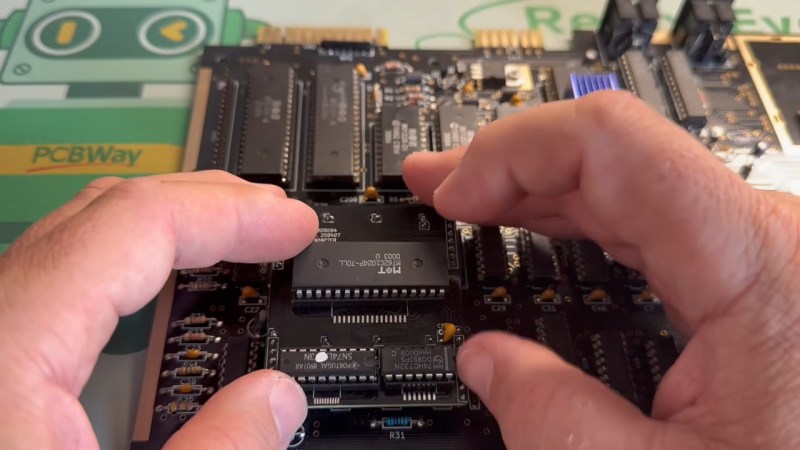
If you think RAM is expensive now, try putting yourselves in the shoes of a Commodore engineer, circa 1981. RAM was eye-wateringly expensive by modern standards, and Jack Tramiel wanted 64K of the stuff for the next computer — hence the name, Commodore 64 — but he didn’t want to pay for it. The solution was to use cheaper dynamic RAM over the more expensive static RAM that later took over the market in the kilobyte range. That’s a small problem for retrocomputer hobbyists, because while we’re complaining about the price of gigabytes of the stuff, you can’t buy new DRAM chips that fit a Commodore at any price. That’s why [Fabio Battaglia] aka [hkzlab] came up with an adapter board to fit easily-available SRAM chips onto aging C64s. 

Nothing lasts forever: not cold September rain, and not DRAM chips. Heat damage? Internal corrosion? There are probably multiple failure modes, but someday the old stock of chips will run out and the retrocomputer community is going to be ready for it. [Keith Olson] sent us a tip on a video by [The Retro Shack] about this very problem that serves as a good demo of what you get when you put SRAM into a C64. (Thanks [Keith]!) That said, the adapter board on offer is only good for C64s with the 250407 motherboard. If yours is different, you may have to modify the board. But hey, it’s open source, so go ye and do that thing. Let us know via the tips line if you do.

Continue reading “C64 Finally Gets The SRAM Corporate Wouldn’t Pay For” →

Pi 5 Becomes ALSA-Compatible TOSLINK Sound Card

This is one of those hacks that makes you stop in your tracks and say, “wait, you can do that!?” — before realizing, oh, yes, of course you can do that. With enough computational power, you can do a lot of things, and the Raspberry Pi 5 is a far cry from the single-board computer’s humble beginnings. In this case, the “you can do that!?” is both that [Oliver] was able to get the digital audio TOSLINK working via an LED tied to one GPIO pin on the Pi, but also the larger project that is embedded in: using the Pi as a full featured 8-channel USB sound card called Camilla DSP.

For the first one: the old TOSLink standard is very simple, and all you need to do is blink an LED quickly enough. Considering the clock frequency of the Pi 5 is in the GHz range and the TOSLINK is the same 3.1 Mbit/s S/PDIF signal you could pull off your CD-ROM drive to your Sound Blaster, there’s no problem there. Except, wouldn’t the operating system get in the way? Well, not when you have enough clock cycles to throw at the problem. Using a Pi 5 doesn’t hurt: the RP1 I/O chip included on the board is keeping things smooth with its included PIO while Linux mucks about in the background. There’s a reason we called it the most important product Raspberry Pi ever made.

As for making a USB sound card from an SBC — well, we’re not sure why that got the “you can do that” reaction. The Raspberry Pi family had ‘gadget mode’ for over a decade now, allowing you to present the computer as a USB device, so why not a sound card? That’s a valid class of USB device.